
ARCTIC Case Fan Hub
4.7Editor score
10-port PWM distribution
SATA power input
Compact black design
This guide compares the top 10 Fan Control Hub for PC options available in October 2026 to help you manage cooling and lighting efficiently.
Building a modern PC requires managing multiple fans for cooling and lighting. A fan control hub simplifies this task by centralizing connections and reducing cable clutter inside your case.
We evaluated ten highly rated hubs based on port count, power delivery, compatibility with ARGB and PWM fans, and ease of installation. Our goal is to help you find the right solution.
Each pick below highlights specific strengths and limitations. Prices and availability change frequently so check current listings before purchasing to ensure you get the best deal available today.
4.7Editor score

4.7Editor score
4.6Editor score
The following table provides a side-by-side comparison of all ten fan control hubs reviewed in this guide. It highlights key specifications to help you decide quickly.


The Thermalright ARGB Fan HUB stands out as a robust solution for PC builders needing to manage multiple fans and lighting. It holds a 4.5 rating from users who appreciate its stability. This hub supports 8 groups of fans and integrates both PWM and ARGB connections efficiently.
We may earn a commission when you buy through this link, at no additional cost to you.
Its strong paste and magnetic suction mounting allows for flexible installation inside any chassis. The SATA power cord ensures direct transmission without voltage loss. You can synchronize light efficiency across 5V 3pin devices easily. The small body keeps cables neat and organized.
However, this product does not control speed or adjust lighting. It only expands interfaces. Be careful not to insert 12V 4pin RGB devices as it may damage equipment. The SATA cable must be purchased separately which adds to setup cost.
Ideal for users with multiple ARGB fans who need central control. If you want simple expansion without extra software this hub works well. Ensure your motherboard has the correct ports before buying to avoid compatibility issues during installation.
This hub keeps wiring tidy by connecting multiple fans to one port. It reduces clutter inside your case significantly.
Direct SATA power ensures stable output even under high load. It prevents voltage drops that can affect fan speed.
We may earn a commission when you buy through this link, at no additional cost to you.
The ARCTIC Fan Controller offers an impressive feature set for a low price. It supports up to 10 ports with individual PWM control which is rare in budget hubs. Users rate it 4.7 for its ability to optimize airflow effectively.
We may earn a commission when you buy through this link, at no additional cost to you.
It provides precise management and superior performance by allowing unique settings for each fan. Native driver support works with Windows and Linux systems. Magnetic or adhesive mounting gives you flexibility in placement inside the case.
While it lacks RGB control its cooling management is strong. It supplies up to 2A per port. However you need a driver setup which might complicate installation for some users. It does not support addressable ARGB fans.
Buy this if you prioritize cooling performance over lighting features. It is a great value for budget builds needing more fan headers. Verify your system compatibility before purchasing to ensure smooth operation.
Each port can be controlled individually for custom cooling profiles. This helps balance noise and performance across the system.
Native support for Linux makes it versatile for server builds. It works with kernel versions 7.2 and higher seamlessly.
We may earn a commission when you buy through this link, at no additional cost to you.
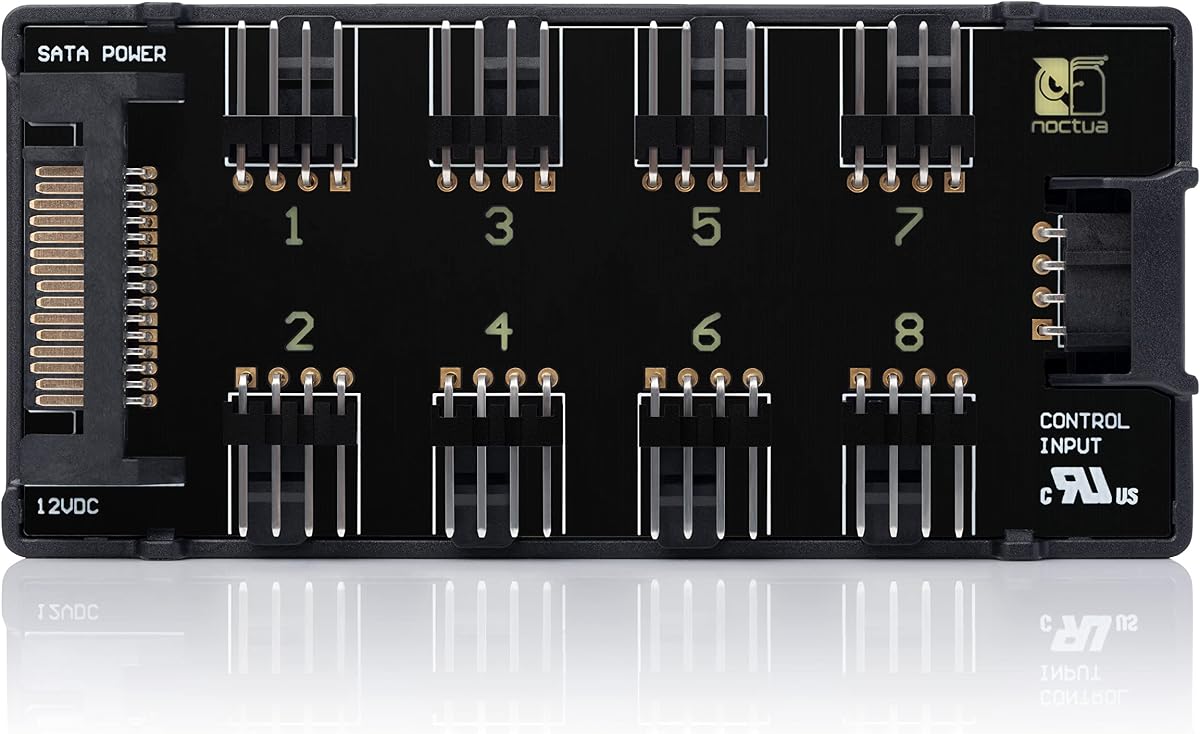
The Noctua NA-FH1 is a premium hub designed for high performance and safety. It features an 8-way fan splitter board for powering and controlling fans efficiently. It holds a 4.6 rating for its reliability and quality construction.
We may earn a commission when you buy through this link, at no additional cost to you.
It transmits PWM signals from the motherboard to all connected fans simultaneously. Safety fuses provide protection against overcurrent and short-circuits. The magnetic mounting allows easy installation on steel panels. It comes with a 6 year warranty.
Despite the high cost it offers peace of mind with its safety features. It handles up to 54W via SATA power. It is not RGB ready which limits aesthetics. You need separate power cables for setup.
Buy this if you need robust protection and reliability. It fits perfectly in silent or performance builds using Noctua fans. Check if your case supports the magnetic mounting for best results.
Built-in fuses protect your system from electrical damage. This ensures longevity for both the hub and connected fans.
With 54W total power it supports high-load setups easily. You can connect multiple high-performance fans without stress.
We may earn a commission when you buy through this link, at no additional cost to you.
The ARCTIC Case Fan Hub is a straightforward solution for expanding fan ports. It offers a 10-fold PWM distribution using SATA power. Users rate it 4.7 for its simple and effective design that keeps builds clean.
We may earn a commission when you buy through this link, at no additional cost to you.
It connects to the motherboard with one cable reducing chaos inside the case. The PWM signal passes synchronously to all fans connected. The external power supply ensures no voltage loss. It allows smooth operation even under load.
This hub focuses purely on cooling expansion without extra features. It reads RPM from the first fan slot only. You cannot control each fan individually which might limit tuning. It does not support lighting effects.
Ideal for those who want clean cable management. It is a solid choice for budget builds needing more slots. Ensure your case has enough space for the hub to fit properly.
Setup is easy with minimal wiring. The hub connects to one header and distributes power to ten fans.
Reduces visible cables significantly inside the chassis. It helps keep your build looking professional and tidy.
We may earn a commission when you buy through this link, at no additional cost to you.
This hub supports 12 groups of CPU fans and integrates ARGB lighting well. It maintains stable output under high loads with direct SATA power. The white color matches many modern PC builds nicely for users seeking style.
We may earn a commission when you buy through this link, at no additional cost to you.
It connects power and lighting interfaces for twelve fans at once. The 4PIN and 3PIN interfaces make connections easy. You can synchronize lighting effects with the motherboard. The compact size keeps cables neat.
Be aware that speed control is not included here. You must connect to the motherboard for PWM regulation. If you use 12V RGB devices avoid this hub as it damages equipment. The SATA cable is missing.
Buy this if you need high capacity for lighting fans. It is good for white themed builds needing extensive fan coverage. Ensure your case has enough room for the larger hub size.
Supports up to twelve fan groups simultaneously. This is ideal for cases with massive cooling requirements.
Syncs lighting effects via the motherboard header. You get a unified look across all your ARGB devices easily.
We may earn a commission when you buy through this link, at no additional cost to you.
This hub manages up to 9 fans and ARGB devices in one unit. It includes an RF remote control for easy adjustments. Users rate it 4.6 for its comprehensive kit that includes necessary cables and tools.
We may earn a commission when you buy through this link, at no additional cost to you.
The magnetic mounting secures it effortlessly inside the case. A front-facing RGB panel syncs with fans for consistent lighting. You can customize colors and effects easily. The SATA power ensures stable performance at full load.
Setup is complete but requires careful attention to cable routing. The remote is useful if you do not want software. It supports dual-control which simplifies management. Ensure the magnetic surface is strong for stability.
Ideal for RGB enthusiasts needing a complete kit. It offers great value with all included accessories. Check the remote battery life to avoid future replacements during use.
The included RF remote allows quick lighting changes. It is convenient for users who do not use software.
Manages both PWM fans and ARGB devices efficiently. This dual function simplifies your case wiring significantly.
We may earn a commission when you buy through this link, at no additional cost to you.
The Thermalright Integrated Fan Hub supports up to 10 fans with direct SATA power. It keeps cables in order with multi-line control features. Users appreciate its compact design that fits easily inside small cases.
We may earn a commission when you buy through this link, at no additional cost to you.
It provides stable output under high load without voltage loss. The double-sided sticker allows for simple installation on chassis walls. It supports speed reading for a single fan on the red interface.
While effective for cooling it does not support lighting. The SATA cable is not included in the package. You must buy it separately which adds to the cost. It focuses purely on fan expansion.
Buy this if you need pure cooling expansion for 10 fans. It is ideal for silent builds needing maximum airflow. Check your case clearance to ensure the hub fits correctly.
The small body allows placement in tight spaces. It helps keep airflow unobstructed inside the chassis.
SATA direct output ensures no voltage loss during use. This prevents fans from slowing down under high loads.
We may earn a commission when you buy through this link, at no additional cost to you.
This hub supports 8 ARGB fans and 8 PWM fans simultaneously. It offers high performance cable management for tidy builds. Users rate it 4.5 for its compact design that fits into most cases.
We may earn a commission when you buy through this link, at no additional cost to you.
The ARGB and FAN hub uses direct SATA power output. It ensures stable output under high load conditions. Strong double-sided stickers allow secure installation on chassis positions. It is simple and guaranteed safe.
It does not control fan speed or lighting directly. You must use motherboard headers for speed sync. The 12V RGB devices are not supported so avoid them. The black color blends well with dark interiors.
Ideal for those needing mixed fan and light support. It is a reliable solution for expanding ports without software. Ensure you connect the correct 5V 3pin header for lights.
Manages both lighting and power needs well. It reduces clutter significantly while maintaining system efficiency.
Strong stickers ensure the hub stays in place. It prevents movement inside the case during operation.
We may earn a commission when you buy through this link, at no additional cost to you.
This hub supports 10 sets of ARGB fans with magnetic suction mounting. It offers an RF remote and chassis key for control. Users rate it 4.4 for its small and exquisite shape that aids organization.
We may earn a commission when you buy through this link, at no additional cost to you.
It supports fan speed reading and PWM regulation. The magnetic mounting allows flexible placement easily. The RF remote enables lighting control without software. You can prevent stray currents and ensure efficient operation.
While it controls lighting switch speed control is limited. The SATA cable must be purchased separately for power. If you use 12V RGB devices avoid this hub to prevent damage. The controller only switches lights.
Buy this if you want hardware lighting control. It is great for cases where software control is not desired. Ensure your motherboard has 5V 3pin ARGB support for this unit.
The RF remote allows physical control of lights. This is helpful if you prefer not to use software.
Magnetic mounting makes installation simple and flexible. It secures the hub effectively inside any case.
We may earn a commission when you buy through this link, at no additional cost to you.
This hub supports 8 groups of fans with stable output design. It has a compact black body with Thermalrich logo. Users rate it 4.6 for its reliable functionality and sturdy build quality.
We may earn a commission when you buy through this link, at no additional cost to you.
It connects power to 8 PWM and ARGB groups. The direct output ensures stable output under high load conditions. Strong double-sided stickers secure it safely. It simplifies wiring significantly.
It does not have functions for speed or light adjustment. You rely on motherboard settings for speed control. Avoid connecting to the wrong interface to prevent damage. The SATA cable is not included.
Buy this if you want a reliable expansion hub. It is suitable for mixed lighting and fan setups. Ensure you have the correct motherboard ports for connection.
Stable output ensures consistent fan performance. It prevents sudden drops in speed during usage.
Strong stickers keep the hub fixed securely in place. It prevents loose connections during operation.
We may earn a commission when you buy through this link, at no additional cost to you.
Choosing the right hub depends on your cooling needs and desired features. Below are key factors to consider for a perfect fit.
Ensure the hub supports the number of fans you have. Look for at least 8 to 10 ports to avoid future upgrades.
Choose a model with enough capacity for all your fans.
Check if the hub uses SATA power or motherboard headers. SATA direct output ensures stable performance without voltage loss.
Prioritize SATA powered hubs for better reliability and efficiency.
Decide if you need lighting control alongside fan speed. Some hubs support both 5V ARGB and 4-pin PWM signals.
Verify your motherboard ports match the hub requirements exactly.
Hubs usually come with magnetic or adhesive mounting options. Ensure the case surface is suitable for the chosen method.
Pick a mount that keeps the hub secure inside your case.
Some hubs only expand ports while others offer independent control. Consider if you need manual speed adjustments.
Opt for independent control if you want precise cooling profiles.
Look for hubs that reduce clutter inside your case. Compact designs help keep cables neat and improve airflow.
Select a compact model to maintain clean cable management.
High quality hubs often include short circuit protection. Check for certifications and warranty periods before buying.
Choose a branded hub with safety features for peace of mind.
Connect the SATA power cable to your PSU and the motherboard header to the hub. Ensure all fan cables are securely plugged into the matching ports.
Check that the hub is mounted securely to avoid loose connections. If using adhesive strips clean the surface first for best results.
Regularly inspect cables for wear and clean dust from the hub to maintain performance. Avoid forcing plugs into the wrong ports to prevent damage.
Most hubs do not require software as they pass signals from the motherboard. However some advanced controllers may have driver support for better management.
You must match the hub type to your fan type. Most hubs support 5V 3pin ARGB but 12V RGB devices are not compatible.
High quality hubs with SATA power prevent voltage loss. Ensure you use a stable power source for optimal fan speed.
PWM hubs control fan speed while ARGB hubs manage lighting. Some models offer both functions for complete system control.
Use the included magnetic or adhesive mounting strips. Secure the hub on a clean flat surface inside your case for stability.
Many hubs only read one fan speed. Insert one fan into the red interface to get correct RPM readings on the motherboard.
We reviewed ten top fan hubs offering reliable cooling management and cable control.
Prioritize port count and compatibility with your existing setup before buying.
Prices may fluctuate so verify current listings before making your final decision.