
RedThunder One Handed Keyboard
4.4Editor score
35 Anti-Ghosting Keys
RGB Backlit Modes
Portable Ergonomic Design
This comprehensive guide compares the top gaming keypads for performance, ergonomics, and customization to help you find the perfect one-handed controller for
Gaming keypads offer a compact alternative to full keyboards, providing essential keys for rapid access during intense sessions. They are designed to maximize efficiency while minimizing desk space and hand movement. Choosing the right model depends on your preferred switch type, layout size, and specific game genres.
We evaluated ten leading models based on build quality, switch responsiveness, customization options, and ergonomic comfort. Our analysis covers wired and wireless connectivity, programmable macro capabilities, and compatibility with various operating systems. Each product was assessed for its ability to enhance gameplay without introducing latency or fatigue.
Each selection in this guide highlights unique strengths, from budget-friendly mechanical switches to high-end analog thumbsticks. We detail pros and cons to help you align your purchase with your gaming style. Note that availability and costs may fluctuate, so verify current listings before ordering your preferred device.
4.4Editor score

4.3Editor score

4.2Editor score
This table provides a side-by-side overview of the top ten models, highlighting key specifications like switch type, key count, connectivity, and special features. Use this comparison to quickly identify which device matches your ergonomic needs and performance requirements.




The AZERON Gaming Keypad stands out as a top-tier option for players seeking advanced control. With a rating of 4.3, it combines a Hall Effect analog thumbstick with 30 programmable keys. This unique setup replaces the traditional keyboard entirely for left-hand use while keeping your mouse on the right.
We may earn a commission when you buy through this link, at no additional cost to you.
Its standout feature is the Hall Effect thumbstick, which eliminates drift and supports WASD or full analog movement in compatible games. You can customize dead zones and sensitivity to match your preferences. Each of the 30 inputs is individually connected, ensuring precise execution of macros or complex commands without matrix interference.
While the keypad offers exceptional ergonomics, its adjustable parts mean it may require time to perfect your fit. The price reflects its specialized engineering, which might not appeal to casual gamers. However, the ability to store layouts directly on the device ensures consistency across different systems.
This keypad is ideal for competitive FPS or RPG players who need granular control. If you value customization and comfort over standard keypads, the AZERON provides a premium experience that adapts to your unique hand size and playstyle.
The analog thumbstick allows for nuanced movement control, mimicking console sticks for smoother transitions in open-world games.
Designed with a modular main board, the Cyborg II supports software updates and potential hardware enhancements down the line.
We may earn a commission when you buy through this link, at no additional cost to you.
The RedThunder One Handed Gaming Keyboard delivers impressive value with a 4.4 rating. Designed for gamers on a budget, it features 35 keys with anti-ghosting capabilities for fluent gameplay. Its compact design makes it easy to carry to LAN parties or save space at home.
We may earn a commission when you buy through this link, at no additional cost to you.
Key features include a built-in game chip that ensures fast response times, enhancing your reaction speed during critical moments. The device includes two sets of macro recording keys, allowing you to automate complex sequences without needing external software. RGB lighting offers static and breathing modes to match your setup.
While it lacks advanced software customization, its plug-and-play nature makes it ready to use immediately. The included wrist rest helps reduce fatigue during long sessions, though the keys themselves are not hot-swappable. This simplicity is a trade-off for the low cost and ease of use.
If you are looking for an entry-level gaming keypad that performs reliably without breaking the bank, the RedThunder is a strong choice. It suits casual gamers or those who want to test one-handed gameplay before investing in premium models.
With driver-free setup, you can simply plug in and start recording macros instantly, making it perfect for quick adoption.
Its small footprint and lightweight design make it an excellent travel companion for gaming on the go.
We may earn a commission when you buy through this link, at no additional cost to you.
The Keychron C0 HE is engineered for high-performance gaming, boasting a 4.2 rating and rapid trigger magnetic switches. It features an 8K polling rate and adjustable actuation, giving competitive players the edge they need in fast-paced titles like Valorant. CS2. The keypad is compatible with Windows and macOS.
We may earn a commission when you buy through this link, at no additional cost to you.
Its magnetic switches detect input based on real-time travel rather than fixed points, allowing for finer control and instant resets. You can customize actuation points with high precision to suit your playstyle. A web-based configurator eliminates the need for bulky software, making setup quick and efficient across systems.
While the absence of wireless connectivity might limit desk flexibility, it ensures zero interference or lag issues. The per-key RGB lighting adds aesthetic value, but the focus remains on performance. Users may need time to dial in their settings for maximum benefit.
Competitive FPS players and power users who demand precision will appreciate the Keychron C0 HE. It offers professional-grade features in a compact form, making it a top choice for those prioritizing performance over portability.
The Rapid Trigger feature allows for incredibly fast key resets, essential for techniques like counter-strafing in competitive shooters.
Supporting both Windows and macOS via a browser tool ensures seamless integration into multi-OS work and gaming environments.
We may earn a commission when you buy through this link, at no additional cost to you.
The Razer Tartarus V2 is a versatile left-handed keypad designed for immersive gaming experiences. With a 4.3 rating, it offers 32 programmable keys and a unique thumbpad for movement. It uses mecha-membrane switches that provide tactile feedback while maintaining a soft, cushioned feel for comfort.
We may earn a commission when you buy through this link, at no additional cost to you.
Key strengths include full integration with Razer Chroma, syncing lighting with games and other hardware. You can remap keys and execute complex commands using Razer Hypershift for expanded functionality. The thumbpad allows for natural movement controls, ideal for console-oriented players transitioning to PC.
While the membrane switches offer comfort, they are not as durable as mechanical options. Additionally, accessing advanced features requires the Synapse software, which adds a layer of dependency. However, the ergonomic design minimizes fatigue during extended sessions.
For fans of the Razer ecosystem who value lighting and customization, the Tartarus V2 is an excellent addition. It balances comfort and functionality well, making it suitable for both gaming and creative workflows.
Chroma RGB synchronization creates a cohesive visual experience across your peripherals and supported titles for greater immersion.
The 8-way directional thumbpad provides console-style movement accuracy without needing a separate joystick.
We may earn a commission when you buy through this link, at no additional cost to you.
The Redragon K585 Wired offers a tactical approach with 42 keys and dedicated macro capabilities. Rated at 4.4, it allows you to bind commands to seven onboard keys, streamlining MMO rotations. The socket design accepts various switches, letting you tune the feel without soldering.
We may earn a commission when you buy through this link, at no additional cost to you.
Key benefits include a USB pass-through port for connecting other devices directly to the keypad, reducing cable clutter. RGB modes offer 16.8 million colors to match your setup, and the detachable wrist rest provides comfort. The layout is optimized for quick access during intense gameplay.
While the switch swap feature is innovative, it may be unnecessary for users who prefer out-of-the-box reliability. The wired nature limits placement options, but ensures stable performance. Software customization adds depth for advanced users.
This model suits players who need extensive macro access and customization. If you want a balance of features and cost with a reliable wired connection, the K585 Wired is a solid option.
With 28 total macro slots across profiles, you can manage complex ability rotations without fumbling for keys.
The USB pass-through port simplifies cable management by allowing your mouse to connect through the keypad.
We may earn a commission when you buy through this link, at no additional cost to you.
The Redragon K585 PRO brings wireless freedom to your gaming with BT and 2.4GHz connectivity. Rated at 4.2, it maintains the tactical 42-key layout of its wired counterpart. The battery lasts 15-20 hours on a single charge, supporting all-day play without constant tethering.
We may earn a commission when you buy through this link, at no additional cost to you.
Key features mirror the wired version, including macro binding and socketed switches for customization. You can record sequences via software to tailor controls to your exact needs. The RGB lighting keeps your setup vibrant, and the wrist rest ensures ergonomic support.
Wireless connectivity may introduce slight latency compared to wired models, but the 2.4GHz mode minimizes this. The battery life is sufficient for most sessions, though heavy users may need to recharge often. This flexibility is a major benefit for a clean desk.
If you prioritize a clutter-free setup without sacrificing key functionality, the K585 PRO is a strong contender. It is ideal for gamers who value mobility and customization in a wireless package.
Dual connectivity options allow you to choose between stable 2.4GHz or flexible Bluetooth based on your setup.
Stock switches are rated for 50 million presses, ensuring long-term reliability even with frequent wireless use.
We may earn a commission when you buy through this link, at no additional cost to you.
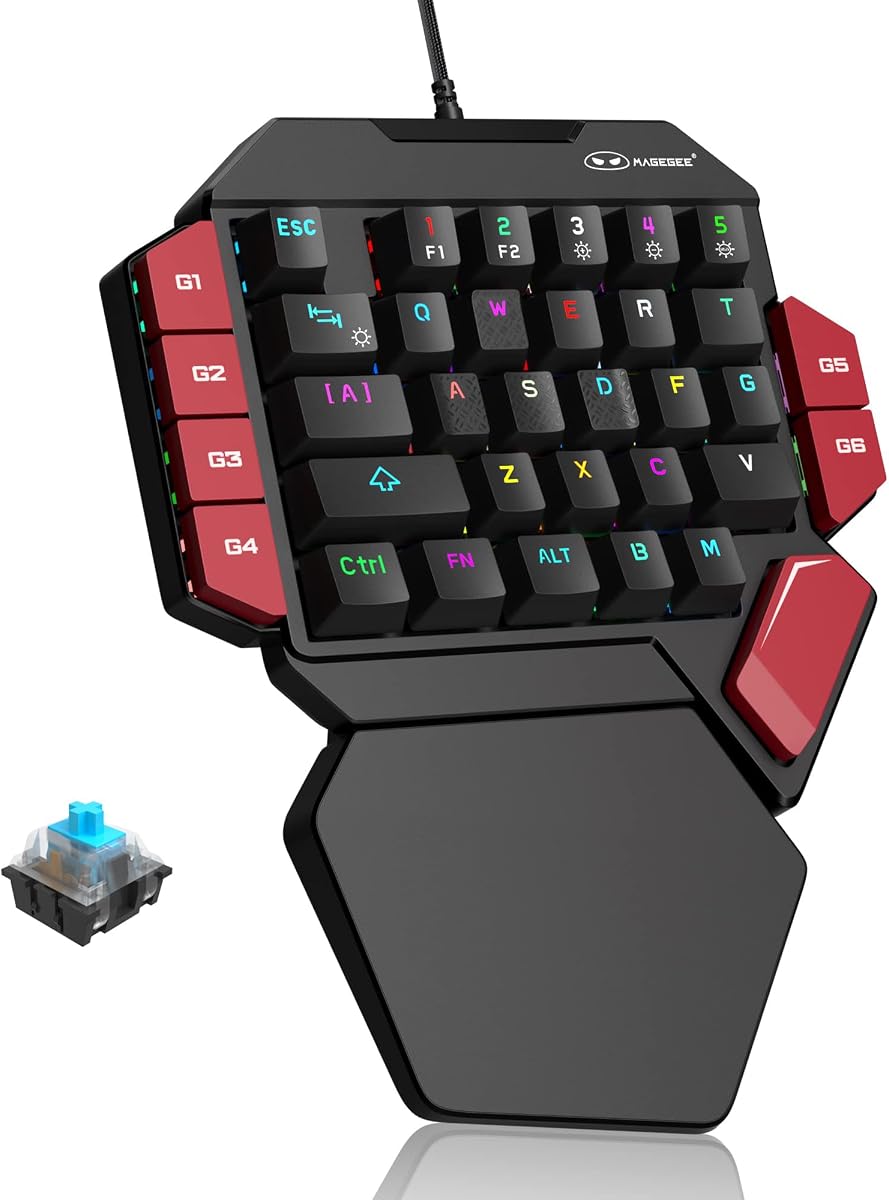
The MageGee One Handed provides mechanical precision with blue switches for a distinct tactile experience. Rated at 4.3, it features 35 non-conflict keys and 6 macro keys for essential commands. The loud click offers clear feedback, making every press feel deliberate during gameplay.
We may earn a commission when you buy through this link, at no additional cost to you.
Its RGB modes allow color and effect changes via simple key combinations. The design supports plug-and-play without drivers, ensuring immediate use. A wrist rest is included to reduce strain during long sessions, improving overall comfort.
While the click is satisfying for typing, it might be too loud for quiet environments. The macro system is straightforward but less flexible than software-driven solutions. Overall, it offers solid mechanical performance at a competitive price point.
For those who prefer mechanical switches and a straightforward setup, the MageGee is a reliable choice. It is best suited for gamers who enjoy tactile feedback and do not require advanced macro programming.
The blue switches provide a strong mechanical sensation that enhances key recognition during rapid typing or gaming actions.
Dedicated keys allow for easy recording and clearing of macros without needing to install additional software.
We may earn a commission when you buy through this link, at no additional cost to you.
The AJAZZ AK029 stands out with a 29-key compact design and Hall Effect switches. Rated at 4.5, it delivers zero dead zones and 8KHz polling for tournament-grade performance. The aluminum plate ensures stability, while the gasket mount provides a cushioned feel.
We may earn a commission when you buy through this link, at no additional cost to you.
Adjustable actuation points allow precision tuning, and the web driver simplifies customization without installation. RGB modes add visual appeal, and profiles save directly to the device for consistency. It saves significant desk space, freeing room for mouse movement.
The limited key count may require planning your binds carefully, but the performance compensates. Users must have internet access for the web driver initially. The build quality is robust, supporting durability over time.
Gamers seeking compact efficiency and advanced magnetic switch features will appreciate this model. It is ideal for FPS players who need quick responses and a minimal footprint on their desk.
The 8KHz polling rate ensures every tap registers instantly with no debounce delay for flawless counter-strafing.
Save dedicated layouts to the keypad itself, allowing seamless transitions between different computers without losing settings.
We may earn a commission when you buy through this link, at no additional cost to you.
This Razer model offers immersion through 32 programmable keys and extensive RGB integration. With a 4.2 rating, it provides a soft membrane feel combined with tactile feedback. The Chroma system supports 16.8 million colors for a visually engaging setup.
We may earn a commission when you buy through this link, at no additional cost to you.
Customization includes Hypershift for multi-layer key functions, enabling complex commands. The thumbpad assists with movement, and the layout reduces hand fatigue. Syncing with Philips Hue adds depth to room lighting, enhancing the overall atmosphere.
While it relies on software for full functionality, the convenience is worth it for Razer users. The membrane switches are less durable than mechanical ones but offer a quieter operation. It balances aesthetics and practicality well.
If you prioritize visual integration and comfort in a gaming environment, this keypad is excellent. It is best for those already invested in the Razer ecosystem looking to expand their control options.
Chroma integration with games and lighting creates a seamless visual experience that heightens immersion during critical moments.
Hypershift allows for extensive key remapping without needing physical macro keys, maximizing the utility of every button.
We may earn a commission when you buy through this link, at no additional cost to you.
The Redragon RM104 features a multifunction knob for audio and RGB control, rated at 4.4. It supports tri-mode connectivity including BT, 2.4GHz, and USB-C, with a massive 4000mAh battery. This allows seamless switching between devices while keeping your desk organized.
We may earn a commission when you buy through this link, at no additional cost to you.
Key strengths include the smart knob, which can adjust volume and cycle lighting modes quickly. The software lets you assign macros to buttons, and the battery life ensures long-term usability. Anti-ghosting ensures accurate inputs during intense gaming.
While the battery is large, it may take time to charge fully. Software is needed to unlock the knob's full potential. The pink and white design offers a unique aesthetic compared to standard black models.
This model suits multi-device users who need audio and lighting control within reach. If you want a versatile wireless solution with a unique design, the RM104 is a compelling option.
The smart knob provides quick access to volume and mute, streamlining audio adjustments without alt-tabbing out of a game.
The 4000mAh capacity offers extended use between charges, reducing the frequency of recharging for heavy users.
We may earn a commission when you buy through this link, at no additional cost to you.
Selecting a gaming keypad requires evaluating several critical factors to match your specific gaming needs and ergonomic preferences. This section outlines the primary considerations to help you make an informed decision.
Switches determine the feel and durability of your keypad. Mechanical switches offer tactile feedback and durability, while mecha-membrane options provide a softer touch. Hall Effect magnetic switches allow for adjustable actuation, ideal for competitive play.
Choose a switch type that matches your preference for noise and tactile response. If precision and speed are priority, magnetic switches are highly recommended.
Extended gaming sessions require comfortable layouts and wrist support. Look for models with detachable wrist rests or adjustable designs. A compact footprint can improve mouse movement space without sacrificing functionality.
Prioritize models with ergonomic curves and padding. Comfort ensures long-term health and reduces fatigue during extended use.
Programmable keys allow you to execute complex commands with a single press. Check for onboard memory and software support. Advanced customization options let you tailor the device to your specific game roles.
Ensure the keypad supports multiple profiles and easy macro recording. Software tools are essential for maximizing the utility of programmable keys.
Wired connections generally offer zero latency, while wireless options provide freedom. 2.4GHz wireless typically offers better stability than Bluetooth. Check the polling rate to ensure responsiveness in competitive titles.
Select connectivity based on your desk setup and tolerance for cables. For competitive play, wired or high-speed wireless is best.
Durability is key for devices used frequently. Look for reinforced frames, quality keycaps, and robust internal structures. Aluminum plates and gasket mounts add stability and improve typing feel.
Invest in units with strong build quality to ensure longevity. Durable materials resist wear and maintain performance over time.
RGB lighting adds aesthetic value and can improve visibility in dark environments. Custom lighting modes and sync options enhance immersion. Software should support lighting customization without requiring high system resources.
Choose a keypad with flexible lighting options. Visual customization helps personalize your gaming space effectively.
Ensure the device works with your OS. Many modern keypads support Windows, macOS, and sometimes consoles. Driver-free options simplify setup across different machines.
Verify cross-platform support if you use multiple systems. Universal compatibility ensures you can use the device anywhere.
Consider your budget when evaluating features. Higher-end models offer advanced tech like magnetic switches but cost more. Balance essential features with cost to find the best value.
Prioritize must-have features over extra aesthetics. Determine what matters most to your gameplay before spending.
To get the most out of your keypad, start by installing necessary software or drivers. Configure macro profiles for your most-used games and assign keys strategically. This setup process ensures that commands are ready when you need them.
Keep your keypad clean by gently wiping keys with a soft cloth regularly. Avoid food or drinks near the device to prevent spills. For mechanical models, periodically clean under keycaps to maintain smooth operation.
Update your keypad's firmware when available to access new features and fixes. Store your custom layouts on onboard memory if supported to prevent data loss. Regular maintenance ensures consistent performance and extends the device lifespan.
A gaming keypad is designed to provide one-handed control over essential game commands. It allows you to free up your main keyboard for other tasks or to reduce hand movement. These devices are popular for MMO, MOBA, and competitive FPS games where quick access to macros is crucial.
Not necessarily. Some players use a keypad alongside a full keyboard for specialized control. Others replace the keyboard entirely for left-hand use. It depends on your gaming style and whether you need number keys or navigation keys on your main board.
Wired keypads offer zero latency and consistent power, making them ideal for competitive play. Wireless options provide flexibility and cleaner desk setups. High-quality wireless models with 2.4GHz connectivity are reliable for most non-professional gamers.
Most modern gaming keypads support macOS, but software features may vary. Check product specifications for compatibility. Many devices offer plug-and-play functionality that works without installation on Mac systems.
Most keypads include dedicated macro keys or software for recording sequences. Press the record button, input your desired actions, and save to a key. Refer to the user manual for specific steps as methods vary by manufacturer.
Hall Effect switches use magnetic technology to detect keypresses without physical contact. This eliminates mechanical wear, allows adjustable actuation points, and provides faster response times. They are excellent for competitive gaming and durability.
The AZERON Gaming Keypad, RedThunder One Handed Keyboard, and Keychron C0 HE stand out as top choices for customization, budget, and competitive precision respectively. Each device offers unique strengths tailored to different gaming needs and preferences.
Prioritize factors like switch type, ergonomics, and macro support when making your decision. Matching the device to your specific playstyle ensures you get the most value and performance out of your investment.
Always check current listings and availability before purchasing to ensure you get the best deal. Prices and stock can fluctuate, so verifying the latest details helps you secure the right keypad for your setup.