
ARCTIC Fan Controller
4.6Editor score
Ten individual PWM ports
Clean cable management design
Simple plug and play support
This expert guide compares the top 10 front panel fan controllers for precise cooling, featuring LCD displays, PWM control, and temperature monitoring options.
Managing airflow in your computer case is crucial for maintaining peak performance and extending hardware lifespan. A front panel fan controller provides the user with direct control over fan speeds and temperature thresholds. This allows for a quieter system during light tasks and ensures adequate cooling under heavy loads.
We have evaluated a wide range of controllers based on build quality, display clarity, and control versatility. Our selection includes models with traditional LCD screens and modern digital interfaces. Each product was assessed for its ability to manage multiple fans and provide reliable thermal protection features.
Each pick in this list highlights specific strengths such as budget friendliness or premium features like RGB integration. Note that availability and pricing can fluctuate regularly on the marketplace. Always verify the latest specifications and offers before making your final purchase decision for your specific build.
4.6Editor score

5.0Editor score

4.2Editor score
The following table provides a side-by-side look at the key specifications and features of each selected controller to help you quickly identify the model that fits your specific cooling needs.


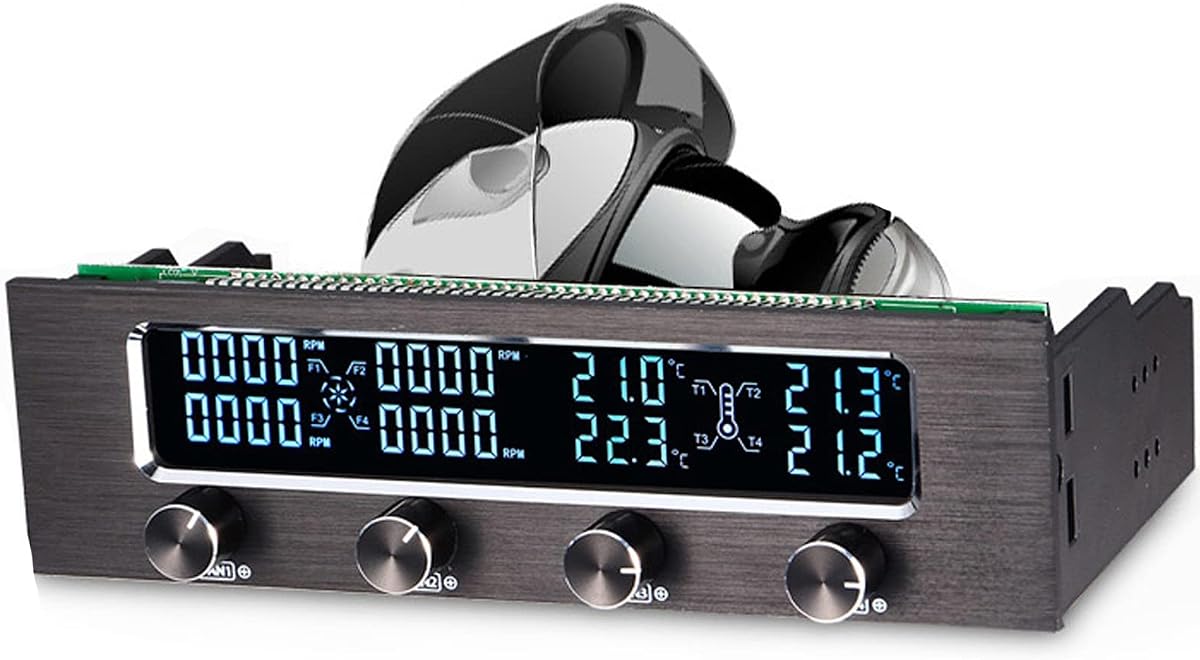
The STW-6041 stands out as a top choice for users needing reliable manual and automatic control. It features a robust aluminum alloy front panel that looks professional and withstands heat well. The 5.0 rating reflects consistent user satisfaction with its performance and build quality.
We may earn a commission when you buy through this link, at no additional cost to you.
Its wide LCD screen provides clear visibility of four temperature zones and fan speeds simultaneously. The over temperature warning system ensures you are alerted if any component exceeds safe limits. The PWM circuit allows for smooth speed adjustments that reduce high frequency noise effectively.
While the matte finish resists scratches it can show fingerprints easily in bright lighting. Setting up the temperature thresholds takes a few minutes but is straightforward once you understand the interface. These minor issues do not detract from its overall utility in a workstation environment.
This controller is ideal for users who prioritize visual monitoring and physical control knobs over software solutions. It offers a balanced mix of durability and functionality for standard PC cases. We recommend it for anyone looking for a reliable and safe cooling management solution.
The LCD display allows you to track four distinct temperature zones and fan speeds at once for better system awareness.
Built-in alarms alert you immediately when temperatures rise too high or a fan stops spinning unexpectedly.
We may earn a commission when you buy through this link, at no additional cost to you.
The ARCTIC Fan Controller offers exceptional value for users needing to connect many fans without clutter. It provides ten ports for independent PWM control which is rare at this price point. The physical design keeps cables organized and fits into tight spaces easily.
We may earn a commission when you buy through this link, at no additional cost to you.
It works as a passive hub that draws power directly from the PSU for reliable operation. The magnetic mount allows you to place it securely inside the case without drilling holes. Linux users will appreciate the native support for kernel based fan control tools.
Unlike other units on this list it does not feature an LCD screen for temperature readouts. You will need to rely on BIOS or software tools to monitor heat levels while using this device. This trade-off makes it less ideal for those needing immediate visual data.
This option is perfect for builders focusing on airflow volume and cost efficiency over advanced monitoring features. It simplifies cabling and provides robust power distribution for large fan setups. We recommend it for budget builds or servers where software monitoring is already in place.
With ten ports you can connect multiple case and radiator fans without needing complex splitter cables.
The adhesive or magnetic mount makes it easy to secure the unit anywhere inside your computer case.
We may earn a commission when you buy through this link, at no additional cost to you.
The Thermaltake Commander F6 brings a premium aesthetic to your build with its integrated RGB LCD screen. It features six independent voltage control knobs that allow for fine tuning of individual fan speeds. This level of control is ideal for custom loops and high performance workstations.
We may earn a commission when you buy through this link, at no additional cost to you.
Users can connect two LED strips directly to the controller for synchronized lighting effects. The short circuit protection adds a layer of safety when managing multiple high power devices. The physical knobs provide a tactile experience that many enthusiasts prefer over digital interfaces.
The higher price reflects the added features but may not be necessary for basic cooling needs. Initial setup involves connecting temperature sensors which adds time to the build process. It requires a dedicated 5.25 inch bay which limits placement in smaller chassis options.
This controller is best suited for enthusiasts who want both visual flair and precise manual control over airflow. It bridges the gap between functional cooling and aesthetic customization effectively. We recommend it for users who value RGB integration and physical feedback in their system.
The RGB LCD screen and LED support allow you to match your case lighting for a cohesive look.
Six physical knobs give you direct authority over each fan channel without relying on software settings.
We may earn a commission when you buy through this link, at no additional cost to you.
The V BESTLIFE controller combines a large LCD display with a useful hard disk status indicator. It allows users to switch between automatic and manual modes with a simple button press. The 4.7 rating suggests reliable performance for general home and office computing needs.
We may earn a commission when you buy through this link, at no additional cost to you.
You can set custom alarm ranges between forty and ninety degrees for specific protection needs. The hard disk state display offers a quick way to check drive health at a glance. Fans that fail to spin trigger an immediate alert which prevents overheating damage.
The sensor placement instructions lack detail and may require trial and error for optimal readings. Users should ensure the temperature probe is placed near the intake air for accurate results. This setup hurdle is minor compared to the comprehensive monitoring features provided.
This unit is suitable for users who want a balance of automation and manual override capabilities. The HDD indicator adds unique value for those managing data sensitive workloads. We recommend it for home servers or PCs where drive health monitoring is a priority.
Toggle between automatic temperature based speed control and manual override with a single switch.
The system warns you of both high temperatures and potential fan failures instantly.
We may earn a commission when you buy through this link, at no additional cost to you.
The SaiDian controller offers a unique feature set including a date and time display on the LCD screen. It manages three groups of fans with basic temperature monitoring capabilities. The low price makes it accessible for budget builds needing standard control options.
We may earn a commission when you buy through this link, at no additional cost to you.
It includes a fan jam alarm that sounds when a fan fails to rotate as expected. This safety feature helps protect your hardware from thermal issues caused by blocked airflow. The 3 pin interface is standard for many older or simpler fan models.
The user rating of 3.9 suggests some inconsistency in build quality or usability over time. The number of control groups is lower than other options which might limit complex setups. The display brightness may also be dim in well lit environments.
This unit is a good fit for casual users who need basic fan management and a system clock. It provides essential safety alarms without the cost of advanced software features. We recommend it for simple cases where extra control channels are not required.
The display shows the date and time which adds a functional utility beyond cooling control.
Simple alarms alert you to high heat or stopped fans to keep your system safe.
We may earn a commission when you buy through this link, at no additional cost to you.
The Ejoyous controller provides four independent channels for case fans with a clear LCD overview. It is built with an aluminum alloy panel that matches many modern chassis aesthetics. The PWM circuitry ensures smoother operation and less noise compared to basic controllers.
We may earn a commission when you buy through this link, at no additional cost to you.
It includes a double safety function that alerts you when temperatures rise too high or fans stop. The separate controls allow you to adjust each channel manually without changing global settings. High temperature capacitors are used to ensure the unit lasts through extended use.
Limited review data makes it difficult to predict long term reliability compared to established brands. The features align well with standard expectations for a mid range controller but lack unique innovations. It fits standard 5.25 inch bays easily without requiring adapters.
This controller is a solid choice for users seeking a reliable standard interface for airflow management. It balances manual control with automated safety features effectively. We recommend it for users looking for a simple and safe cooling solution for their case.
Adjust each of the four fan channels separately for precise airflow control.
The aluminum alloy panel and high temp capacitors provide durability and longevity.
We may earn a commission when you buy through this link, at no additional cost to you.
The Noctua NA-FC1 is a compact PWM controller designed to sit inside the case rather than on the front. It prevents fans from stopping completely with a no stop mode that keeps speeds above three hundred RPM. This ensures BIOS fan errors do not occur during low load periods.
We may earn a commission when you buy through this link, at no additional cost to you.
It is ideal for managing industrial PWM fans that require manual speed reduction for quiet operation. The 3-way splitter cable allows you to control up to three fans with a single unit. The build quality aligns with the high standards expected from the Noctua brand.
Because it is not a front panel unit you lose the visual feedback of an LCD display. You must rely on external tools to see if the fans are running at the desired speed. This limits its use for users who want to monitor temps at a glance.
This device is perfect for silent PC builders who need a simple manual control solution inside the chassis. It complements high performance fans by giving them a manual override capability. We recommend it for quiet builds focused on performance rather than display features.
The no stop mode ensures fans keep spinning even at low speeds to avoid system warnings.
A compact knob design allows for easy manual adjustment of fan speed inside the case.
We may earn a commission when you buy through this link, at no additional cost to you.
The Delinx controller offers a versatile solution for PC cooling with auto and manual modes. It can be powered by a USB-C charger making it easy to install anywhere without fixed wiring. The digital display shows both temperature and fan speed for precise control.
We may earn a commission when you buy through this link, at no additional cost to you.
It supports a wide voltage range and includes protection against over voltage and reverse polarity. The hysteresis settings allow for stable fan adjustments without constant fluctuation. This model is ideal for DIY projects or smaller builds needing flexible mounting options.
The display is smaller than full size LCD panels which might limit visibility from a distance. You will need to ensure you have the correct USB-C power adapter for reliable operation. The compact size means it may not fit all aesthetic preferences for a 5.25 bay.
This unit is excellent for users wanting flexibility and safety features in a small package. It bridges the gap between traditional controllers and modern USB powered cooling solutions. We recommend it for compact builds or custom projects requiring versatile power inputs.
Power the controller via standard 12V or a convenient USB-C adapter for easy placement.
Hysteresis settings prevent fan speed from fluctuating wildly as temperatures rise and fall.
We may earn a commission when you buy through this link, at no additional cost to you.
This controller provides a standard 4 channel LCD display for CPU and case fan management. It features an alloy panel finish that matches the look of more premium units. The PWM circuit helps to reduce noise while maintaining effective cooling performance.
We may earn a commission when you buy through this link, at no additional cost to you.
Safety systems include high temperature alarms and fan anti seize features. These alerts help prevent damage when a fan stops spinning or heats exceed safe limits. The date and time display adds a utility similar to other models in this category.
The user rating of 3.2 indicates potential inconsistencies in product quality or support. Users may experience issues with the LCD responsiveness or the alarm sensitivity. These factors make it a riskier choice compared to higher rated alternatives.
This option is suitable for users who need a basic controller at a very competitive price. It covers the essential functions needed for standard PC cooling management. We recommend it for budget constrained builds where high reliability is less critical.
Alerts notify you of thermal issues or fan stops to prevent hardware damage.
A standard LCD screen provides quick visibility of temps and speeds without software.
We may earn a commission when you buy through this link, at no additional cost to you.
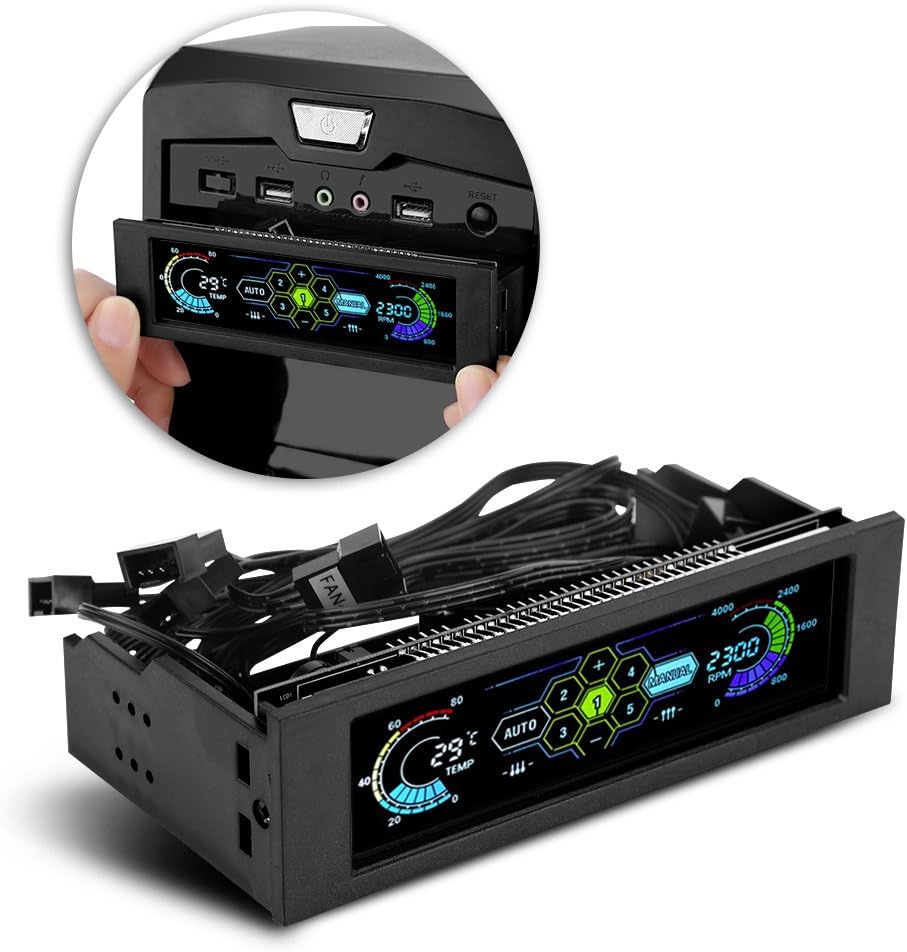
The 5-Fans Speed controller allows you to manage five groups of fans from a front panel. It includes an auto manual mode switch for flexibility in cooling strategies. The LCD screen displays temperature and hard disk state for basic system monitoring.
We may earn a commission when you buy through this link, at no additional cost to you.
You can set alarm ranges manually to protect specific hardware components. It alerts you immediately when a fan fails to cool the computer properly. This feature is vital for maintaining system stability under heavy workloads or overclocking.
The rating of 3.4 suggests users may face challenges with installation or reliability. The number of groups is useful but might not compensate for potential build issues. Users should be prepared to spend time troubleshooting the initial setup and sensor placement.
This model is an option for those needing more fan channels than standard controllers offer. It provides a balance of manual and automatic features at a standard price point. We recommend it only if specific channel count is a higher priority than overall build quality.
Control up to five distinct groups of fans to manage complex airflow needs.
The screen shows hard drive status to help keep tabs on storage health.
We may earn a commission when you buy through this link, at no additional cost to you.
Selecting the right front panel fan controller involves understanding how your system manages airflow and temperature. The following factors will help you narrow down the options to find the best fit for your case and cooling needs.
Front panel controllers often come with LCD or digital displays that show fan speeds and temperatures. Look for a model with a clear screen that can be read from your typical viewing angle. Some displays show multiple values at once which helps you monitor several zones simultaneously.
Prioritize displays that are bright enough to be visible but not distracting during dark usage.
The number of channels determines how many separate fans you can control independently. Ensure the controller supports the total number of fans you plan to install in your system. Having extra channels allows for future expansion without needing to upgrade the controller again.
Choose a channel count that matches or slightly exceeds your current fan setup for flexibility.
Most controllers offer both manual and automatic modes to suit different usage scenarios. Manual mode allows you to set fixed speeds while automatic mode adjusts speed based on temperature readings. Dual mode support ensures you can switch between silence and cooling power as needed.
Verify that the switch between modes is easy to use without needing a system reboot.
Effective controllers include sensors that measure heat from specific areas like the CPU or intake. Check if the model provides enough sensors to cover your key components adequately. Accurate monitoring ensures the fan speeds respond correctly to actual thermal conditions inside the case.
Look for adjustable alarm thresholds that alert you before temperatures reach dangerous levels.
Consider how the controller mounts into your case whether it is a standard 5.25 inch bay or internal. A front panel unit fits into an optical drive bay while internal units may clip inside the chassis. Ensure your case has the necessary space or bay slots before purchasing.
Prefer models that come with all necessary cables to simplify the installation process.
Safety features like over temperature alarms and fan fail detection protect your hardware from damage. A good controller will alert you if a fan stops spinning or if heat spikes unexpectedly. These features are essential for systems running 24/7 or under heavy loads.
Ensure the model includes short circuit protection to prevent electrical issues with your power supply.
Look for controllers made with durable materials like aluminum alloy panels and high quality capacitors. These materials resist heat and physical wear better than cheaper plastic alternatives. A well built unit will last longer and perform more consistently over several years of use.
Check the warranty terms to confirm the manufacturer stands behind the product longevity.
Verify the power source requirements whether the unit draws from the PSU or a separate adapter. Most controllers use standard Molex or SATA power connectors which are common in most cases. Ensure the output voltage supports the fans you plan to connect such as 12V PWM models.
Match the controller power ratings with the total current draw of your fan setup.
To begin installing your controller connect the power cable to a Molex or SATA power source from your supply unit. Plug the fan connectors into the corresponding channels on the controller so that they align with your airflow design. Secure the unit into a 5.25 inch bay using the provided screws or brackets.
Turn on your system and observe the LCD display to ensure it powers up correctly and shows values. Calibrate the temperature sensors by placing them near the heat sources you wish to monitor like the CPU intake. Set your desired temperature thresholds using the menu buttons to enable automatic control.
Regularly clean dust from the controller vents and fan sensors to maintain accurate readings. Check all cables periodically to ensure no connections have become loose over time. Keep the settings menu bookmarked in your mind for quick adjustments if your workload changes.
Most controllers are designed to work with standard 3-pin and 4-pin PWM fans. Always check the voltage requirements of your fans to ensure they match the controller output.
You can use both but software may conflict with the controller settings. It is often best to set the controller to manual mode to avoid conflicts.
Many controllers have an alarm feature that alerts you if a fan stops spinning. This helps prevent overheating by notifying you to replace the failed fan quickly.
Installation is generally straightforward if you have an available 5.25 inch bay. The main steps involve connecting power and fan cables and securing the panel.
Controllers with high fan counts need extra power to drive all fans safely. This ensures each fan gets enough voltage without overloading the motherboard headers.
Yes, some models like the Commander F6 include specific connections for LED strips. These controllers allow you to sync fan speeds with lighting effects easily.
Some models include features to display hard disk status or activity alongside fan data. This is a bonus feature found on select units with advanced LCD screens.
Adjust settings only when you change your thermal load or upgrade hardware components. Default settings usually handle most daily usage scenarios without interference.
We have highlighted the top choices for front panel fan controllers ranging from budget options to premium displays. The STW-6041 offers a reliable balance of features while the ARCTIC unit provides excellent value for port count.
When prioritizing your needs focus on the number of channels and the safety features that match your system. A good controller should offer clear visual feedback and robust protection against thermal issues.
Always check current availability and specifications before purchasing to ensure the model fits your specific case. Prices and features can change so verify the details on the retailer page before finalizing your order.