Switch 2 RGB Organizer Station with Controller Charging Dock
4.6Editor score
Holds TV dock and cases
Charges four Joy-Cons at once
RGB lighting with breathing modes
Compare the top 10 Controller Charging Dock for Switch 2 options including features like speed, RGB, and compatibility to find the perfect match for your setup.
Finding a reliable charging solution for your new console is essential for uninterrupted play sessions. A quality dock ensures your controllers stay powered up without cluttering your desk with loose cables.
We evaluated ten top-rated options based on charging speed, design quality, and compatibility with official Joy-Cons. Each pick offers unique features like RGB lighting, magnetic alignment, or multi-device support.
Every selection includes verified specs and user ratings to help you decide quickly. Note that availability and details may shift over time, so check current listings before buying to confirm compatibility.
4.6Editor score

4.7Editor score

4.0Editor score
This side-by-side comparison highlights key differences across the top ten docks. Check capacities, special features like RGB or magnetic holds, and port types to find the right fit for your needs.


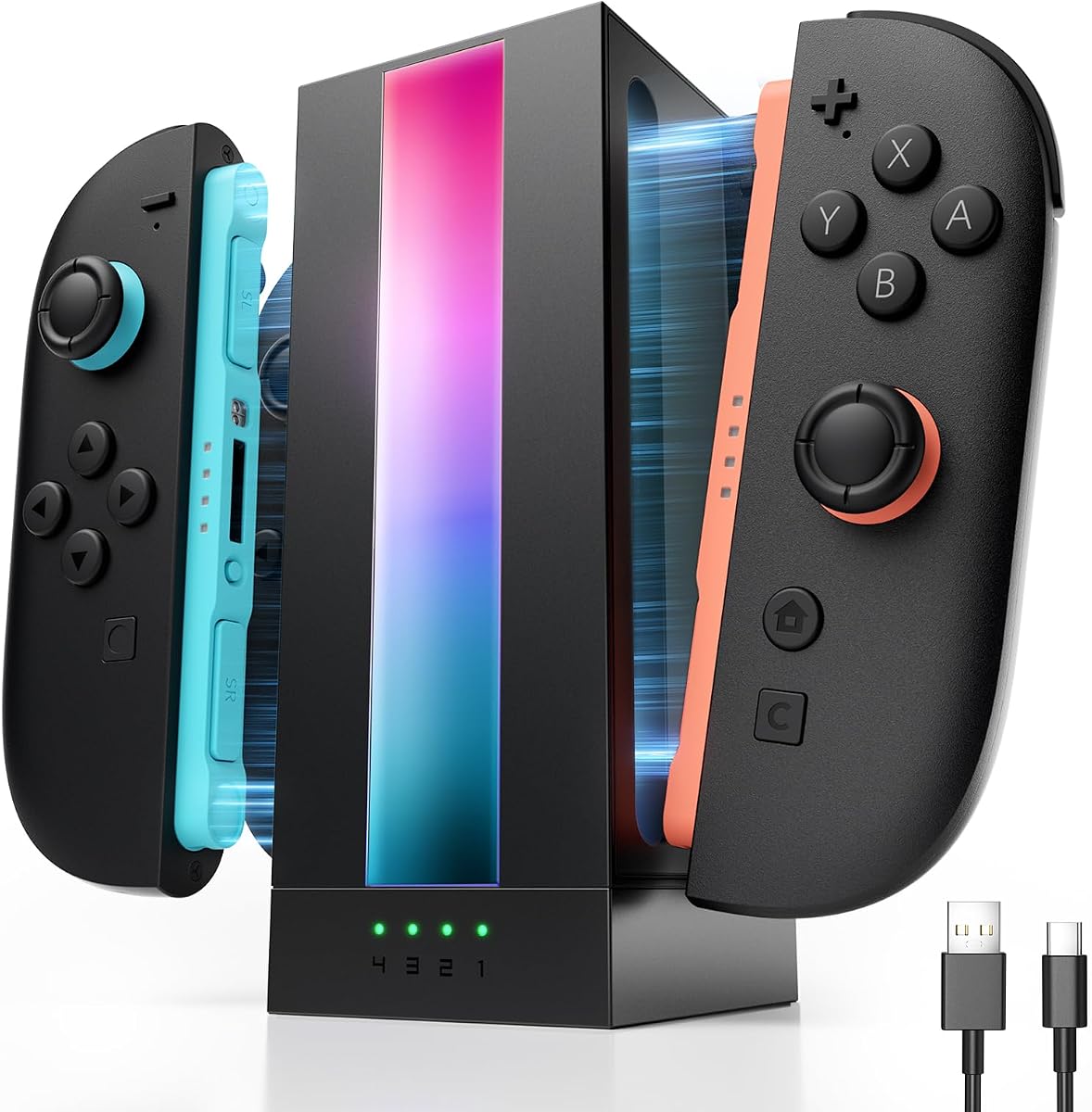
This dock stands out as the top choice for Switch 2 users seeking convenience. It earns a high 4.7 rating thanks to its magnetic alignment feature that lets you drop Joy-Cons in without worrying about orientation.
We may earn a commission when you buy through this link, at no additional cost to you.
The ability to charge four controllers at once makes it ideal for multiplayer nights. Touch controls let you toggle lights while the memory function keeps your preferred color active after power cycles.
While the magnetic hold is secure, heavy cases might require removal for best contact. The vibrant RGB modes add flair but could distract some players who prefer a dark desk environment.
Gaming groups or households needing rapid charging will love this setup. It keeps your desktop clean and ensures you never run out of power during intense sessions with friends or family.
The dual-direction magnetic design means you can insert Joy-Cons in any orientation without struggling with ports.
Overcharge and overcurrent protection ensure your controllers stay safe during extended charging cycles.
We may earn a commission when you buy through this link, at no additional cost to you.
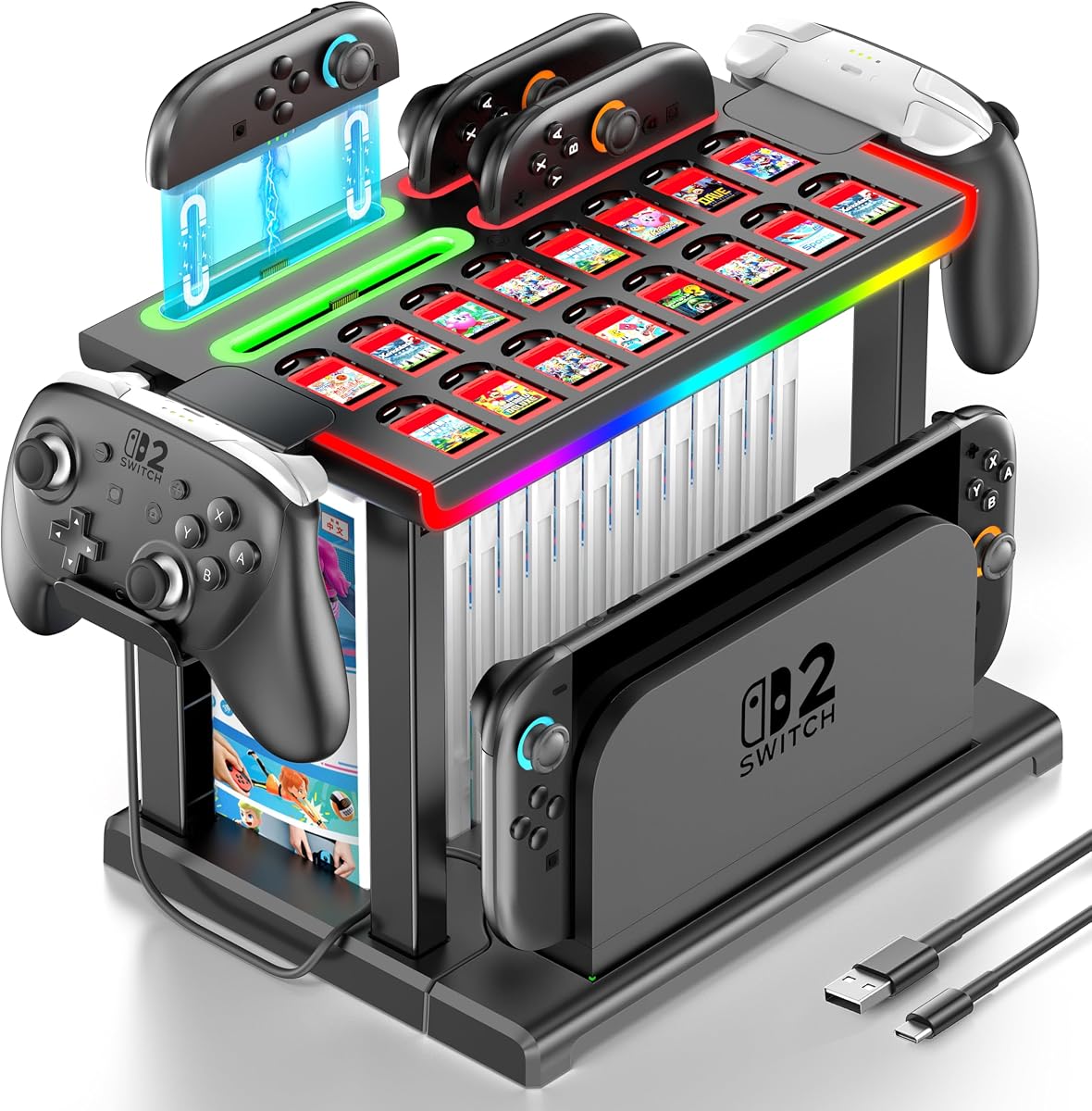
This organizer is more than a charger; it is a complete hub for your gaming setup. It rates 4.6 because it combines storage for 16 game cases with fast charging for four Joy-Cons simultaneously.
We may earn a commission when you buy through this link, at no additional cost to you.
The RGB lighting syncs with gaming rhythms, adding a visual layer to your play area. It holds up two Pro Controllers and game cards while keeping your desk tidy and clutter-free for long sessions.
Note that you must own your own Switch 2 dock as it is not included with this station. The size might be large for smaller desks, requiring careful placement to fit comfortably in your gaming space.
Perfect for serious collectors who need organized storage alongside power solutions. Its tool-free setup makes it easy to get running quickly so you can start gaming without waiting for assembly.
Stores the console dock, Joy-Cons, Pro Controllers, and game cases all in one neat unit.
Seven single-color and two multi-color lighting modes enhance the visual appeal of your gaming desk.
We may earn a commission when you buy through this link, at no additional cost to you.
For those seeking value, this two-port station delivers solid performance at a lower cost. It gets a 4.0 rating for its straightforward design that supports Switch Pro, PS5, and Xbox Series controllers seamlessly.
We may earn a commission when you buy through this link, at no additional cost to you.
The removable Type-C adapters reduce wear on controller ports when charging. LED lights turn green when full so you know exactly when your controllers are ready for action without guessing power levels.
Be sure to use a 5V2A adapter for best results as low-power ports can slow down charging. It is not compatible with PowerA or third-party Pro models so verify your controller model before buying.
Ideal for casual gamers needing a reliable and budget-friendly dual solution. It keeps two controllers charged and ready while maintaining a clean look on your TV stand or desk.
Supports controllers from Switch, PS5, and Xbox Series X|S including Elite 2 models.
Red shows charging while green indicates a full charge so monitoring power is simple.
We may earn a commission when you buy through this link, at no additional cost to you.
This stand focuses solely on charging two Switch 2 Pro Controllers with a no-frills design. It holds a 3.5 rating and uses clear LEDs to show charging status with red for charging and green for full.
We may earn a commission when you buy through this link, at no additional cost to you.
The 5V/2A input helps reduce wait times so controllers stay ready for long sessions. Safety features protect against overheating and overcharging to keep your valuable gear safe during use.
It is strictly for Pro controllers so Joy-Con users will need a different station. Some users find the design basic compared to RGB options but it delivers stable power for daily charging.
Perfect for players who only use Pro Controllers and want a simple stand. It keeps your desk organized and ensures you have power ready without complex setups or extra cables cluttering space.
Designed specifically to charge two Switch 2 Pro Controllers simultaneously with efficiency.
Supports 5V/2A input for fast and stable charging performance every time.
We may earn a commission when you buy through this link, at no additional cost to you.
As a trusted brand, PowerA offers a base that handles both Joy-Cons and Pro Controllers. It rates 4.6 for its reliable build and ability to charge wireless and wired units simultaneously without hassle.
We may earn a commission when you buy through this link, at no additional cost to you.
The LED lights indicate when controllers are fully charged so you can manage power easily. Its bold design is made to look great with any gaming setup adding style to your desk.
It works best with PowerA wireless controllers so check compatibility if you use third-party brands. There is no RGB lighting so it appeals more to users preferring simple and functional setups.
Ideal for PowerA users who want a dependable base. It keeps your controllers charged and ready while matching your existing gear with a sleek and reliable design.
Charges Joy-Con and wireless controllers at the same time to save you time.
Built by PowerA for reliable performance with official Nintendo accessories and third-party gear.
We may earn a commission when you buy through this link, at no additional cost to you.
This six-in-one station stands out for supporting multiple consoles in a single hub. With a 4.7 rating it handles Joy-Cons Pro and PS5 controllers using a smart IC chip for reliable power.
We may earn a commission when you buy through this link, at no additional cost to you.
The fireproof panel design adds safety during charging cycles. USB Type-C ports make connections simple and it plugs directly into consoles or hubs for power convenience without needing extra adapters.
It does not include Joy-Cons so check what is in the box before buying. The lack of RGB lighting might be a downside for some but it offers solid safety and flexibility for multi-system gamers.
Great for households with mixed console setups needing one charger. It keeps your devices powered and safe while offering versatile support for Switch and PlayStation systems in a single compact unit.
Charges Nintendo Switch and PS5 controllers together saving space and cables.
Includes smart IC chip protection for overvoltage and overcurrent safety.
We may earn a commission when you buy through this link, at no additional cost to you.
This dock uses dual USB-C ports for efficient charging of Switch and PS5 controllers. It holds a 3.9 rating and includes adapters to reduce wear on controller ports during repeated use.
We may earn a commission when you buy through this link, at no additional cost to you.
The LED indicators make it easy to see charging status at a glance. Compatible with Xbox Elite 2 and PS5 it supports many controller types in one compact station for flexible setups.
Ensure you have a proper adapter as low-power ports can slow charging. Not all third-party controllers work so check your controller type before purchase to avoid compatibility issues.
Good for users who value compact USB-C solutions across consoles. It keeps your controllers organized and charged while saving space on your desk with its clean low-standby design.
Supports Switch Pro Xbox Series and PS5 controllers in a single dual-port station.
Removable Type-C adapters reduce wear on your controller charging ports.
We may earn a commission when you buy through this link, at no additional cost to you.
SUPCASE delivers a dock that charges four Joy-Cons at once using magnetic alignment. It earns a 4.7 rating for its convenience and nine RGB lighting modes that personalize your gaming space with color.
We may earn a commission when you buy through this link, at no additional cost to you.
Dual-side charging means you can place Joy-Cons in any orientation without struggle. Smart chips prevent overcharging and overheating so your controllers stay safe during all-night gaming sessions.
This unit is priced higher than basic docks but offers extra features. Joy-Cons are not included so you must buy them separately before using the dock for charging needs.
Ideal for families with multiple controllers needing quick charging. The magnetic hold and RGB lights make it a stylish and functional upgrade to your gaming desk setup.
Magnetic design ensures Joy-Cons snap in securely for effortless alignment and charging.
Nine RGB lighting modes allow you to match the dock to your room decor.
We may earn a commission when you buy through this link, at no additional cost to you.
This 10-in-1 dock handles Joy-Cons and Pro Controllers for both Switch 1 and 2 models. It holds a 4.2 rating and uses a Y-Type cable to ensure stable power for charging multiple devices at once.
We may earn a commission when you buy through this link, at no additional cost to you.
Two extra USB ports let you charge other devices while controllers charge. RGB effects include marquee and breathing modes so you can customize the look to fit your setup style.
You need the included Y-Type cable to connect to the dock properly. Third-party controllers are not supported so stick to official models for best results with this unit.
Perfect for groups needing to charge many controllers at once. It keeps all your power sources ready while adding USB ports to expand your desk connectivity options easily.
Includes two USB 2.0 ports for data transfer or charging other devices.
Eleven lighting modes including marquee and fast flash effects for style.
We may earn a commission when you buy through this link, at no additional cost to you.
JSAUX designed this dock exclusively for Switch 2 Joy-Cons with fast charging speeds. It rates 4.3 and charges four units in about 2.5 hours reducing wait time between play sessions significantly.
We may earn a commission when you buy through this link, at no additional cost to you.
Each port has an independent LED to show status at a glance. The dynamic RGB light bar adds style to your desk while smart chips protect against overcharging and overheating safely.
It does not work with older Switch Joy-Cons so verify your model before buying. An adapter is not included so you need to provide one to power the dock for use.
Great for Switch 2 owners needing fast efficient charging. It keeps your Joy-Cons ready for action while adding a modern RGB touch to your gaming environment.
Up to 30% more efficient than previous models to reduce waiting time.
Each port has its own LED so you see status for every controller.
We may earn a commission when you buy through this link, at no additional cost to you.
Selecting the right dock depends on your needs and your console setup. Check these factors to find a solution that fits your desk and keeps controllers powered.
Ensure the dock matches your Joy-Cons or Pro Controllers. Some models work only with official Nintendo units while others support third-party brands like PowerA or Xbox.
Verify the product description matches your controller model to avoid purchasing an incompatible dock.
Decide how many controllers you need to charge at once. Some docks hold four Joy-Cons while others focus on two Pro Controllers.
Pick a dock that supports all controllers you own to avoid buying extra chargers.
Look for docks with 5V2A input for faster power delivery. Faster charging means less waiting between gaming sessions.
Check if the dock supports simultaneous charging so all controllers charge at the same time.
LED lights help you see when controllers are fully charged. Red or orange often means charging while green means full.
Choose a dock with clear indicators so you know when to remove controllers.
Magnetic docks let you place Joy-Cons in any orientation. This reduces wear on ports and makes charging easier.
If you prefer quick setup consider a magnetic dock for seamless alignment.
Some docks feature RGB lights to enhance your setup. Modes can include single colors or breathing effects.
Pick a dock with customizable lighting if you value visual style.
Look for built-in chips that prevent overcharging and overheating. These features protect your expensive controllers.
Prioritize docks with safety certifications to ensure long-term reliability.
Some stations double as storage for game cases or TV docks. These units save space on your desk.
Choose a dock with storage if you want a tidy gaming area.
Place the dock on a flat stable surface near your TV or desk. Ensure the power adapter is connected securely to avoid loose connections.
Insert controllers gently until they click or connect magnetically. Check that LED indicators show charging status before you start playing.
Remove controllers once LEDs turn green to avoid overcharging. Clean the dock ports regularly with a dry cloth to keep them working well.
Check the product specs carefully. Some docks are made only for Switch 2 Joy-Cons while others support older models or Pro Controllers. Always verify compatibility before purchasing to avoid issues.
Many docks require a 5V2A adapter for fast charging. Some include the cable but not the adapter itself. Using a low-power port may slow charging so use the recommended adapter.
Not all docks support third-party controllers. Some work only with official Nintendo or specific brands like PowerA. Review the compatibility list in the product description to confirm support.
Look at the LED indicators. They usually turn green or blue when the charge is full. This visual cue helps you avoid overcharging and manage your power.
Yes many docks support charging multiple Joy-Cons. Some even allow you to charge Joy-Cons and Pro Controllers simultaneously. Check the slot count to see how many units fit.
Most docks are designed for charging when not in use. While some allow passthrough charging others may block connections during charging. Check the product description for charging mode details.
Compact docks fit most TV stands or shelves. Larger units may need more space so measure your area before buying. Non-slip pads help keep the dock stable.
The dock should not overheat due to safety chips. If it feels hot unplug it immediately and check for obstructions. Proper ventilation helps it stay cool during charging.
We reviewed ten top charging docks for Switch 2 Joy-Cons and Pro Controllers. Our picks cover options for budgets storage needs and advanced features like RGB lighting.
Focus on compatibility and capacity first to match your setup. Safety features and LED indicators add reliability to keep your controllers powered for long sessions.
Check current listings for availability and updated details before buying. A good dock ensures you spend less time charging and more time playing games.