
Acer 13-in-1 Laptop Docking Station
4.5Editor score
Triple display expansion support
110W power adapter included
Aluminum body heat dissipation
This guide compares the top docking station with 2 HDMI ports for dual monitor setups, focusing on performance, compatibility, and value for professionals.
In today's digital workspace, having a reliable docking station with 2 HDMI ports is essential for maximizing productivity. These devices allow you to connect multiple displays and peripherals through a single cable, transforming your laptop into a full desktop workstation. Whether you are a developer, designer, or financial analyst, dual monitor support can significantly streamline your workflow and reduce clutter.
We evaluated ten top-rated models based on their video output capabilities, data transfer speeds, power delivery, and overall build quality. Each product was scrutinized for compatibility with major operating systems and the ability to handle high-resolution displays without signal degradation. Our analysis ensures you find a solution that meets your specific technical requirements and budget constraints.
Each pick in this list highlights key features, pros, and cons to help you make an informed decision. We focus on real-world performance metrics and user feedback to ensure reliability. Please note that prices and availability can change rapidly, so we recommend checking the latest offers before making a purchase to secure the best deal available today.
4.5Editor score

4.5Editor score

4.4Editor score
The following comparison table provides a side-by-side overview of the ten featured docking stations, highlighting their key specifications and unique selling points to simplify your selection process.


The Anker Laptop Docking Station Dual Monitor stands out as a highly versatile hub for professionals needing dual display capabilities. With a rating of 4.5 stars, it offers a robust 8-in-1 design that includes two HDMI ports for connecting external monitors at high resolutions. The device ensures your workflow remains uninterrupted by providing essential ports like Ethernet and SD card readers alongside standard USB connectivity.
We may earn a commission when you buy through this link, at no additional cost to you.
Its standout quality lies in the massive expansion capabilities it offers from a single USB-C connection. You can stream content in stunning 4K at 60Hz or mirror across two displays at 30Hz depending on your needs. The power delivery compatibility supports pass-through charging up to 85W, which means your laptop stays powered even while driving multiple external devices and high-definition screens.
While the performance is impressive, there are trade-offs to consider. For macOS users, the display output is limited to mirroring on both external monitors rather than extended desktop mode, which can be a constraint for Apple users relying on multi-screen productivity. Additionally, the SD card reader supports reading but does not specify write speeds, which might matter for heavy media transfers.
This docking station is an excellent choice for Windows and ChromeOS users looking for a reliable bridge between their laptop and a desktop-like setup. It effectively consolidates networking, storage, and display needs into a compact form factor. If you prioritize brand reliability and port variety over OS-specific advanced display modes, this model delivers exceptional value and performance for daily workloads.
The inclusion of Ethernet and SD card readers ensures you have access to wired internet and fast storage without needing separate dongles.
Pass-through charging capabilities allow you to maintain battery life while utilizing the full bandwidth of the docking station for video and data.
We may earn a commission when you buy through this link, at no additional cost to you.
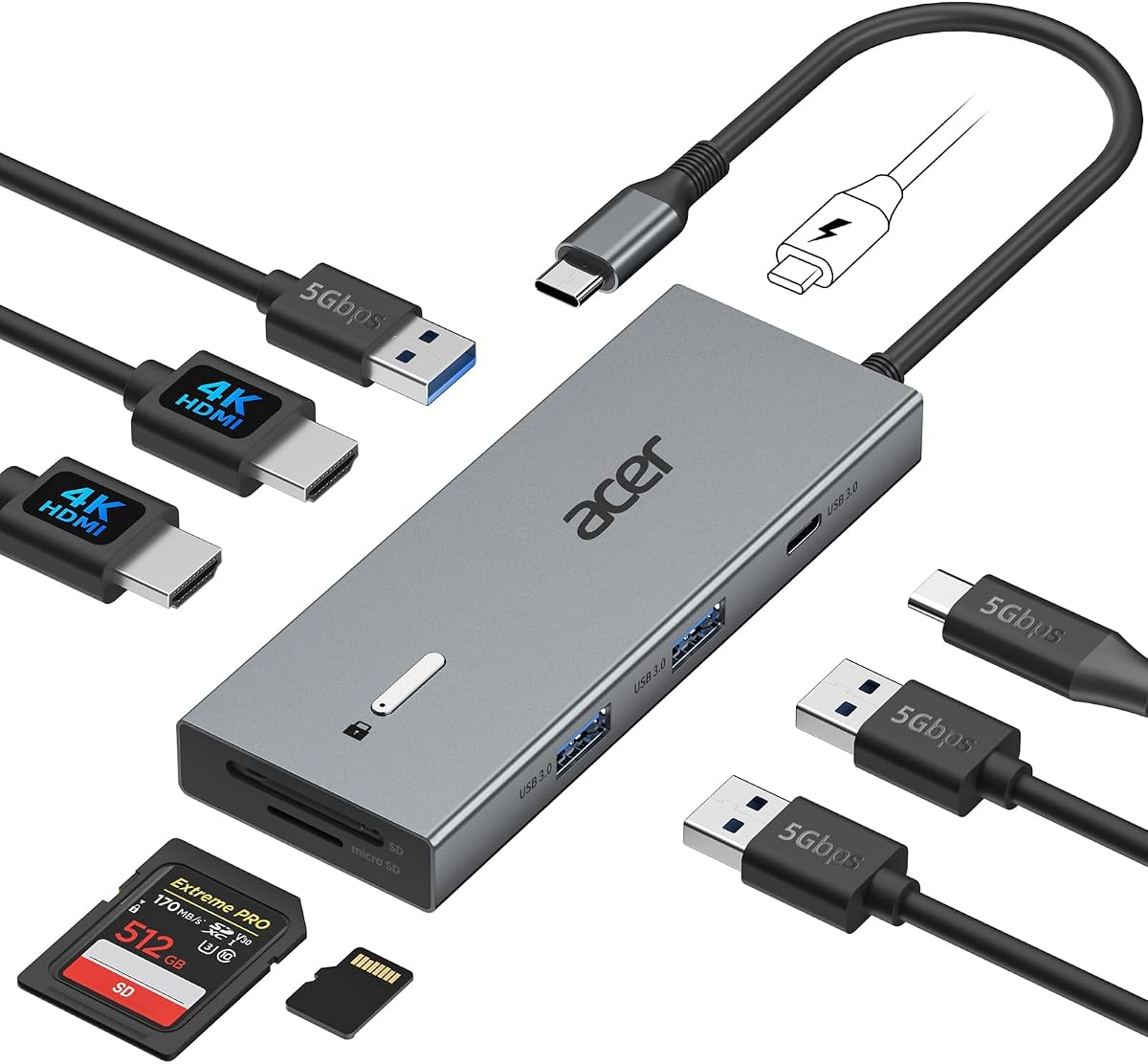
The Acer 13-in-1 Laptop Docking Station is a powerhouse for users who need more than just dual displays. It features a premium aluminum body and includes a 110W power adapter to ensure robust power delivery. With support for three independent screens via two HDMI and one DisplayPort, it is ideal for complex workflows requiring extensive screen real estate and reliable connectivity.
We may earn a commission when you buy through this link, at no additional cost to you.
This docking station excels in seamless triple display expansion, allowing you to multitask like a professional across multiple windows. The included adapter delivers 100W directly to your laptop, ensuring it stays charged even under heavy workloads. The aluminum design also helps dissipate heat efficiently, maintaining peak performance during prolonged use without overheating issues.
However, users should be aware of certain limitations. The macOS system restricts users to mirroring mode across multiple displays, preventing extended desktop modes. Additionally, while it is a premium device, the price point is higher than standard hubs, which might not suit all budgets. Performance on triple 4K output also depends on your host laptop supporting Display Stream Compression.
If you need a command center for finance, coding, or design, this dock offers the connectivity and stability required. It consolidates networking, storage, audio, and power into a sleek unit. The integrated security slot adds an extra layer of protection for physical assets, making it a strong candidate for office environments where security and performance are paramount priorities.
The 110W adapter ensures that both the dock and your laptop receive sufficient power to run multiple monitors without throttling performance.
A built-in security slot allows you to lock the docking station and your laptop to a desk, protecting against theft in shared spaces.
We may earn a commission when you buy through this link, at no additional cost to you.
The Selore USB C Docking Station Dual Monitor is a fantastic entry-level option for those needing reliable dual HDMI output without breaking the bank. It transforms your laptop with a latest upgrade 8-in-1 design that supports dual 4K at 60Hz. This model is particularly suited for home and office use where budget efficiency is a primary concern alongside essential functionality.
We may earn a commission when you buy through this link, at no additional cost to you.
Its key strength is the ability to support MST mode under Windows laptops for extending two monitors simultaneously. The USB-C power delivery port can charge your laptop at up to 100W input, ensuring you stay powered during long work sessions. The fast USB-C and USB-A ports allow for quick data transfer speeds up to 5Gbps, enhancing overall productivity.
Despite the competitive price, there are trade-offs. The package does not include a power charger or charging cable, so you must provide your own to use the PD port effectively. Additionally, for Mac users, the adapter does not support dual-screen extension and only supports mirroring mode, which might limit workflow flexibility for Apple users.
For Windows users looking for a straightforward, cost-effective way to double their screen space, this hub is an ideal choice. It is versatile and all-in-one, suitable for various peripherals. If you prioritize value and core dual-monitor functionality over bundled accessories or advanced macOS features, this model provides a solid performance baseline.
Delivering dual 4K support at a budget price makes this an accessible solution for small businesses or students expanding their workspace.
With 5Gbps transfer speeds and SD card access, file management and media sharing remain quick and efficient for daily tasks.
We may earn a commission when you buy through this link, at no additional cost to you.
The Acer 9-in-1 Laptop Dock offers a balanced mix of features for users seeking high-resolution display options without the bulk of higher-end models. It supports dual monitors via two HDMI ports with 4K at 60Hz resolution, making screen extension easy for dynamic workloads. The aluminum alloy body ensures efficient heat dissipation and a professional look on any desk.
We may earn a commission when you buy through this link, at no additional cost to you.
Key strengths include the fast data transfer capabilities and the dedicated privacy lock feature. A single click locks Windows, while a press and hold allows for Mac locking, adding security to your external display setup. The charging port supports up to 100W input delivering up to 90W to your laptop which is sufficient for most productivity tasks without needing a second power source.
On the trade-off side, the power adapter is not included in the box, meaning you must have a compatible 100W charger ready to use the full charging capabilities. Additionally, macOS users will only see mirrored content across all external monitors rather than extended desktop mode. This might limit its appeal for those deeply embedded in the Apple ecosystem.
This dock is a strong candidate for Windows and ChromeOS users who want a reliable hub with privacy features. It ensures stable power and data transfer to protect your devices while keeping your workspace clutter-free. If you value a compact design with essential ports and security functions, this model provides a dependable solution for daily connectivity needs.
Supporting 4K at 60Hz ensures that video playback and high-resolution content appear smooth and clear without stuttering or lag.
The dedicated lock button allows for quick screen locking, safeguarding sensitive information when you step away from your workstation.
We may earn a commission when you buy through this link, at no additional cost to you.
The Dell D3100 Docking Station is a robust solution designed primarily for users with existing USB 3.0 ports who need to expand their desktop capabilities. It offers enhanced connectivity with 3 superspeed USB 3.0 ports and dual HDMI ports for dual display support. This model is particularly beneficial for maintaining productivity on older laptops that lack modern USB-C features.
We may earn a commission when you buy through this link, at no additional cost to you.
Its standout qualities include the inclusion of a DisplayPort output alongside HDMI ports for vibrant high-resolution video streaming. The device supports triple displays under certain conditions which increases workspace flexibility. It also features a Gigabit Ethernet port for reliable network connectivity and audio convenience with headphone input and output jacks for multimedia tasks.
However, it relies on older USB 3.0 technology which limits data transfer speeds compared to modern Thunderbolt or USB-C docks. The power delivery is capped at 65W which might not be sufficient for high-performance laptops that require more power during intensive tasks. It is also limited to specific Microsoft Windows operating systems for compatibility.
This docking station is ideal for business environments or users with older Dell models like Inspiron or Latitude series looking for a stable upgrade. It ensures seamless work with specific laptop lines and provides reliable multimedia connectivity. If you need a reliable connection for basic dual-screen productivity and have older hardware, this model remains a practical choice.
Designed to work with a wide range of Dell models, this dock ensures compatibility with legacy systems that do not yet support USB-C video.
The inclusion of audio input and output alongside HDMI and DisplayPort ensures you can manage sound and video simultaneously without extra cables.
We may earn a commission when you buy through this link, at no additional cost to you.
The Anker 7-in-1 USB-C Hub is designed for multitaskers who need a compact solution to extend their workspace without the bulk of larger docks. It features a powerful 7-in-1 hub that allows you to see more and do more across two screens with 1080p@60Hz resolution. This is an ideal choice for those prioritizing data transfer speed and portability.
We may earn a commission when you buy through this link, at no additional cost to you.
Its key strength lies in the blazing-fast 10Gbps data transfer capabilities which dramatically reduce transfer times for large files. The hub also supports 100W fast charging input delivering 85W output to your laptop ensuring it stays charged while in use. Compatibility extends to macOS Windows and ChromeOS devices making it a versatile tool for various users.
The main trade-offs are the lower video resolution of 1080p compared to 4K options and the absence of an Ethernet port. Users relying on wired networking will need a separate adapter. Additionally, it is not compatible with Linux systems which limits its scope for some open-source environments. These factors may affect its suitability for high-resolution media professionals.
If your priority is rapid file transfers and keeping your laptop powered while using dual monitors at standard HD resolutions this hub is a strong contender. It fits well in travel kits and provides essential ports without unnecessary bulk. For general productivity tasks where 1080p suffices this model offers a balance of speed and convenience.
With 10Gbps speeds, moving large design files or video clips is significantly faster than with standard USB-C hubs.
The 85W output ensures that your laptop remains charged even when driving two displays and multiple peripheral devices simultaneously.
We may earn a commission when you buy through this link, at no additional cost to you.
The MOKiN USB C Docking Station is a comprehensive solution featuring a complete 13-in-1 dock setup. It includes two HDMI ports for dual 4K Ultra HD display which boosts efficiency for work and daily life. The device supports laptops with Thunderbolt 3/4 or full-featured USB-C ports ensuring broad compatibility across major brands like Dell, HP, and Lenovo.
We may earn a commission when you buy through this link, at no additional cost to you.
Its strengths include a dedicated USB-C Power Delivery port that delivers up to 100W charging to power your laptop efficiently. The RJ45 network port provides a stable high-performance 1000Mbps connection for seamless video calls and gaming. A privacy protection lock button allows you to turn off screens quickly to protect sensitive information at any time.
However, similar to other models it only supports mirroring mode on macOS meaning extended desktop mode is unavailable for Apple users. The large number of ports might require a bit of organization to avoid cable clutter. Additionally, the charger is not included so you must provide a separate 100W adapter to realize the full charging potential.
This hub is perfect for users needing a wide variety of ports without carrying multiple dongles. It maximizes productivity by consolidating data transfer networking and display options into one unit. If you need extensive connectivity and privacy features in a compact design this docking station offers a robust set of tools for a versatile workspace.
With 13 ports including multiple USB types and HDMI, this hub serves as a complete station for connecting all peripherals without extra adapters.
The built-in lock button allows for instant screen privacy, which is crucial in shared offices or public spaces where data security is a concern.
We may earn a commission when you buy through this link, at no additional cost to you.
The Selore USB C Docking Station supports triple monitors allowing you to extend your workspace across three independent screens. With a 10-in-1 hub design it includes 2 HDMI ports and a DP port for clarity on demand. It is perfect for trading coding and design where visual space is critical. The aluminum chassis ensures optimal heat dissipation during extended use.
We may earn a commission when you buy through this link, at no additional cost to you.
One of its standout features is the one-touch monitor control button that saves energy and switches modes instantly. You can cycle through different display modes like PC Screen Only Duplicate Extend or Second Screen Only with a long-press. This control button adds ultimate convenience especially when sharing screens or stepping away from the desk.
The main limitation is that macOS users are restricted to mirroring modes across all connected external monitors due to system limitations. Additionally achieving triple 4K output on Windows requires a laptop GPU that supports Display Stream Compression. This might limit its performance on older machines or basic laptops without dedicated graphics capabilities.
If you need a high-performance hub for multiple displays and want advanced controls this model is an excellent choice. It delivers up to 100W input and supports 5Gbps data transfer speeds. For users who prioritize multi-screen productivity and efficient power management this docking station provides a robust platform for complex work environments.
The dedicated control button allows for rapid switching between screen modes reducing the need to navigate system settings for common tasks.
Supporting 8K resolution via DP and triple 4K via HDMI ensures that visual content appears sharp and detailed for professional applications.
We may earn a commission when you buy through this link, at no additional cost to you.
The Anker Laptop Docking Station transforms your laptop into a full desktop workstation with 13 ports including two HDMI ports. It features a vertical design that saves desk space while offering triple display support at 1080p@60Hz. This model is built for Windows users who need to expand multitasking capabilities without cluttering their workspace.
We may earn a commission when you buy through this link, at no additional cost to you.
Its standout feature is the inclusion of a 135W power adapter right out of the box providing desktop-grade power delivery. You can charge your laptop at 85W and your phone at 18W simultaneously which enhances efficiency. The compact vertical design allows it to stand upright saving significant desk space compared to flat hubs.
However, macOS users will find limitations as it only supports mirroring for monitors rather than extended desktop mode. The price point is higher than some simpler hubs which may not suit all budgets. Additionally, setup requires checking USB-C DP Alt Mode compatibility which might require some technical knowledge from the user.
If you want a powerful all-in-one solution with included power and triple screen support this dock is a strong option. It transfers files at 10Gbps and reads SD cards at 104 MB/s for a power-user workflow. For professionals who value desk space efficiency and robust connectivity this model delivers a complete workstation experience.
The included 135W adapter ensures you do not need to purchase extra chargers to power your laptop and peripherals fully.
The vertical layout minimizes the footprint on your desk allowing more room for your keyboard and other essential tools.
We may earn a commission when you buy through this link, at no additional cost to you.
This generic docking station provides a basic solution for users needing minimal dual monitor connectivity. It offers standard HDMI output for connecting displays without advanced features like high-power delivery or extensive port variety. This model serves as a straightforward option for users who prioritize simplicity over advanced functionality.
We may earn a commission when you buy through this link, at no additional cost to you.
Its strengths lie in its simplicity and likely lower cost compared to feature-rich hubs. It allows for basic data transfer and screen extension without complicated setup processes. This makes it a potential option for casual users who do not require high-speed data transfer or extensive connectivity options.
However, it lacks many features found in professional docks such as power delivery or Ethernet ports. Reliability may vary due to the lack of brand-specific quality control. Users needing high-performance workflows might find it insufficient for demanding tasks like video editing or large file transfers.
If your needs are limited to extending a single screen and occasional data transfer this basic hub might suffice. It avoids the complexity of drivers and additional settings. For budget-conscious buyers with simple requirements it provides a functional path to dual display connectivity without unnecessary extras.
Provides essential HDMI connectivity for dual screens without advanced features that increase cost or complexity.
Designed for plug-and-play use without requiring extensive configuration or software installations.
We may earn a commission when you buy through this link, at no additional cost to you.
Selecting the right docking station involves understanding several technical factors to ensure compatibility and performance.
Ensure the docking station supports the resolution you need such as 4K at 60Hz or 1080p. Higher resolutions require more bandwidth and may impact refresh rates depending on your laptop's capabilities.
Check the maximum supported resolution to avoid purchasing a model that cannot display your preferred screen settings.
Consider what other devices you need to connect like Ethernet, SD card readers, or USB drives. A model with the right mix of ports prevents the need for additional adapters.
Verify the number and type of USB ports to ensure they match your peripherals.
Look for a dock that supports Power Delivery to charge your laptop while in use. Adequate wattage ensures your laptop does not drain during heavy workloads.
Confirm that the dock provides enough power to meet your laptop's charging requirements.
Check if the docking station supports your operating system. Some models have limitations on macOS or Linux systems regarding extended display modes.
Ensure the USB-C or Thunderbolt connection matches your laptop's specifications.
Materials like aluminum help dissipate heat which keeps the device running cool during long sessions. Durability is key for frequent travel or office use.
Choose a sturdy design that fits well on your desk or in your bag.
USB 3.0 or higher speeds are essential for transferring large files quickly. Slow ports can become a bottleneck in your workflow.
Verify the speed ratings of USB and storage ports to ensure efficiency.
Some docks support extended displays on Windows but only mirror on macOS. Be aware of these limitations if you plan to use multiple monitors.
Check if the dock supports MST or SST modes for your operating system.
A reliable warranty protects you against defects and ensures customer support is available. Look for brands with good track records and service options.
Review the warranty terms to understand coverage duration and conditions.
Connect your laptop to the docking station using a high-quality USB-C or Thunderbolt cable. Ensure the cable is fully inserted to avoid connection drops that can disrupt your workflow.
Plug the HDMI monitors into the designated ports on the dock and configure the display settings on your laptop to extend or mirror the screen. Adjust resolution settings to match the native resolution of your monitors for optimal clarity.
Keep the docking station in a well-ventilated area to prevent overheating during long sessions. Clean the ports regularly to remove dust and debris that could interfere with connections or damage the device.
Yes, many models support 4K resolution but the frame rate depends on the laptop and cable. Some support 4K at 60Hz while others may limit to 30Hz. Check the specifications for your specific model.
You can use it but macOS often limits external displays to mirroring mode. Some advanced setups may work with specific drivers but extended desktop mode is less common on macOS.
Yes, a high-speed USB-C or Thunderbolt cable is usually required. Standard charging cables may not support video transmission. Use a certified cable for best performance.
Most modern docks support Power Delivery which allows charging while connected. Ensure the wattage meets your laptop's requirements for optimal charging speed during use.
MST allows multiple monitors to show different content on Windows. SST mirrors the same content on all displays which is common on macOS. MST enables extended desktop setups.
They work best with laptops that have full-featured USB-C or Thunderbolt ports. Older laptops may require specific adapters. Always check your laptop's port capabilities.
We have reviewed ten top docking stations with 2 HDMI ports offering solutions for budget, performance, and advanced needs. The Anker 8-in-1 and Acer 13-in-1 models stand out for reliability and features respectively.
When choosing, prioritize compatibility with your operating system and the resolution you need. Ensure the power delivery meets your laptop's charging needs for a seamless experience.
Remember to check current prices and availability before purchasing as these can change frequently. We hope this guide helps you find the perfect docking station to enhance your workflow.