
SteelSeries Apex 3 Gaming Keyboard
4.6Editor score
IP32 water resistant
Whisper quiet switches
10-zone RGB illumination
This guide compares the top ten Mac gaming keyboards for October 2026 focusing on compatibility, switch type, wireless options, build quality, and performance
Finding the right gaming keyboard for your Mac setup can be challenging due to specific layout requirements and connectivity needs. You need a device that supports macOS function keys seamlessly while delivering the precision and responsiveness required for competitive play or immersive single-player experiences.
We evaluated ten standout models based on their compatibility with Mac OS, switch feel, wireless capabilities, and overall build quality. Each product was selected to offer a unique balance of price, performance, and features ensuring you find the perfect match for your specific gaming habits and desk setup.
Each pick in this list highlights key strengths and potential trade-offs to help you make an informed decision quickly. Prices and availability can change frequently so please check the current listings before purchasing to ensure you get the best deal available at this moment.
4.6Editor score
4.3Editor score

4.2Editor score
The following comparison table provides a side-by-side overview of all ten models to help you quickly identify which features align best with your requirements and budget constraints.




The SteelSeries Apex 3 stands out as a top budget option for Mac users seeking reliability without breaking the bank. It earns a strong rating from users who appreciate its durability and thoughtful design features that enhance everyday comfort during long sessions.
We may earn a commission when you buy through this link, at no additional cost to you.
Its IP32 water resistance protects against accidental spills which is crucial for shared workspaces or busy gaming nights. The whisper quiet switches make it ideal for environments where noise is a concern such as offices or late-night sessions. The dedicated multimedia controls allow you to adjust volume and settings without interrupting your game or workflow.
While it lacks mechanical switches the membrane technology provides a smooth typing experience with low friction for millions of keypresses. The 10-zone RGB illumination adds visual flair without the complexity of per-key customization. The magnetic wrist rest ensures your hands stay supported reducing fatigue over time.
This keyboard is perfect for casual gamers or students who need a versatile tool for both work and play. It delivers solid performance and protection at a fraction of the cost of premium models making it a practical choice for many setups.
The IP32 rating ensures liquid spills won't ruin the keyboard extending its lifespan significantly.
The included magnetic wrist rest provides essential palm support for long typing or gaming sessions.
We may earn a commission when you buy through this link, at no additional cost to you.
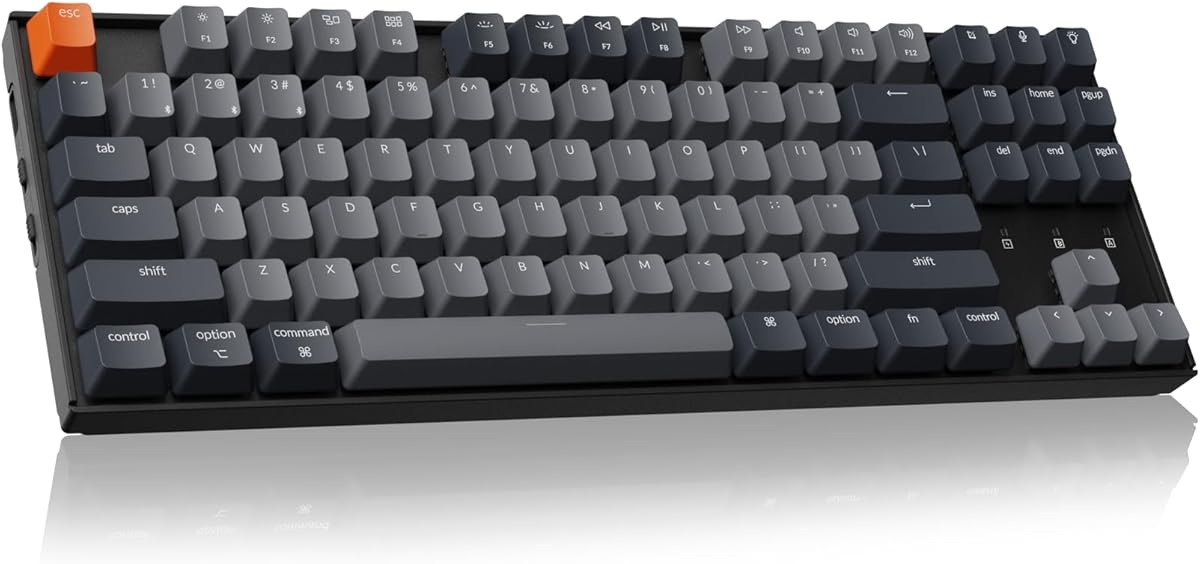
The Keychron K8 TKL is a top-rated mechanical keyboard designed with Mac users in mind while maintaining compatibility with Windows. Its unique layout and robust wireless capabilities make it a versatile choice for hybrid work and gaming environments where reliability is key.
We may earn a commission when you buy through this link, at no additional cost to you.
It comes with extra keycaps for both macOS and Windows ensuring that function keys and modifiers align perfectly with your operating system. The Bluetooth 5.1 connection allows you to pair up to three devices and switch between them effortlessly. The tactile brown switches provide satisfying feedback without being too loud for shared spaces.
The 4000 mAh battery offers exceptional longevity lasting up to 200 hours with the backlight off. This means you won't need to recharge frequently even with heavy daily use. The Type-C wired mode ensures you can still use it as a traditional keyboard if needed.
Ideal for professionals who game occasionally this keyboard bridges the gap between productivity and play. Its compact TKL design saves desk space while providing access to navigation keys essential for various workflows and games.
Included keycaps let you switch between Mac and Windows layouts instantly without fumbling for obscure shortcuts.
Bluetooth connectivity eliminates cable clutter while maintaining a stable connection for most gaming scenarios.
We may earn a commission when you buy through this link, at no additional cost to you.
The EPOMAKER X Aula F75 MAX is a highly versatile keyboard featuring a TFT screen and knob for intuitive control. With a 75% layout it balances compactness with functionality offering everything you need for efficient gaming and typing on macOS or other systems.
We may earn a commission when you buy through this link, at no additional cost to you.
The TFT screen allows you to monitor battery status or customize settings without diving into complex software. The gasket mount structure separates the PCB from the shell providing a soft and soothing typing experience that reduces harsh bottoming. The hot-swappable design lets you experiment with different switches to find your preferred feel.
Its sound-dampened build eliminates echo and produces a creamy thocky sound that is pleasing to the ear. RGB lighting can be adjusted via software screen or shortcuts to match your style. The anti-ghosting technology ensures precise inputs even when multiple keys are pressed simultaneously.
This model suits enthusiasts who want customization and high performance in a compact package. Whether for office use or competitive gaming its flexibility and build quality make it a standout choice for discerning users.
The TFT screen offers real-time feedback and settings adjustments directly on the keyboard for convenience.
Foams and silicone layers reduce noise making every keystroke sound rich and pleasant.
We may earn a commission when you buy through this link, at no additional cost to you.
The Logitech G915 X Wired offers a premium full-size gaming experience with next-gen engineering and a sleek aesthetic. It is designed for those who want the latest innovations in speed and precision without relying on wireless connections for critical inputs.
We may earn a commission when you buy through this link, at no additional cost to you.
Its low-profile GL mechanical switches have a short actuation point that increases actions per minute for faster reactions. The sand-blasted aluminum top plate and PBT keycaps ensure durability and a comfortable typing feel. You can remap up to 15 functions per key using KEYCONTROL to create a personalized command center.
LIGHTSYNC RGB lets you access 16.8 million colors to sync with other Logitech G gear via G HUB software. The volume roller and dedicated media controls provide intuitive management so you can stay focused on play. The slim 23mm design fits seamlessly on any desk.
This keyboard is ideal for serious gamers who prioritize performance and build quality. While it lacks wireless flexibility the wired stability and advanced features justify its price for competitive users seeking top-tier hardware.
Low-profile switches with short travel distance allow for rapid inputs and quicker reaction times in games.
High-quality materials like aluminum and PBT keycaps ensure long-term resistance to wear and tear.
We may earn a commission when you buy through this link, at no additional cost to you.
The Logitech G413 TKL SE delivers uncompromising performance in a tenkeyless format that saves valuable desk space. It combines gaming-first features with the durability needed to compete in intense matches while maintaining a sleek look for everyday use.
We may earn a commission when you buy through this link, at no additional cost to you.
Its PBT keycaps resist heat and wear better than standard ABS plastics ensuring legends stay sharp over time. The tactile mechanical switches provide consistent feedback for accurate typing and gaming. The brushed aluminum-magnesium alloy case gives it a robust structure with minimal flex.
White LED lighting offers a clean aesthetic without distracting color changes. You can control volume and media directly via FN keys without leaving your game. The 6-key rollover ensures reliable input even during complex key combinations.
This keyboard is perfect for gamers who want a reliable wired setup with premium materials. Its compact form factor works well on smaller desks while delivering the quality expected from the Logitech brand.
PBT keycaps offer superior texture and longevity compared to standard ABS plastics used in cheaper keyboards.
Removing the numpad frees up mouse space and creates a more ergonomic layout for many users.
We may earn a commission when you buy through this link, at no additional cost to you.
The Redragon K742 Wireless is a 98% compact layout keyboard that offers seamless tri-mode connectivity for hybrid workflows. Its hot-swappable design and programmable software give users deep control over customization and functionality.
We may earn a commission when you buy through this link, at no additional cost to you.
You can switch between Bluetooth 5.0 2.4GHz wireless and USB-C wired modes to adapt to different scenarios. The gasket structure with sound-absorbing padding provides a silent and satisfying typing feel. The volume knob saves desk space while offering quick media control.
QMK VIA support allows you to remap keys and edit macros for maximum efficiency. The built-in 4000mAh battery lasts for 53 hours with backlight off. PBT keycaps ensure long-lasting texture and durability for daily heavy use.
This keyboard fits users who want a versatile tool for both work and gaming with minimal compromise. Its programmable features and comfortable design make it an excellent choice for those seeking customization at a reasonable price.
VIA software lets you tailor every key and layer to match your specific workflow and game preferences.
Connect up to three devices and switch between them with a single click for seamless multitasking.
We may earn a commission when you buy through this link, at no additional cost to you.
The Keychron K4 96% combines a full number pad with a compact design making it ideal for productivity-focused users. It offers wireless connectivity and robust Mac layout support ensuring seamless integration into your macOS environment.
We may earn a commission when you buy through this link, at no additional cost to you.
The 100-key layout retains all essential keys while saving space compared to a full-sized keyboard. It connects to up to three devices via Bluetooth 5.1 for efficient switching between laptop and desktop. The Keychron Super Switch provides a reliable tactile experience with a 50 million click lifespan.
White LED backlighting offers static or flashing modes to suit your mood and environment. The 4000 mAh battery ensures up to 240 hours of use with backlight disabled. Wired USB-C connection provides stability when needed.
This keyboard is perfect for data entry professionals or anyone needing number pad functionality without the bulk. Its Mac-specific layout ensures all function keys are accessible and intuitive for macOS users.
The 96% layout packs a numpad into a smaller footprint improving desk organization significantly.
Key mapping matches macOS defaults reducing confusion and improving workflow efficiency for Apple users.
We may earn a commission when you buy through this link, at no additional cost to you.
The Logitech MX Mechanical is a premium wireless keyboard designed for effortless precision and smart illumination. It pairs perfectly with Mac users needing cross-computer flow and multi-device control for a unified ecosystem.
We may earn a commission when you buy through this link, at no additional cost to you.
Its low-profile mechanical switches provide a satisfying tactile bump with less noise for a focused environment. Smart illumination lights up when your hands approach and adjusts to ambient light automatically. You can customize Fn keys and effects via Logi Options+ software.
Bluetooth Low Energy and Logi Bolt receiver support up to three devices with instant switching. The USB-C quick charging lasts up to 15 days on a full charge or 10 months with backlight off. Many parts use certified post-consumer recycled plastic.
This keyboard is best for professionals who value ergonomics and seamless workflow integration. While it targets productivity its reliable performance makes it suitable for light gaming and everyday tasks.
Backlight sensors detect hand movement and ambient light to save power and enhance visibility.
Logitech Flow allows you to move your cursor and text between Mac and other OS devices easily.
We may earn a commission when you buy through this link, at no additional cost to you.
The GravaStar Mercury K1 features a futuristic aluminum alloy exoskeleton with a gradient black finish that stands out on any desk. It combines high-end design with tri-mode connectivity and gasket-mounted structure for an exceptional typing experience.
We may earn a commission when you buy through this link, at no additional cost to you.
Custom GravaStar x Kailh linear switches ensure smooth and responsive inputs with quick reactions. The gasket-mounted structure with sound dampening reduces vibrations and noise making keystrokes comfortable for long sessions. Dual independent RGB systems offer 16.8 million colors and 13 customizable modes.
It supports wired USB-C Bluetooth 5.0 and 2.4GHz wireless for seamless device switching. The compact 75% layout balances functionality with desk space efficiency. The aluminum build provides stability and a premium feel.
This keyboard is ideal for users who want style without sacrificing performance. Its high rating reflects its ability to deliver both beauty and functionality for Mac and Windows users alike.
The flowing curves and gradient finish make this keyboard a visual centerpiece of your setup.
Five layers of dampening foam create a rich and pleasant sound that enhances the typing feel.
We may earn a commission when you buy through this link, at no additional cost to you.
The Logitech G213 Prodigy is a full-sized keyboard designed for gamers of all levels seeking reliable performance and durability. It offers essential gaming features and customizable lighting zones at an accessible entry-level price point.
We may earn a commission when you buy through this link, at no additional cost to you.
Five customizable lighting zones with over 16.8 million colors allow you to match your setup or game. Each key is tuned to enhance the tactile experience while the anti-ghosting gaming matrix ensures control during intense moments. Dedicated media controls let you play pause and mute instantly.
The slim body and durable construction repel liquids and dirt for easy cleanup. An integrated palm rest keeps you comfortable during long sessions. Logitech G HUB software enables macro programming and game mode customization.
This keyboard is perfect for beginners or casual gamers who want quality without high costs. Its reliable performance and user-friendly features make it a trusted choice for everyday gaming and productivity.
The integrated palm rest supports your wrists reducing strain during extended gaming sessions.
Spill-resistant design keeps the keyboard functional and easy to maintain even after accidents.
We may earn a commission when you buy through this link, at no additional cost to you.
Selecting the right gaming keyboard involves weighing compatibility features and comfort to ensure it meets your specific needs on Mac systems.
Ensure the keyboard supports macOS function keys and layout defaults. Look for models that include Mac-specific keycaps or offer software remapping to avoid frustrating workarounds.
Prioritize keyboards explicitly marketed as Mac compatible or multi-platform for seamless integration with your operating system.
Mechanical switches like tactile or linear provide consistent feedback and durability essential for gaming. Membrane options might be quieter but lack the responsiveness of mechanical switches.
Choose tactile switches if you want feedback without excessive noise and linear switches for smooth fast keypresses.
Decide between wired and wireless based on your setup. Wireless offers flexibility and cleaner desks but may have slight latency compared to wired connections.
Wired keyboards guarantee stability for competitive play while wireless models with Bluetooth 5.1 provide reliable performance for most tasks.
Look for durable materials like aluminum frames and PBT keycaps that resist wear and tear. A solid build ensures longevity and a premium feel.
Keyboards with robust construction and spill resistance offer better protection and value for your investment over time.
Comfort is crucial for long sessions. Consider keyboards with adjustable feet palm rests or ergonomic profiles to reduce wrist strain.
Choose a design that fits your natural hand position to prevent fatigue during extended gaming or typing.
Extra features like RGB lighting dedicated media controls or programmable keys enhance usability. Software support allows you to map macros and adjust settings easily.
Prioritize keyboards with robust software if you need to customize lighting and actions for your specific games.
Decide if you need a full-size layout or a compact tenkeyless design based on desk space. Compact layouts save room for mouse movement.
If you need a number pad for productivity choose a 96% or full-size layout over smaller options.
Set a realistic budget to narrow down options. Prices range significantly but you can find quality keyboards at various price points.
Balance your needs with affordability to ensure you get the best value without overspending on unnecessary features.
Connect your keyboard to your Mac via Bluetooth or USB-C and ensure all drivers are installed if needed for full feature access. Verify that function keys are mapped correctly in System Settings for smooth operation.
Clean the keyboard regularly with compressed air to remove dust and debris from between the keys. Use a soft cloth for the surface to maintain the aesthetic and prevent grime buildup.
For wireless models charge the battery when it drops below 20% to maintain battery health. Avoid spilling liquids and store the keyboard in a cool dry place when not in use.
Not all mechanical keyboards are optimized for Mac but most modern models support both Windows and Mac. Look for keyboards that include Mac-specific keycaps or software for remapping keys to match macOS defaults. This ensures function keys like brightness and volume work seamlessly.
Wired keyboards generally offer lower latency which is crucial for competitive gaming. Wireless options with Bluetooth 5.1 have improved significantly and are sufficient for most casual or single-player games. Consider your priority between stability and desk cleanliness when deciding.
Switch type determines how keys feel and respond to your input. Tactile switches give physical feedback while linear switches are smooth and quiet. Choosing the right type helps prevent finger fatigue and improves accuracy during intense gaming sessions.
Many Bluetooth gaming keyboards are compatible with iPad as long as they support standard OS input protocols. Check the product specifications to confirm iPad or iOS support before purchasing to ensure all functions work correctly.
Use compressed air to blow out dust between keycaps and a soft brush for stubborn debris. Dampen a cloth slightly for the surface but avoid liquids on the switches. Removing keycaps carefully allows deeper cleaning of the stem area.
A gasket-mounted design isolates the keyboard plate from the case using silicone gaskets. This provides a softer and more flexible typing feel that reduces harsh impacts and improves acoustics significantly.
Yes most gaming keyboards work well for office tasks on Mac. Look for models with quiet switches and ergonomic features to ensure comfort during long workdays. Avoid overly bright RGB lighting if working in shared spaces.
Gaming keyboards offer anti-ghosting and faster response times which can improve your input accuracy in games. While they don't directly boost FPS they provide reliable controls that help execute complex commands without errors or delays.
We have explored ten top options ranging from budget-friendly models to premium choices with advanced features. Whether you prioritize wireless convenience tactile switches or Mac-specific layout support there is a perfect match for your needs.
Prioritize features like switch type and connectivity that matter most to your workflow and gaming habits. A keyboard that fits your hands and system will serve you better than one with unnecessary extra features.
Always check the latest prices and availability before making your purchase to ensure you get the best deal. Our list provides a solid foundation to help you decide quickly and confidently on the right keyboard.