
NZXT H5 Flow
4.7Editor score
Compact mid-tower design
Perforated PSU shroud
Two quiet airflow fans
This guide compares the top 10 high airflow PC cases for performance thermal management build flexibility and cooling efficiency to help you choose the right
Finding the right case is critical for system stability. High airflow PC cases ensure components stay cool under load. They feature mesh panels and optimized fan placements to maximize thermal performance.
We compared ten leading models based on cooling capacity build quality and design features. Each entry offers unique benefits for different budgets and component sizes ensuring a great fit.
Each pick highlights key strengths and ideal use cases for enthusiasts. Prices and availability change frequently so check the links for the latest deals before you buy today.
4.7Editor score

4.8Editor score

4.8Editor score
The following table compares the key specifications and design features of all ten cases to help you quickly identify the best match for your build needs.





The MONTECH AIR 903 MAX is a standout choice for builders seeking high performance without breaking the bank. It earns our Editor's Choice award for its exceptional balance of cooling capacity and build quality. With four pre-installed fans and a mesh front panel it delivers outstanding airflow right away.
We may earn a commission when you buy through this link, at no additional cost to you.
Its internal volume accommodates demanding components including E-ATX boards and GPUs up to 400mm. The included fans are high quality and offer PWM control for precise tuning. Radiator support is generous allowing for robust liquid cooling setups at the front or top.
While it lacks some advanced storage features the focus on cooling is clear. Dust filtration could be better on the top but the performance gain justifies the trade-off. The ARGB lighting adds visual appeal without overwhelming the clean design aesthetic.
This case is ideal for gamers and content creators who prioritize thermal performance. It provides a solid foundation for high-end builds and grows with your upgrades. If you need a reliable cooling-focused chassis this is a top recommendation.
The combination of four 140mm fans and a fully ventilated front panel ensures that heat is efficiently expelled from the chassis keeping components running at optimal temperatures.
Supporting E-ATX motherboards and massive graphics cards means you won't need to upgrade your case soon even as you install more powerful hardware in the coming years.
We may earn a commission when you buy through this link, at no additional cost to you.
The NZXT H5 Flow proves that you don't need to spend a fortune to get excellent airflow. It is our Best Budget pick because it offers high-performance cooling features at a very accessible price point. The design prioritizes air movement over flashy aesthetics.
We may earn a commission when you buy through this link, at no additional cost to you.
Its compact footprint makes it perfect for smaller desks while still supporting ATX boards and substantial radiators. The perforated PSU shroud and mesh panels ensure that intake is maximized. Two pre-installed fans provide solid performance without excessive noise.
Build quality is typical for the price with some plastic components that feel less premium. Cable management is straightforward though space is tight compared to larger towers. The minimalist look fits well in any setup without drawing too much attention.
This case is best for budget builders or those with limited space. It delivers the thermal performance needed for mid-range gaming rigs effectively. If you want a no fuss cooling solution without the cost this is a smart choice.
By focusing on essential airflow features rather than extra RGB lighting or complex modularity this case keeps costs low while maintaining effective thermal management for standard builds.
Its compact dimensions allow it to fit on tighter desks without sacrificing compatibility with key components like ATX motherboards and standard cooling radiators.
We may earn a commission when you buy through this link, at no additional cost to you.
The Cooler Master HAF II 500 represents the pinnacle of airflow focused design. It wins Best Premium for its aggressive cooling strategy and high-end build quality. The use of oversized fans sets it apart from standard cases offering unique thermal advantages.
We may earn a commission when you buy through this link, at no additional cost to you.
Its design prioritizes moving as much air as possible with large intake and exhaust openings. The split-level cable management keeps the interior clean even with complex routing. The MasterRail system allows for flexible fan and radiator configurations to suit any needs.
The size is substantial which may not fit all desks or rooms. The price reflects the premium materials and engineering but it is an investment for serious enthusiasts. The unique fan sizes require specific replacements which could be a minor inconvenience.
This case is perfect for high-end builds where thermal performance is non-negotiable. If you have the space and budget this case offers cooling potential that few others can match. It is a true flagship for airflow enthusiasts.
The inclusion of 220mm and 180mm fans creates a massive air volume that quickly removes heat from high-performance components reducing noise levels during heavy loads.
Flexible storage cages and split-level cable management provide builders with the freedom to organize components efficiently while maintaining unrestricted airflow paths throughout the chassis.
We may earn a commission when you buy through this link, at no additional cost to you.
The CORSAIR 4000D RS ARGB introduces a modular approach to case design. The FRAME system allows for customization of parts like the motherboard tray or I/O panel. It features high quality pre-installed fans and a mesh panel for optimal cooling.
We may earn a commission when you buy through this link, at no additional cost to you.
Its InfiniRail system provides flexibility for fan placement on the roof and front. The internal side panel can be used for cable management or removed for extra cooling. It supports back-connect motherboards for cleaner aesthetics without visible cables.
The modular aspects add value for users who want to change their case setup over time. The Y-Pattern front panel looks unique and offers low restriction airflow. Some users might find the customization options slightly complex for a standard build.
This case suits those who value aesthetics and customization alongside cooling. It is a strong choice for enthusiasts wanting a build that evolves with their preferences. If modularity is a priority this is a top tier option.
The FRAME system lets you swap components like the motherboard tray or I/O panels giving you control over the look and feel of your case as your needs change.
The InfiniRail mounting system and 3D Y-Pattern panel work together to direct cool air precisely where it is needed reducing thermal hotspots effectively.
We may earn a commission when you buy through this link, at no additional cost to you.
The LIAN LI LANCOOL 216 RGB is known for its balance of cooling power and visual appeal. The pre-installed 160mm fans offer massive airflow and are very quiet. It supports large GPUs and includes features that make installation straightforward.
We may earn a commission when you buy through this link, at no additional cost to you.
Its modular motherboard I/O allows for flexible positioning to suit air or liquid cooling needs. The fine mesh panels ensure unrestricted air intake. Cable management tools like velcro straps help keep the interior organized and neat.
The case is quite heavy which adds to the premium feel but makes it less portable. Dust filters are present but need regular cleaning to maintain peak airflow. The ARGB lighting is vibrant and easily controlled via motherboard headers.
This case is ideal for users wanting high performance with a touch of style. It handles demanding builds well and offers room for future upgrades. If you prioritize cooling and aesthetics this is a top recommendation.
The two 160mm ARGB fans move a high volume of air quietly which keeps even the hottest components cool without generating excessive noise during operation.
Modular I/O and multiple cable management options provide the freedom to adapt the interior layout to specific component sizes and cooling preferences easily.
We may earn a commission when you buy through this link, at no additional cost to you.
The Antec Flux Pro is a full tower case designed for maximum thermal performance. It includes six PWM fans right out of the box covering intake and exhaust. The design features unique materials and a multi-directional vent setup for airflow efficiency.
We may earn a commission when you buy through this link, at no additional cost to you.
It supports simultaneous installation of large radiators which is rare in this price range. The PSU shroud includes reverse fans to cool the power supply independently. Build quality uses metal glass and wood for a distinctive premium look and feel.
The size may be too large for many desks or home setups. The weight makes it difficult to move once installed. Dust management is decent but regular maintenance is required to keep vents clear for optimal performance.
This case suits workstation builds or extensive gaming rigs needing extensive cooling. It is a great choice for users who want a large case with all fans included. If you need maximum thermal capacity this stands out.
Including six pre-installed PWM fans ensures that every area of the case has active airflow reducing reliance on buying additional fans after purchase.
The combination of metal glass and wood creates a textured look that distinguishes this case from standard all steel or plastic options on the market.
We may earn a commission when you buy through this link, at no additional cost to you.
The CORSAIR 3500X RS ARGB offers a panoramic glass view without sacrificing cooling capacity. It includes high-performance RS120-R ARGB fans to ensure airflow remains strong. The design prioritizes aesthetics with wraparound glass panels that show off your build.
We may earn a commission when you buy through this link, at no additional cost to you.
Despite the glass front it supports up to 10x 120mm fans internally. The glass panels are removable making it easy to access components after the build is complete. Cooling is efficient thanks to strategic fan placement and mesh side options.
The main trade-off is the maintenance required for keeping glass clean. Without proper fans the sealed front can restrict airflow slightly. The lighting control is simple via motherboard headers allowing for seamless synchronization with other components.
This case is perfect for those who want a showpiece build. It balances style and function better than many glass-heavy cases. If you want a visual masterpiece with solid cooling this is a great pick.
The wraparound tempered glass design provides an unobstructed view of internal components making it ideal for showcasing custom loops and RGB lighting setups.
With support for up to 10 fans the case maintains strong airflow even with the glass front ensuring performance isn't sacrificed for aesthetics.
We may earn a commission when you buy through this link, at no additional cost to you.
The Lian Li V100RX stands out for its support of back-connect motherboards. This feature allows for a cable-free look that improves airflow and aesthetics. It includes four pre-installed fans and an integrated LED strip for lighting.
We may earn a commission when you buy through this link, at no additional cost to you.
Tool-less panels make access easy which simplifies hardware installation and maintenance. The case supports a range of motherboard sizes including Mini-ITX. The integrated RGB strip adds color without requiring extra cables.
Its compact size limits large radiator options compared to bigger cases. Rear fan placement is restricted by the design. The value proposition is strong given the features included at this price point.
This case is ideal for modern builds aiming for a clean aesthetic. It is a smart choice for those with compatible back-connect boards. If you want simplicity and style this is a solid option.
Supporting back-connect motherboards eliminates the need for rear cable routing resulting in a cleaner interior and improved airflow dynamics.
An integrated ARGB LED strip provides full color control without needing separate fan lighting reducing cable clutter and simplifying setup.
We may earn a commission when you buy through this link, at no additional cost to you.
The NZXT H9 Flow features a dual-chamber design that separates the PSU from main components. This layout improves thermal performance and simplifies cable routing. It supports up to ten fans and includes pre-installed cooling for immediate use.
We may earn a commission when you buy through this link, at no additional cost to you.
The wraparound glass panel offers a seamless view of the interior. It is ready for back-connect motherboards enhancing the clean look. Extra-wide channels and tie-down points make cable management effortless.
The design focuses on airflow efficiency while maintaining a stylish look. The separation of components ensures that intake air remains cool. Dust filters are integrated but will need periodic cleaning to maintain airflow.
This case is best for modern high-end builds wanting clean aesthetics. It balances cooling capacity with visual appeal effectively. If you want a dual chamber design this is a top choice.
Separating the power supply from critical components ensures that heat generated by the PSU does not directly impact CPU and GPU temperatures.
Built-in wide channels and tie-down points allow for tidy routing of cables ensuring airflow paths remain clear and unrestricted inside the chassis.
We may earn a commission when you buy through this link, at no additional cost to you.
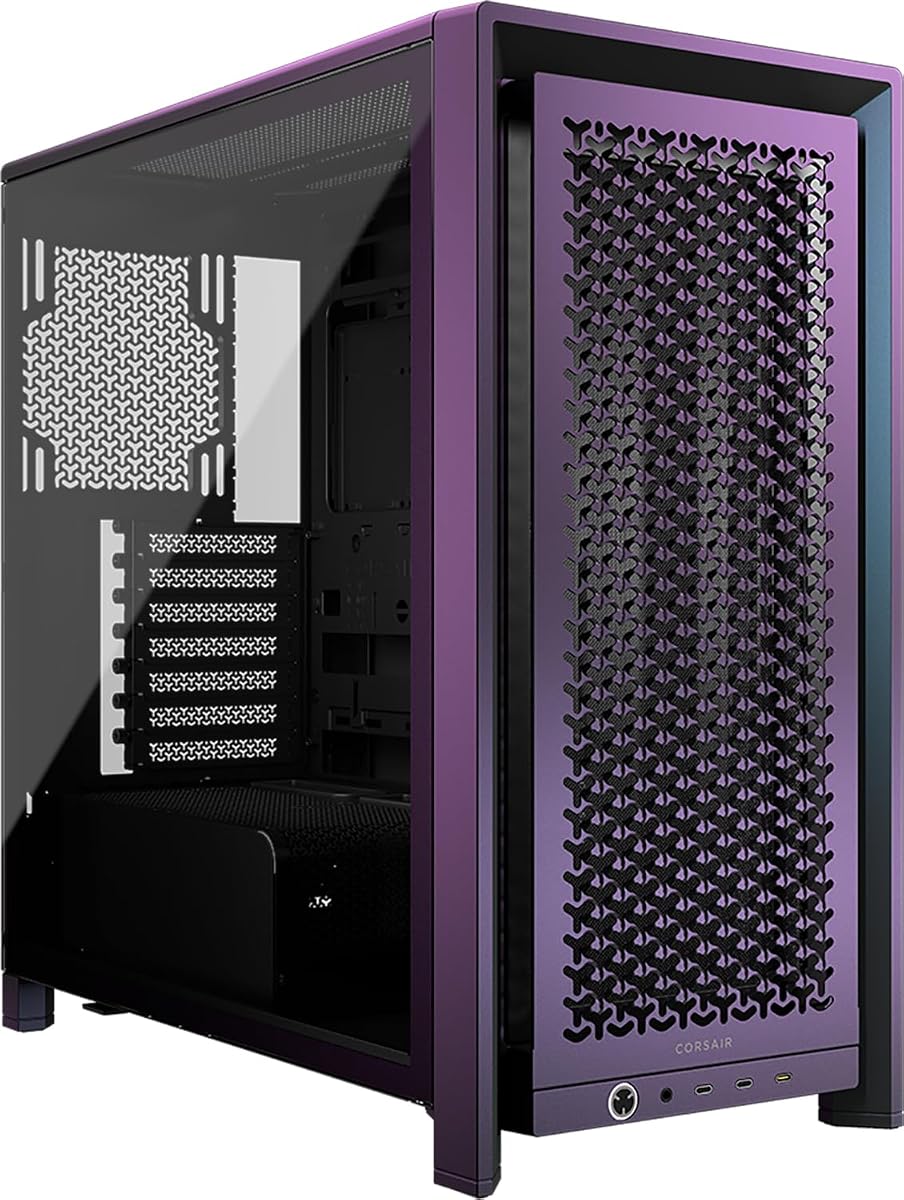
The CORSAIR Frame 4000D Vault is a limited edition case offering unique finishes and modular capabilities. Only 1337 units exist making it a true collector's item. It includes the same cooling features as the standard 4000D with exclusive styling.
We may earn a commission when you buy through this link, at no additional cost to you.
The FRAME system allows for deep customization of the chassis. It supports dual 360mm radiators for serious liquid cooling. The Galaxy finish is stunning and will not be produced again increasing its rarity value.
Availability is extremely limited which may make purchasing difficult. The price reflects its exclusivity. For enthusiasts who want a unique build this offers both performance and collectibility. It is a special edition for passionate builders.
This case suits those who value uniqueness and modularity. If you can find it it is a great statement piece for a high-end gaming setup. For exclusivity and features this is the ultimate pick.
As a limited edition release with unique colors this case appeals to collectors and enthusiasts who want a build that stands out visually from standard models.
The FRAME system continues to allow users to swap components and adapt the case to their needs over time ensuring long-term value and personalization.
We may earn a commission when you buy through this link, at no additional cost to you.
Choosing the right high airflow PC case depends on your hardware size cooling needs and aesthetic preferences. This guide covers the most important factors to consider.
Look for cases with large perforations mesh panels or fully open front designs. These features ensure that air can move freely through the case reducing heat buildup inside.
Cases with minimal solid panels and open layouts provide the best thermal performance for demanding components.
Check how many fans the case supports and where they can be mounted. More fans mean better air movement but ensure the case has enough mounting points and headers.
High capacity cases allow you to customize cooling for your specific needs without extra cost.
Ensure the case supports your motherboard form factor such as ATX or E-ATX. Larger boards need larger cases to fit properly and allow for proper airflow routing.
Matching your board size to the case prevents fit issues and ensures room for cooling solutions.
Graphics cards are often the longest component. Verify the case supports your GPU length and width to avoid installation struggles and to maintain airflow.
Clearance allows GPUs to cool efficiently and ensures fans can spin freely without obstruction.
Efficient cable management keeps airflow paths clear. Look for cases with tie-down points straps and grommets to route cables neatly behind the motherboard tray.
Neat cable routing improves airflow and makes future upgrades easier to perform.
Steel and aluminum frames provide structural rigidity and better sound damping. High-quality materials ensure the case remains sturdy and resistant to damage over time.
Durability ensures your case lasts long and supports heavy components without flexing or warping.
Consider RGB lighting tempered glass panels and overall design style. While performance matters the look should fit your room and personal preferences.
Choosing the right aesthetic ensures your build looks great in your specific setup environment.
Balance features with price to find a case that meets your needs without overspending. Many budget options include fans and quality materials that offer great value.
Smart budgeting ensures you get all essential features while saving money for other components.
Regularly clean dust filters and fans to maintain optimal airflow. Use compressed air to remove particles that can block ventilation openings over time.
Cable management should be reviewed after component changes. Keeping cables organized ensures that heat does not get trapped behind components.
Check fan operation periodically to ensure all fans are spinning correctly. Replace any fans that make noise or fail to spin smoothly.
High airflow cases use mesh panels large ventilation holes and open layouts to maximize air movement. They prioritize cooling over solid front panels which restrict airflow significantly.
Pre-installed fans are usually sufficient for standard builds. Extra fans are only necessary if you have very high heat output or want additional lighting options for your case.
Most high airflow cases support radiators at the front or top. Check specific mounting points to confirm compatibility with your desired radiator size for your build setup.
Cleaning every three to six months is recommended depending on your environment. Dust accumulates quickly and can block airflow reducing cooling efficiency over time.
Quality mesh panels are durable and protect internals from dust while allowing airflow. High-quality cases use reinforced mesh that does not bend or break easily during normal use.
ATX boards are ideal for balancing size and airflow. Micro-ATX and Mini-ITX boards fit in smaller cases but may have slightly less internal airflow space for components.
We reviewed ten top models including MONTECH AIR 903 MAX and NZXT H5 Flow. Each offers unique cooling capabilities and design features suitable for various builders.
Prioritize airflow and GPU clearance when choosing your next case. A well-designed case ensures your components stay cool and perform reliably over time.
Check current availability and promotions before purchasing. Prices and stock change frequently so visiting the links below will give you the most up-to-date information.