
Network Cable Untwist Tool
4.3Editor score
3 Piece Kit Included
Fits CAT5 to CAT7
Compact 4.72 Inch Size
This guide compares the top Ethernet Untwist Tool models for network professionals, highlighting features, durability, and performance to help you choose the
Ethernet Untwist Tools are essential for network technicians who need to separate twisted pairs efficiently. These tools reduce finger strain and improve termination quality across various cable categories like CAT5e and CAT6.
We evaluated ten popular models based on design, material quality, ease of use, and customer feedback. Each product was analyzed for its ability to straighten wires without damaging internal conductors during installation tasks.
Each pick highlights specific strengths and ideal use cases for different budgets. Prices and availability may change, so verify details on the product page before making your final purchasing decision today.
4.3Editor score

4.5Editor score

4.2Editor score
The following table provides a side-by-side comparison of all ten selected Ethernet Untwist Tools. Review key specifications and features to find the model that best matches your specific networking installation needs.



The Untwist Tool PRO-COMBO is the top rated model in this guide with a 4.5 rating. It stands out for its automated separation capabilities and USB-C rechargeable design.
We may earn a commission when you buy through this link, at no additional cost to you.
This tool can untwist up to 2000 pairs on a single charge, which significantly speeds up large installations. The built-in LED light ensures visibility in dark cable trays or racks.
While it is more expensive than manual tools, the time savings often pay for itself after just a few jobs. The only downside is relying on battery power during field work.
Ideal for professional network technicians who handle high volume cabling tasks. If you want the fastest and most efficient solution available today, this is the recommended choice.
The motorized separation process reduces manual effort significantly for large scale network deployments.
The built-in LED work light helps technicians see details in poorly lit server rooms or conduit runs.
We may earn a commission when you buy through this link, at no additional cost to you.
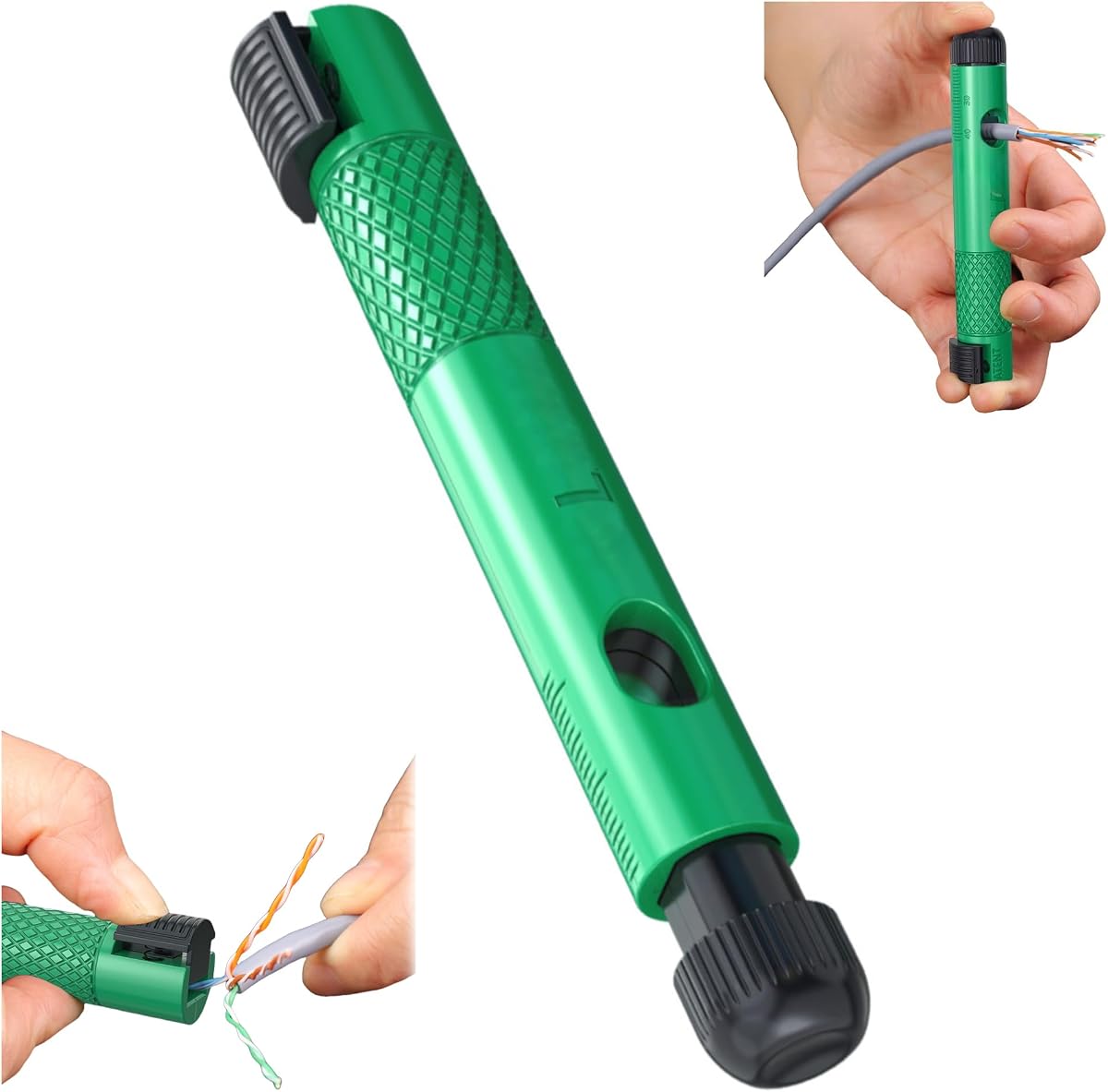
This tool offers excellent value with a 3-piece kit that covers various untwisting needs. It has a solid 4.3 rating from users who appreciate its practicality for daily life.
We may earn a commission when you buy through this link, at no additional cost to you.
Measuring 12 cm, it fits easily into tool bags and boxes. The dual-headed design helps avoid twisted pair damage during separation processes efficiently.
The main limitation is that it requires manual rotation which can cause fatigue on very large jobs. However for small home or office tasks it performs admirably well.
Recommended for DIY enthusiasts or technicians on a tight budget. It provides essential functionality without the cost of motorized alternatives found in premium models.
Receiving three tools in one package allows users to tackle different cable types and sizes immediately.
At only 12 cm long it stores easily in pocket or small pockets without taking up space.
We may earn a commission when you buy through this link, at no additional cost to you.
This model features a solid brass tube that provides durability and consistent untwisting results. With a 4.2 rating it is highly regarded by professional network technicians.
We may earn a commission when you buy through this link, at no additional cost to you.
The heat-shrink coated handle offers excellent grip even when wearing gloves which is crucial for safety in industrial environments. The dual-headed design speeds up prep for RJ45 crimping.
The metal construction adds some weight compared to plastic tools but ensures longevity. Users note that it significantly reduces strain during repetitive wire separation tasks.
Best for professional installers working on large LAN projects or data centers. If you prioritize build quality and durability for daily heavy use this tool is worth the investment.
Solid brass tubing ensures the tool withstands frequent professional use without bending or breaking over time.
The slip-resistant grip design maintains control even in wet or slippery conditions found on job sites.
We may earn a commission when you buy through this link, at no additional cost to you.
This tool combines stripping cutting and manual straightening into one compact device. It holds a perfect 5.0 rating indicating high satisfaction among users who use it regularly.
We may earn a commission when you buy through this link, at no additional cost to you.
The dedicated slot for manually straightening cables guarantees smooth plug-in and connections. It is designed specifically for round Ethernet cables ensuring clean insulation peeling without nicking.
Not compatible with flat cables is the main limitation to consider before purchasing. For round cables it provides professional grade results that reduce signal interference effectively.
Ideal for electricians and DIY enthusiasts working with Cat7 round cables. If your jobs mainly involve round cabling this tool streamlines your workflow significantly.
Combining stripping and straightening in one tool reduces the number of gadgets needed in your toolkit.
The precision stripping feature prevents damage to wire cores ensuring stable signal transmission.
We may earn a commission when you buy through this link, at no additional cost to you.
This pen-style tool combines stripping straightening and organizing functions into a single compact device. However it currently has a lower 2.8 rating compared to others on this list.
We may earn a commission when you buy through this link, at no additional cost to you.
The rotating handle is designed to reduce hand fatigue during prolonged use. Users find it convenient for organizing tangled cables quickly with ease in small spaces.
Some users report mixed results with blade quality and cutting precision on specific cable types. It is recommended for light tasks where heavy duty performance is not required.
Suitable for IT technicians who need a portable solution for minor repairs. While functional it may not be the first choice for heavy industrial or high volume cabling work.
The compact pen-style design fits easily into a pocket allowing for quick fixes anywhere.
Handles stripping cutting and straightening in one unit which simplifies daily cable management tasks.
We may earn a commission when you buy through this link, at no additional cost to you.
Designed specifically for 1.3mm crystal network cables this tool offers quick and easy separation of pairs. It carries a 3.8 rating reflecting its specific utility for certain cable types.
We may earn a commission when you buy through this link, at no additional cost to you.
The ABS material provides a comfortable grip that reduces hand fatigue during extended use. Its compact size fits easily into any toolkit or pocket for on-the-go maintenance.
The main constraint is compatibility with 1.3mm wires specifically which limits broader application compared to general tools. For new network installations it improves efficiency significantly.
Recommended for technicians working with specific crystal cables who need a dedicated separator. It is a specialized solution that simplifies tasks for those specific cable sizes.
Specialized design for 1.3mm wires ensures precise separation without damaging delicate network cable crystals.
Small dimensions allow it to be carried in a pocket without adding bulk to your toolkit.
We may earn a commission when you buy through this link, at no additional cost to you.
This model is designed to untwist and separate pairs fast across CAT5 to CAT7 standards. With a 4.1 rating it is a solid choice for those seeking simplicity and effectiveness.
We may earn a commission when you buy through this link, at no additional cost to you.
It reduces finger pressure significantly on large jobs making the work easier for engineers. The simple design ensures it is easy to carry and use without complex adjustments.
While it is a basic tool it effectively protects twisted pairs from damage during separation. It is a good budget-friendly option for technicians who do not need advanced features.
Best for general wiring tasks where speed and basic protection are the priorities. Its 3 pack inclusion makes it convenient for sharing or having replacements ready.
The straightforward design allows technicians to learn and use the tool immediately without training.
Receiving three units ensures you have backups available for team projects or replacement needs.
We may earn a commission when you buy through this link, at no additional cost to you.
This pen-shaped tool combines stripping straightening and organizing functions for IT technicians. It has a 3.2 rating indicating some users find it useful for specific cable tasks.
We may earn a commission when you buy through this link, at no additional cost to you.
Equipped with an SK5 steel blade it delivers clean accurate cuts. The rotating handle reduces hand fatigue during prolonged use making it comfortable for repetitive work.
Some users note that durability may vary due to plastic components. It is lightweight at 18g making it easy to carry everywhere for quick fixes.
Ideal for electricians who need a multi-functional tool for server room or home office cabling. It helps streamline cable management effectively without taking up much space.
SK5 steel blade ensures precision cutting that minimizes damage to internal wires during stripping.
The tool simplifies the process of separating wires to create a neat and efficient layout.
We may earn a commission when you buy through this link, at no additional cost to you.
This tool features an innovative roller mechanism for quick untwisting. With a 3.9 rating it offers a unique approach to separating twisted wires for category 5 and 6 cables.
We may earn a commission when you buy through this link, at no additional cost to you.
Simply turn the roller to untwist and press to straighten which makes the process effortless. The design is ergonomic and reduces hand fatigue during extended use.
The combination of ABS and metal ensures durability for frequent use. However it is primarily optimized for specific cable categories which may limit versatility for advanced projects.
Best for engineers working on telephone wires or standard 5/6 cabling. It simplifies the separation process and is a valuable addition to any toolkit.
The roller allows for easy untwisting with just a simple turn reducing physical effort.
Combining ABS and metal materials creates a robust tool that withstands professional demands.
We may earn a commission when you buy through this link, at no additional cost to you.
This model is recognized for quickly untwisting pairs before RJ45 crimping. With a 4.2 rating it is a favorite among network technicians who value efficiency.
We may earn a commission when you buy through this link, at no additional cost to you.
The solid brass tube is precisely machined for consistent results. The heat-shrink coated handle offers excellent grip and control even when wearing gloves on site.
While it does not automate the process like some premium models it reduces strain effectively. It is ideal for large LAN projects where speed is essential.
Recommended for IT professionals who need a reliable manual separator. Its durable build and ergonomic design make it a smart choice for daily work.
Fast untwisting capabilities allow technicians to complete prep work before crimping quickly.
Solid brass ensures the tool lasts long and does not corrode in harsh environments.
We may earn a commission when you buy through this link, at no additional cost to you.
Selecting the right Ethernet Untwist Tool depends on your specific cabling needs and budget. This section outlines the key factors to consider before making a purchase.
Check if the tool supports the cable categories you work with most often like CAT5e CAT6 or CAT7. Some tools are specialized for round cables while others handle flat cables effectively.
Ensure the tool matches the cable types you use daily to avoid buying incompatible equipment.
Manual tools require physical rotation but are often lighter and do not need charging. Motorized tools save finger effort and speed up large volume installations significantly.
Choose manual for budget and battery for heavy professional use.
Look for durable materials like brass or high-strength plastic that can withstand frequent use. Cheap plastic may break under pressure during tough separation tasks.
Prioritize metal components for long-term reliability.
An ergonomic handle reduces hand fatigue when working for long periods. Features like heat-shrink coatings improve grip and control during repetitive motions.
Test the grip comfort if possible before buying.
If choosing a motorized tool check the charge capacity and recharge time. Some tools offer thousands of untwists per charge which is vital for field work.
A longer battery life ensures uninterrupted workflow.
Consider the size and weight of the tool if you carry it in a pocket or small kit. Compact designs make it easier to access the tool when needed.
Smaller tools are better for mobile technicians.
Compare the cost of the tool against its features. Premium models cost more but save time and labor costs over the long run.
Balance your budget with your productivity needs.
Read customer feedback to understand real-world performance. High ratings generally indicate reliability and ease of use.
Prioritize tools with consistent positive feedback.
Insert the cable end into the tool slot and rotate the handle gently to separate the twisted pairs. Avoid pulling too hard to prevent damaging the internal wires.
Clean the tool blades regularly with a soft cloth to remove dust and residue that may accumulate during use.
Store the tool in a dry place to prevent corrosion especially if it contains metal parts or a rechargeable battery.
An Ethernet Untwist Tool is used to separate twisted wire pairs in network cables quickly. This reduces finger fatigue and ensures cleaner connections during termination.
Most tools support CAT5e CAT6 and CAT7 but some specialized models might focus on specific widths. Always check the compatibility specs before buying.
Manual tools do not require charging as they rely on physical rotation. However motorized models need periodic charging via USB-C.
Wipe the tool with a dry cloth to remove dirt. For metal parts use a light oil to prevent rust and maintain smooth movement.
Some tools are designed for round cables and may not work well on flat cables. Check the product description to confirm compatibility.
High-quality tools are designed to separate pairs without damaging internal conductors. Always follow the instructions to avoid applying excessive force.
The Untwist Tool PRO-COMBO and LIUJINCAN models offer excellent performance for different needs. Whether you choose manual or motorized depends on your workflow volume.
Prioritize comfort and durability when selecting a tool for professional daily use. These factors directly impact your efficiency and long-term satisfaction.
Check current prices and availability on the product pages before purchasing to ensure you get the best value for your investment.