
Thrustmaster T-Flight Hotas X
4.5Editor score
Comfortable ergonomic design
Fully programmable controls
Detachable throttle lever
Adjustable stick resistance
This guide compares the top ten Mac game flight controllers to help you find the perfect yoke or hotas system for your Mac flight simulator setup.
Choosing the right flight controller for your Mac can transform your simulation experience. Whether you are a casual enthusiast or a serious pilot seeking realism, the right hardware brings virtual skies to life with precision and immersion.
We evaluated ten top-rated flight control systems compatible with Mac environments. Our analysis focuses on build quality, software support, ergonomics, and overall performance to ensure you get the most out of your Mac game flight sim sessions.
Each pick highlights specific strengths like yoke realism or compact HOTAS design. Prices and availability change frequently, so verify current details before purchasing. This guide helps you navigate the best options available for Mac users today.
4.5Editor score

3.9Editor score

4.4Editor score
The following table provides a side-by-side comparison of all ten flight controllers featured in this guide to help you quickly identify the best option for your Mac setup.



The Logitech G Saitek X52 Pro Flight Control System stands out as a top choice for Mac game flight controllers seeking realism. With a 3.9 rating, it offers illuminated buttons and an intuitive LCD multi-function display that enhances gameplay by showing critical flight data at a glance.
We may earn a commission when you buy through this link, at no additional cost to you.
Key strengths include its progressive throttle with resistance adjustment and detents for Afterburner and Idle, allowing for precise control. The precision centering mechanism with no contact technology on x and Y axes ensures smooth inputs, while the 5-position handle adjustment system suits all hand sizes with a soft-touch contoured grip.
Trade-offs include its older design compared to newer models and the need for software setup to fully customize controls. These are acceptable as the build quality remains robust and the software allows deep customization for various simulation games.
This controller is ideal for users who want a balance of realism and programmability without spending a premium. It remains a solid recommendation for Mac users looking to elevate their flight simulation experience with a reliable and feature-rich device.
The LCD multi-function display provides real-time flight data, making it easier to manage systems without alt tabs.
The 5-position handle adjustment ensures comfort during long sessions by adapting to different hand sizes and preferences.
We may earn a commission when you buy through this link, at no additional cost to you.
The Thrustmaster T-Flight Hotas X is an excellent entry-level option for Mac game flight controllers. Rated at 4.5, it features a comfortable ergonomic HOTAS design with a wide hand rest and real-size throttle control, allowing users to fly for hours without fatigue.
We may earn a commission when you buy through this link, at no additional cost to you.
Its key strengths include fully programmable flight controls with 12 action buttons and 5 axes, plus a detachable throttle for flexible setups. The precision joystick has adjustable resistance and dual rudder control via handle rotation, ensuring smooth and responsive aerial maneuvers without needing complex configuration.
Trade-offs involve basic build materials and limited axes compared to premium units. These are acceptable for beginners who prioritize value and versatility, as the plug-and-play design saves time and lets users start flying immediately with preconfigured controls.
Ideal for users on a budget or those new to flight simulation, this controller offers great value. It is a strong recommendation for anyone wanting an immersive cockpit experience on Mac without a significant financial investment.
The detachable throttle allows users to separate controls for an ideal setup or keep them connected for compact arrangement.
Built-in memory and exclusive preset buttons ensure you are always ready for your next mission without repeated configuration.
We may earn a commission when you buy through this link, at no additional cost to you.
The Honeycomb Aeronautical Alpha Flight Controls Yoke & Switch Panel is a top-tier choice for Mac game flight controllers seeking realism. Rated 4.4, it features a realistic full 180-degree yoke rotation with a solid steel shaft and dual linear ball bearings for smooth control.
We may earn a commission when you buy through this link, at no additional cost to you.
Its strengths include a dampened self-centering mechanism and a base with a switch panel for master alternator avionics and light switches. The handles offer 8-way hat switches, rocker switches, and buttons, while the dual mounting solution allows clamp-free use with a 3M Micro-Suction Pad.
Trade-offs include a higher price point and significant desk space requirements. These are acceptable for serious simmers who prioritize authentic cockpit feel, as the design by pilots and aerospace engineers ensures the most realistic flight simulation experience possible.
Best for experienced pilots or enthusiasts building a dedicated setup, this yoke delivers unmatched realism. It is a highly recommended investment for those who demand high-quality materials and comprehensive control options for their Mac flight simulation.
The integrated switch panel allows you to manage aircraft systems realistically without relying solely on on-screen menus.
Heavy-duty clamps or the 3M pad provide secure mounting on various desk thicknesses, offering flexibility in setup.
We may earn a commission when you buy through this link, at no additional cost to you.
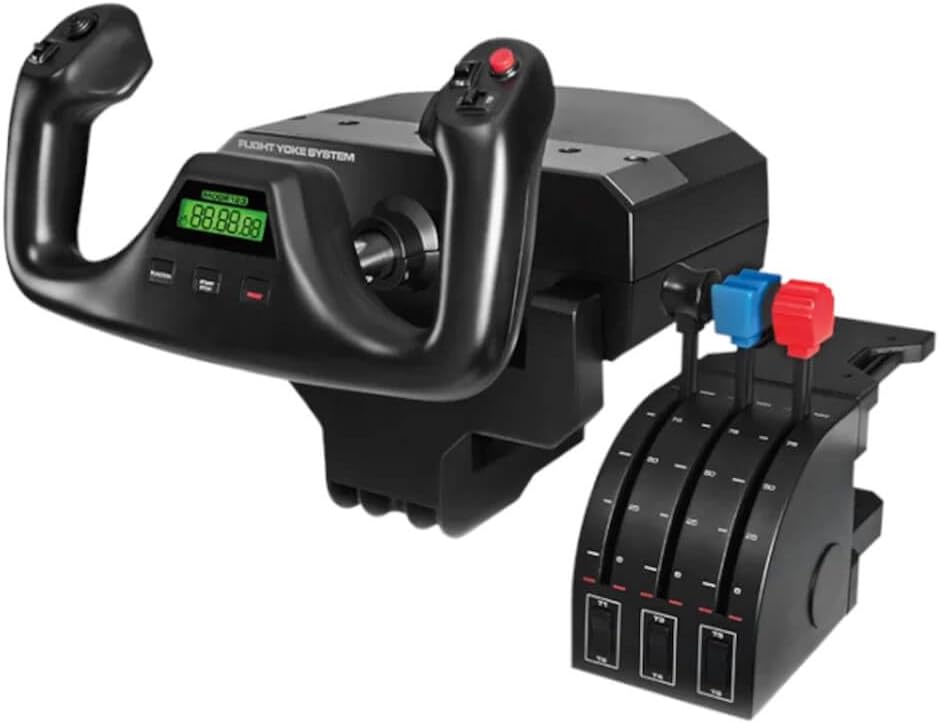
The Logitech G PRO Flight Yoke System is designed for an ideal setup for new pilots and helps experienced pilots build muscle memory. With a 4.3 rating, it features a realistic yoke with a stainless steel shaft for robust and accurate control in flight simulators.
We may earn a commission when you buy through this link, at no additional cost to you.
Its strengths include a POV hat, 14 button controls, and a 3-position mode switch offering at least 54 programmable controls. The 2-position desk clamp ensures flexibility for a wide range of desks, keeping controls secure during intense flight sessions on Mac platforms.
Trade-offs include the need for optional software downloads for use with Microsoft Flight Simulator and limited Mac compatibility. These are acceptable as the core hardware provides excellent physical feedback and build quality for most users.
Recommended for users who want a dedicated yoke experience at a reasonable price, this system offers great immersion. It is suitable for those willing to configure software to achieve optimal performance on their Mac flight sim setup.
The robust stainless steel shaft ensures smooth pitch and roll control, mimicking the feel of real aircraft yokes.
The 2-position desk clamp provides a robust, secure clamping force to ensure your controls stay where you need them.
We may earn a commission when you buy through this link, at no additional cost to you.
The Logitech G X56 H.O.T.A.S offers military-grade space and flight sim precision with customizable options for performance. Rated 4.0, it features new mini analog stick control surfaces for pitch roll yaw and more, along with RGB backlighting to match your gaming rig.
We may earn a commission when you buy through this link, at no additional cost to you.
Key strengths include fully featured HOTAS controls with 16-bit aileron and elevator axes using hall-effect sensors. The adjustable stick force via the 4-spring system and twin throttles with friction adjusters allow for fine-tuned control suitable for VR environments.
Trade-offs involve its large footprint and the complexity of setting up over 189 programmable controls. These are acceptable for users seeking maximum customization, as the software allows detailed mapping for various flight and space simulation scenarios.
Best for users who want extensive control and visual customization, this HOTAS system delivers high performance. It is ideal for those building a dedicated cockpit space and willing to invest time in configuration for the best experience.
Mini analog sticks provide control surfaces for pitch, roll, yaw, and more, enhancing control in complex sims.
16-bit aileron and elevator axes with hall-effect sensors ensure accurate and reliable input without drift.
We may earn a commission when you buy through this link, at no additional cost to you.
The Turtle Beach VelocityOne Flightstick offers a universal sim controller experience with high-precision non-contact main axes. Rated 4.2, it features customizable multi-function throttle and flap levers, plus 27 programmable buttons, 8 axes, a POV hat, and a rapid-fire trigger.
We may earn a commission when you buy through this link, at no additional cost to you.
Key strengths include an integrated OLED flight management display and a touchpad navigation sensor for full cursor control. The intuitive flight configuration wheel simplifies setup, while the ambidextrous design supports fighter jets and airliners with adjustable RGB lighting.
Trade-offs include a stick-only design without a separate rudder pedal integration and limited advanced rudder control. These are acceptable for casual or intermediate users who prioritize ease of use and modern features over complex multi-part cockpit setups.
Recommended for users seeking a modern, feature-rich stick that works across platforms, this flightstick offers good versatility. It is suitable for those who value intuitive navigation and display features to enhance their Mac flight simulation sessions.
The OLED flight management display provides real-time flight data and quick performance tuning during your sessions.
An intuitive flight configuration wheel allows you to switch between modes or profiles quickly without menus.
We may earn a commission when you buy through this link, at no additional cost to you.
The Logitech G Pro Flight Yoke System + Pro Flight Rudder Pedals Bundle provides a complete setup for realistic control. Rated 4.6, the smooth and accurate self-centering rudder pedals add another layer of realism, while the yoke offers realistic controls for muscle memory building.
We may earn a commission when you buy through this link, at no additional cost to you.
Its strengths include differential toe brakes for full control on runways and adjustable foot rests that accommodate various sizes with non-slip materials. The yoke offers a POV hat, 14 button controls, and 3-position mode switch, totaling at least 54 programmable controls for your aircraft.
Trade-offs involve bundled pricing and the significant desk space required for both yoke and pedals. These are acceptable for users building a full cockpit, as the bundle ensures compatibility and a unified experience across all controls.
Best for users wanting a comprehensive control solution without buying parts separately, this bundle offers excellent value. It is a strong recommendation for those seeking to enhance their Mac flight simulation with realistic and coordinated controls.
Differential toe brakes deliver the full control needed when bringing your aircraft up to speed on the runway.
The adjustable foot rests include non-slip materials and accommodate a wide range of sizes for comfort.
We may earn a commission when you buy through this link, at no additional cost to you.
The Turtle Beach VelocityOne H.O.T.A.S. offers 73 programmable inputs and 15 axes for detailed control. With a 2.6 rating, it features high-resolution 16-bit Hall-Effect sensors for stick control and a full-color display that provides real-time flight data and quick performance tuning.
We may earn a commission when you buy through this link, at no additional cost to you.
Strengths include swappable dual throttle detents for tactile thrust reference points, adjustable throttle resistance and stick tension settings, and customizable RGB lighting. The expandable ecosystem supports pedals and mounting solutions, while the adjustable left or right-handed grip design ensures comfort.
Trade-offs include its low rating score and complex software customization requirements. These are acceptable for users who prioritize detailed inputs, as the hardware provides advanced features for those willing to configure the VelocityOne Flight Hangar app.
Recommended for users seeking extensive programmability and advanced sensor tech, this HOTAS has potential. It is suitable for enthusiasts who can tolerate initial complexity to achieve a highly tailored flight simulation experience on Mac.
High-resolution 16-bit Hall-Effect sensors for Flightstick II control ensure precise and accurate input during maneuvers.
The expandable ecosystem supports pedals and mounting solutions, allowing you to build a full cockpit setup over time.
We may earn a commission when you buy through this link, at no additional cost to you.
The Logitech G PRO Flight Yoke System provides 75 programmable controls with configurable throttle knobs and a steel shaft. Rated 4.4, it includes a POV hat, 14 button controls, and a 3-position mode switch, along with a separate three-axis lever throttle for precise control.
We may earn a commission when you buy through this link, at no additional cost to you.
Its strengths include an integrated 1-USB 2.0 Port Hub for connecting peripherals and a 2-position clamp for mounting. The durable steel shaft ensures stability during use, while the system supports Windows 10 and later along with older Windows versions for broad compatibility.
Trade-offs include Windows-focused design and compatibility that may require configuration on Mac. These are acceptable as the hardware quality is solid, offering realistic throttle knobs and a reliable yoke for those willing to adapt settings for Mac use.
Recommended for users wanting a dedicated throttle quadrant and robust hardware, this system offers good control options. It is suitable for those who prioritize physical controls and programmability for their Mac flight simulation setup.
Configurable throttle knobs allow for precise adjustment of throttle settings, matching specific aircraft requirements.
An integrated 1-USB 2.0 Port Hub simplifies connectivity by allowing peripherals to connect directly to the yoke.
We may earn a commission when you buy through this link, at no additional cost to you.
The Logitech G Saitek PRO USB Flight Yoke System (Renewed) offers a lifelike aviation simulation experience with a well-designed yoke and throttle quadrant. Rated 4.2, it features a stainless steel shaft with ultra-precise bearings for smooth control and a dedicated control quadrant with realistic throttle prop and mixture controls.
We may earn a commission when you buy through this link, at no additional cost to you.
Key strengths include a whopping 14 buttons with a 3-position mode switch and POV hat switch, plus an integrated digital chronograph for IFR and cross-country procedures. It connects via USB 2.0 and is compatible with Windows and Mac OSX operating systems.
Trade-offs include its renewed condition and older design compared to current models. These are acceptable for budget-conscious buyers who want proven hardware and full customization via Saitek's Smart Technology software without paying for new units.
Best for users seeking a proven, affordable entry into flight simulation with Mac support, this renewed unit offers solid value. It is a practical choice for those prioritizing functionality and cost-effectiveness for their Mac flight simulator setup.
The integrated digital chronograph helps brush up on IFR and cross-country procedures with timing features.
Compatible with Mac OSX operating systems, ensuring broad support for flight sim users on Mac platforms.
We may earn a commission when you buy through this link, at no additional cost to you.
Selecting the right flight controller for Mac involves balancing realism, compatibility, and budget. Consider these factors to find a system that enhances your simulation experience.
Ensure the flight controller explicitly supports Mac OSX or Mac OS. Some devices are marketed for Windows only, which can limit functionality on Mac unless using bridging tools like Boot Camp or Wine.
Verify driver availability and software compatibility before purchasing to avoid setup issues and ensure all features work smoothly on your Mac system.
Yokes offer the most realistic feel for civil aviation and are best for flight simulators focused on airliners or general aviation. HOTAS (Hands On Throttle-And-Stick) systems are better suited for military combat sims or users preferring a compact setup.
Choose a yoke if you want authentic airplane handling or HOTAS if you value a smaller footprint and easier integration into tight gaming spaces.
Stainless steel shafts and durable plastics contribute to longevity and realistic resistance. High-quality materials reduce wear and tear during extensive simulation sessions.
Look for robust mounting options and well-designed grips to ensure stability and comfort during long hours of flight simulation.
Controllers with extensive programmable buttons and axes allow for better immersion and ease of use. Good software enables mapping complex functions without constant menu navigation.
Check for intuitive configuration tools that work well on Mac to customize controls efficiently for various flight simulation titles.
Comfortable grips and adjustable positions are essential for extended sessions. Features like resistance adjustments and hand rests help prevent fatigue.
Prioritize designs that fit your hand size and seating position to maintain comfort during long flight simulations on Mac.
Flight controllers range from budget-friendly sticks to premium yoke systems. Determine how much you can spend and what features are non-negotiable for your setup.
Balance cost with features to ensure you get a controller that meets your simulation needs without overspending on unnecessary extras.
Some controllers include twist-rudder, while others require separate pedals. Consider if you need precise directional control for takeoff and landing.
If realistic yaw control is important, look for bundles or options that integrate dedicated rudder pedals for a complete experience.
Systems with modular designs allow adding throttle quadrants or pedals later. This flexibility helps tailor the setup to evolving interests.
Choose controllers with expandable ecosystems to future-proof your investment as your flight simulation interests grow.
Begin by installing the latest drivers and software on your Mac. Most controllers come with configuration apps to map buttons to specific simulation functions for optimal performance.
Adjust resistance and calibration settings to match your preferences. Proper calibration ensures smooth and accurate inputs during flight, enhancing the realism of your experience.
Keep your controller clean and stored properly when not in use. Avoid exposure to dust or moisture to maintain the longevity and responsiveness of the mechanical parts.
Many flight controllers support Mac OS, but compatibility varies by model. Check the product specifications for Mac OSX or Mac OS support. Some require specific drivers or software to function properly on macOS.
HOTAS stands for Hands On Throttle-And-Stick. It combines a joystick and throttle in one unit, allowing pilots to access all functions without removing their hands. It is ideal for combat and multi-axis simulations.
Yes, yokes can be used with combat sims, though they may feel oversized for fast-paced action. Many sims allow remapping controls, so you can adapt the yoke for different aircraft types and scenarios.
Not always, some controllers have twist-rudder features. However, dedicated pedals provide more realistic yaw control for takeoffs and landings. Consider adding pedals if you want a more complete cockpit experience.
Use the manufacturer's software or Mac's built-in joystick calibration tool to calibrate your controller. Follow the on-screen instructions to map axes and buttons for smooth and accurate flight input.
The Thrustmaster T-Flight Hotas X offers great value with ergonomic design and programmability. It balances cost and performance well for Mac users seeking entry-level flight simulation gear.
Choosing the right flight controller enhances immersion and realism in Mac flight sims. Top picks like the Logitech G Saitek X52 Pro, Thrustmaster T-Flight Hotas X, and Honeycomb Aeronautical Alpha Flight Controls offer varying levels of detail and comfort.
Prioritize features such as Mac compatibility, build quality, and programmability when selecting a controller. Consider your preferred aircraft type and budget to find the best match for your simulation setup.
Prices and availability change often, so verify current details before purchasing. Use this guide to make an informed decision that elevates your Mac flight simulator experience.