
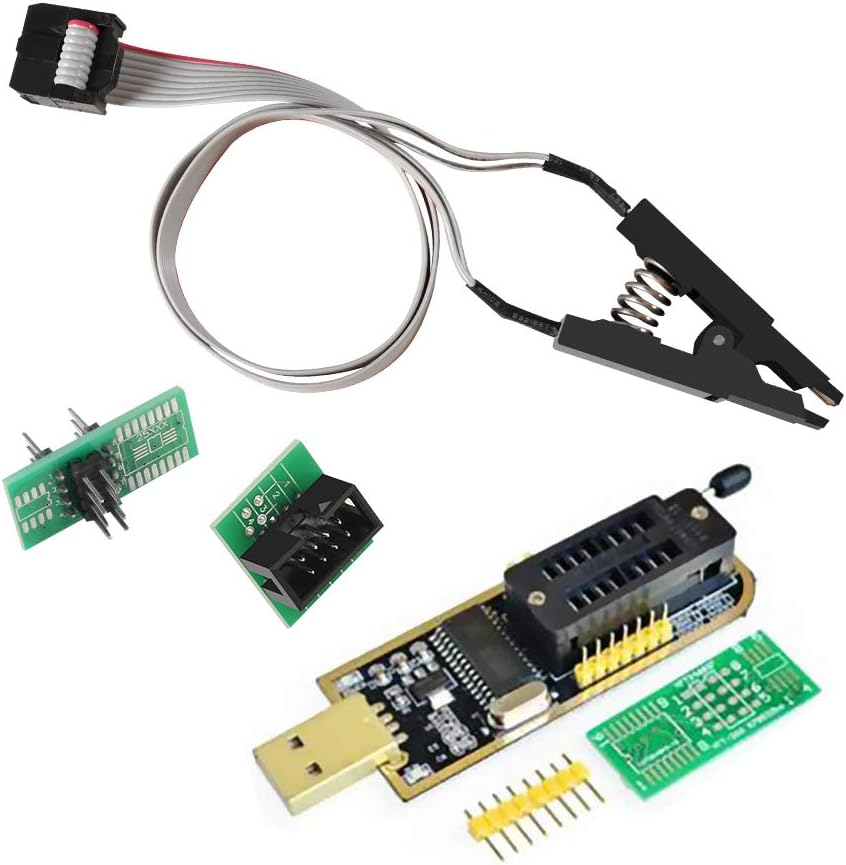
WWZMDiB CH341A EEPROM BIOS Programmer SPI I2C + SOIC8 SOP8 Clip + SOP8 SOP16 Conversion Plate for 24 25 Series Flash
4.1Editor score
Supports 24 25 series
Includes test clip for clips circuit
Compatible with CH341A B chips
This guide compares the top ten best Bios Flash Tool options available in 2026 to help technicians and enthusiasts select the right programmer for their
Finding the right bios flash tool is essential for anyone working with computer hardware recovery and repair. These devices allow you to rewrite firmware on memory chips when standard methods fail due to corruption or hardware issues. A reliable tool can save costly components and restore functionality to otherwise unusable systems efficiently.
We evaluated ten distinct products ranging from simple clip programmers to advanced kits with multiple adapters. Our analysis focuses on compatibility with common chip series, ease of use, software support, and overall build quality. This comparison helps you identify which solution matches your specific repair needs and technical skill level.
Each selection below details unique capabilities and limitations based on verified product information. We highlight key features and real-world application scenarios to guide your decision-making process. Please note that availability and pricing may fluctuate so always check the latest details before purchasing.
4.1Editor score
4.4Editor score

4.3Editor score
The following table presents a side-by-side comparison of all ten selected tools. It outlines key specifications and features to help you quickly identify differences in compatibility and functionality across the range of options available.





This CH341A programmer serves as a foundational tool for hobbyists and technicians needing basic backup and programming capabilities. It holds a solid rating reflecting its reliability for straightforward tasks involving common EEPROM chips. The inclusion of a test clip significantly lowers the barrier to entry for those without soldering experience.
We may earn a commission when you buy through this link, at no additional cost to you.
The main purpose covers backup erase programming and calibration for various software on compatible chips. It supports most 24 and 25 series SOP8 and SOP16 chips which are prevalent in many electronic devices. This versatility ensures it can handle a wide range of standard memory chips found in consumer electronics.
Users must confirm chip voltage to avoid damage since the device supports 3.3V and 5V switching. While convenient this safety step is critical for preventing accidental burns during operation. The design avoids welding by allowing direct clamping which streamlines the workflow for quick operations.
Ideal for beginners or occasional users this kit offers essential functionality without a complex setup. It is suitable for simple repair tasks where cost efficiency matters most. We recommend this for those starting their electronics repair journey looking for a reliable entry point.
The included test clip allows direct clamping without soldering making in-circuit programming accessible for non-experts.
Support for both 3.3V and 5V switching ensures compatibility with a broader range of chip voltage requirements.
We may earn a commission when you buy through this link, at no additional cost to you.
This kit builds upon the CH341A foundation by offering a refined setup with enhanced features for efficiency. It holds a strong rating indicating high satisfaction among users for its performance in common repair scenarios. The primary focus is on simplifying in-circuit programming to reduce physical handling of chips.
We may earn a commission when you buy through this link, at no additional cost to you.
The SOP8 clip enables in-circuit programming without disassembling the chip which makes flashing the BIOS simpler and more efficient. It supports 24CXX 25CXX and 93CXX chips effectively covering a vast majority of EEPROM devices. This broad support ensures versatility across different device types from routers to motherboards.
However users should note that ESMT SST class 25 chips can only be read and not written with this specific programmer configuration. Additionally peripheral circuits may affect some chips requiring careful inspection of the chip location before purchasing. These limitations are minor for general use but important for specific chip types.
Recommended for technicians seeking a balance between cost and functionality this kit is highly practical. It streamlines the process of backup and erasing while maintaining ease of use. We suggest this for regular users who need a reliable tool for varied EEPROM tasks.
The design allows direct clamping for backup and erase operations without needing to remove the chip from the board.
Support for 24CXX 25CXX and 93CXX ensures readiness for most common memory chip families found in electronics.
We may earn a commission when you buy through this link, at no additional cost to you.
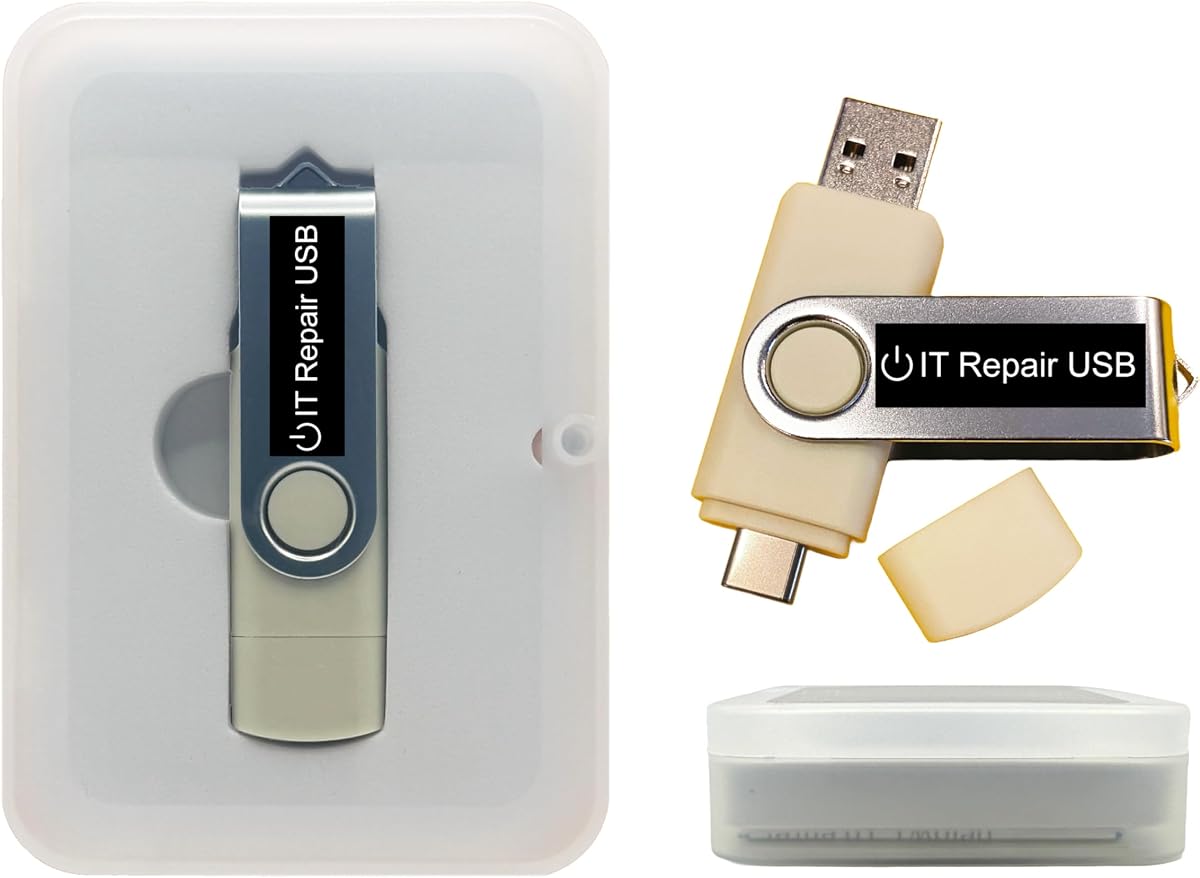
While primarily designed for password recovery this tool offers bootable functionality that complements system repair workflows. It receives a moderate rating reflecting its specific niche utility compared to dedicated programming hardware. This drive allows quick access to system utilities without needing to install software on the host machine.
We may earn a commission when you buy through this link, at no additional cost to you.
It supports Legacy BIOS and UEFI boot modes making it compatible with nearly all laptops desktops and servers. The interface is user-friendly with on-screen guidance allowing users to reset forgotten passwords efficiently. No internet connection is required which adds a layer of security and convenience during recovery.
Advanced workflows can be customized by adding compatible bootable ISO apps or utilities to the drive. This flexibility makes it a useful addition to a technician toolkit for broader system management tasks. It focuses on restoring access rather than hardware firmware programming though it integrates well with maintenance routines.
Ideal for IT professionals this tool speeds up access restoration and reduces downtime significantly. It serves as a vital backup solution for situations where firmware programming is not the primary need. We recommend this for teams handling diverse system support requirements.
Support for both Legacy and UEFI ensures compatibility with older and newer hardware systems seamlessly.
Users can add or replace utilities to tailor the drive for specific operational needs or advanced workflows.
We may earn a commission when you buy through this link, at no additional cost to you.
This drive is focused on providing a straightforward path for reinstalling Windows 11 without strict TPM hardware mandates. It holds a decent rating indicating reliability for its specific purpose of OS setup and recovery. Users can boot from it to restore system functionality when standard methods fail.
We may earn a commission when you buy through this link, at no additional cost to you.
The device must power on to access BIOS setup as it cannot resolve hardware failures like bad RAM. It supports UEFI and Legacy boot modes ensuring flexibility across different hardware generations. This tool streamlines the installation process for users who need a quick and compliant Windows setup.
Not intended for all devices this drive excludes support for Chromebooks and Apple silicon Macs. It serves purely as an installer and does not provide diagnostics for hardware faults. This limitation ensures clarity about its role as a recovery medium rather than a hardware repair tool.
Best suited for users needing to bypass TPM requirements for clean installs this drive is effective and reliable. It simplifies the recovery process for compatible systems. We recommend this for home users or small businesses needing a compliant Windows reinstallation method.
Removes the TPM requirement hurdle allowing for smooth installation of Windows 11 on older hardware.
Supports both Legacy and UEFI modes to ensure the installer works across a wide range of PC systems.
We may earn a commission when you buy through this link, at no additional cost to you.
This kit is designed for amateur programmers needing a robust setup for 24 and 25 series FLASH chips. It maintains a high rating due to its speed and versatility across different chip series. The added 1.8V adapter expands its utility for specific hardware like iPhone or motherboard memory.
We may earn a commission when you buy through this link, at no additional cost to you.
Programming is faster than ordinary ATMEGA8 programmers with erasing speeds reaching up to 2-3 Mbit per minute. This efficiency reduces downtime during repair workflows making it appealing for technicians. The use of the CH341A USB chip ensures compatibility with standard USB 1.1 ports for easy connectivity.
While effective for many applications it is best suited for specific series such as TV memory and set-top boxes. The adapter allows for 1.8V operations which are critical for low voltage devices. Users should verify chip series compatibility before purchase to ensure optimal performance.
Recommended for hobbyists and professionals needing speed and adaptability this kit delivers strong value. The included adapters and test clip provide a complete solution for varied tasks. We suggest this for users managing diverse repair needs efficiently.
Erasing speed reaches up to 2-3 Mbit per minute significantly reducing wait times during repair processes.
The 1.8V adapter enables compatibility with low voltage chips found in smartphones and other mobile devices.
We may earn a commission when you buy through this link, at no additional cost to you.
This unit stands out as the fastest BIOS chip programmer currently on the market for high-speed operations. It holds a strong rating reflecting its reliability and performance for professional repair tasks. The device is engineered to handle a wide array of EEPROM and flash chips with precision.
We may earn a commission when you buy through this link, at no additional cost to you.
It reads EN25T80 in just three seconds and writes in nine seconds offering unmatched speed for complex tasks. The device automatically identifies chip models and selects the correct supply voltage reducing user error. This automation streamlines workflows ensuring consistent results across varied chip types.
The kit includes a set of 15 adapters supporting 24 25 93 and 95 series chips broadly. While automatic detection works well for 25 series 24 series chips may require manual selection for accuracy. This comprehensive set ensures readiness for a large portion of the market without additional purchases.
Ideal for professional technicians needing maximum speed and efficiency this tool is worth the investment. It significantly reduces repair times while maintaining high accuracy. We recommend this for businesses requiring reliable and fast programming solutions.
Automatic detection of chip model and supply voltage simplifies setup and minimizes the risk of user error.
Inclusion of 15 adapters ensures compatibility with diverse chip series including 24 25 93 and 95 types.
We may earn a commission when you buy through this link, at no additional cost to you.
This toolkit is designed to repair and recover Windows systems through a bootable environment. It has a moderate rating indicating it is best suited for general system issues rather than hardware firmware programming. The drive provides a user-friendly interface to guide users through diagnostics and repairs.
We may earn a commission when you buy through this link, at no additional cost to you.
It works with modern and older PCs supporting both Legacy BIOS and UEFI modes for broad compatibility. Users can run diagnostic tools and fix startup issues without modifying the PC's storage directly. This approach ensures safe and efficient recovery for unbootable systems.
The drive is fully customizable allowing easy addition of custom bootable ISO apps or utilities. It includes lightweight rescue environments to help revive old or slow PCs effectively. While internet is not required the drive ensures a comprehensive offline recovery solution.
Best for technicians needing a versatile recovery tool this kit is practical and reliable. It streamlines the process of diagnosing and fixing system errors. We suggest this for support staff handling varied PC repair requests.
Operates without an internet connection ensuring functionality even when network access is unavailable or limited.
Includes tools to fix startup problems remove malware and recover files efficiently in a single toolkit.
We may earn a commission when you buy through this link, at no additional cost to you.
This clip is a specialized accessory designed to enhance the efficiency of BIOS programmer workflows. It holds a strong rating due to its durable construction and precise design for SOP16 chips. While not a standalone tool it is essential for handling specific pin configurations effectively.
We may earn a commission when you buy through this link, at no additional cost to you.
The clip supports both wide and narrow body chips making it versatile for different manufacturers. Its hardened clip with thick gold-plated pins ensures a stable connection over a 40cm line length. This design minimizes signal interference and improves reliability during programming sessions.
Users should note that the chip on the circuit board may be affected by peripheral circuits. Some boards may not support in-circuit programming so removal might be necessary. This limitation ensures safety but requires careful evaluation before attempting direct programming.
Ideal for professionals handling SOP16 series this clip ensures reliable connections during tasks. It complements other programmers to create a complete repair setup. We recommend this for technicians needing robust and stable clip solutions.
Hardened clip with gold-plated pins ensures stable connections and long-term durability during repeated use.
Supports both wide and narrow body chips ensuring readiness for various manufacturer specifications.
We may earn a commission when you buy through this link, at no additional cost to you.
This tool is focused on providing a secure and compliant way to reinstall Windows 11 and 10. It is designed for users needing a genuine recovery solution that works with modern boot security settings. The drive ensures users access the latest official releases without outdated or pirated copies.
We may earn a commission when you buy through this link, at no additional cost to you.
Unlike other tools this drive works with Secure Boot enabled requiring no BIOS changes for compatibility. It downloads genuine Windows directly from Microsoft to ensure a clean and secure installation process. This feature is critical for maintaining system integrity and trust in the recovery environment.
Support is based in the US allowing real people to assist with setup or issues. The drive supports 64-bit systems designed for PCs from 2013 and newer but excludes Legacy BIOS. This focus ensures performance and compatibility with modern hardware standards.
Best for users needing a secure and official reinstall method this drive is reliable and safe. It simplifies the recovery process while adhering to security best practices. We recommend this for organizations prioritizing genuine and compliant system recovery.
Works with Secure Boot enabled eliminating the need to modify BIOS settings during recovery processes.
Downloads genuine Windows directly from Microsoft ensuring no outdated or pirated copies are used during install.
We may earn a commission when you buy through this link, at no additional cost to you.
This drive is a powerful toolkit for security testing and analysis providing a complete portable environment. It holds a solid rating for its reliability and depth of features. Professionals can access it to perform vulnerability assessments and digital investigations efficiently.
We may earn a commission when you buy through this link, at no additional cost to you.
It includes over 600 pre-installed penetration testing and security analysis tools covering network and web auditing. Users can run Kali directly from the USB or install it permanently for full performance flexibility. The support for both amd64 and arm64 builds extends its utility across diverse hardware platforms.
The fully customizable USB allows adding or replacing compatible bootable ISOs and utilities as needed. This adaptability ensures it remains relevant for evolving security requirements. Support is responsive with customer care available within 24 hours for any setup queries.
Ideal for ethical hackers and IT experts this platform is indispensable for comprehensive testing. It delivers professional-grade capabilities in a portable form factor. We suggest this for security professionals needing a versatile and powerful audit tool.
Over 600 pre-installed tools ensure readiness for diverse security testing and audit scenarios out of the box.
Support for amd64 and arm64 builds allows use on a wide range of desktop and mobile hardware systems.
We may earn a commission when you buy through this link, at no additional cost to you.
Selecting the right tool requires understanding specific repair needs and hardware compatibility factors.
Ensure the tool supports the specific series and types of chips found in your target devices. Common series like 24 25 and 93 are standard but specialized chips may need specific adapter support.
Check manufacturer documentation or chip markings to confirm series support before purchasing.
Verify that the programmer can handle the voltage levels of your chips. Most tools support 3.3V and 5V but low voltage chips require 1.8V adapters or specific configurations.
Mismatched voltage can permanently damage chips so matching specifications is essential.
Consider whether your workflow needs in-circuit programming without desoldering. Test clips and adapter sets can significantly speed up operations and reduce physical handling.
Check if the tool includes necessary clips and adapters for your target chip packages.
For high-volume or professional work speed can be a critical factor. Some models offer fast erase and write speeds that reduce downtime significantly during repairs.
Prioritize speed if you handle frequent repair tasks or large batches of devices.
Compatible software is essential for managing read write and verification tasks smoothly. Ensure the tool supports Windows or other OS systems you use for your work.
Look for tools with intuitive interfaces to streamline the programming process effectively.
Physical durability matters for tools that undergo frequent use and movement. Hardened clips and sturdy connections ensure long-term reliability during demanding workflows.
Invest in tools with reinforced pins and stable cables to minimize wear over time.
Automation such as automatic model detection simplifies the setup process and reduces user error. This feature is helpful when working with unknown or varied chip types frequently.
Prioritize tools that identify chips automatically to speed up initial setup times.
Balance the tool price against its capabilities and compatibility with your needs. Entry-level tools are cost-effective but may lack speed or advanced features needed for complex work.
Choose a model that fits your budget while meeting your specific operational requirements.
Always verify chip voltage and series before connecting to the programmer to prevent accidental damage. Use test clips carefully to ensure stable contact without bending pins during in-circuit operations.
Keep firmware and software tools updated to maintain compatibility with newer chip types and improve performance. Store the tool in a dry environment to avoid corrosion and ensure long-term functionality.
Handle clips and adapters gently to preserve gold plating and connection integrity. Regular inspection of the connection line ensures no fraying or signal loss during programming.
A bios flash tool is primarily used to backup erase and program EEPROM and flash memory chips on motherboards and electronic devices. It helps technicians restore firmware when standard updates fail or when chips become corrupted requiring hardware intervention.
Many tools include test clips that allow in-circuit programming without soldering which simplifies use for beginners. However some complex repairs may require removing chips which can involve basic soldering skills depending on the device design.
Always check the chip markings or manufacturer documentation to determine the required voltage. Ensure your programmer supports that voltage level or use adapters to match the requirement accurately before connecting.
Most tools support common chip series found in modern motherboards but verify specific model compatibility before purchasing. Some specialized boards may require specific adapters or updated software for proper communication and programming.
While primarily designed for firmware programming some tools can help recover data by reading chip contents. However dedicated data recovery tools are often better suited for retrieving lost user files from storage drives.
Automatic chip detection simplifies setup by identifying the model and selecting correct parameters automatically. This reduces user error and speeds up the workflow when handling various chip types.
Update the software regularly to gain access to new chip support and improved features. Staying current ensures compatibility with modern devices and optimal performance during programming tasks.
No special permits are typically required for personal or professional use of these tools. However always ensure you have authorization when modifying firmware on devices not owned by you to adhere to local laws.
The tools reviewed cover a broad spectrum from budget-friendly options to high-speed professional kits. Selecting the right one depends on your specific repair needs and technical expertise.
Prioritize compatibility with your target chips and the availability of reliable adapters for efficient workflows. Balancing features with budget will ensure you get the best value for your investment.
Always verify the latest product details and availability before making a purchase to ensure it meets your requirements.