
Canon MegaTank G3270
4.1Editor score
Save up to one thousand dollars
High page yield capacity
Wireless print copy scan
Discover the best ink tank printer for home and office use. Our guide compares top models for savings, quality, and reliability.
Ink tank printers have revolutionized home and office printing by offering massive ink savings and high volume capabilities. These devices replace expensive cartridges with refillable bottles, allowing users to print thousands of pages before needing a refill.
We evaluated ten top models based on print quality, connectivity features, ink capacity, and ease of use. Our analysis covers wireless capabilities, scanning functions, and overall reliability to help you find the right device for your needs.
Each pick below highlights specific strengths like borderless photo printing or duplex text. Prices and availability can change rapidly online, so check current listings before making your final purchasing decision today.
4.1Editor score

4.2Editor score

4.2Editor score
This side-by-side comparison lists all ten selected models with key specifications to help you quickly identify the best fit for your specific printing requirements and budget constraints.





The Epson EcoTank ET-2803 stands out as a top contender in the ink tank printer market due to its exceptional value proposition. This all-in-one device offers wireless printing, scanning, and copying capabilities without the ongoing expense of traditional cartridges.
We may earn a commission when you buy through this link, at no additional cost to you.
Its standout quality lies in the included ink supply, which promises up to two years of printing for average users. The innovative cartridge-free design means you buy bottles instead of small, wasteful cartridges, significantly reducing long-term costs and environmental impact.
While the print quality is sharp and the color photos are vibrant, users should note the lack of automatic two-sided printing on this specific model. This manual duplexing might be a minor inconvenience for high-volume text document workflows.
Overall, this model is ideal for home offices and families who print frequently and want to avoid running out of ink unexpectedly. Its reliable connectivity and easy refilling system make it a highly recommended choice for budget-conscious users.
The high capacity ink tanks drastically reduce the cost per page compared to standard laser or inkjet options.
By eliminating the need for disposable cartridges, this printer helps reduce plastic waste in landfills.
We may earn a commission when you buy through this link, at no additional cost to you.
The Canon MegaTank G3270 is an excellent entry point for those seeking an affordable ink tank printer without sacrificing quality. It combines standard all-in-one functions with a massive ink supply right out of the box.
We may earn a commission when you buy through this link, at no additional cost to you.
Key strengths include the promise to save up to one thousand dollars on ink over the product lifetime. The single set of inks can produce thousands of pages, ensuring that you are not interrupted by frequent refills.
Trade-offs include the absence of automatic two-sided printing and a smaller LCD display compared to higher-end models. However, these limitations are acceptable given the low price point and the high value provided.
This printer is best suited for small home offices or students who need a reliable device for everyday document tasks. Its straightforward design makes it easy to use for anyone new to ink tank technology.
Low initial cost combined with high ink yield makes this a smart financial choice for most households.
Seamless wireless printing allows you to send documents from phones and laptops without cables.
We may earn a commission when you buy through this link, at no additional cost to you.
The Canon Megatank G3290 elevates the ink tank experience with premium features like automatic two-sided printing and a larger color touchscreen. This model is designed for users who want more control and convenience.
We may earn a commission when you buy through this link, at no additional cost to you.
Its standout quality is the combination of high-speed output and significant ink savings. Users can print thousands of pages before needing a refill, and the auto-duplex feature saves paper without manual intervention.
While the price is higher than basic models, the added functionality often pays for itself over time. Some users report needing occasional maintenance to keep the print heads clean, but this is standard for this type of device.
This printer is perfect for busy home offices or families with heavy printing demands. It balances performance and economy well, making it a top choice for those willing to invest in a long-term solution.
Automatic two-sided printing and large screen navigation streamline workflows for professional use.
Advanced ink technology ensures crisp text and vivid colors suitable for both documents and photos.
We may earn a commission when you buy through this link, at no additional cost to you.
The HP Smart Tank 5003 offers an impressive three years of ink included right out of the box. This makes it one of the most convenient options for users who want to minimize maintenance and refills.
We may earn a commission when you buy through this link, at no additional cost to you.
Its mess-free refill system is a standout feature, allowing you to simply plug bottles into the tank and let them drain without squeezing or spilling. This thoughtful design reduces the frustration often associated with ink refills.
While the device is robust, some users report that certain advanced features require the HP Smart app, which can be inconsistent. Additionally, borderless prints can sometimes have minor alignment issues depending on paper type.
This printer is ideal for households that print a lot of photos and documents daily. The sheer volume of ink provided ensures that you can focus on your work without worrying about supplies running out soon.
The easy-access refill system is designed to prevent spills, making maintenance a hassle-free experience.
Wireless printing and scanning allow you to manage tasks from anywhere in your home office.
We may earn a commission when you buy through this link, at no additional cost to you.
The Epson EcoTank ET-4800 is engineered with a focus on high-quality photo printing and scanning. Its Micro Piezo Heat-Free technology delivers sharp details and rich colors that stand out in visual projects.
We may earn a commission when you buy through this link, at no additional cost to you.
A major strength is the zero cartridge waste design, which aligns with eco-friendly goals. The EcoFit bottles are easy to fill and ensure that ink stays clean during the refilling process.
However, the printing speed is not as fast as some competitors, which might be a drawback for high-volume text jobs. Additionally, the ink tank capacity is slightly lower than other Supertank models in this comparison.
This model is best for hobbyists or small businesses that prioritize image quality over speed. The reliable scanning features and intuitive display make it a solid choice for mixed media workflows.
The unique heating technology enhances color gamut for vibrant and accurate image reproduction.
Reducing plastic waste is a key benefit of the Supertank refillable system for the environment.
We may earn a commission when you buy through this link, at no additional cost to you.
The Epson EcoTank ET-2903 is built for reliability with a permanent printhead designed to last the life of the printer. This reduces the risk of expensive repairs and ensures consistent output quality over time.
We may earn a commission when you buy through this link, at no additional cost to you.
Its productivity features include a one hundred sheet paper tray and fast print speeds without warmup time. This makes it efficient for handling large batches of documents quickly and without interruptions.
The mobile printing support through AirPrint and Mopria ensures you can print from any device. However, the color display is small, and occasional firmware updates might be required to maintain optimal performance.
This printer is an excellent choice for high-volume offices or families with many users. The balance of speed and cost efficiency makes it a strong contender for daily operational tasks.
The built-in printhead ensures long-term use without the need for replacement parts.
A larger paper tray reduces the frequency of reloading sheets during busy work sessions.
We may earn a commission when you buy through this link, at no additional cost to you.
The HP Smart Tank 5003 focuses heavily on user experience with an intuitive setup and control process. It is designed for those who want to print with confidence without technical headaches.
We may earn a commission when you buy through this link, at no additional cost to you.
Key strengths include the ink monitoring system and the ability to print borderless photos easily. The AI-capable features help optimize print settings for better results without manual tuning.
Trade-offs include the lack of duplex printing and limited paper size support beyond standard sizes. These are manageable for most home users but might limit office applications requiring larger paper sizes.
Overall, this model is recommended for casual users who prioritize convenience and ease of use. It handles everyday tasks smoothly and keeps the printing experience stress-free.
The control panel and mobile app are designed for simplicity and quick access to all functions.
Smart features help monitor ink levels and maintenance needs to avoid unexpected stops.
We may earn a commission when you buy through this link, at no additional cost to you.
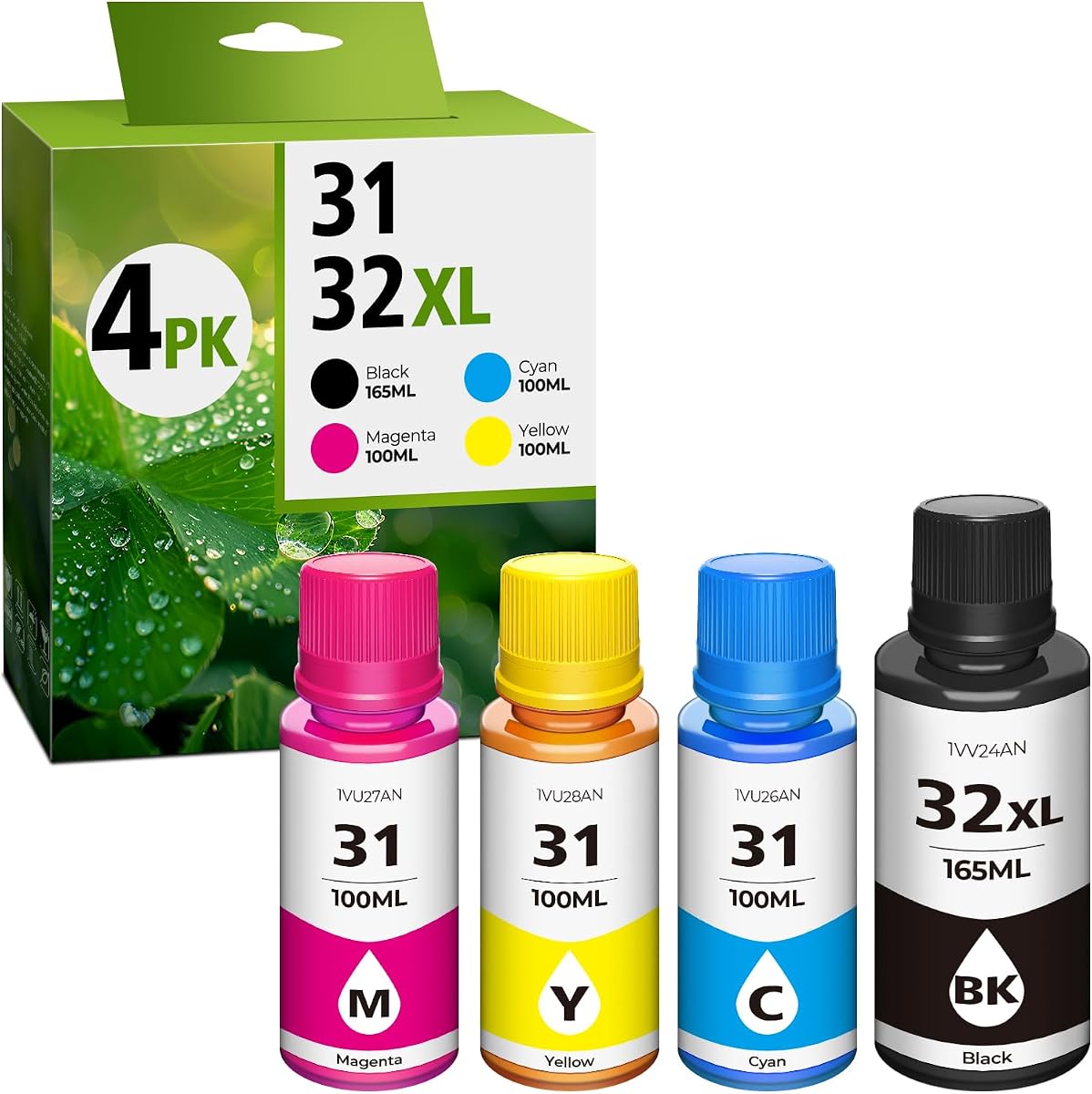
The 31 Ink 32XL Set provides a cost-effective alternative for refilling Smart Tank printers. It offers a high yield capacity that can save money for users who print frequently.
We may earn a commission when you buy through this link, at no additional cost to you.
Its main strength is compatibility with a wide range of HP Smart Tank models and a design that prevents leaks. This ensures that refilling is a clean and straightforward process.
However, using non-genuine ink may require cleaning the print heads to ensure optimal performance. Additionally, the quality might vary slightly compared to original manufacturer bottles.
This refill set is perfect for budget-conscious users looking to maximize the life of their printer. It is an excellent addition for anyone looking to reduce ongoing printing costs.
Designed to work with a wide range of Smart Tank models for maximum versatility.
High volume ink bottles reduce the frequency of purchasing new refills.
We may earn a commission when you buy through this link, at no additional cost to you.
The Epson EcoTank ET-2980 is designed with a strong focus on wireless connectivity for modern devices. It allows you to print and scan from smartphones and tablets with ease.
We may earn a commission when you buy through this link, at no additional cost to you.
Its standout quality is the reliable app support and EcoFit bottles for easy refilling. The ink supply lasts up to three years which minimizes the need for frequent replacements.
Trade-offs include a small screen size and single-sided printing capability. These are acceptable for users who rely primarily on mobile printing and do not need high-volume duplexing.
This printer is ideal for remote workers or students who need to print from various devices. Its compact design fits well in smaller spaces while maintaining professional output quality.
Seamless integration with mobile apps allows for printing from any connected device.
The included ink ensures long-term use without the worry of running out soon.
We may earn a commission when you buy through this link, at no additional cost to you.
The Epson EcoTank ET-2800 is a solid entry-level option for those transitioning to ink tank printers. It provides the essential features needed for reliable home printing without a high cost.
We may earn a commission when you buy through this link, at no additional cost to you.
Key strengths include fast print speeds and the Micro Piezo Heat-Free technology for quality output. The ink system offers enough supply to print thousands of pages for minimal long-term expenses.
Trade-offs are a basic feature set and lack of advanced touchscreen controls. However, for standard printing needs, these limitations do not significantly impact the overall user experience.
This model is best for casual users who want reliable performance and lower costs. It is an accessible option for anyone looking to switch from traditional cartridges to a tank system.
Low upfront cost combined with low operating costs makes this a budget-friendly choice.
Fast ISO page rates ensure that printing large documents does not take too long.
We may earn a commission when you buy through this link, at no additional cost to you.
Selecting the right ink tank printer requires evaluating several factors to ensure it meets your specific printing needs and budget.
Consider how many pages the included ink can produce before you need to buy more. Models offering years of ink save more money but may cost more initially.
Look for high page yields to minimize refills and ensure continuous operation for your workflow.
Check for wireless, mobile, and cloud printing capabilities to ensure you can print from your devices easily.
Modern models support apps and voice commands for seamless integration into a smart home setup.
Evaluate the print resolution and technology to ensure text and photos meet your standards for clarity.
Models with advanced ink technologies often deliver better color accuracy and sharper text details.
Look at pages per minute ratings to determine how fast the printer can handle your typical document volumes.
Faster speeds are important if you frequently print large batches or time-sensitive documents.
Consider the tray capacity and support for various paper types and sizes to suit your printing tasks.
High capacity trays reduce the need to reload paper frequently during busy work sessions.
Check if the printer has a permanent printhead or needs regular cleaning to maintain optimal performance.
Simple maintenance designs reduce the risk of costly repairs and extend the lifespan of the device.
Ensure the printer comes with reliable software and apps for managing print jobs and monitoring ink levels.
Good software support helps you troubleshoot issues and get the most out of your printing experience.
Calculate the total cost including the initial device price and expected long-term ink expenses.
Choose models that offer the best balance between upfront cost and ongoing savings to fit your budget.
Unbox the printer and remove all protective tape before plugging it into a power outlet. Install the included ink bottles carefully to ensure they drain properly into the tanks.
Use the manufacturer's mobile app or software to complete initial setup and connect the printer to your Wi-Fi network. This allows you to print from various devices easily.
Keep the printer in a cool, dry place away from direct sunlight to avoid ink drying out. Periodically run maintenance cycles to keep the printheads clean and ready for use.
Yes, ink tank printers generally have a lower cost per page because they use high-capacity ink bottles instead of expensive cartridges. Over time, this leads to significant savings especially if you print frequently.
It is recommended to use genuine ink to ensure optimal performance and avoid potential damage to the print heads. However, compatible third party inks exist but should be used with caution.
Depending on the model and usage frequency, the included ink can last anywhere from two to three years. This covers thousands of pages which is sufficient for most home users.
Some models include automatic two-sided printing while others require manual flipping. Check the specifications carefully if duplexing is a priority for your printing workflow.
Yes, most modern tank printers support mobile printing via Wi-Fi and dedicated apps. This allows you to send photos directly from your smartphone or tablet without a computer.
Refilling is usually simple and mess-free with bottles that plug directly into the tank. Follow the color-coded guides to ensure you pour ink into the correct tanks.
You can purchase replacement ink bottles from the manufacturer or authorized retailers. Most printers notify you when ink is low so you can prepare ahead of time.
The top picks like the Epson EcoTank ET-2803 and Canon MegaTank G3270 offer excellent value and features for various needs. They stand out for their reliability and cost savings.
Prioritize factors like print speed, ink capacity, and connectivity to find the model that best suits your daily tasks. This will help ensure you are satisfied with your purchase long term.
Remember to check current prices and availability as these can fluctuate over time. Making a decision based on the latest data will ensure you get the best deal possible today.