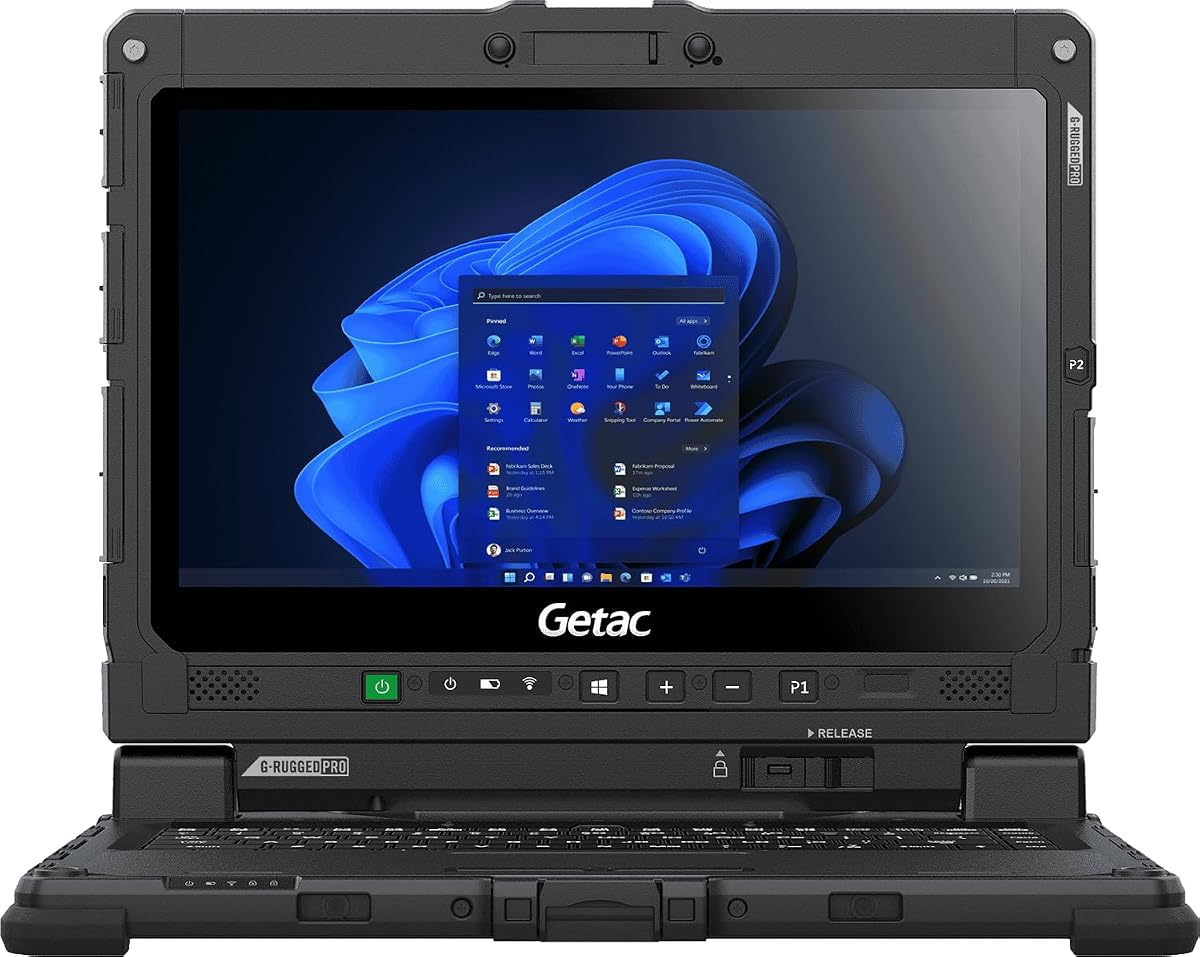
Getac Renewed K120
5.0Editor score
1200 Nits Sunlight Readable
Mil-Std-810H Certified
12.5 Inch FHD Touchscreen
Working outdoors requires a display that cuts through glare. Professionals in construction, field research, and logistics need devices designed for extreme visibility. A standard laptop often fails under direct sun, making specialized hardware essential for productivity.
We evaluated ten laptops based on brightness, durability, and performance. Each model was assessed for sunlight readability and real-world usability. Our list includes rugged industrial machines and consumer devices optimized for outdoor environments.
Each pick highlights key specs and ideal use cases. Read the detailed reviews to find the right device. Note that availability and terms can change over time, so verify details before purchasing.
5.0Editor score

4.1Editor score

As an Amazon Associate we earn from qualifying purchases.
This side-by-side comparison highlights the key specifications of all ten laptops. Focus on brightness levels and durability ratings to choose the right tool for your specific outdoor needs.


The MUNBYN IRX17 is a robust choice for field professionals requiring high visibility. With a 1000 nit display, it delivers clear visuals even under direct sunlight. Its industrial design ensures reliability in tough environments like construction sites or oil rigs.
We may earn a commission when you buy through this link, at no additional cost to you.
Performance is driven by an Intel i7-1255U processor paired with 32GB of DDR5 RAM. This combination handles complex tasks like CAD design and data analysis smoothly. The device also features WiFi 6 for faster data transfer and lower latency.
While the build is sturdy, it adds weight compared to consumer laptops. The dual battery system is a significant advantage for extended outdoor use without access to power outlets. Privacy is also managed with a physical camera switch.
Ideal for engineers and field researchers, this laptop balances power with durability. Its ability to withstand dust and water makes it a top recommendation for hazardous conditions. Consider this if you need a reliable outdoor workstation.
The 1000 nit screen ensures you can read maps and data without squinting or shading the display.
IP65 rating protects against heavy rain and dust, keeping your work running smoothly in any weather.
We may earn a commission when you buy through this link, at no additional cost to you.
This renewed Getac K120 offers an affordable entry into rugged computing. Its standout feature is the 1200 nit brightness, surpassing many more expensive models. This makes it perfect for extreme outdoor visibility needs.
We may earn a commission when you buy through this link, at no additional cost to you.
Built to military standards, it handles drops, shocks, and extreme temperatures. The capacitive multi-touch screen works even with gloves on, which is crucial for field work. The 256GB SSD ensures fast boot times and application access.
The main trade-off is the smaller screen size, which may limit multitasking. Additionally, the processor is older, so it may struggle with very heavy computational tasks. However, for general field data, it is highly capable.
For budget-conscious teams needing reliable outdoor gear, this is a top pick. It provides premium brightness and durability at a lower cost. Check condition details when purchasing renewed items to ensure satisfaction.
With 1200 nits, this display is one of the brightest available, ensuring visibility in the harshest sun.
Buying renewed saves money while still delivering military-grade protection for demanding environments.
We may earn a commission when you buy through this link, at no additional cost to you.
The Getac S510 brings modern AI performance to rugged computing. It features the Intel Core Ultra 5 125U, offering enhanced multitasking capabilities. With 32GB RAM and a 1TB SSD, it handles large datasets efficiently.
We may earn a commission when you buy through this link, at no additional cost to you.
The 15.6 inch touchscreen has 1000 nit brightness for excellent outdoor visibility. It meets MIL-STD-810H standards for protection against drops and vibration. A dedicated Copilot key on the keyboard provides quick access to AI tools.
As a premium model, the price is higher than average. The weight is also notable due to the rugged build and larger components. However, the performance and storage make it worth the investment for power users.
This laptop is best for professionals who need top-tier specs in a tough chassis. Whether for engineering or logistics, it offers reliability and speed. Ensure you have the budget and need for these advanced features.
The Intel Core Ultra series delivers improved AI and general performance for modern field software.
A 1TB SSD ensures you can store extensive maps, designs, and data without external drives.
We may earn a commission when you buy through this link, at no additional cost to you.
The MUNBYN IRX16 is a solid choice for general industrial tasks. It offers a 1000 nit display ensuring clear visuals in bright conditions. The IP65 waterproof rating protects it from dust and water exposure.
We may earn a commission when you buy through this link, at no additional cost to you.
Powered by an Intel i5-1235U and 16GB DDR5 RAM, it handles most software efficiently. The SSD is replaceable, allowing storage expansion up to 4TB. This flexibility is valuable for teams with growing data needs.
While powerful, the processor may not suit very heavy 3D modeling or simulation. The RAM is also adequate but could be limiting for complex multitasking. Still, it covers most standard field engineering requirements well.
For users seeking a balance of features and protection, this model is reliable. The physical camera switch adds a layer of security for sensitive projects. Consider this if you need expandability without the top-tier cost.
The user-replaceable SSD lets you upgrade capacity easily as your project data grows.
Privacy is prioritized with a physical switch to disable the camera when not in use.
We may earn a commission when you buy through this link, at no additional cost to you.
This HP OmniBook is designed for on-the-go productivity with strong battery life. The Snapdragon processor supports AI features and long usage times. It is lightweight and easy to carry during travel.
We may earn a commission when you buy through this link, at no additional cost to you.
The OLED display offers vibrant colors and deep blacks, though at 300 nits it struggles in direct sunlight. Best for shaded outdoor use or indoor work. The 2K resolution ensures sharp text and media viewing.
While not rugged, the design includes recycled materials and durable components. It is not meant for harsh environments but excels in office or cafe settings. The Otter.ai integration helps with meeting notes and summaries.
Ideal for professionals who need portability and battery endurance. If your outdoor work involves occasional use in shade, this is a strong option. Avoid for heavy outdoor construction or exposed field environments.
With up to 41 hours of battery life, you can work uninterrupted for days.
The OLED screen provides rich contrast ideal for presentations and media in controlled light.
We may earn a commission when you buy through this link, at no additional cost to you.
The HP OmniBook 3 16 offers a spacious display for multitasking. Its 2K touchscreen provides clear visuals and interactive control. This makes it great for general work and entertainment on a larger canvas.
We may earn a commission when you buy through this link, at no additional cost to you.
Powered by AMD Ryzen 3 30 with 8GB RAM, it handles standard tasks well. The 256GB SSD ensures quick system responsiveness. However, the 300 nit brightness is low for direct sunlight visibility.
This model is not rugged and should be treated as a consumer device. It is best used indoors or in shaded areas. The anti-glare coating helps slightly but does not replace high-nit displays for outdoors.
For office workers or students needing a big screen on a budget, this fits well. It supports basic productivity and media tasks. Avoid if your primary use case involves working under direct outdoor light.
The 16 inch screen gives ample room for split-screen apps and large spreadsheets.
This model provides a large display at a competitive price point for general use.
We may earn a commission when you buy through this link, at no additional cost to you.
The Dell 15.6 is a standard business laptop designed for efficiency. It features ComfortView software to reduce blue light for eye comfort. The layout includes a numeric keypad for quick data entry.
We may earn a commission when you buy through this link, at no additional cost to you.
With an Intel Core i5 processor, it handles daily tasks smoothly. It is not built for harsh environments and lacks high brightness for sunlight. This makes it more suitable for indoor or shaded office work.
The ergonomic design with lifted hinges aids in typing comfort. Service support is robust with onsite warranty options. However, do not expect it to perform well under direct sun or physical stress.
For corporate users needing a reliable daily driver, this is a good fit. It balances cost and performance well. Keep it away from direct sun to avoid visibility issues during use.
Dell ComfortView reduces blue light to protect your eyes during long hours of screen time.
Includes onsite service support ensuring minimal downtime if hardware issues arise.
We may earn a commission when you buy through this link, at no additional cost to you.
This HP laptop offers a massive 17.3 inch display for immersive viewing. The anti-glare coating helps with reflections but does not solve sunlight visibility. It is ideal for media consumption and detailed indoor work.
We may earn a commission when you buy through this link, at no additional cost to you.
Powered by Ryzen 5 7430U with 16GB RAM, it multitasks effectively. The 1TB storage provides ample space for files. Privacy is managed with a webcam shutter and secure login features.
The brightness is limited to 300 nits, making it difficult to read in direct sun. It is better suited for indoor or shaded environments. The design includes recycled materials for sustainability.
For users prioritizing screen real estate and storage, this is a strong choice. It is not recommended for outdoor field work. Use it in controlled lighting for the best experience.
The 17.3 inch display offers a wide view for spreadsheets and detailed diagrams.
A physical shutter on the webcam gives you total control over your video privacy.
We may earn a commission when you buy through this link, at no additional cost to you.
The Panasonic Toughbook is a trusted name in rugged computing. It features a 1000 nit display for clear outdoor visibility. The MIL-STD-810H certification ensures it withstands drops and vibrations well.
We may earn a commission when you buy through this link, at no additional cost to you.
Powered by an Intel Core i7 processor, it handles business applications efficiently. The inclusion of 4G LTE ensures connectivity where Wi-Fi is unavailable. This is valuable for remote sites or travel.
As a renewed model, it offers a lower cost than new units. Check the condition carefully to ensure it meets your expectations. The stylus support adds utility for notes on the touch display.
For field workers needing connectivity and durability, this is a great option. It provides essential rugged features without the latest CPU speed. Consider this if reliability and screen brightness are top priorities.
Multi-carrier 4G LTE keeps you online even in areas without Wi-Fi coverage.
Certified to withstand drops, dust, and water, ensuring long-term reliability in tough sites.
We may earn a commission when you buy through this link, at no additional cost to you.
The Dell 16 Laptop is a modern PC with a wide aspect ratio screen. It delivers crisp visuals for productivity and entertainment indoors. ComfortView Plus technology protects your eyes during long usage sessions.
We may earn a commission when you buy through this link, at no additional cost to you.
Powered by Intel Core 7 processor, it supports fast multitasking and AI tools. The 16GB RAM ensures smooth operation for multiple apps. However, it is not designed for direct sunlight viewing.
This model is best for office or home use. It lacks the brightness and build of rugged units. If you work outdoors, consider the specialized models mentioned earlier in this guide.
For general consumers wanting a reliable and fast laptop, this is a solid choice. Its wide screen enhances productivity in standard indoor settings. Use with caution if you expect to work outside.
The Intel Core 7 processor ensures fast load times and smooth operation for modern tasks.
ComfortView Plus maintains true-to-life color while reducing blue light exposure.
We may earn a commission when you buy through this link, at no additional cost to you.
Selecting the right laptop for outdoor use requires focusing on brightness, durability, and battery life. Follow these factors to ensure you choose a device that performs well in your specific environment.
Brightness measured in nits is the most critical factor for outdoor visibility. Standard laptops have 300 nits which wash out in direct sunlight. Aim for at least 1000 nits to ensure text and graphics remain clear.
Look for models with 1000 nits or higher. If sunlight is extreme, prioritize displays that advertise 'sunlight readable' technology to maintain contrast and clarity.
If you work in harsh environments, check for IP and MIL-STD ratings. IP65 protects against water and dust, while MIL-STD-810H ensures resistance to drops and vibration.
Choose a laptop with certified rugged specs if you face physical stress. Consumer devices usually lack these protections and may fail in extreme conditions.
Field software like CAD or data analysis requires strong processing power. Ensure the CPU can handle your specific workloads without lag. Modern Core i7 or Ultra processors offer better performance.
Match the processor to your task complexity. For basic data entry, lower-end chips suffice. For 3D modeling, prioritize higher-end multi-core CPUs.
Field work often means limited access to power outlets. A long battery life ensures you can work all day without interruption. Look for laptops with at least 10 hours of real usage.
Prioritize models with high capacity batteries or dual battery options. This allows for continuous operation during long shifts or travel.
Outdoor environments may lack reliable Wi-Fi. Consider laptops with 4G LTE or 5G capabilities for constant connectivity. WiFi 6 is also beneficial for faster speeds where available.
Check for Ethernet ports or hot spot compatibility. Reliable internet is essential for real-time data analysis and communication.
OLED screens offer great contrast but may have lower brightness than high-nit LCDs. For sunlight, a high-brightness IPS or LED display is often more practical. Anti-glare coatings help but do not replace brightness.
Opt for FHD or higher resolution for clarity. Touchscreens can be useful for field navigation but ensure they work with gloves if needed.
Field professionals often handle sensitive data. A physical camera shutter adds a layer of security. Some rugged models include this to prevent unauthorized access.
Check for privacy controls on webcam and microphone. This ensures confidentiality in public or open environments.
Rugged laptops are priced higher than consumer ones. Balance the need for durability with your financial constraints. Sometimes a renewed option provides similar value at a lower cost.
Consider long-term repair costs. Rugged units are built to last and may save money over time compared to replacing a consumer model frequently.
Keep your device clean by wiping the screen regularly. Use a soft microfiber cloth to remove dust and smudges. This ensures the high-brightness display remains clear and scratch-free.
Protect the laptop from extreme heat when not in use. Avoid leaving it in direct sun on a dashboard where temperatures can rise rapidly. This prevents damage to internal components and battery.
Update drivers and software regularly to maintain performance. Regular updates improve security and efficiency. If you notice performance drops, restart the device or check for system updates.
For direct sunlight, you should look for a display with at least 1000 nits of brightness. Standard consumer screens around 300 nits will be washed out. Models with 1200 nits offer even better visibility.
If you work in harsh environments, rugged laptops are worth the cost. They are built to withstand drops, water, and dust that would damage a standard laptop. This durability saves money on repairs.
Yes, but visibility will be poor in direct sun. You may need to shade the screen or work in a covered area. Rugged or high-brightness models are better for consistent outdoor use.
Look for an IP rating on the specs. IP65 or higher means the device is protected against water jets and dust. If there is no IP rating, assume it is not waterproof.
Yes, higher brightness settings consume more power. To extend battery life, use brightness only when needed. Consider models with large battery capacities to offset this drain.
Renewed laptops are often inspected and restored to good condition. They can be a cost-effective choice. Check the warranty and seller rating before purchasing to ensure quality.
FHD offers clear resolution suitable for most field tasks. UHD provides more detail but may not improve sunlight visibility. Prioritize brightness over resolution for outdoor conditions.
We reviewed ten laptops ranging from rugged industrial units to consumer models. The MUNBYN IRX17 and Getac K120 stand out for their high brightness and durability. These options offer the best visibility in direct sun.
Prioritize brightness and protection based on your environment. If you face harsh conditions, invest in a rugged unit with high nits and MIL ratings. For occasional use, a high-nit consumer model might suffice.
Always verify current availability and terms before purchasing. Prices and stock fluctuate, so check the latest details on product pages. Choosing the right device ensures smooth work in any light.