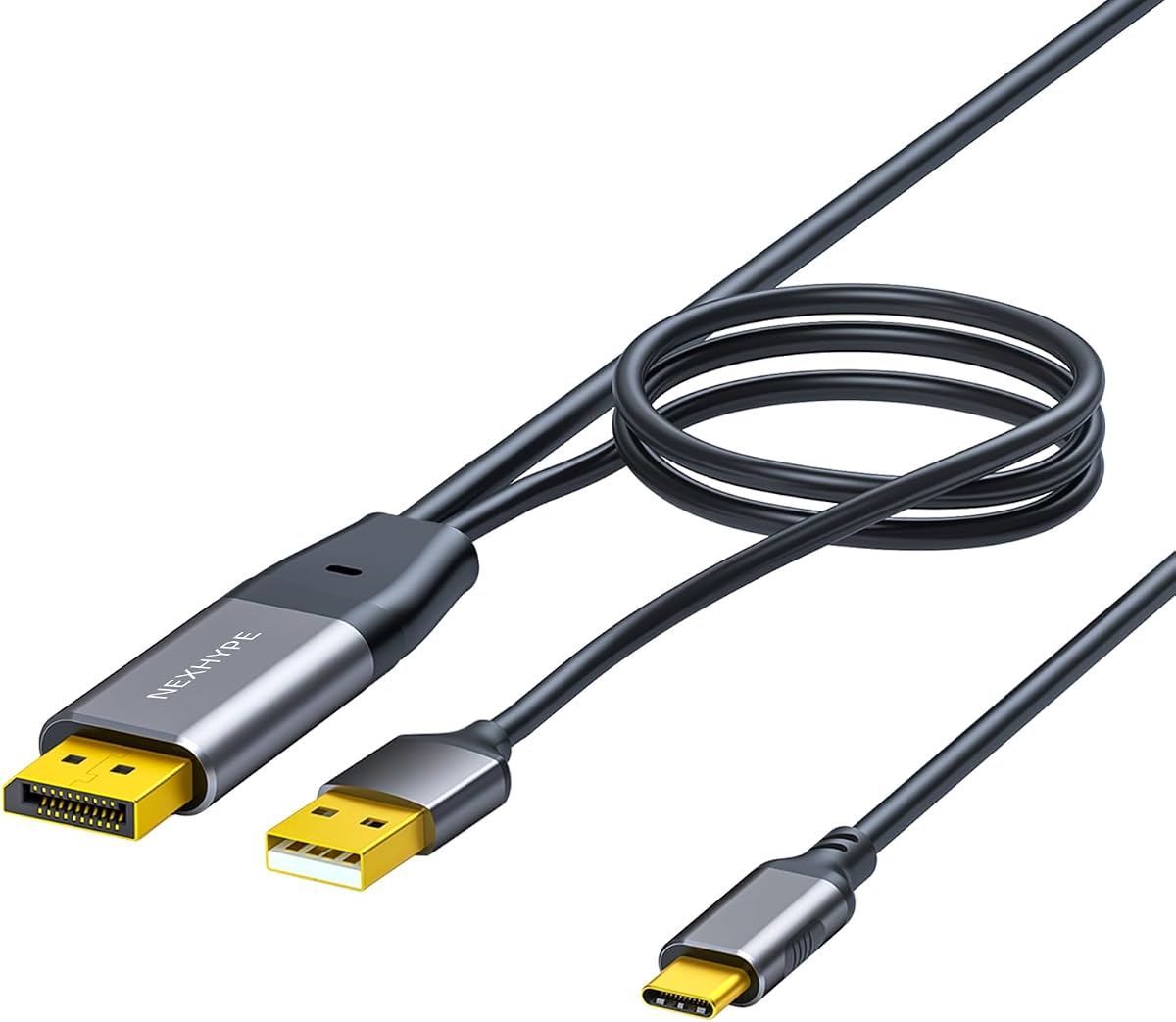
DisplayPort to USB-C Cable with Power 6.6ft for PC to AR Glasses
4.7Editor score
Integrated USB power and data design
Supports up to 1080P portable monitors
Gold-plated connectors for durability
Six-point-six-foot flexible cable length
This guide compares the top Displayport Adapter for AR Glasses options for 2026, analyzing performance, compatibility, and power delivery for immersive viewing
Finding the right Displayport Adapter for AR Glasses is crucial for seamless connectivity between your computer and immersive wearable displays. These adapters enable high-resolution video transmission, allowing users to enjoy crystal-clear visuals directly through augmented reality headsets without needing complex setups or additional hardware components.
We evaluated ten top-rated adapters based on resolution support, refresh rates, power delivery capabilities, and build quality. Our analysis covers compatibility with major AR brands like Xreal, Rokid, and Viture, ensuring you choose a device that meets your specific gaming, productivity, or media consumption needs effectively.
Each pick highlights key strengths, potential limitations, and ideal use cases to help you make an informed decision. Please note that product availability and pricing may change frequently, so verify current details on the manufacturer page before finalizing your purchase to ensure you get the best value available today.
4.7Editor score
4.5Editor score

4.8Editor score
The following comparison table breaks down the essential specifications of each adapter to help you quickly identify the model that aligns with your technical requirements and usage scenarios.


This adapter stands out as the top choice for users seeking high-refresh-rate performance with their augmented reality glasses. With support for 4K at 120Hz, it delivers ultra-smooth visuals ideal for fast-paced gaming or immersive media consumption. The one-way design ensures stable transmission from your computer to the AR display without unnecessary complexity.
We may earn a commission when you buy through this link, at no additional cost to you.
Its compatibility spans across popular AR brands including Xreal, Rokid, and Viture, making it a versatile option for diverse ecosystems. The premium aluminum alloy housing not only provides durability but also effectively dissipates heat during extended use. Built-in advanced chipsets maintain low latency, which is critical for responsive gaming experiences.
While the adapter requires a separate USB-C cable for power, this design keeps the unit compact and easy to carry. Some users might find the lack of bidirectional support limiting if they need to connect USB-C sources to DisplayPort monitors. However, for the intended use of connecting PCs to AR glasses, this limitation is negligible.
Buyers prioritizing smooth gameplay and high-definition clarity will find this adapter an excellent investment. Its plug-and-play nature eliminates driver installation hassles, ensuring quick setup. Whether you are streaming movies or playing competitive games, this model delivers consistent performance that meets modern AR demands effectively.
The 120Hz refresh rate minimizes motion blur in action games, providing a competitive edge through fluid visual updates.
The aluminum alloy housing protects internal components from heat and physical wear, ensuring longevity even with frequent travel use.
We may earn a commission when you buy through this link, at no additional cost to you.
This cable offers exceptional value for budget-conscious users who need reliable connectivity for their AR glasses. It supports audio and video transmission with an integrated USB power cable that supplies necessary energy to battery-free devices. The longer six-foot length provides flexibility in positioning your setup without being tethered too closely to the source.
We may earn a commission when you buy through this link, at no additional cost to you.
Gold-plated connectors enhance durability and signal stability while preventing corrosion over time. The PVC jacket allows for smooth bending during daily use without compromising internal integrity. Despite its affordable pricing, it maintains solid performance for standard AR viewing tasks including video streaming and basic productivity applications.
One limitation is its power output which restricts portable monitor support to 1080P resolution. Users with higher-resolution portable screens may need additional power sources to function correctly. However, for AR glasses which typically require less power, this design is sufficient and simplifies cabling requirements significantly.
Ideal for casual users or those new to AR technology, this cable removes financial barriers to entry. Its plug-and-play functionality ensures immediate use without software configuration. With a twelve-month warranty and lifetime support, buyers can expect reliable assistance if they encounter any connectivity issues during daily operation.
Providing essential features at a low price makes this accessible for anyone exploring augmented reality experiences without large financial investment.
The six-point-six-foot design allows greater freedom of movement between your computer and glasses, reducing physical strain during long sessions.
We may earn a commission when you buy through this link, at no additional cost to you.
This premium cable targets professionals who need precise color accuracy and reliable touch input during creative workflows. Optimized for Apple Studio Display, it ensures seamless integration with Mac systems while supporting high-resolution video output for detailed editing tasks. The graphene shielding minimizes interference for maintaining signal integrity over longer distances.
We may earn a commission when you buy through this link, at no additional cost to you.
Full touch functionality allows direct interaction with connected portable monitors making it perfect for design work requiring precision control. Integrated USB-A power stabilizes signals ensuring smooth touch responses without lag. The aluminum cooling casing helps dissipate heat during intensive processing sessions preventing performance throttling over extended periods of use.
While it lacks compatibility with Nintendo Switch consoles it excels in computer-based environments particularly for macOS users. The eighteen-month warranty offers peace of mind reflecting confidence in its durability and performance standards. Users needing a professional-grade connection for AR displays will appreciate its robust feature set and consistent output quality.
Recommended for graphic designers and video editors using AR monitors for immersive workspaces. Its ability to transmit pristine digital audio alongside video creates a unified experience for media production. With strong technical support and a focus on stability this adapter justifies its premium price for serious creative professionals.
Designed with color-critical workflows in mind this cable ensures consistent brightness and hue representation for accurate creative output.
Active USB power stabilization eliminates touch lag enabling precise cursor movement essential for professional design software applications.
We may earn a commission when you buy through this link, at no additional cost to you.
This converter targets gamers who want to expand connectivity options while maintaining high refresh rates for competitive play. The built-in three USB ports allow connecting peripherals like keyboards directly to the adapter reducing cable clutter. Its HDR and 10-bit color depth enhance visual realism in supported games providing richer shadows and highlights.
We may earn a commission when you buy through this link, at no additional cost to you.
The aluminum housing features an anti-slip silicone pad that keeps it steady on surfaces during intense gaming sessions. Heat management is optimized for long usage periods preventing thermal throttling. However users must note that the included cable is for power only meaning a separate data cable is needed to activate USB hub functions fully.
Power limitations restrict it from driving larger portable monitors requiring significant wattage so external power may be necessary for such displays. Despite this its focus on AR glasses and low latency makes it suitable for dedicated gaming setups. The responsive customer support ensures any setup issues get addressed quickly.
Best suited for PC gamers looking to enhance their AR experience with extra peripherals. The combination of high refresh rates and additional USB ports offers practical utility beyond simple video transmission. If you need a compact hub alongside your video adapter this model provides a convenient all-in-one solution.
Three integrated USB ports let you attach mice or dongles directly reducing the need for a separate docking station near your setup.
HDR and 10-bit color support unlock deeper contrast in games making explosions and dark scenes appear more lifelike on AR screens.
We may earn a commission when you buy through this link, at no additional cost to you.
This adapter emphasizes power efficiency with a 65W USB-C port that can charge your portable monitor while displaying video. This dual function simplifies setups reducing the need for separate chargers during mobile work. The graphene-coated cable resists tangling and physical damage ensuring longevity even with frequent handling in transit.
We may earn a commission when you buy through this link, at no additional cost to you.
Support for 8K at 30Hz future-proofs the device for high-resolution content although practical use currently focuses on 4K. The extremely short cable suits tight desk environments but may limit reach for larger setups. Its compact design makes it easy to carry in a bag though careful placement is required to avoid obstruction.
Compatibility notes indicate it does not work with displays featuring built-in batteries which is rare for AR devices. Users must ensure their screens support DP Alt Mode for successful connection. Despite its niche length the power delivery capability makes it valuable for travelers needing clean cable management solutions.
Recommended for professionals who prioritize cable reduction and power flexibility. While the short length restricts some uses the integrated charging function is a significant benefit for extended sessions. If you need a single cable solution that handles video and charging this model offers distinct advantages.
The 65W delivery means you can charge your screen and watch videos simultaneously without juggling multiple power adapters during work.
Support for 8K resolution ensures the adapter remains relevant as high-resolution content becomes more common in coming years.
We may earn a commission when you buy through this link, at no additional cost to you.
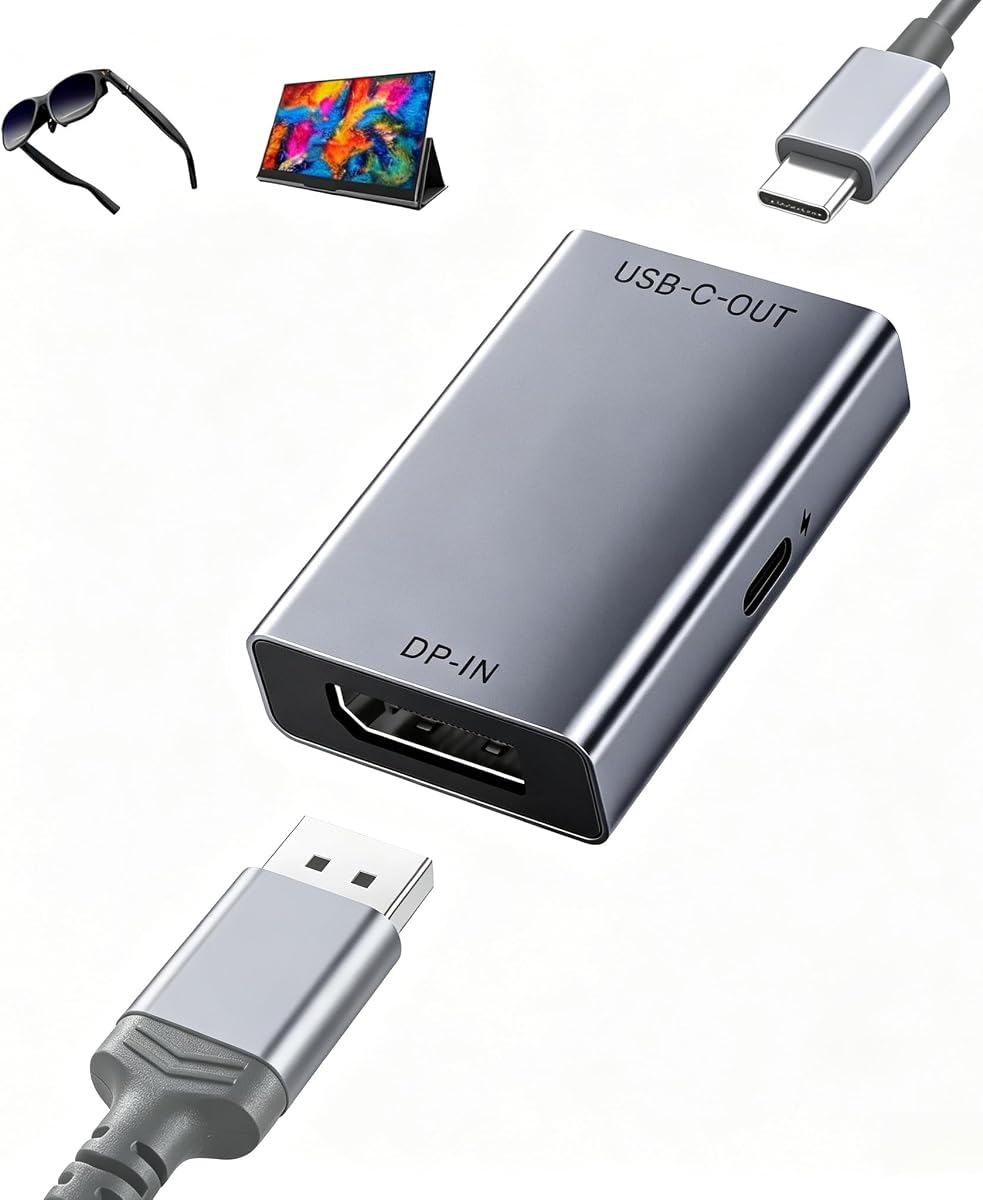
This female adapter offers a clean solution for connecting DisplayPort sources to USB-C inputs with minimal bulk. Its compact size is ideal for permanent setups where space is limited. The gold-plated connector ensures stable transmission while the aluminum housing aids in heat management during continuous use.
We may earn a commission when you buy through this link, at no additional cost to you.
Clear port labeling helps users avoid connection errors by distinguishing power inputs from data outputs. It supports 4K at 60Hz which covers most high-definition needs including streaming and gaming. Backward compatibility ensures it works with lower resolutions if source devices have limited capabilities.
The short cable length requires precise placement of your source device near the adapter. For Xreal users sound might require firmware updates to function correctly which adds a small setup step. However once configured it provides reliable video output for most standard AR scenarios without extra dongles.
Best for users needing a simple no-fuss connection without extending cables significantly. The clear labeling and robust build make it a dependable choice for fixed desks or travel kits. Its focus on core video delivery without unnecessary features keeps costs reasonable and performance consistent for daily tasks.
Labels like PD100W and USB2.0 prevent confusion helping you plug power and data correctly without trial and error.
The aluminum alloy and gold-plated connections ensure consistent 4K signal transmission without flickering during video playback.
We may earn a commission when you buy through this link, at no additional cost to you.
This cable balances length and performance for general AR use with a six-foot design that provides ample room for movement. It converts DisplayPort 1.2 signals to USB-C inputs ensuring compatibility with most desktop and laptop setups. The USB power tail stabilizes the signal which helps maintain consistent video without dropouts.
We may earn a commission when you buy through this link, at no additional cost to you.
Gold-plated connectors resist corrosion ensuring long-term reliability even with frequent plugging and unplugging. The PVC jacket allows bending without cracking making it suitable for dynamic setups like gaming stations. While it does not charge portable monitors it effectively powers its own circuitry to ensure smooth signal transmission.
Limitations include lack of data transfer through the USB line which means touch control depends on monitor capabilities. It requires direct connection to source and display without passing through hubs to maintain integrity. For standard video output and basic interaction it performs reliably across various popular AR brands.
Ideal for users who need a dependable cable without complex features. Its straightforward design reduces setup confusion while delivering solid performance for movies and casual gaming. If you prioritize reliability over advanced functions this cable offers a balanced solution for daily augmented reality tasks.
The six-foot length allows you to position your PC away from your desk while keeping a clear line of sight for AR use.
Active USB power stabilization prevents signal loss during extended viewing sessions ensuring a flicker-free experience.
We may earn a commission when you buy through this link, at no additional cost to you.
This adapter is uniquely optimized for handheld console users particularly those with Switch 2 in dock mode for seamless AR streaming. It supports PD3.0 charging allowing uninterrupted gameplay while casting video to glasses. The aluminum alloy construction aids cooling despite generating heat during high-load TV mode activation for extended sessions.
We may earn a commission when you buy through this link, at no additional cost to you.
High refresh rates up to 1080P at 144Hz ensure smooth motion for fast-paced games reducing blur during intense action. The compact design makes it easy to travel with though its short cable requires close proximity to the console. External power is needed to fully activate TV output ensuring stable performance without interruptions.
Heat management requires proper ventilation to prevent thermal throttling which may occur in enclosed spaces. While VR headsets are not supported its focus on AR glasses provides precise video output for portable displays. Users must ensure proper airflow during use to maintain consistent performance during long gaming marathons.
Recommended for gamers who want to bring console gaming into AR glasses easily. Its specific tuning for Switch 2 offers a tailored experience that generic adapters may not match. If you play on the go and value charging capabilities this adapter provides a versatile solution for modern handheld gaming.
Pass-through charging lets you keep your console powered while casting video so you never stop playing due to battery drain.
Built-in chip support for Switch 2 ensures seamless signal handshake which prevents display handshake errors in dock mode.
We may earn a commission when you buy through this link, at no additional cost to you.
This cable emphasizes touch support for portable monitors allowing direct interaction without extra peripherals. The six-foot length provides flexible setup options while maintaining signal integrity through direct connection. Its design ensures USB power stabilizes the transmission for consistent performance during interactive sessions or productivity tasks.
We may earn a commission when you buy through this link, at no additional cost to you.
It supports 4K at 60Hz ensuring clear visuals for both movies and work applications. Direct connection is mandatory to avoid signal loss which simplifies setup but restricts chaining through hubs. While marketed for Mac systems it generally works with most DP sources provided the display matches compatibility requirements.
Limitations include no data transfer capability which limits external device connectivity through the USB line. It may not work with all AR glasses so checking specific device lists is essential before purchase. The focus on touch functionality makes it better suited for monitors than standalone AR headsets primarily.
Best for users needing touch-capable monitors alongside standard video output. The straightforward design minimizes driver needs while enabling precise input for creative work. If touch responsiveness is critical for your workflow this cable provides the necessary support without adding bulk to your cable bundle.
Touch support enables precise interaction with UI elements making it easier to navigate menus without external input devices.
Direct source-to-display connection ensures the cleanest signal path reducing latency and preventing potential handshake errors.
We may earn a commission when you buy through this link, at no additional cost to you.
This adapter serves specifically for VITURE users needing a magnetic connection to standard USB-C displays or docking stations. The magnetic port simplifies attachment and detachment ensuring secure contact without repeated plugging. High-speed transfer rates of 10 Gbit/s enable smooth 4K streaming at 60fps for clear visual content.
We may earn a commission when you buy through this link, at no additional cost to you.
Pairing with the Mobile Dock allows dual display setups which is rare among AR accessories. This feature boosts productivity by enabling split-screen tasks on separate monitors. The magnetic design reduces wear on both the adapter and the glasses ensuring long-term durability during daily use cycles.
Its compatibility is narrow focusing only on VITURE magnetic ports which limits general utility. Users outside this ecosystem will find it unusable compared to universal adapters. However within the brand it provides a premium user experience with quick and easy connection management for travel or home use.
Recommended strictly for VITURE owners who value convenience and dual display support. Its magnetic solution minimizes physical stress on the device while maintaining high data rates. If you are invested in the VITURE ecosystem this adapter is the logical choice for expanding your connectivity options.
The magnetic connection lets you snap adapters on and off effortlessly saving time during frequent setup changes.
Combining with the Mobile Dock lets you extend work across two screens improving efficiency during multitasking sessions.
We may earn a commission when you buy through this link, at no additional cost to you.
Selecting the right adapter requires understanding your specific device ecosystem and performance needs.
High-resolution displays benefit from adapters supporting 4K at 60Hz or higher refresh rates like 120Hz for gaming. Check that both source and glasses support the desired resolution to avoid compatibility mismatches.
Prioritize high refresh rates if you play action games to ensure smooth motion without blurring.
Some AR glasses require extra power which adapters may provide through USB-C PD ports. Ensure the wattage meets your glasses needs so the screen stays on without draining your device battery.
Adapters with 65W delivery simplify setups by charging monitors while playing video.
Most adapters support only one-way transmission from DisplayPort to USB-C. Verify your signal direction needs since bidirectional adapters are often more expensive and unnecessary.
Choose unidirectional adapters to save cost if you only connect PCs to glasses.
Cables vary from half meters to six feet affecting how you arrange your desk. Longer cables allow more movement but may degrade signal quality if not shielded properly.
Select a length matching your room setup to avoid physical strain.
Aluminum housings protect against heat and physical drops while gold-plated connectors resist corrosion. These features ensure reliable performance over time especially with frequent handling.
Invest in durable builds to reduce replacement costs in the long run.
Not all adapters work with every AR brand. Confirm support for your glasses manufacturer like Xreal or Rokid to avoid signal failures.
Check product details against your specific AR model before purchasing.
Some adapters transmit touch data to connected monitors which helps productivity. Audio support varies so test settings if sound is needed for immersive experiences.
Ensure both video and audio are handled if your use case requires full media playback.
Extra USB hubs or charging ports can simplify setups by reducing cable clutter. Evaluate if you need these extras to justify higher price points.
Simpler adapters work best if you only need basic video transmission without peripheral connections.
Begin by connecting the DisplayPort end to your computer or graphics card output. Ensure the connection is secure to prevent signal drops during use.
Attach the USB-C end to your AR glasses or portable monitor. If your device needs power connect a USB-C cable to the adapter to keep it running efficiently.
Care for your adapter by avoiding sharp bends in the cable and storing it in a soft pouch when not in use to extend its lifespan.
Most modern adapters work on plug-and-play without driver installation. They rely on the standard DisplayPort protocol which your operating system already supports. If issues arise check for firmware updates on your glasses first.
Sound issues often stem from incorrect mode settings. Some glasses need to switch to DP mode manually using volume keys. Ensure your source device outputs audio to the DisplayPort correctly.
Most adapters are designed for PC sources not consoles unless specified. Some models support Switch 2 specifically for docked gameplay. Check the product description for console compatibility before buying.
Many glasses use USB-C for power which adapters can provide. Some adapters include a USB-A power port to supply extra energy if the glasses need it. Verify wattage requirements to ensure stable performance.
DP Alt Mode is essential for USB-C video input. If your glasses lack it this adapter type will not work. Check manufacturer specs or look for alternative HDMI-based solutions instead.
With proper care aluminum and gold-plated connectors last for years. Avoid dropping or forcing connectors to prevent internal wire damage. Regular gentle cleaning helps maintain connection quality.
We highlighted ten standout adapters ranging from premium creative tools to budget-friendly cables. The top picks offer specific advantages whether you need high refresh rates, power delivery, or console compatibility.
Prioritize your specific needs like resolution or power delivery when deciding. Matching the adapter to your existing setup avoids compatibility issues and ensures smooth performance.
Always verify current availability and pricing on Amazon before purchasing. Small changes in product versions can affect performance so check the latest details from the seller.