
THUSTAR 8MP Document Camera & Webcam 4K with Dual Microphones
4.4Editor score
Affordable USB document camera solution
3-Level adjustable LED brightness lighting
Foldable design for easy storage
Choosing the right document projector for classroom use is essential for modern educators who want to enhance student engagement and clarity during lessons. These devices allow teachers to display physical documents, objects, and diagrams in real time, making learning more interactive and accessible for every student in the room.
We have evaluated ten leading models based on image quality, connectivity options, ease of use, and compatibility with various operating systems. Our analysis focuses on features that matter most in educational settings, such as resolution, lighting, flexibility, and reliability for daily classroom demands.
Each product pick highlights key strengths and ideal use cases so you can match the device to your specific teaching needs. Please note that prices and availability may change over time, so checking current listings before purchasing is always recommended for the best value.
4.4Editor score

4.5Editor score

4.6Editor score
As an Amazon Associate we earn from qualifying purchases.
The following table provides a side-by-side comparison of all ten featured document projector for classroom options. This overview highlights key specifications and capabilities to help you quickly identify the model that best fits your educational environment and technical requirements.





The IPEVO V4K Ultra High Definition 8MP USB Document Camera stands out as a top-tier solution for educators seeking high-quality live demonstrations. With a 4.5-star rating from users, it delivers exceptional clarity and reliability. Its standout qualities include an 8-megapixel camera capable of capturing Ultra High Definition images up to 3264 x 2448 pixels, ensuring fine details are visible to every student.
We may earn a commission when you buy through this link, at no additional cost to you.
Key strengths of this device revolve around its performance in dynamic classroom settings. The high frame rate allows for lag-free live streaming at up to 30 frames per second at full HD resolution. This means that when demonstrating moving objects or writing on paper, there is no noticeable delay. The fast focusing speed further minimizes interruptions when switching between different materials, keeping lessons flowing smoothly. Additionally, the Sony CMOS Image Sensor provides exceptional noise reduction and color reproduction, making it great for capturing images in dimly lit environments where lighting might be inconsistent.
Honest trade-offs include the reliance on USB connectivity for most functions, which limits mobility compared to wireless models. However, this trade-off is acceptable for many classrooms where stable wired connections are preferred to avoid signal drops. The multi-jointed stand offers a simple fix for tightening loose joints caused by heavy daily use, ensuring durability over time. The maximum shooting area of 13.46 inches by 10.04 inches accommodates most standard documents and materials effectively.
Educators who need a reliable, high-resolution camera for live demos, web conferencing, distance learning, and remote teaching should strongly consider this model. It works with a variety of software and applications on Mac, PC, and Chromebook, offering flexibility for different tech setups. The system requirements are manageable for most modern computers, ensuring that the camera can be integrated without extensive IT support.
The 8-megapixel camera captures detailed images up to 3264 x 2448 pixels, ensuring students can see text and diagrams clearly on large screens.
Sony CMOS Image Sensor technology provides exceptional noise reduction and color reproduction, making it great for capturing images in dimly lit environments without losing clarity.
We may earn a commission when you buy through this link, at no additional cost to you.
The Apollo Overhead Projector, Horizon 2 represents a classic approach to document projection in educational settings. With a 4.2-star rating, it offers a robust solution for those who prefer traditional overhead projection methods. This model delivers 2000 lumen output, ensuring that images remain visible even in well-lit classrooms where modern projectors might struggle.
We may earn a commission when you buy through this link, at no additional cost to you.
Key strengths of this projector include its open head design, which allows teachers to place transparencies, books, or physical objects directly on the stage for immediate display. The 10-inch by 10-inch display area provides ample space for standard documents. Additionally, the inclusion of both VGA and USB connectivity ensures compatibility with older and newer devices alike. The LCD display further enhances usability by providing clear information on settings and status.
Honest trade-offs involve the physical size and weight compared to modern document cameras. Traditional overhead projectors typically require more desk space and can be heavier to move between rooms. However, for stationary classroom setups where reliability and brightness are paramount, these factors are often acceptable. The technology base is older, which means it may lack some of the advanced features found in digital document cameras like wireless streaming.
Educators who have existing classrooms equipped for overhead projection or who need a high-lumen solution for daytime presentations will find this model suitable. It is particularly useful for schools that still rely on transparencies or prefer a simpler interface without software dependencies. The durable gray construction ensures it can withstand regular educational use over many years.
2000 lumen output ensures that images remain visible even in well-lit classrooms where modern projectors might struggle.
Open head design allows teachers to place transparencies, books, or physical objects directly on the stage for immediate display.
We may earn a commission when you buy through this link, at no additional cost to you.
The IPEVO VZ-X Wireless 8MP Document Camera is a premium choice for educators who need flexibility and mobility in their teaching environment. Boasting a 4.6-star rating, it combines high-quality imaging with versatile connectivity options. This device captures images in high definition when using Wi-Fi and HDMI modes, and near 4K quality in USB mode, ensuring crisp visuals for students.
We may earn a commission when you buy through this link, at no additional cost to you.
Key strengths include its three modes of connectivity: Wi-Fi, HDMI, and USB. This versatility allows the camera to connect to a computer, iOS or Android device, Apple TV, projector, TV, or monitor without requiring a single cable setup. The built-in LED illuminates the viewing area effectively, while the Sony 8 MP sensor boosted by an Ambarella system-on-a-chip provides fast focusing speed and excellent color reproduction. Additionally, the 9 to 12 hours of battery life ensures a complete class or presentation session without interruptions.
Honest trade-offs primarily involve the price point, which is higher than many wired alternatives. However, the investment is justified by the wireless range of up to 33 feet, allowing teachers and presenters to capture different objects all over the room. The swiveling head and multi-jointed stand offer freedom to capture from different heights, angles, and orientations. Buttons conveniently located on the camera body enable instant video feed adjustments without needing a computer.
Educators who frequently move around the classroom, conduct distance learning sessions, or need to connect to various devices like tablets and smart TVs should consider this premium option. Its compatibility with web conferencing software makes it ideal for hybrid learning environments. The small footprint and battery independence make it perfect for mobile teaching setups.
Up to 33-feet of wireless range allows teachers and presenters to capture different objects all over the room without being tethered to a computer.
9 to 12 hours of battery life ensures a complete class or presentation session without interruptions, even when power outlets are unavailable.
We may earn a commission when you buy through this link, at no additional cost to you.
The THUSTAR 8MP Document Camera & Webcam 4K with Dual Microphones offers an excellent entry point for educators seeking high performance at an accessible price. With a 4.4-star rating, it balances cost and capability effectively. This USB document camera features adjustable image reversal, allowing users to manually adjust the image left, right, up, or down during video chat or image output for optimal viewing.
We may earn a commission when you buy through this link, at no additional cost to you.
Key strengths include its 8-megapixel resolution capable of capturing ultra-high-definition images and videos at 30 frames per second. The camera can focus on objects as close as 3.94 inches, making it suitable for detailed work like showing small components or intricate artwork. The 3-Level LED lights eliminate shooting problems under difficult lighting conditions by allowing manual brightness adjustment in 10-degree increments. Additionally, the foldable design occupies minimal space after folding, making it easy to carry between classrooms.
Honest trade-offs include basic software integration compared to premium models with advanced annotation tools. The focus system is primarily automatic but may require manual intervention in certain lighting scenarios. However, the dual silicon microphones reduce noise and improve sound quality, which is a valuable addition for distance education where audio clarity is crucial. Compatibility with Windows, macOS, and Chrome OS ensures broad adoption across different school systems.
Educators and institutions looking for a budget-friendly solution that does not compromise on image quality or portability should consider this camera. It is highly compatible and plug-and-play, automatically installing drivers when plugged into a computer. Its suitability for live demos, distance education, and collaboration with platforms like Zoom and Microsoft Teams makes it a practical choice for diverse educational needs.
14 ring lamp beads with 3 levels of brightness adjustable eliminate shooting problems under difficult lighting conditions, allowing clear capture in dark and bright environments.
Foldable design occupies a small space after folding, easy to carry; multi-joint support allows free rotation to capture 2D and 3D objects effectively.
We may earn a commission when you buy through this link, at no additional cost to you.
The INSWAN INS-2 UHD 4K 13MP Document Camera is designed for professional educators and art instructors who need clear displays for large documents and artwork. With a 4.4-star rating, it delivers high-resolution, large-format capture capabilities. The 13MP Sony sensor captures clear 4K Ultra HD images at 30 frames per second, ensuring that intricate details in spreadsheets, two-page spreads, and big-screen presentations remain sharp and legible.
We may earn a commission when you buy through this link, at no additional cost to you.
Key strengths include the multi-joint arm that allows flexible angle adjustments for documents up to A3 size, accommodating oversized materials without cutting off content. The all-in-one Documate software offers zoom, annotation, video recording, scanning, whiteboard tools, and OCR for enhanced teaching functionality. Additionally, the built-in LED light, anti-glare sheet, and dual-mode autofocus provide professional performance features. It is compatible with Windows, Mac, iPad, and Chromebook systems.
Honest trade-offs involve the specific system requirements, particularly for iPad users who must have a USB-C port. The reliance on USB connection limits wireless mobility compared to some competitors. However, the instant UVC plug-and-play compatibility ensures minimal setup time. The macro capability allows capturing objects as close as 3.9 inches, making it versatile for both large documents and small detailed objects.
Educators who need to display large documents, artwork, or two-page spreads in classrooms or exhibitions will find this camera particularly useful. The professional performance features like built-in mic deliver clear and professional presentations without requiring external microphones. Downloading the latest version of the software is free, ensuring access to the most up-to-date tools for teaching and presentation.
Multi-joint arm allows flexible angle adjustments for documents up to A3 size, accommodating oversized materials without cutting off content.
Documate offers zoom, annotation, video recording, scanning, whiteboard tools, and OCR for enhanced teaching and workflow integration.
We may earn a commission when you buy through this link, at no additional cost to you.
The Lumens DC166 SXGA 6X Optical Document Camera Projector is a robust device for those needing high-resolution output and optical zoom capabilities. With a 3.6-star rating, it offers advanced features that cater to specific presentation needs. The high-resolution UXGA, SXGA, and XGA support ensures that images projected are crisp and detailed, suitable for technical diagrams and small text.
We may earn a commission when you buy through this link, at no additional cost to you.
Key strengths include the 6x Optical Zoom combined with manual zoom and 8x digital zoom, allowing for significant magnification of objects without losing quality. The one-touch video recording and playback feature, along with internal memory for 120 JPEG images, enables educators to save and review content quickly without a computer connection. The SD card slot accepting up to 32 GB provides additional storage options for extended presentations.
Honest trade-offs include a lower user rating, which may indicate a steeper learning curve or complexity for some users. The feature set is more advanced, potentially requiring more time to master compared to plug-and-play models. However, for interactive whiteboard (IWB) compatible setups, this device shines by offering seamless integration with educational technology systems.
Educators who work heavily with interactive whiteboards and require optical zoom capabilities for detailed demonstrations should evaluate this model. Its compatibility with all interactive whiteboards makes it a strong candidate for tech-forward classrooms. The ability to record and playback video and store images internally offers flexibility for lesson planning and review.
6x Optical Zoom combined with manual zoom and 8x digital zoom allows for significant magnification of objects without losing quality.
Internal memory for 120 JPEG images and SD card slot accepting up to 32 GB provide flexibility for extended presentations without computer dependency.
We may earn a commission when you buy through this link, at no additional cost to you.
The Epson PowerLite 118 LCD Projector is a high-performance device rated at 4.9 stars, ideal for classrooms requiring vibrant and durable projection solutions. It utilizes 3LCD technology to produce vibrant, eye-catching images that stand out even in well-lit rooms. The moderator function allows up to 50 users to connect simultaneously, making it excellent for collaborative sessions where students need to share content.
We may earn a commission when you buy through this link, at no additional cost to you.
Key strengths include a durable design providing a long lamp life of 17,000 hours, significantly reducing maintenance and replacement costs over time. HDMI connectivity transfers video and audio through a single cable, simplifying setup and reducing clutter. The built-in speaker ensures engaging projector displays without needing external audio equipment. These features make it a reliable choice for daily classroom use.
Honest trade-offs involve the need for ceiling mount installation, which may require professional setup. The price point is higher than standard projectors, but the durability and functionality justify the investment. For educational environments where reliability and collaborative features are paramount, these trade-offs are often acceptable for long-term value.
Educators and schools looking for a ceiling-mountable projector that supports large group collaboration and offers long-lasting performance should consider this model. Its 3LCD technology ensures true-to-life colors, which is essential for art and science classes. The ease of connectivity and built-in audio make it a convenient all-in-one solution for modern teaching environments.
Moderator function connects up to 50 users simultaneously, enabling large group collaboration and interactive sessions.
Durable design provides long lamp life of 17,000 hours, reducing maintenance needs and replacement costs over time.
We may earn a commission when you buy through this link, at no additional cost to you.
The DLP Business Projector 3300 Lumens Office Projector is a bright solution designed for daytime display in educational settings. With a perfect 5.0-star rating, it excels in providing clear visuals in bright environments. It delivers 3300 lumens of brightness to help display slides, documents, charts, and other visual materials clearly in offices, classrooms, meeting rooms, and training spaces without dimming lights.
We may earn a commission when you buy through this link, at no additional cost to you.
Key strengths include its DLP technology which supports natural color presentation and enhanced contrast. This helps business content, teaching materials, and presentation visuals appear clean, detailed, and suitable for professional use. The wide display capabilities support large-size projection, making it suitable for team meetings, classroom instruction, and training sessions. The fast startup design reduces preparation time, allowing users to begin displaying content quickly during busy schedules.
Honest trade-offs involve its wired connection setup, which lacks wireless flexibility. However, for a fixed classroom setup where stability is prioritized, this is a minor limitation. The projector is designed for simple wired operation, allowing users to connect the appropriate cable, start the projector, and display content without complicated installation or additional setup steps.
Educators who frequently teach during the day with significant ambient light will appreciate the brightness capabilities of this projector. It is ideal for schools that need a reliable, high-performance display for presentations and training. The ease of setup ensures minimal downtime between lessons, maximizing teaching time.
3300 lumens of brightness to help display slides, documents, charts, and other visual materials clearly in offices, classrooms, meeting rooms, and training spaces.
Fast startup design reduces preparation time before meetings, lessons, and presentations, allowing users to begin displaying content quickly.
We may earn a commission when you buy through this link, at no additional cost to you.
The Epson PowerLite E20 LCD Projector is a reliable ceiling mountable solution with a 4.8-star rating, offering vibrant and true-to-life images. It utilizes 3LCD technology to produce vibrant visuals that are essential for engaging educational content. The flexible construction makes it easy to display from virtually anywhere, ensuring adaptability to different room layouts and teaching needs.
We may earn a commission when you buy through this link, at no additional cost to you.
Key strengths include HDMI connectivity that transfers video and audio through a single cable, simplifying connections and reducing cable clutter. The 5-watt speaker built in for engaging projector displays ensures that audio is clear without needing additional hardware. Its durable design provides a long lamp life of 12,000 hours, which is a significant benefit for reducing maintenance frequency and costs over the product's lifespan.
Honest trade-offs involve the need for ceiling mounting which may require installation effort. However, once installed, it provides a permanent and stable projection solution. The flexible construction allows for easy adjustment to various positions, making it versatile even within a fixed mount setup. This balance of durability and performance makes it a strong contender for dedicated classroom environments.
Educators who need a reliable ceiling-mounted projector with good audio output and vibrant colors should consider this model. It supports 4:3 ratio content and is suitable for standard classroom presentations. The single cable HDMI connection ensures that setup is straightforward, allowing teachers to focus more on teaching and less on technical adjustments.
3LCD technology produces vibrant, true-to-life images that are essential for engaging educational content and accurate color representation.
5-watt speaker is built-in for engaging projector displays, ensuring that audio is clear without needing additional hardware or speakers.
We may earn a commission when you buy through this link, at no additional cost to you.
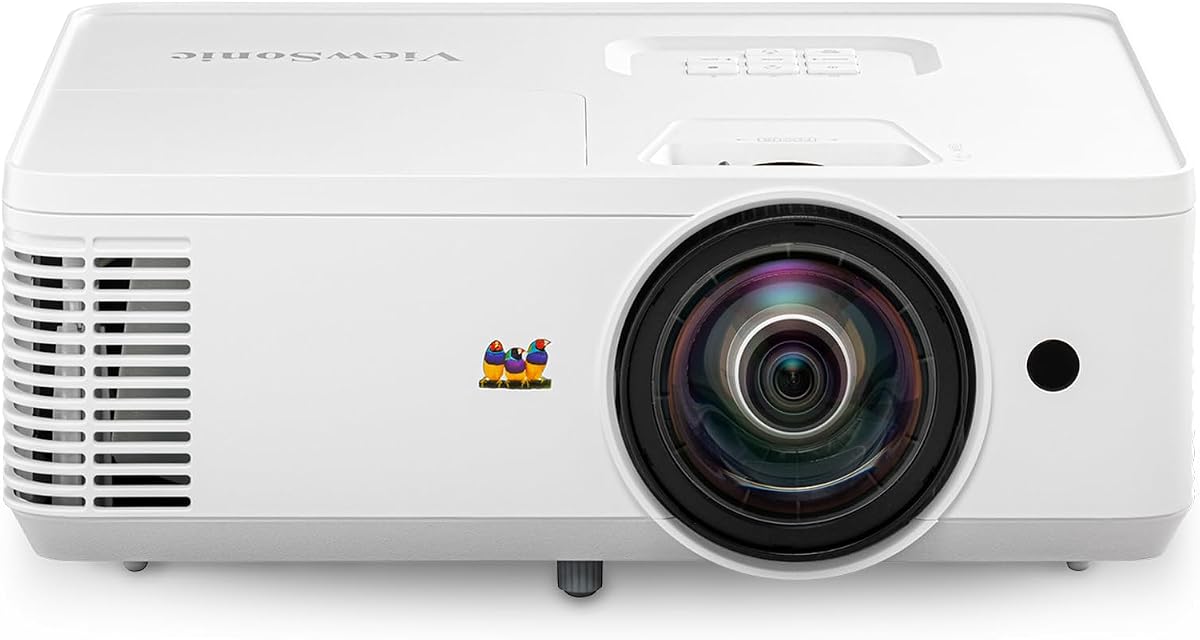
The ViewSonic PS502W WXGA Short Throw Projector is an ideal solution for classrooms with limited space, rated at 4.4 stars. It features a 0.5 throw ratio and delivers crisp visuals with WXGA resolution. This allows for projecting a massive 100-inch image from just 4.5 feet away, transforming small rooms into effective presentation spaces without shadows from teachers standing in front.
We may earn a commission when you buy through this link, at no additional cost to you.
Key strengths include 4000 ANSI lumens of brightness that hold up against moderate ambient lighting, ensuring presentations stay visible and detailed during daytime sessions. Vibrant and cinematic colors are powered by proprietary SuperColor technology, providing a wide color gamut for lifelike visuals in educational settings. Easy setup and image adjustment are achieved through vertical auto-keystone correction and digital zoom, ensuring a stress-free setup for mobile presenters or permanent installs.
Honest trade-offs involve specific throw distance requirements which limit placement flexibility. However, this limitation is purposeful for small room optimization. The instant power and productivity features remove wait times for warm-up or cooldown cycles, which is essential for fast-paced environments where time between classes is short.
Educators with small or crowded classrooms who need large images without long throw distances should prioritize this model. It supports table or ceiling mounting, optimizing layout and maximizing limited floor space. The flexible installation options ensure compatibility with ViewSonic mounts for a secure and integrated setup in any educational environment.
With a 0.5 throw ratio, it projects a massive 100-inch image from just 4.5 feet away, transforming small rooms into effective presentation spaces without shadows.
4000 ANSI lumens of brightness hold up against moderate ambient lighting, ensuring presentations stay visible and detailed during daytime sessions.
We may earn a commission when you buy through this link, at no additional cost to you.
Selecting the right document projector for classroom use involves evaluating several critical factors to ensure compatibility and performance. This section outlines key aspects to consider for making an informed purchasing decision that meets specific educational requirements.
High resolution is essential for displaying detailed text and images clearly. Look for devices that offer at least 8MP or 1080p resolution to ensure that fine details are visible to all students.
Prioritize resolution to ensure students can see text and diagrams clearly without strain.
Connectivity determines how easily the projector integrates with your existing devices. Options like USB, HDMI, Wi-Fi, and wireless capabilities provide flexibility for different teaching setups.
Check compatibility with your computers, tablets, and smart boards to avoid setup issues.
Built-in LED lights and high lumen output are crucial for visibility in various lighting conditions. Adjustable brightness levels help manage reflections and glare.
Ensure the device works well in both dim and bright classroom environments.
Plug-and-play functionality reduces setup time and technical complexity. Simple interfaces and physical buttons allow for quick adjustments during lessons.
Choose intuitive controls to minimize disruption during teaching sessions.
Classroom devices are used daily and must withstand wear and tear. Look for robust construction and reliable warranty terms that cover potential repairs.
Invest in durable builds to ensure long-term reliability and cost-effectiveness.
Support for common operating systems like Windows, macOS, and Chrome OS ensures broad usability. Additional software features like annotation and recording enhance lesson delivery.
Confirm system requirements match your school's technology infrastructure.
If the projector moves between rooms, weight and foldable design matter. Compact devices save space and make transportation easier for staff.
Select lightweight and foldable models for shared use across multiple classrooms.
Built-in microphones and speakers add value for distance learning and presentations without extra hardware. Quality audio is as important as visual clarity.
Consider integrated audio to simplify the setup for video calls and lessons.
To begin, connect your document projector to a display device using HDMI or USB. Ensure the camera lens is clean and properly focused to achieve clear images. Adjust the brightness settings to match your room lighting for optimal visibility.
During use, position the document or object under the camera head. Use multi-jointed stands to tilt the camera as needed. If available, utilize software tools to annotate or save images for later review or distribution.
For maintenance, cover the lens when not in use to prevent dust accumulation. Store portable models in protective cases to avoid damage. Regularly check for firmware updates and clean the exterior with a soft cloth to maintain performance.
A good document projector for classroom should offer high resolution, reliable connectivity options, and strong brightness to handle different lighting conditions. Features like portability and ease of use further enhance its suitability for daily educational tasks.
Not always. Many modern document projectors can connect directly to projectors or displays via HDMI or USB. However, some features like annotation may require a connected computer or compatible software.
Yes. most document projectors function offline when connected via USB or HDMI. Internet access is only needed for Wi-Fi streaming or cloud-based features, not for basic projection tasks.
Use a soft, dry microfiber cloth to gently wipe the lens surface. Avoid harsh chemicals or liquids that could damage the lens coating. Regular cleaning ensures consistent image clarity.
Many models support connectivity with tablets via Wi-Fi, HDMI adapters, or USB. Check specific product requirements to confirm compatibility with your tablet's operating system and ports.
With proper care, high-quality document projectors can last several years. Regular maintenance like cleaning and proper storage helps extend their lifespan. Warranty coverage provides additional protection against defects.
Yes, models with high lumen output and strong built-in lighting work well in bright environments. Look for devices with adjustable LED brightness to manage glare and ensure visibility.
Absolutely. Document projectors are excellent for virtual teaching as they allow real-time display of materials to online students. Ensure they have camera software compatibility with platforms like Zoom or Teams.
We have reviewed ten top document projector for classroom options ranging from portable document cameras to traditional projectors. Our picks highlight strong resolution, flexible connectivity, and reliable performance for various teaching scenarios.
Consider prioritizing resolution and ease of use when selecting your model. Ensure the device integrates well with your current setup and offers the brightness necessary for your specific classroom environment.
Always check current prices and availability before purchasing. Product listings can change over time, so verify details and reviews to make the best informed decision for your educational needs.