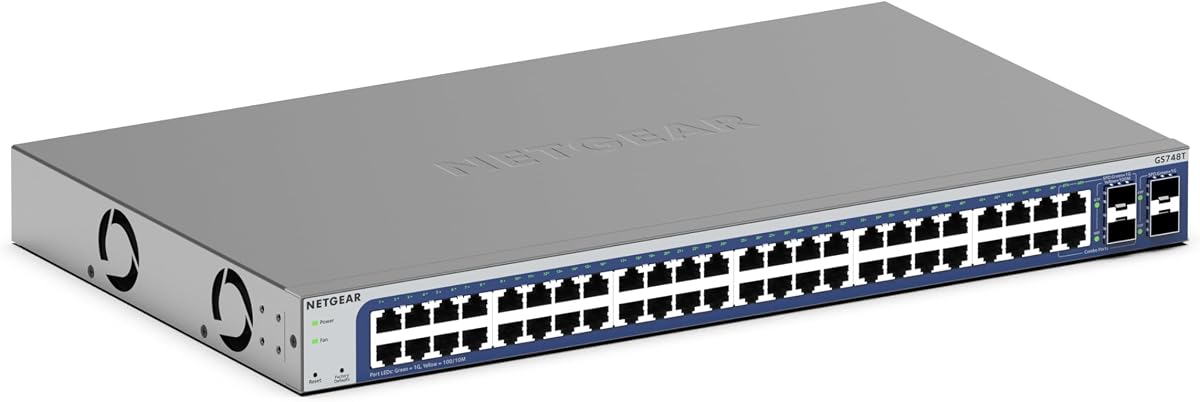
NETGEAR GS748T
4.4Editor score
Insight Remote Management
Energy Efficient Ports
Flexible SFP Uplinks
This guide compares the top 48 port gigabit managed switch options for enterprise networks focusing on security scalability performance and reliability
Modern networks demand robust hardware capable of handling massive data traffic without dropping packets. A reliable switch ensures every connected device gets stable access to resources. Choosing the right one requires balancing speed management tools and security features carefully.
We evaluated ten leading models based on port density switching capacity and advanced management capabilities. Each unit offers unique strengths for different business sizes from small offices to large campuses. Our analysis highlights key differences to help you pick the perfect fit.
Every selection includes detailed breakdowns of specs pros cons and ideal use cases. You will see how each device handles security traffic shaping and remote control. Note that availability and pricing fluctuate so check current offers before buying.
4.4Editor score

4.7Editor score

4.3Editor score
The following table provides a side-by-side technical comparison of all ten selected models. It highlights port counts management types warranty terms and key hardware features to simplify your decision process quickly.


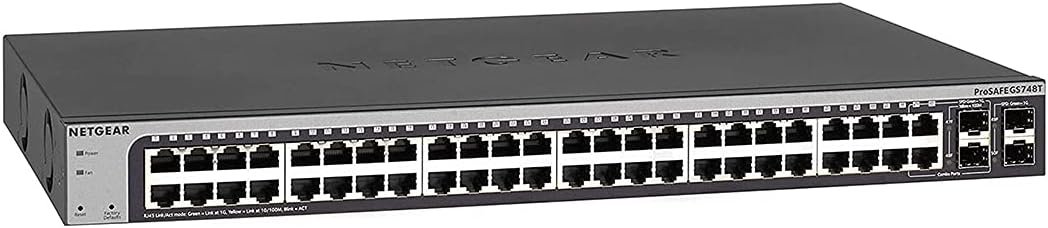


The TP-Link SG2452LP stands out as the top recommendation for organizations needing centralized control. Its integration with the Omada Cloud Management Platform allows for sophisticated monitoring and configuration from any location. With a high user rating and comprehensive security tools this switch delivers enterprise-grade reliability.
We may earn a commission when you buy through this link, at no additional cost to you.
A key strength lies in its fanless passive cooling design which ensures silent operation even under heavy loads. This makes it ideal for offices or healthcare facilities where noise is a concern. Advanced features like IP-MAC-Port binding and DHCP snooping provide robust protection against unauthorized access threats.
While the reliance on cloud integration might be a hurdle for strictly on-premise networks it offers unmatched scalability. The initial setup learning curve is offset by the long term efficiency gains in network management. Most users find the transition to centralized control well worth the effort.
This model is perfect for growing businesses or managed service providers wanting a unified network solution. Its combination of quiet performance strong security and cloud readiness justifies its position as the best overall pick. We recommend it for any scenario where remote management and stability are critical.
The Omada platform lets you monitor traffic and configure VLANs across multiple sites from a single dashboard. This centralization drastically reduces the time spent on routine network maintenance tasks.
By eliminating fans this switch operates without generating acoustic noise or relying on mechanical parts that wear out. This design ensures consistent performance and longevity in temperature-controlled indoor environments.
We may earn a commission when you buy through this link, at no additional cost to you.
The NETGEAR GS748T represents a premium choice for those needing deep visibility into their network health. It features four SFP ports for flexible fiber uplinks making it easy to connect distant buildings. The Insight software adds a layer of remote management that simplifies troubleshooting across multiple locations.
We may earn a commission when you buy through this link, at no additional cost to you.
Its energy efficiency stands out as it adheres to IEEE 802.3az standards to reduce power consumption during low activity periods. The metal casing ensures durability while supporting both desktop and rack-mount installations seamlessly. This versatility makes it a strong candidate for varied office environments.
Users might find the initial configuration of SNMP and Insight features somewhat involved compared to simpler models. Additionally some advanced remote capabilities require subscription planning which can add to long term costs. However the value provided by detailed monitoring usually offsets these minor drawbacks.
This switch is recommended for IT professionals managing distributed networks who need reliable remote oversight. Its blend of high speed connectivity robust build quality and premium software features makes it a top-tier investment. Consider it if your priority is advanced diagnostics and flexible cabling options.
NETGEAR Insight allows you to manage your network from anywhere using a web or mobile app. You can troubleshoot issues proactively before they impact end user productivity significantly.
Smart energy features detect link status and cable length to automatically adjust power usage. This helps lower electricity bills and reduces the environmental footprint of your network infrastructure.
We may earn a commission when you buy through this link, at no additional cost to you.
The Omada SG3452 offers an affordable entry point into managed networking without sacrificing essential control. It includes static routing capabilities which are rare at this price point helping to optimize internal traffic flow. The option to operate in standalone mode provides flexibility for smaller setups not needing cloud controllers.
We may earn a commission when you buy through this link, at no additional cost to you.
Integration with the Omada SDN platform is seamless allowing for centralized management of APs and gateways. Users appreciate the variety of management methods available including web GUI CLI and SNMP for professional monitoring. This ensures you can choose the interface that best suits your technical skill level.
One limitation is the requirement to ensure devices have SDN firmware for full integration which can add a step to setup. While it covers most standard security needs it may lack some of the deep packet inspection found in higher end models. Still it remains a powerful tool for budget conscious businesses.
This model is ideal for small to medium enterprises expanding their network infrastructure efficiently. Its balance of cost performance and essential managed features makes it a standout value pick. Choose it if you need reliable routing and VLAN support without a high price tag.
You can use this switch independently via web or CLI or integrate it into a full SDN ecosystem. This dual capability future proofs your investment as your network grows over time.
Built-in static routing allows you to direct traffic between subnets without needing a separate router. This simplifies network topology and reduces overall hardware costs for smaller deployments.
We may earn a commission when you buy through this link, at no additional cost to you.
This NETGEAR model provides a stable solution for environments prioritizing long term hardware support and reliability. It includes a limited lifetime hardware warranty which offers significant peace of mind for IT managers. The unit runs quietly thanks to its fanless design making it suitable for noise sensitive areas.
We may earn a commission when you buy through this link, at no additional cost to you.
Its smart software interface is straightforward making setup accessible even for those with less networking experience. You can manage security access and access via standard SNMP tools which integrates well with existing monitoring systems. The compact metal casing fits neatly into racks or on desktops without taking up much space.
While it lacks the latest cloud features found in newer units it remains a dependable workhorse for basic managed needs. The interface feels slightly dated compared to modern web dashboards which might require an adjustment period. However the core functionality remains solid and consistent for daily operations.
This switch is recommended for organizations needing a proven device with strong manufacturer support and warranty terms. If your priority is durability and standard management over cutting edge cloud integration this is a strong choice. It serves well as a reliable backbone for traditional network infrastructures.
The limited lifetime warranty covers defects in materials and workmanship ensuring long term device reliability. This support reduces the risk of unexpected hardware failures impacting your network operations.
Designed without internal fans the unit operates silently which is perfect for offices or classrooms. Passive cooling maintains thermal stability without introducing noise or moving parts that could fail.
We may earn a commission when you buy through this link, at no additional cost to you.
The TP-Link TL-SG3452P is the top choice for networks requiring extensive Power over Ethernet capabilities. With 384 watts of power budget it can support dozens of IP cameras or wireless access points simultaneously. The PoE auto recovery feature ensures connected devices reboot automatically if they lock up reducing manual intervention.
We may earn a commission when you buy through this link, at no additional cost to you.
Integration with the Omada SDN platform allows for centralized control of all network devices including switches and APs. It supports IPv6 and static routing making it suitable for modern complex network environments. The management interface provides granular control over each port to ensure efficient resource allocation.
The power consumption of a PoE switch is naturally higher than non-PoE models which impacts energy costs slightly. Setting up all the PoE parameters can be complex for beginners but becomes intuitive with documentation. Most administrators find the ability to power and manage devices from one box invaluable.
This switch is ideal for security installations or large offices with many powered devices needing centralized management. Its robust power budget and smart recovery features minimize downtime and simplify maintenance significantly. If you need to power devices across 48 ports this model is the clear leader.
If a connected device freezes the switch detects it and cycles power automatically to restore functionality. This feature reduces the need for physical visits to reboot remote devices like cameras or APs.
A 384 watt budget ensures you can power high demand devices like PTZ cameras or dual radio APs. This eliminates the need for separate power supplies and simplifies cabling significantly.
We may earn a commission when you buy through this link, at no additional cost to you.
The NETGEAR GS348 offers a simple plug-and-play solution for networks that do not require complex management. It connects 48 devices instantly without any software installation or configuration steps. This makes it incredibly easy to deploy in scenarios where basic connectivity is the only priority.
We may earn a commission when you buy through this link, at no additional cost to you.
Its fanless design ensures it runs silently which is a major benefit for shared workspaces or quiet environments. The unit is energy efficient complying with IEEE standards to minimize power usage while maintaining high speeds. The compact metal design supports both desktop placement and rack mounting options for flexibility.
Because it is unmanaged you cannot segregate traffic into VLANs or monitor port levels individually. This limitation makes it unsuitable for securing sensitive data or managing heavy traffic loads effectively. However for simple extensions where security is handled elsewhere it works perfectly well.
This model is best for small offices or departments needing to expand port counts quickly and cheaply. If your network does not need advanced control features this provides reliable high speed connectivity. It is the perfect fit for straightforward expansion without administrative overhead.
Simply plug in cables and the network starts working immediately. There are no settings to adjust or software to install which saves valuable time.
The unit uses passive cooling to eliminate noise which is ideal for quiet offices or classrooms. This ensures a distraction free environment for everyone nearby.
We may earn a commission when you buy through this link, at no additional cost to you.
The renewed version of the GS748T offers a cost effective way to access premium managed features. It provides the same 48 port configuration and smart management capabilities as a new unit. Buyers can save money while still getting a device designed for professional network environments and reliability.
We may earn a commission when you buy through this link, at no additional cost to you.
It includes ProSAFE lifetime protection which ensures ongoing support and warranty coverage even for the renewed unit. The smart management interface allows for secure setup and monitoring just like the brand new version. This makes it a smart choice for budget conscious buyers who need enterprise quality.
Since it is refurbished the physical condition may vary slightly from a pristine new device. You rely on the refurbisher to test and clean the unit before shipping which adds some uncertainty. However for functional electronics this is often a negligible risk if the rating is high.
This model is ideal for organizations looking to minimize costs without sacrificing critical network features. If you need a reliable managed switch and are comfortable with refurbished items this is a great option. It allows you to deploy high quality hardware on a tighter budget effectively.
Buying renewed allows you to access enterprise grade features at a fraction of the original price. This reduces capital expenditure significantly for large scale deployments.
Even renewed units come with ProSAFE lifetime protection ensuring you have support when needed. This peace of mind makes the refurbished choice much safer and more appealing.
We may earn a commission when you buy through this link, at no additional cost to you.
The UBIQUITI EdgeSwitch Lite delivers high performance throughput with non-blocking switching architecture. It features 10 Gbps SFP plus ports for future proofing your uplinks to support high speed data transfer. This switch is built to handle heavy traffic loads without bottlenecks or latency issues in busy environments.
We may earn a commission when you buy through this link, at no additional cost to you.
Management is handled through the Ubiquiti UniFi ecosystem offering a modern intuitive interface. You can monitor traffic and configure ports easily via the controller software. The device supports both wall and rack mounting making it flexible for various physical installation needs.
A limitation is that full management relies on the Ubiquiti controller which might be complex for first time users. The cost can also be higher compared to standard managed switches due to its performance tier. However the speed and reliability justify the price for demanding applications.
This switch is recommended for environments needing high speed uplinks and robust traffic handling capabilities. If you plan to upgrade to 10Gbps links soon this provides a seamless transition path. Choose it for high performance needs where speed and reliability are non-negotiable priorities.
This architecture ensures all ports can operate at full speed simultaneously without data loss. It guarantees consistent performance even when the network is under heavy load.
The SFP Plus ports support high speed fiber connections for connecting to core routers or servers. This prevents bottlenecks and ensures data moves quickly through your network.
We may earn a commission when you buy through this link, at no additional cost to you.
The YuanLey switch stands out with six 10Gbps SFP plus ports for exceptional uplink bandwidth capacity. It includes 460 watts of PoE budget making it suitable for dense deployments of cameras and access points. The L3 smart management allows for advanced routing and VLAN control within the device.
We may earn a commission when you buy through this link, at no additional cost to you.
Security features are extensive with support for SSL and and ACLs to protect network traffic effectively. The web interface is user friendly and simplifies configuration tasks for administrators. Its fanless design ensures it runs quietly while maintaining efficient temperature control under load.
As a smaller brand you might find support documentation slightly less extensive than major vendors. Setting up Layer 3 routing can be complex for users unfamiliar with IP routing protocols. However the hardware capabilities are impressive and match or exceed larger competitors at this price.
This model is best for businesses needing massive uplink speed and high PoE capacity in one device. If you need to connect multiple high speed servers or need 10Gbps backhaul this is ideal. Consider it for advanced deployments requiring high throughput and rich management features.
With six 10Gbps ports you can balance heavy traffic load across multiple connections effectively. This reduces congestion and ensures your network backbone stays fast and responsive.
Built-in routing capabilities allow you to segment and route traffic without external routers. This reduces hardware costs and simplifies the overall network topology significantly.
We may earn a commission when you buy through this link, at no additional cost to you.
The NETGEAR GS348TPv2 offers a balanced mix of managed features and robust power capabilities. It includes 48 PoE plus ports with 380 watts of budget supporting multiple high demand devices. The four SFP slots provide flexible fiber connectivity for expanding your network infrastructure securely.
We may earn a commission when you buy through this link, at no additional cost to you.
Its smart software interface makes it easy to secure and manage access across the network. You can monitor traffic and configure settings without needing deep command line knowledge. The compact design fits easily into racks and saves valuable space in crowded server closets.
While it offers solid features it lacks the advanced static routing found in higher tier models. The power budget is slightly lower than some competitors but still sufficient for most standard use cases. Users find the interface intuitive and the setup process straightforward for daily tasks.
This switch is ideal for small to medium offices needing reliable PoE and smart management features. It offers a dependable solution for powering devices and maintaining secure network access efficiently. Choose it if you need a proven brand with a clean interface and strong PoE support.
The compact metal casing fits standard racks while maintaining a small physical footprint. This allows you to maximize rack space while keeping your network efficient and organized.
An easy to use software interface simplifies complex configuration tasks for network admins. You can secure your network quickly without extensive technical training or expertise.
We may earn a commission when you buy through this link, at no additional cost to you.
Selecting the right switch involves evaluating several technical factors to ensure it meets your specific needs. This section breaks down the most critical elements to consider before making a purchase decision.
A managed switch allows you to control VLANs security and traffic flow providing granular network control. In contrast an unmanaged switch simply connects devices without any configuration options or traffic shaping. For enterprise security you should always choose a managed model.
Always select a managed switch if you need security VLANs or traffic monitoring features.
PoE switches deliver power to devices like cameras or access points through data cables. Check the total wattage budget to ensure it can support your connected devices simultaneously. Without enough budget devices may fail to power up properly.
Calculate the total wattage needed for all your PoE devices before choosing a model.
Management options vary from local web interfaces to cloud controllers. Cloud management allows for remote oversight across multiple sites efficiently. Local interfaces are simpler and work offline without internet access.
Choose cloud management for remote control or local interfaces for standalone setups.
Uplink ports connect your switch to the core network or internet router. SFP fiber ports allow for high speed connections over long distances. Ensure your uplinks match the speed of your network backbone.
Verify that uplink speeds match your network backbone to avoid bottlenecks.
Layer 2 switches handle switching within VLANs while Layer 3 models can route between subnets. If you need to route traffic internally without a separate router choose Layer 3. This reduces hardware costs and complexity in small networks.
Opt for Layer 3 switching if you need internal routing between network segments.
Network hardware warranties range from limited lifetime to five years. A longer warranty ensures protection against defects and reduces repair costs. Check manufacturer support channels for technical assistance when needed.
Prioritize models with longer warranties and reliable manufacturer support channels.
Install the switch in a ventilated rack or desktop space to prevent overheating. Connect the uplinks first to your core router before adding end devices to ensure stability.
Access the web management interface using the default IP address provided in the manual. Change the default admin password immediately to secure the device from unauthorized access attempts.
Regularly update the firmware to patch security vulnerabilities and improve performance. Monitor port statistics to identify potential issues like high traffic or errors early.
Yes you can use a 48 port switch for home setups if you need to connect many devices. However they are designed for businesses so the management features might be overkill for simple home networks. Ensure it fits your space and noise requirements before buying.
Most cloud managed switches work best with a cloud controller for centralized control. Some allow standalone modes where you can manage them locally without a controller. Check the specific model support to know if a controller is mandatory.
PoE delivers up to 15 watts while PoE+ delivers up to 30 watts per port. If you have high power devices like PTZ cameras you need PoE+ to support them. Check the power budget to ensure it covers your connected devices.
You can reset the switch through the web interface by looking for system settings. Most models have a physical reset button you can press to restore factory defaults. This erases all configurations so use it only when necessary.
Yes you can connect both types of devices to a PoE switch safely. The switch will only provide power to devices that support PoE. Non-PoE devices will operate normally receiving only data signals.
You need Cat5e or Cat6 cables to achieve full gigabit speeds reliably. Ensure the cables are rated properly to support the bandwidth and avoid signal loss. For long runs fiber optic is better for uplinks than copper cables.
We have reviewed the top models ranging from the versatile TP-Link SG2452LP to the cost effective YuanLey managed options. Each offers distinct strengths depending on your need for cloud control PoE or budget efficiency.
Prioritize security and management features that match your network size to ensure long term reliability. A reliable switch is the backbone of your network and investing in quality pays off over time.
Always check current availability and pricing before finalizing your purchase to get the best deal. Compare the warranty terms and support options to ensure your investment remains protected.