
Reborn USB to HDMI Adapter
4.1Editor score
1080P 60Hz Support
Windows and macOS Compatible
Compact and Portable Design
This guide compares the top flash drive to HDMI adapters for 2026, evaluating resolution, compatibility, and performance to help you choose the best model.
Connecting your laptop to a larger display has never been easier with modern adapters. A flash drive to HDMI adapter allows you to extend your workspace effortlessly. These devices transform standard USB ports into high-definition video outputs for presentations and media.
We evaluated ten top-rated models based on resolution support, driver requirements, and system compatibility. Our comparison highlights key features like USB 3.0 bandwidth and multi-monitor capabilities. Each product offers unique strengths for different user needs and budget levels.
Every pick includes detailed specifications and pros to help you make an informed decision. Prices and availability may change frequently due to market conditions. Always verify current details before purchasing to ensure you get the best value for your setup.
4.1Editor score

4.5Editor score

4.4Editor score
This side-by-side comparison breaks down the essential specs and capabilities of each adapter. Use this table to quickly identify which model meets your specific resolution and connectivity requirements.




The Reborn USB to HDMI adapter stands out as an affordable entry point for users seeking reliable video output. With a solid rating and full HD support, it bridges the gap between USB ports and HDMI displays efficiently.
We may earn a commission when you buy through this link, at no additional cost to you.
Its core strength lies in its versatility across operating systems like Windows and macOS. The adapter supports both mirror and extended modes, enhancing productivity for multitasking. Its sturdy build ensures longevity for daily office use.
However, users should note the driver installation requirement which may pose initial hurdles. Additionally, compatibility issues with other USB-to-video adapters necessitate uninstalling conflicting drivers first to ensure smooth operation.
Ideal for budget-conscious users needing basic video output, this adapter offers reliable performance. Its compact design makes it easy to carry for presentations or travel. We recommend this for general office tasks and home entertainment.
This adapter provides an affordable way to extend your display without expensive hardware upgrades.
It works seamlessly with both Windows and macOS, accommodating diverse user environments.
We may earn a commission when you buy through this link, at no additional cost to you.
The StarTech USB-A 3.0 to HDMI Converter earns top marks for its reliability and professional features. Its TAA compliance makes it a safe choice for regulated environments. Users praise its lightweight design which fits perfectly in travel bags.
We may earn a commission when you buy through this link, at no additional cost to you.
Performance-wise, it delivers steady 1080p60 video output ideal for office work. The USB bus-powered feature eliminates the need for external power adapters. This simplifies setups significantly for professionals working remotely or in offices.
While limited to Windows, the adapter ensures stability through required driver installation. Administrator rights are necessary which might inconvenience some home users. However, this ensures secure and controlled deployment in corporate settings.
We recommend this converter for Windows users needing consistent video output. It excels in productivity scenarios where reliability is key. Consider this model for your next workstation upgrade.
TAA compliance ensures the adapter meets specific procurement standards for government contracts.
Powered directly by USB, it removes the hassle of finding extra power outlets.
We may earn a commission when you buy through this link, at no additional cost to you.
This USB to HDMI adapter offers flexible connectivity options for Windows and Mac users. It supports both USB 2.0 and 3.0 ports, ensuring compatibility with older systems. The hot-plug feature adds convenience for swapping displays frequently.
We may earn a commission when you buy through this link, at no additional cost to you.
Key strengths include a generous warranty period and return policy which reduces purchase risk. The ability to mirror or extend screens helps manage workloads better. Users appreciate its broad compatibility across various laptop models.
However, the rating suggests mixed user experiences likely due to driver complexities. Some users may find the installation process less intuitive compared to plug-and-play alternatives. This might require patience during initial setup.
Ideal for users needing a flexible solution with strong warranty support. It works well for secondary displays or presentations. If warranty coverage is a priority, this model delivers good value for long-term use.
It works with both USB 2.0 and 3.0, making it versatile for older laptops.
A 36-month warranty provides extra peace of mind for long-term usage.
We may earn a commission when you buy through this link, at no additional cost to you.
The WAVLINK adapter delivers premium versatility by supporting up to six monitors simultaneously. DisplayLink certification ensures compatibility across Windows and macOS, including newer M-series chips. Its LED status indicator simplifies connection monitoring significantly.
We may earn a commission when you buy through this link, at no additional cost to you.
Performance highlights include high-resolution outputs and audio support for immersive experiences. Thunderbolt compatibility ensures fast data transfer and stable video feeds. This makes it perfect for graphic designers or developers needing multiple screens.
Installation involves downloading DisplayLink drivers which might take time. The cost reflects its high-end capabilities. However, users needing multi-monitor setups will find the investment worthwhile for productivity gains.
Best suited for power users and professionals requiring multiple displays. It bridges the gap between simple adapters and expensive graphics cards. Consider this if you need robust multi-screen functionality.
Connect up to six monitors for a true command center experience.
Supports Windows and macOS including Apple Silicon for maximum flexibility.
We may earn a commission when you buy through this link, at no additional cost to you.
This StarTech adapter brings dual HDMI outputs to any USB 3.0 port enabling multi-display setups. With 4K support on one port and 1080p on another, it caters to mixed resolution needs. It is designed specifically for Windows environments.
We may earn a commission when you buy through this link, at no additional cost to you.
Its strengths lie in reliability and robust warranty coverage. The dual HDMI design eliminates the need for multiple adapters. IT professionals often recommend it for expanding desktops efficiently.
Limitations include macOS incompatibility and driver dependencies which may slow setup. However, for Windows users, the stability is unmatched. The 3-year warranty adds significant value over competing models.
Ideal for Windows workstations needing dual displays without internal hardware changes. It simplifies connectivity for office environments. If you need dual screens and use Windows, this is a top choice.
Two HDMI ports allow you to set up dual monitors with a single USB connection.
A 3-year warranty provides extended protection for your investment.
We may earn a commission when you buy through this link, at no additional cost to you.
This adapter combines certified DisplayLink technology with automatic driver installation for ease of use. It supports 5.1ch audio making it suitable for multimedia presentations. The compact design ensures it does not clutter desk spaces.
We may earn a commission when you buy through this link, at no additional cost to you.
Its automatic setup reduces user frustration significantly. HDCP 1.4 ensures compatibility with content protected media. Users appreciate the consistent performance across different laptop models.
While costlier than generic alternatives, the reliability justifies the price. It may require USB 3.0 ports for optimal resolution support. This ensures users get the full potential without hardware bottlenecks.
Best for users seeking certified reliability and simple setup. Ideal for professionals needing stable audio-video sync. Choose this if automatic installation is a priority for your workflow.
Automatic driver installation minimizes configuration time and technical overhead.
5.1ch audio output supports surround sound for richer multimedia experiences.
We may earn a commission when you buy through this link, at no additional cost to you.
This adapter targets users with USB-C devices like iPhones and Android phones. It supports 4K 60Hz video allowing high-quality streaming to TVs. The included charging port keeps devices powered during use.
We may earn a commission when you buy through this link, at no additional cost to you.
Key strengths include plug-and-play functionality which simplifies connectivity. Its compact design makes it travel-friendly for presentations or movie nights. Compatible with the latest iPhone models for seamless ecosystem integration.
Limitations involve DRM restrictions on certain apps which may block content. Users must ensure devices support DP Alt Mode for proper video transmission. While minor, this affects streaming flexibility.
Ideal for mobile users needing a reliable TV connection. Great for home entertainment or business presentations on the go. If you have a USB-C phone, this adapter delivers clear high-resolution output.
Connect modern smartphones directly to TVs with high-resolution support.
A dedicated charging port ensures your device stays powered during use.
We may earn a commission when you buy through this link, at no additional cost to you.
This silver adapter offers a clean look with solid 1080P 60Hz performance. It supports 3D display enhancing entertainment potential. Local driver installation ensures privacy by keeping data off the internet.
We may earn a commission when you buy through this link, at no additional cost to you.
Key strengths include straightforward setup and dual display modes. The privacy feature appeals to security-conscious users. Its aesthetic design fits well in modern office setups.
Users should note specific OS requirements which may exclude older systems. This driver approach adds complexity but ensures control. Overall, it balances performance with user privacy concerns effectively.
Best for users prioritizing privacy and visual appeal. Great for home offices needing secure connectivity. Consider this if you value data security alongside standard display functions.
Local drivers keep installation data off the internet for added security.
A sleek silver casing adds a touch of elegance to your desk.
We may earn a commission when you buy through this link, at no additional cost to you.
The BENFEI adapter stands out for its ultra-compact size making it easy to carry. It supports 4K 60Hz video ideal for high-definition content. Thunderbolt compatibility ensures fast performance with modern laptops.
We may earn a commission when you buy through this link, at no additional cost to you.
Plug-and-play operation eliminates installation hassles for most users. Its durable aluminum casing protects against wear. This makes it a reliable daily driver for business trips or travel.
Users must ensure devices support DP Alt Mode for video output. Its small size may be tricky to handle for those with larger hands. However, its portability outweighs these minor physical limitations.
Best for users needing a highly portable solution. Ideal for frequent travelers and presenters. If portability is your main concern, this adapter offers excellent performance in a tiny package.
Pocket-sized form factor ensures you never forget your connection tool.
Delivers crisp 4K visuals for professional presentations and media.
We may earn a commission when you buy through this link, at no additional cost to you.
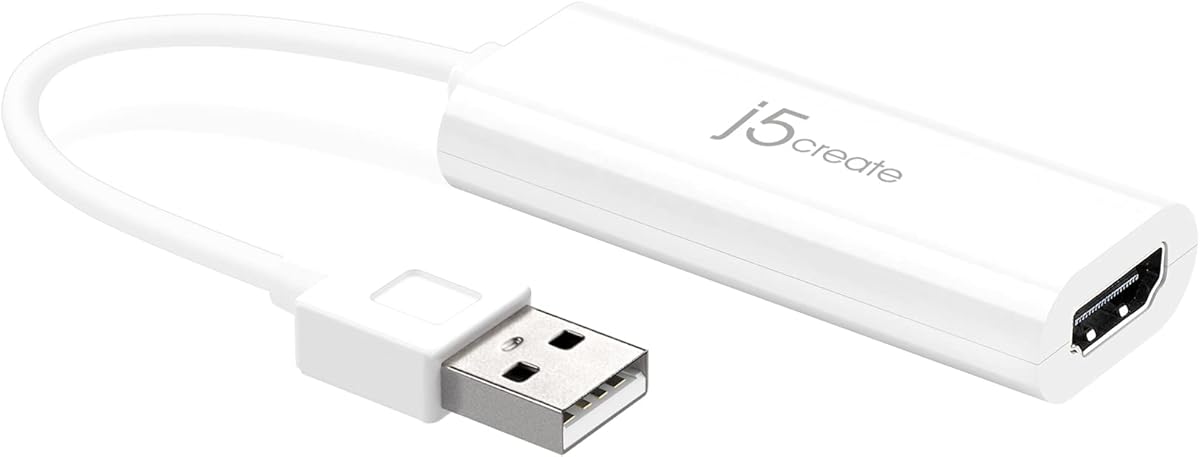
The j5create adapter offers a straightforward solution for adding external monitors. It supports 1080P output suitable for general office work. Hot-swappable USB allows easy changes without rebooting the system.
We may earn a commission when you buy through this link, at no additional cost to you.
Key strengths include its reputation for reliability and high user ratings. Setup is intuitive though drivers are needed. It effectively expands workspace for multitasking without complex configuration.
Limitations are basic resolution compared to newer 4K models. However, for text and data tasks, this is sufficient. Users appreciate its simplicity in expanding desktop space.
Best for users needing a simple extra display. Ideal for administrative roles or stock traders. If you just need one more screen for productivity, this adapter delivers.
Add a second screen with minimal setup for improved workflow.
Hot-swapping allows you to connect or disconnect without restarting.
We may earn a commission when you buy through this link, at no additional cost to you.
Selecting the right adapter requires understanding key factors like resolution and compatibility.
Ensure the adapter supports your monitor's native resolution. 1080P is standard for most office work while 4K suits media production. Higher resolutions require USB 3.0 or Thunderbolt for bandwidth.
Choose higher resolution if you need crisp visuals for design work.
Check if the adapter supports your OS. Some models are Windows-only while others include macOS or Linux. Always verify driver availability for your specific OS version to avoid installation issues.
Match the adapter to your primary OS to ensure smooth setup.
Some adapters need manual driver installation which may require admin rights. Others offer plug-and-play simplicity. Consider your technical comfort level when choosing between these two types.
Prioritize plug-and-play if you want minimal setup.
Identify if you need USB-A or USB-C connections. Newer laptops only have USB-C while older ones use USB-A. Ensure the adapter matches your device's physical ports.
Select USB-C for modern devices and USB-A for legacy systems.
If you need multiple screens, check if the adapter supports dual outputs or daisy-chaining. Some models allow connecting up to six monitors via DisplayLink technology for expanded setups.
Look for DisplayLink certification if you plan to add multiple screens.
Most adapters are USB bus-powered but some may need external power. Bus-powered options are convenient as they don't need wall outlets. Verify power needs for your specific use case.
Choose bus-powered adapters for better portability and travel.
Materials like aluminum or durable plastics protect internal components. Heat dissipation is crucial for continuous operation during long meetings. Sturdy connectors prevent wear from frequent plugging.
Opt for metal casings if you use the adapter daily.
A longer warranty period indicates confidence in product longevity. Brands offering responsive customer service help resolve driver issues quickly. Always check return policies before purchasing.
Prioritize brands with at least a one-year warranty.
First plug the adapter into an available USB port on your computer. Wait for the driver to install or connect the software if manual setup is needed.
Once connected plug an HDMI cable from the adapter to your monitor or TV. Your computer should automatically detect the new display allowing you to configure screen layout in system settings.
To maintain performance avoid bending the cable excessively and store it in a cool place. Clean the ports periodically with compressed air to prevent dust buildup that might affect connectivity.
Most adapters require drivers to function correctly especially those using DisplayLink technology. Plug-and-play models exist but may have limited resolution support. Always check product specs for driver requirements before purchasing to ensure compatibility with your OS.
Many adapters support macOS but verify OS version compatibility explicitly. Newer Macs with Apple Silicon may need specific adapters like DisplayLink certified ones. Check the product description to confirm macOS support before buying.
While some adapters work with USB 2.0 they often reduce resolution to 640×480. For 1080P or higher resolution use USB 3.0 or USB-C ports for sufficient bandwidth. USB 2.0 is generally only suitable for basic displays.
Some adapters support 4K 30Hz but not all models offer 60Hz refresh rates. Check the specs carefully for 4K support requirements. Usually USB-C or Thunderbolt connections are needed for stable 4K performance.
Only adapters with dedicated charging ports allow simultaneous charging. Standard adapters draw power from your computer instead. If you need charging while presenting look for models with integrated USB-C pass-through charging.
Limited support exists for Linux and mostly for specific open-source drivers. Always check vendor documentation for Linux compatibility notes. If Linux is your primary OS consider adapters with explicitly listed Linux support.
We explored ten adapters balancing affordability and performance for diverse users. Top picks like the Reborn adapter offer budget solutions while WAVLINK supports multiple monitors for professionals.
Prioritize compatibility and resolution based on your specific needs to ensure the device fits your workflow. Whether for a quick presentation or home theater setup the right adapter enhances your productivity significantly.
Remember that prices fluctuate often so check current listings before purchasing. Verify warranty terms and return policies to ensure you get the best value for your investment.