
Apevia ITX-AP300W
3.9Editor score
300W Reliable Output
Mini-ITX Flex-ATX Fit
40mm Quiet Cooling
Essential Power Ports
This guide compares the top low power PSU options for compact builds and energy efficiency, helping you select the right unit for your specific system needs
Finding the right low power PSU is essential for building efficient compact systems that run quietly without wasting electricity. These units are designed to deliver stable power while minimizing energy consumption and heat output for reliable operation.
We compared ten top-rated models based on efficiency ratings, connector types, cooling performance, and overall reliability. Each entry was selected for its ability to support small form factor builds or energy-conscious desktop configurations effectively.
Each pick shows key specifications and user feedback to help you make an informed decision for your next build. Please note that product availability and pricing can change frequently so verify details before purchasing your chosen unit.
3.9Editor score

4.6Editor score

5.0Editor score
This side-by-side comparison highlights the key differences between all ten selected power supply units. Use this table to quickly identify which model offers the best balance of wattage, form factor, and features for your specific build requirements.




The Thermaltake Smart 500W stands out as a top contender for users seeking a reliable low power PSU without breaking the budget. With a solid 4.6 rating from verified buyers it delivers consistent performance for standard builds. Its 80 PLUS White certification ensures you get at least 80 percent efficiency under typical loads which translates to less wasted energy and lower heat output.
We may earn a commission when you buy through this link, at no additional cost to you.
This unit features a powerful 120mm cooling fan designed for ultra-quiet operation. The Active PFC technology helps stabilize voltage and improve overall system efficiency. It supports multiple PCI Express connectors and adheres to strict Intel ATX standards ensuring compatibility with most modern motherboards. The industrial grade protections guard against overvoltage overcurrent and short circuits giving you peace of mind during operation.
While the lack of modular cables might be a minor drawback for clean builds the fixed wiring is robust and sufficient for most cases. The non-modular design means you will have to route unused cables carefully to avoid airflow obstruction. However given the price point these trade-offs are acceptable for many users who prioritize raw performance and reliability over aesthetics.
If you are building a standard office PC or a budget gaming rig this power supply offers excellent value. It provides enough wattage for mid-range components while keeping energy costs down. We recommend this model for anyone who needs a dependable power source that balances efficiency and cost effectively for everyday computing tasks.
The 80 PLUS White certification ensures that the unit converts AC power to DC power with minimal loss reducing electricity bills and heat generation significantly.
Built-in protections against overvoltage overload and short circuits protect your sensitive components from electrical surges and unexpected power failures during use.
We may earn a commission when you buy through this link, at no additional cost to you.
The Apevia ITX-AP300W is an ideal choice for budget-conscious builders looking to create compact systems without overspending. With a 300W output it is specifically engineered for standard Mini-ITX Flex-ATX and 1U cases. While it carries a slightly lower rating than premium models it delivers stable power for basic computing tasks and home theater PCs effectively.
We may earn a commission when you buy through this link, at no additional cost to you.
This power supply includes versatile connectivity options with separable 24-pin and 8-pin CPU connectors that support both modern and legacy motherboards. The built-in 40mm double ball-bearing fan offers thermal speed control for quiet operation under varying loads. It also comes with a full industrial safety suite including overvoltage and overcurrent protection to safeguard your components.
One thing to note is the manual voltage selector switch which defaults to 115V for North American outlets. International users must toggle this switch to 230V to prevent damage ensuring safe operation in different regions. While this adds a step to setup it ensures versatility across different power grids worldwide.
This unit is perfect for HTPC builds retail POS systems or compact servers where high wattage is not required. If you need a simple reliable power source for low power components this model provides excellent functionality for the price. Just ensure your case supports the specific form factor before purchasing.
Engineered specifically for small form factor cases this unit fits snugly into Mini-ITX and Flex-ATX chassis making it perfect for space-saving builds.
Separable main and CPU connectors allow you to adapt to different motherboard requirements seamlessly whether you are using a legacy or modern system.
We may earn a commission when you buy through this link, at no additional cost to you.
The Apevia ITX-PFC500W brings fully modular convenience to the small form factor market with a robust 500W output. This unit is designed for Mini-ITX and FLEX ATX configurations allowing users to connect only the cables they need. The 4.1 rating suggests consistent performance for those needing a clean and organized internal layout in compact builds.
We may earn a commission when you buy through this link, at no additional cost to you.
It features a full range Active PFC system that works across 90 to 264 volts making it versatile for different power environments. The connector set includes standard PCIe and SATA options to support modern storage and graphics cards. A 40mm double ball bearing fan provides forced air ventilation though it may generate some noise under heavy loads.
Installation requires attention as the unit will not power on without proper cable connections to the PC components. The split connectors for CPU and motherboard allow flexibility for boards requiring specific pin counts. While the fan is small it keeps the unit cool during typical office or media center usage scenarios.
Buyers seeking a clean look in an ITX case will appreciate the modular capability of this power supply. It balances power delivery with cable management options well for small builds. Just be mindful of the fan size if you prioritize silence in your environment over compact dimensions.
The fully modular design allows you to attach only necessary cables reducing clutter and improving airflow within tight small form factor chassis.
Full range Active PFC supports a wide voltage input from 90 to 264 volts ensuring stable operation regardless of local electrical standards.
We may earn a commission when you buy through this link, at no additional cost to you.
The MSI MAG A650BE offers a compelling mix of power and efficiency with its 80 Plus Bronze certification and 650W output. This unit targets users who need more wattage for modern components while maintaining a compact footprint. Its high 4.7 rating reflects satisfaction with its low noise performance and robust build quality.
We may earn a commission when you buy through this link, at no additional cost to you.
Featuring a low-noise fan this power supply keeps acoustic levels down even under moderate loads. The semi-modular design provides some cable management benefits by allowing you to disconnect non-essential cables. Industrial level protections including OVP and OCP ensure your system remains safe from electrical anomalies during extended operation periods.
The Active PFC design helps maintain high power factor efficiency reducing energy waste and heat. DC-DC circuit design ensures stable voltage delivery to critical components like the processor and memory. While not fully modular the fixed cables are well-organized to minimize clutter in most standard ATX cases.
This model is a great choice for gamers or creators needing a balance between wattage and efficiency. The five year warranty adds confidence in its longevity for long-term projects. If you want reliable power with a touch of premium features at a reasonable cost this unit delivers well.
DC-DC circuit technology ensures that voltage levels remain stable even when component loads fluctuate providing consistent power to your system.
A five year warranty coverage demonstrates the manufacturer's confidence in the unit's durability and reliability for long term daily use.
We may earn a commission when you buy through this link, at no additional cost to you.
The NovaMist unit stands out with a high 4.7 rating and Bronze certification for efficient power conversion. It promises reliable operation with a five year limited warranty that ensures long term security for your hardware. The low noise fan keeps your system running quietly while managing internal heat effectively during regular computing sessions.
We may earn a commission when you buy through this link, at no additional cost to you.
This power supply delivers consistent power for standard setups without requiring complex cable management. Its compact design fits well in many mid tower cases where space is a constraint. The protection circuits work silently in the background to shield your components from voltage spikes and electrical failures.
While it does not feature modular cables the fixed design is straightforward for users who do not prioritize aesthetics over functionality. The Bronze certification indicates it meets specific efficiency targets to save on electricity costs over time. It is a no-frills option that focuses on core performance and reliability.
Buyers looking for a dependable power source without extra features will find this unit fits the bill perfectly. It provides the necessary wattage and protection for everyday tasks and gaming. Ensure you check compatibility with your case before installation to avoid any fit issues.
Bronze certification ensures the unit operates at high efficiency levels reducing wasted energy and lowering your overall electricity usage.
The low noise fan design minimizes acoustic disturbance making this unit suitable for quiet offices and bedroom setups.
We may earn a commission when you buy through this link, at no additional cost to you.
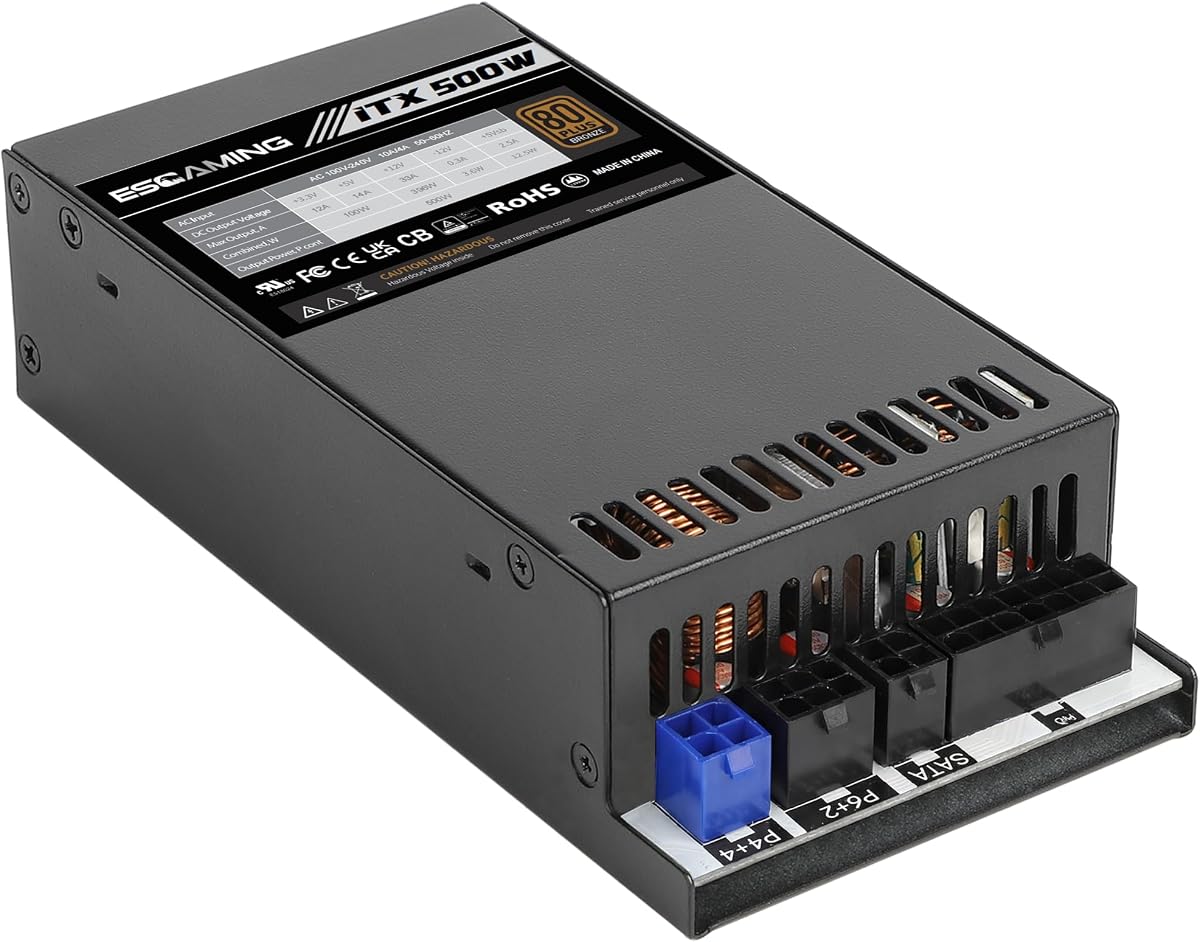
The ESGAMING Fully Modular power supply brings Gold certification to compact ITX builds offering top tier efficiency. With up to 85 percent efficiency at typical loads it reduces energy waste and heat output effectively. The 4.0 rating suggests users appreciate its clean installation and reliable output for daily operations.
We may earn a commission when you buy through this link, at no additional cost to you.
Its fully modular cable system simplifies installation and improves airflow in small chassis. This design allows you to use only necessary wires for a clutter-free build inside compact cases. Active PFC technology supports a wide voltage range ensuring stability across different electrical standards worldwide.
Connectors include standard options for motherboards and graphics cards providing versatility for different component configurations. While it is designed for compact builds it still offers sufficient power for mid-range systems. The unit requires proper connection to power on ensuring safety during setup procedures.
If you are building a high-performance small form factor PC this unit delivers the efficiency and cleanliness you need. It is particularly useful for silent builds where airflow and minimal resistance are priorities. Verify local support and compatibility before purchasing to ensure a smooth setup experience.
Gold certification guarantees the unit meets strict efficiency standards reducing heat and noise while saving energy over long term use.
Fully modular cables give you full control over routing and airflow making it easier to build clean systems.
We may earn a commission when you buy through this link, at no additional cost to you.
The Apevia TFX-PFC500W is a high-performance unit designed specifically for small form factor cases requiring TFX compatibility. With a 500W output it delivers reliable power for gaming and workstation tasks. The 4.2 rating reflects a balance of performance and affordability for compact system builders.
We may earn a commission when you buy through this link, at no additional cost to you.
It features a silent-start fan that engages only when necessary to reduce noise during light loads. Auto-switching universal power eliminates the need for manual voltage toggles protecting the unit from incorrect settings. The heavy-duty 12V rail ensures stable performance for graphics cards and other power-hungry components.
Connectors include standard options for modern builds ensuring compatibility with a wide range of components. The fixed cable design simplifies routing but may limit airflow in tighter enclosures. Industrial protections guard your system against electrical faults during operation keeping hardware safe from damage.
This unit is ideal for SFF enthusiasts who need a TFX compliant power supply with strong capabilities. It provides a clean installation experience without complex manual switches. Ensure your case supports the TFX shape before purchase to guarantee a proper fit.
The silent-start fan technology reduces noise by spinning only when temperatures rise keeping your system quiet during light usage.
Automatic voltage detection adjusts to your local electrical standard preventing damage and ensuring stable power delivery across regions.
We may earn a commission when you buy through this link, at no additional cost to you.
The APEVIA VENUS500W provides a reliable power source for standard ATX builds with a strong 500W output. Its large 120mm fan ensures efficient temperature management even under continuous load. The 3.9 rating suggests it is a solid choice for basic users who prioritize value and reliability.
We may earn a commission when you buy through this link, at no additional cost to you.
It includes a comprehensive protection suite that safeguards your system from overvoltage overcurrent and short circuits. The auto-thermally controlled fan adjusts speed based on internal heat to maintain quiet operation. Precise voltage regulation ensures components receive stable power reducing the risk of system instability.
The manual voltage switch requires attention to ensure safe operation in different regions. Connectors support legacy drives and modern storage providing versatility for various hardware configurations. While it lacks advanced efficiency ratings it delivers consistent power for everyday computing tasks.
If you are building a budget PC or workstation this unit offers essential protection and cooling features. It is suitable for users who do not require high efficiency but need dependable power delivery. Always check voltage settings before first use to prevent hardware damage.
The 120mm fan provides ample airflow to keep internal temperatures low preventing overheating during extended use.
Precise voltage regulation ensures that all components receive stable power reducing the risk of crashes and hardware damage.
We may earn a commission when you buy through this link, at no additional cost to you.
The 600W Flex ATX PSU is a premium option designed for high efficiency and clean installations. With over 92 percent efficiency it generates minimal heat and reduces fan noise effectively. The perfect 5.0 rating highlights exceptional satisfaction among users who value reliability and advanced features.
We may earn a commission when you buy through this link, at no additional cost to you.
It features a fully modular design with black embossed PVC cables for organized builds. The built-in silent 4020 ball-bearing fan ensures ultra-quiet operation even under load. Japanese capacitors deliver stable output and long-term reliability for demanding applications like networking and surveillance systems.
Support for modern 16-Pin connectors makes it future-proof for high-performance GPUs requiring advanced power standards. Comprehensive protection mechanisms safeguard your hardware against electrical faults and surges. While the price is higher the performance and reliability justify the investment for serious builds.
This unit is best for enthusiasts and professionals needing a powerful compact power supply. It excels in scenarios requiring silent operation and high stability. Ensure your case supports Flex ATX dimensions before purchasing to guarantee compatibility.
The standard 16-Pin connector supports modern high-power GPUs delivering stable power for next generation graphics cards.
A high-quality ball-bearing fan minimizes noise keeping the system quiet even under heavy thermal loads.
We may earn a commission when you buy through this link, at no additional cost to you.
The Smart W3 Series 600W meets the latest ATX v3.1 specification providing compatibility with modern motherboards. Its 80PLUS certification ensures efficient power conversion reducing energy waste. The 4.6 rating reflects a strong performance profile for general and gaming desktops.
We may earn a commission when you buy through this link, at no additional cost to you.
A 120mm FDB cooling fan ensures quiet and reliable operation during extended use. DC to DC design provides robust +12V rail output for stable system performance. Industrial grade protection covers all major electrical risks protecting your components from unexpected failures.
Flat black cables make routing easier within standard cases though they are not modular. The five year warranty coverage adds confidence in the unit's long-term reliability. This design prioritizes function and stability for typical users.
If you need a modern compliant power supply at a reasonable price this model fits the bill. It offers solid performance for daily tasks and gaming workloads. Check your case compatibility to ensure it fits properly before installation.
ATX v3.1 compliance ensures this unit works seamlessly with the latest hardware standards for a longer useful life.
The FDB fan technology reduces friction and noise delivering quiet performance even when the system is under load.
We may earn a commission when you buy through this link, at no additional cost to you.
Selecting the right low power PSU requires evaluating several key factors to ensure compatibility and efficiency for your specific build. This section breaks down the most important features to consider before making a purchase.
Ensure the power supply matches your case requirements such as ITX TFX or ATX. A mismatched size can lead to installation issues or poor airflow inside the chassis. Always measure your case dimensions before buying to guarantee a proper fit.
Check your case dimensions carefully to confirm the PSU fits within the designated space without obstructing other components.
Calculate the total power draw of your components to choose a unit with sufficient wattage. Underpowering can lead to system instability while overpowering may reduce efficiency. For compact builds a range of 300W to 600W is often ideal.
Choose a wattage that meets your needs without excessive surplus to maintain optimal energy efficiency.
Look for 80 PLUS certification ranging from White to Gold or Platinum. Higher ratings mean less energy is wasted as heat improving overall system efficiency. This is especially important for low power builds where thermal management is critical.
Select a unit with a rating that balances performance and energy savings for your specific usage.
Modular units allow you to connect only necessary cables improving airflow and aesthetics. Fixed cables are generally more affordable but can create clutter in small cases. Decide based on how much you value clean cable management.
Prioritize modular options if you want a tidy build or fixed cables if budget is your main constraint.
Verify that the PSU includes all connectors needed for your motherboard GPU and storage devices. Common types include 24-pin main 8-pin CPU and PCIe for graphics. Missing connectors can make the unit unusable for your hardware.
Ensure all essential connectors are present to avoid needing adapters or extensions.
A good low power PSU should have protections against overvoltage overcurrent and short circuits. These features prevent electrical faults from damaging your expensive components during operation. Always check the technical specifications for safety ratings.
Always verify that the unit includes comprehensive electrical safety protections for your peace of mind.
Consider the size and type of fan included with the power supply. Larger fans usually move more air at lower speeds reducing noise levels. Silent technologies like fluid dynamic bearings can also help keep operation quiet.
Look for larger fans or silent technologies if noise reduction is a priority for your environment.
A longer warranty indicates the manufacturer's confidence in product longevity. Units with five year coverage often offer better reliability and customer support options. Check the brand reputation before committing to a purchase.
Choose models with longer warranties to ensure better long term protection and service support.
Install the power supply in a well-ventilated area inside your case to allow optimal airflow. Secure it firmly using the provided screws to prevent vibration damage during operation. Connect all necessary cables securely to ensure stable power delivery.
Keep the exterior vents clean from dust using compressed air every few months. Dust buildup can cause overheating and reduce the efficiency of the cooling fan. This simple maintenance step extends the lifespan of your unit significantly.
Avoid overloading the PSU with components that exceed its rated wattage. Always double check your total system power draw before turning on the device for the first time. Regular monitoring of system temperatures helps detect potential issues early.
A low power PSU typically refers to units ranging from 300W to 600W designed for small or energy-efficient systems. These units provide sufficient power for standard desktops and compact builds without excess energy consumption.
Modular PSUs offer better cable management and airflow which is crucial for small form factor cases. While they cost more the cleaner look and reduced heat make them a worthwhile investment for many users.
Yes provided your graphics card and processor requirements stay within the unit's wattage rating. Most modern games run well on 500W units if you avoid high-end GPU configurations.
Consult your case manual or specifications online to verify the supported power supply dimensions. Measuring the space inside your chassis with a tape measure also ensures a proper fit.
It guarantees a minimum efficiency level which reduces energy waste and heat generation. This certification helps you identify reliable units that save on electricity costs over time.
Modern GPUs often require PCIe 8-pin or 16-pin connectors so check your card requirements. Most standard units include these but high-end models may need adapters for compatibility.
We have reviewed ten excellent options ranging from budget ITX models to premium Gold certified units. Each provides unique advantages depending on your case type and power needs for your specific setup.
Prioritize efficiency and form factor when selecting a power supply to ensure your system runs quietly and reliably. Investing in a quality unit with proper protections will safeguard your hardware against electrical issues.
Remember to check current pricing and availability before purchasing as these details can change frequently. Verify all compatibility requirements to ensure a smooth installation and stable long-term performance.