
VEIKK VK1200 V2
4.3Editor score
Full laminated display
8192 pressure levels
Single cable connectivity
Finding an affordable pen display can be challenging for artists on a budget. We have curated a list of the most cost effective options available today. Each model offers a balance of quality and value for digital creators.
Our team analyzed technical specifications user reviews and real world performance data. We focused on pressure sensitivity color accuracy and connectivity options. This ensures you get a reliable tool without breaking the bank.
Each pick highlights key strengths and potential limitations for different users. Prices fluctuate frequently so always verify the current deal before purchasing. We aim to help you make an informed decision for your creative workflow.
4.3Editor score

4.4Editor score

4.5Editor score
As an Amazon Associate we earn from qualifying purchases.
This side by side comparison highlights the core specifications of all ten selected pen displays. Review the screen size color gamut and connectivity options to find the perfect match for your needs.




The XP-PEN Artist12 stands out as a top contender for those seeking a reliable entry-level pen display. It balances cost and performance effectively making it a popular choice among students and hobbyists. The display quality is crisp with vivid colors that help bring your digital sketches to life.
We may earn a commission when you buy through this link, at no additional cost to you.
Its battery-free pen offers 8192 levels of pressure sensitivity which provides a natural drawing experience. The tilt function adds versatility for shading and brush effects without needing complex setup. Compatibility with major creative software ensures you can start working immediately on Windows or Mac systems.
While it lacks a single cable solution the included ports allow for stable connectivity. The screen protector reduces glare effectively enhancing the paper-like feel during use. Some users may find the need for an HDMI port limiting if their laptop only has USB-C.
We recommend this tablet for artists who want a proven device without overspending. It is suitable for digital painting photo editing and online teaching. For those starting their journey in digital art this model offers a solid foundation for growth.
A battery-free pen ensures you never face interruptions due to charging. The pressure sensitivity tracks accurately allowing for precise strokes and detailed work.
Works with Photoshop Illustrator and many other creative tools. Drivers are easy to install and customize for different workflows.
We may earn a commission when you buy through this link, at no additional cost to you.
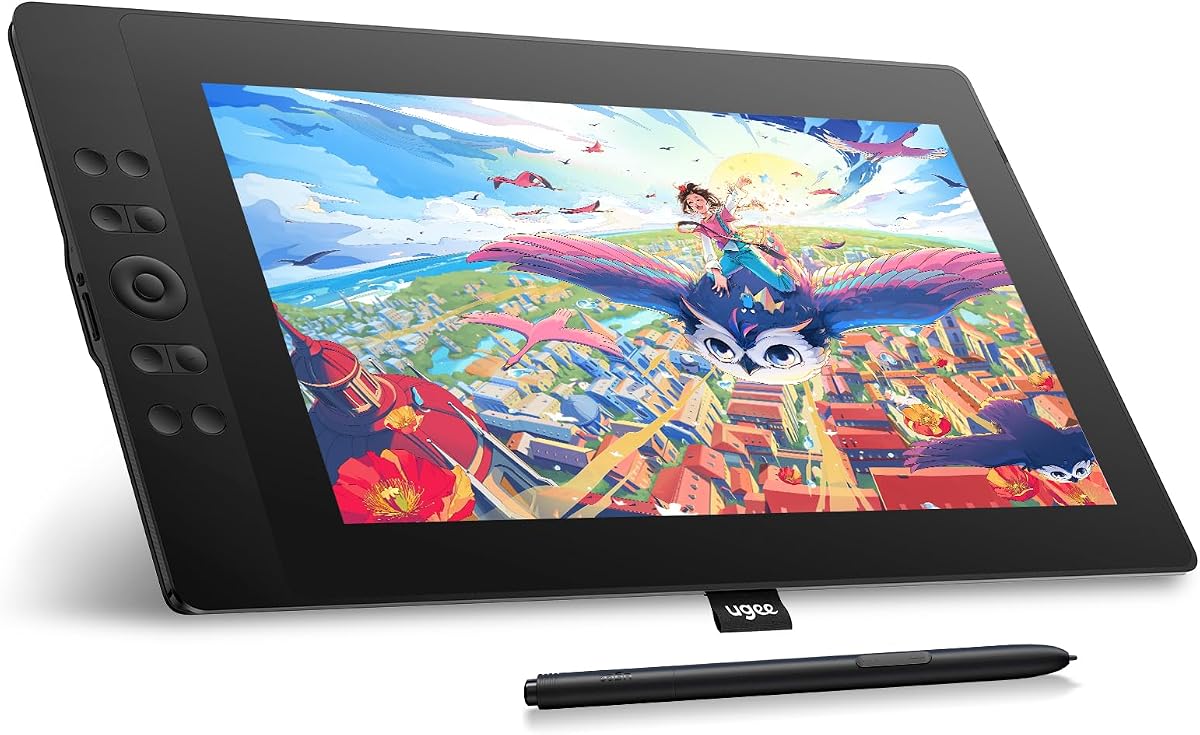
The VEIKK VK1200 V2 is an excellent choice for users prioritizing simplicity and portability. Its full-laminated screen minimizes parallax providing a more accurate drawing experience. The single USB-C cable simplifies setup significantly compared to multi-cable alternatives.
We may earn a commission when you buy through this link, at no additional cost to you.
With 8192 levels of pressure sensitivity the pen responds well to touch and pressure changes. The anti-glare glass protects the screen and adds to the natural feel. Two pens and multiple nibs are included extending the value of the package.
Color accuracy is decent though not industry-leading for professional printing. The driver software is functional but may require some time to master fully. However for casual users and students this device offers substantial value for the price.
Choose this model if you need a straightforward tool for quick sketches or lessons. It is ideal for those who value ease of connection and a clean desk setup. The lightweight build makes it easy to transport between locations.
Using one USB-C cable reduces clutter and simplifies setup. This is perfect for mobile creators or limited desk spaces.
Reduced parallax means your pen tip matches the cursor exactly. This increases confidence and accuracy during detailed work.
We may earn a commission when you buy through this link, at no additional cost to you.
The HUION Kamvas 13 Gen 3 offers advanced features typically found in more expensive models. Its factory calibration ensures color accuracy right out of the box which is vital for design work. The dual dials provide quick access to brush size and zoom settings.
We may earn a commission when you buy through this link, at no additional cost to you.
Pressure sensitivity reaches 16384 levels allowing for nuanced control over line weight. The Anti-Sparkle Canvas Glass 2.0 reduces glare while maintaining clarity. This model is well-suited for professionals or serious hobbyists needing reliable color performance.
The premium nature comes with a higher cost compared to basic options. You may need to purchase a stand separately for comfortable use. However the build quality and features justify the investment for dedicated creators.
Invest in this tablet if you need precision and color fidelity for client work. It is excellent for digital painting and detailed illustration. The improved workflow tools help maintain efficiency during long creative sessions.
Two dials allow rapid adjustments without using software menus. This streamlines your process and keeps you focused on art.
Factory calibration ensures colors look consistent across devices. This is essential for professional deliverables and prints.
We may earn a commission when you buy through this link, at no additional cost to you.
The GAOMON PD1161 provides a versatile platform for artists who want quick access to tools. Its eight programmable shortcut keys allow you to map commands to physical buttons for efficiency. The matte film reduces glare and enhances the writing feel significantly.
We may earn a commission when you buy through this link, at no additional cost to you.
With tilt support and 8192 pressure levels the pen offers good control over strokes. The driver software is generally compatible with major platforms. This model is a strong candidate for those needing a functional tool for various tasks.
You will need a separate power adapter which adds to the cable clutter. Driver performance can vary depending on system configuration and updates. However the hardware reliability is solid for regular daily use.
Pick this tablet if you value customization and a traditional drawing feel. It is great for concept art and general digital illustration. The balance of features makes it a practical choice for home studios.
Programmable keys speed up your workflow by reducing clicks. You can map undo redo or brush selection easily.
The pre-installed matte film protects the screen and adds texture. It mimics paper and reduces eye strain.
We may earn a commission when you buy through this link, at no additional cost to you.
The Artisul D16 offers a generous 15.6 inch workspace at an attractive price point. This larger screen helps with detailed work and provides more room for toolbars. The full-laminated construction ensures accurate cursor positioning across the active area.
We may earn a commission when you buy through this link, at no additional cost to you.
A dedicated dial adds another layer of control for brush sizes or zooming. The battery-free stylus performs well with 8192 pressure levels. Refurbished models often provide significant savings while maintaining functionality.
Since this is a refurbished unit checking the warranty terms is essential. Driver support may not be as robust as newer brands. However the hardware itself is durable and provides a solid drawing experience.
Select this if you need a big canvas on a tight budget. It suits animators or designers who require more screen real estate. The larger size can improve ergonomics during long sessions.
A bigger screen reduces zooming and panning frequency. This helps maintain focus on the details of your art.
The quick dial allows instant changes to tool settings. This keeps your workflow smooth and uninterrupted.
We may earn a commission when you buy through this link, at no additional cost to you.
The UGEE UE16 stands out for its impressive color gamut of 143 percent sRGB. This allows for richer more vibrant colors which are critical for digital painting. The large screen offers ample space for creating complex artworks comfortably.
We may earn a commission when you buy through this link, at no additional cost to you.
With 16K pressure levels the pen captures subtle nuances in your strokes. The screen supports multiple color modes including Adobe RGB and DCI-P3. This flexibility is beneficial for designers working across different media formats.
The setup may involve managing multiple cables depending on your system. Driver software requires time to master the customization options fully. Despite this the visual quality is a strong selling point for creatives.
Choose this tablet if color accuracy and screen size are your top priorities. It is suitable for illustrators needing vivid hues for illustrations. The extra space and pressure sensitivity support professional-grade work.
Multiple color modes let you preview how art will look in print or web. This prevents color mismatches later in the process.
16K pressure levels detect minute changes in pen tilt and force. This enhances control for fine lines and shading.
We may earn a commission when you buy through this link, at no additional cost to you.
The VEIKK VK1200 is designed for beginners who want an easy entry into digital art. Its simple interface and reliable performance make it a stress-free option. The included two pens and accessories provide good value out of the box.
We may earn a commission when you buy through this link, at no additional cost to you.
With 8192 pressure levels and tilt support it covers the essentials for most drawing tasks. The six shortcut keys offer quick access to common functions. It is a solid choice for students or hobbyists just starting out.
Color accuracy is adequate for screen work but not for print production. The pressure range is standard but may lack the depth needed for advanced techniques. However it meets the needs of a wide range of casual users.
Opt for this if you are new to pen displays and want simplicity. It is great for learning basics and digital sketching. The user-friendly design helps build confidence without technical hurdles.
Setup is straightforward with no complex tools needed. You can start drawing almost immediately after unboxing.
Two pens and a glove mean you are prepared for long sessions. Spare nibs ensure you never stop due to wear.
We may earn a commission when you buy through this link, at no additional cost to you.
The RubensTab T11 Pro is unique as it works independently without a computer. This makes it ideal for sketching anywhere or taking notes on the go. The 5-hour battery life supports sessions away from power outlets.
We may earn a commission when you buy through this link, at no additional cost to you.
It comes with pre-installed apps covering most basic drawing needs. The responsive pen and touch screen make navigation intuitive. This device bridges the gap between tablets and specialized drawing monitors.
The screen is smaller than full desktop displays which may limit complex layouts. App selection is not as vast as PC software. However for casual use and portability it offers unmatched convenience.
Choose this if you need a portable solution for travel or meetings. It is excellent for concept artists or students needing quick notes. The standalone nature removes dependency on external hardware.
Take your art anywhere without carrying a laptop. This is perfect for creative ideas on the move.
No need for drivers or cables to start creating. The device is ready to use out of the box.
We may earn a commission when you buy through this link, at no additional cost to you.
The VEIKK VK1200V2 offers a competitive mix of specs for a mid-range price. It features 16K pressure levels which provide finer control over line weight. The color gamut of 120 percent sRGB delivers vivid and lifelike visuals.
We may earn a commission when you buy through this link, at no additional cost to you.
The full-laminated design minimizes the gap between pen and cursor for accuracy. Two styluses ensure you have a backup ready for long workdays. This model is a strong contender for serious amateurs.
You may encounter driver quirks depending on your operating system version. Connectivity requires standard ports which may limit some modern setups. However the hardware specs are robust for the cost.
Pick this if you want higher pressure levels without a high price tag. It is suitable for detailed illustration and digital painting. The value proposition is strong for those growing their skills.
16K levels allow for more nuanced strokes than standard pens. This improves the precision of your creative work.
120 percent sRGB ensures colors are vibrant and clear. This helps in accurate representation of your art.
We may earn a commission when you buy through this link, at no additional cost to you.
The XPPen Artist 12 Pro Lite offers a refined experience in a compact package. Its red dial adds a convenient control point for zooming or brush adjustments. The full-laminated screen provides a smooth and accurate drawing surface.
We may earn a commission when you buy through this link, at no additional cost to you.
With tilt support and 8192 pressure levels it covers the essentials for digital art. The design is sleek and portable making it easy to carry. This model balances performance with a minimalist aesthetic.
The dial is a standout feature that adds value to the user experience. Connectivity is straightforward but lacks single-cable power options. Overall it is a reliable choice for daily creative tasks.
Opt for this if you want a compact tool with a useful dial feature. It suits illustrators who prefer streamlined controls. The build quality ensures longevity for regular use.
The red dial allows quick adjustments without touching menus. This keeps your workflow efficient during creation.
Tilt support enhances brush shading capabilities significantly. This adds depth to your sketches and paintings.
We may earn a commission when you buy through this link, at no additional cost to you.
Selecting the right pen display involves considering screen size pressure sensitivity and connectivity. Use this guide to identify features that match your artistic needs and budget.
Screen size impacts your workspace and portability. Smaller screens around 11 inches are easy to carry but may feel cramped. Larger screens up to 15 inches provide more space for detail work.
Choose a size that fits your desk and travel habits.
Pressure sensitivity determines how the pen reacts to touch. Standard levels are 8192 but 16384 offers more nuance. Higher levels help in creating subtle line variations.
Look for at least 8192 levels for a natural feel.
Color accuracy ensures your art looks as intended. Look for high sRGB or Adobe RGB coverage. Full laminated screens reduce parallax and improve color consistency.
High color gamut is vital for professional design work.
Connectivity affects setup complexity. USB-C single cable is ideal for modern laptops. HDMI and USB combinations work well with older systems.
Ensure your computer has compatible ports before buying.
A battery-free pen is convenient and reliable. Tilt support adds versatility for shading. Check for included nibs and accessories in the box.
A good pen is essential for long drawing sessions.
Drivers and software support vary by brand. Ensure the device works with your preferred art tools. Compatibility with major OS versions prevents issues.
Check compatibility lists on manufacturer websites.
Warranty terms provide peace of mind for electronics. One year coverage is standard. Good technical support helps resolve driver or hardware issues quickly.
Prioritize brands with responsive customer service.
Install the drivers from the manufacturer website before connecting the tablet. Ensure your operating system is up to date for best performance. Follow the on-screen setup wizard to calibrate the display.
Keep the screen clean using a soft microfiber cloth to avoid scratches. Avoid applying too much pressure with the pen to protect the coating. Use an artist glove to prevent smudges during work.
Store the tablet in a dry place away from direct sunlight. Disconnect cables carefully to prevent damage to ports. Regular updates to drivers keep the device running smoothly.
Most pen displays require a computer with HDMI or USB-C ports. However some newer models support Android devices with USB OTG. Check compatibility details before connecting to a phone.
Full-laminated screens reduce the gap between pen and cursor. This minimizes parallax and improves accuracy. It also enhances color consistency and viewing angles.
Many models in this range are suitable for freelancers. High color accuracy and pressure sensitivity are key. Ensure you calibrate the screen for critical color work.
The pen usually does not need a battery. The display itself requires power via cable from your computer. Some standalone models include internal batteries.
Major apps like Photoshop and Clip Studio Paint work well. Drivers support common tools on Windows and Mac. Check specific driver requirements for each software.
Pen displays allow for natural note-taking and annotation. They integrate well with Zoom and Teams. This makes them ideal for virtual classrooms and presentations.
We reviewed ten affordable options offering various features for digital artists. Each model balances cost with performance in its own way.
Consider your primary workflow needs when selecting a display. Portability and screen size are important factors.
Always check the latest pricing and stock before purchasing. Deals change frequently in the tech market.