
TEACHUCOMP Keyboard Shortcuts Sticker
4.8Editor score
No-Residue Adhesive Formula
Large 3.25 by 3.25 Inch
Laminated for Durability
Alphabetized Shortcut Layout
Finding the right Mac Keyboard Shortcut Sticker can transform how you interact with your MacBook every day. These small decals place essential commands directly under your fingertips, reducing reliance on menus and mouse clicks for common tasks. Whether you are a student, creative professional, or senior user, having a visual reference nearby accelerates learning and streamlines your workflow significantly.
We evaluated ten highly rated sticker options based on clarity, durability, adhesive quality, and layout efficiency. Our comparison considers compatibility across various MacBook models including Air, Pro, and Neo variants from recent years. We also examined user feedback regarding residue removal and print longevity to ensure you select a product that withstands daily typing friction and palm rest contact over time.
Each pick in this list highlights specific strengths such as universal fit, specialized Excel shortcuts, or premium vinyl materials. You will find detailed breakdowns of features, pros, and cons for every product to help you make an informed decision. Please note that availability and pricing may fluctuate, so verify current details before purchasing to ensure you get the best value for your needs.
4.8Editor score

4.6Editor score

4.6Editor score
As an Amazon Associate we earn from qualifying purchases.
The following table provides a side-by-side comparison of all ten products reviewed in this guide. We highlight key specifications including compatibility, material type, and unique features to help you quickly identify the best match for your specific MacBook model and workflow requirements.


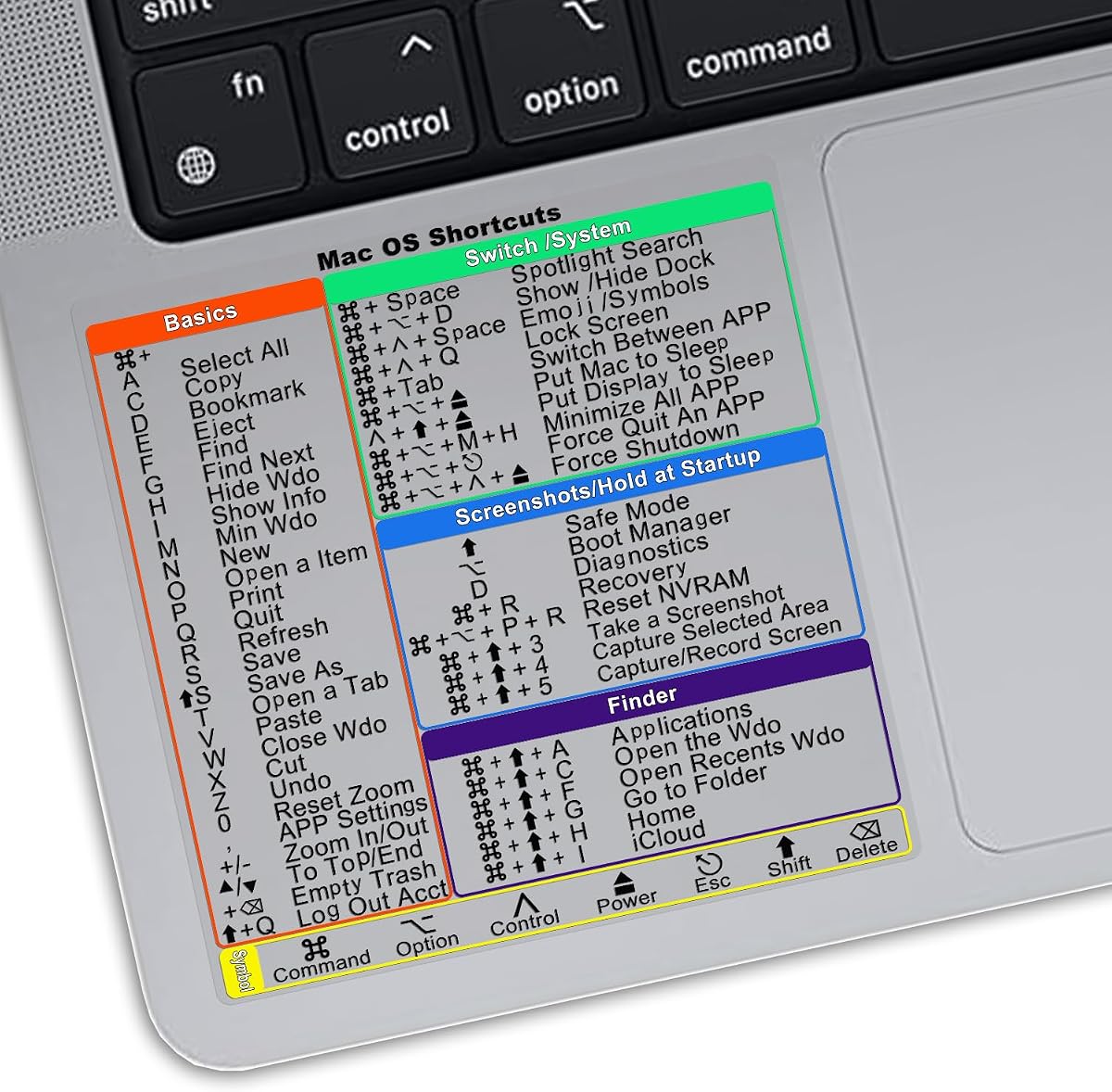


The Synerlogic Mac OS Shortcuts Sticker stands out as a top choice for users seeking a reliable visual guide on their MacBook. With a rating of 4.6 stars, this product delivers essential commands in a clean format that sits comfortably on the palm rest. Its laminated vinyl construction ensures longevity against daily wear and tear.
We may earn a commission when you buy through this link, at no additional cost to you.
This sticker is designed to master Mac shortcuts instantly by keeping important commands visible right where you type. The new adhesive provides a stronger hold than previous versions, reducing the risk of peeling during use. It is versatile enough to fit Air Pro and iMac models regardless of CPU type or macOS version.
While the adhesive is strong, it may leave a light residue when removed though this wipes off easily with warm soapy water. Application requires care to avoid air bubbles so peeling gradually is recommended over removing the entire backing at once. These minor trade-offs are acceptable given the durability and clarity of the printed layout.
Ideal for beginners and power users alike, this sticker helps boost skills and speed up everyday tasks efficiently. Students professionals and seniors will appreciate the easy reference that eliminates the need to search online constantly. We recommend this for anyone wanting a sturdy and clear cheat sheet for their Mac setup.
The new adhesive formula offers a stronger hold to keep the sticker secure during daily typing sessions.
Designed printed and packaged in the USA with responsive customer support and a satisfaction guarantee.
We may earn a commission when you buy through this link, at no additional cost to you.
The SYNERLOGIC Mac OS with Word Excel sticker offers a comprehensive reference for users who rely heavily on productivity apps. Rated 4.7 stars it covers essential Mac shortcuts along with specific commands for Word and Excel on macOS. This dual focus makes it particularly valuable for students and office workers.
We may earn a commission when you buy through this link, at no additional cost to you.
Crafted with military grade durable vinyl this sticker maintains a professional OEM appearance that blends well with Apple hardware. It includes M chip and Intel startup commands ensuring compatibility with models from 2020 to 2022 including 14 and 16 inch Pros. The layout is designed to help you work faster and smarter by keeping tips at your fingertips.
Applying this sticker requires avoiding dust and touching the adhesive directly to prevent bubbles. Peeling the backing in half and applying gradually helps squeeze out air as you go. While the process is meticulous the result is a clean look that does not obstruct the sleek aesthetic of your device.
Whether you are a seasoned professional or a beginner this sticker saves time and frustration by eliminating constant command lookups. It serves as an affordable tool to reach a new level of computer proficiency quickly. We suggest this for Mac users needing specific software shortcuts alongside system commands.
Includes specific Word and Excel shortcuts tailored for Mac users to enhance document productivity.
Works seamlessly with both M chip and Intel Macs including recent 14 and 16 inch models.
We may earn a commission when you buy through this link, at no additional cost to you.
The 2026 Mac OS Shortcuts Sticker is a premium option designed specifically for the latest MacBook Neo alongside Air and Pro models. With a 4.6 rating it emphasizes zero residue adhesive tech that lifts off cleanly without glue marks or discoloration. This makes it ideal for users concerned about preserving their device's surface value.
We may earn a commission when you buy through this link, at no additional cost to you.
Its water repellent matte vinyl shrugs off spills and smudges while the ultra thin 0.10mm profile ensures you barely feel it under your wrists. The layout curates only essentials grouped by task like Basics Navigation and Screenshots for easy scanning. Available in Clear Black Clear White Opaque Black and Pink to match your device finish.
While the design is sleek selecting the right color for your MacBook is key to avoiding a mismatched look. The adhesive is strong enough for daily life but removes easily when you are ready to update or replace it. This balance of protection and removability supports the product's premium positioning in the market.
We recommend this sticker for users of the new 2026 MacBook Neo who want a high quality and damage free solution. The fade resistant print stays sharp for years making it a long term investment for productivity. If preserving your Mac's resale value is a priority this is an excellent choice.
Zero residue adhesive lifts off cleanly to protect your MacBook from damage or discoloration.
Shortcuts grouped by task like Basics Navigation and Screenshots for easy reference at a glance.
We may earn a commission when you buy through this link, at no additional cost to you.
This Mac OS Keyboard Shortcuts Sticker focuses on efficiency by featuring over 50 essential commands in a clean layout. Rated 4.4 stars it is designed for 13 to 16 inch MacBook Pro and Air models with a residue free vinyl that protects your device. It is compatible with various macOS versions from Tahoe to Mojave.
We may earn a commission when you buy through this link, at no additional cost to you.
The user-friendly peel and stick installation makes application simple for users of all skill levels. The removable design allows for hassle free residue free removal ensuring your MacBook surface stays intact. However the clear sticker with black text is best suited for light models like Sky Blue Space Gray Silver and Starlight.
Selecting the right color is crucial for optimal readability especially on darker surfaces where contrast might be low. The durable vinyl resists scratches water and tears to withstand daily typing and palm rest contact over time. While it may not have advanced features the core functionality remains robust for basic needs.
We suggest this for users seeking a straightforward and affordable reference that boosts productivity without clutter. If you have a light colored MacBook this sticker provides quick access to commands to streamline your workflow. It is a solid option for those who prioritize ease of use and durability.
Simple peel and stick installation ensures easy application for users of all skill levels.
Resistant to scratches water and tears to maintain clarity during daily use.
We may earn a commission when you buy through this link, at no additional cost to you.
The KEANBOLL 2-Pack Mac Keyboard Shortcut sticker offers great value by including two sets for use or sharing. With a 4.6 rating it covers 13 to 16 inch MacBook Pro and Air models supporting M1 through M5 chips. The clear design blends seamlessly into the keyboard backlight keeping your Mac aesthetic intact while you learn.
We may earn a commission when you buy through this link, at no additional cost to you.
Laser cut for precision fit it aligns perfectly with US layout spacing to avoid overlapping keys or blocking sensors. The UV resistant ink on scratch-proof vinyl ensures the print stays sharp despite daily typing friction and palm rest contact. This durability makes it suitable for long-term use in active work environments.
While the two pack adds flexibility you must ensure you have enough space on your palm rest for both if applied together. The removable adhesive peels off cleanly to protect resale value but alignment is key to preventing sensor interference. These considerations are minor given the cost savings and clarity of the layout.
Ideal for switchers and beginners this visual guide helps you navigate Final Cut or Logic with confidence. We recommend it for Mac owners seeking a spare set or a gift for a colleague who needs quick reference. It delivers a balance of utility affordability and quality for everyday tasks.
Get a spare set or share with a colleague to extend the benefit of quick references.
UV resistant ink on scratch-proof vinyl withstands daily typing without fading or curling.
We may earn a commission when you buy through this link, at no additional cost to you.
This Mac Keyboard Shortcuts Sticker 3-Pack provides high value with three clear stickers for multiple devices or backups. Rated 4.8 stars it offers universal compatibility for 13 to 16 inch MacBooks and iMacs with Mac Mini support. The Apple silicon support ensures it works with M1 through M5 chip models effectively.
We may earn a commission when you buy through this link, at no additional cost to you.
The 3.25 by 3.25 inch size is designed to fit MacBook Air 13 and 13.6 and 15 inch models seamlessly. It also works with MacBook Pro 13 14 15 and 16 inch models as a shortcut reference. The clear design allows you to see the keyboard beneath while providing essential command visibility.
While the universal fit is convenient checking your specific laptop size ensures the best placement for your palm rest. The high rating indicates strong user satisfaction with clarity and ease of use across different workflows. It is a practical choice for households with multiple Mac users needing consistent references.
We recommend this for teams or families wanting to equip several devices with identical shortcut guides. The comprehensive reference helps beginners and experts find commands without disrupting their workflow. If you need multiple stickers at an accessible point this pack offers excellent flexibility.
Universal compatibility ensures it works across a wide range of MacBook and iMac models easily.
With a 4.8 star rating this product meets high user expectations for clarity and durability.
We may earn a commission when you buy through this link, at no additional cost to you.
The Synerlogic Universal Neo Air Pro sticker is designed for flexibility across various Mac models including Neo variants. With a 4.6 rating it keeps essential keyboard shortcuts visible to boost skills and speed up tasks. The laminated vinyl construction ensures durability against daily wear on both Air and Pro devices.
We may earn a commission when you buy through this link, at no additional cost to you.
It includes a stronger adhesive hold to keep the sticker secure but may leave a light residue when removed. This residue wipes off easily with a soft cloth and warm soapy water for easy cleanup. The application requires folding back a small section to line up and press gradually to avoid bubbles.
Designed in the USA this sticker offers trusted quality with responsive customer support and a satisfaction guarantee. It is suitable for beginners and power users who need a quick reference to learn commands without searching online. The universal fit ensures it works regardless of CPU type or macOS version.
We suggest this for users seeking a reliable cheat sheet that works across multiple device types in a home or office. If you value durability and support alongside clear shortcuts this sticker is a strong contender. It balances practical design with quality materials for consistent performance.
Fit is perfect for any MacBook Neo Air and Pro iMacs and Mac Minis regardless of CPU.
Designed printed and packaged in the USA with responsive support and satisfaction guarantee.
We may earn a commission when you buy through this link, at no additional cost to you.
This SYNERLOGIC 4-Pack offers a colorful mix of Black White Clear and Rainbow options to suit different aesthetics. Rated 4.6 stars it features military grade durable vinyl with an OEM professional appearance that looks integrated with your device. The 3.25 by 2.7 inch size fits Intel MacBook Pro Air iMac and Mini models perfectly.
We may earn a commission when you buy through this link, at no additional cost to you.
Each sticker contains every essential shortcut to help you learn commands without needing to Google them constantly. It is perfect for any age or skill level students or seniors at home or in the office. The responsive customer service team stands behind the product with a quality guarantee for your peace of mind.
The size is compact which may limit text size but ensures it does not cover too much palm rest space. It supports Mac OS 11 Big Sur and older versions like Catalina Mojave and High Sierra for broad compatibility. While rainbow colors add flair white and clear maintain a clean look for professional settings.
We recommend this for users who want variety or need to match different device finishes in one purchase. The professional design and durability make it a reliable tool for increasing productivity daily. If you appreciate a multi pack solution with style options this set offers strong value.
Includes Black White Clear and Rainbow options to match different device finishes or styles.
Shortcuts work for Mac OS 11 Big Sur and older versions like Catalina and High Sierra.
We may earn a commission when you buy through this link, at no additional cost to you.
This Synerlogic sticker is specifically designed for the Midnight Black MacBook Air 2022 or any black surface. With a 4.6 rating it provides essential shortcuts for both Mac OS and Word Excel to streamline document workflows. It fits 2020 to 23 MacBooks Pro and Air including 14 and 16 inch models.
We may earn a commission when you buy through this link, at no additional cost to you.
The new adhesive offers a stronger hold but leaves a light residue when removed that wipes off easily. You should fold back a small section and line it up before pressing gradually to avoid air bubbles. This application method ensures a smooth finish on dark surfaces where visibility is key.
Whether you are a seasoned professional or a beginner this sticker saves time by keeping tips at your fingertips. It helps you reach a new level of computer proficiency by reducing constant command lookups in menus. The clear design blends well on black surfaces for a clean aesthetic look.
We recommend this for users with darker MacBooks who need specialized Office shortcuts alongside system commands. The tailored design ensures readability where others might fail on black backgrounds. If you use Word or Excel frequently this specialized reference adds significant value to your setup.
Designed specifically for midnight black MacBooks to ensure clear visibility of white text.
Includes Word and Excel shortcuts to enhance document productivity for Mac users.
We may earn a commission when you buy through this link, at no additional cost to you.
TEACHUCOMP is a trusted brand founded in 2001 known for educational products that teach computer usage. This sticker has a 4.8 rating and features a no-residue adhesive on durable vinyl that is waterproof and scratch-resistant. It is large at 3.25 by 3.25 inches for laptops 13 inches and larger.
We may earn a commission when you buy through this link, at no additional cost to you.
The layout is alphabetized to make shortcuts easy to locate every time without clutter. Using these commands instead of a mouse saves time improves precision and helps those with mobility or vision difficulties. It serves as a great companion to video training courses and quick reference guides for learners.
While the large size ensures readability it may not fit all laptops so measuring available space is recommended. The waterproof and laminated design ensures longevity even if you are in a busy or active workspace. This reliability makes it a solid choice for individual and corporate training environments.
We recommend this for users who prioritize brand trust and clear alphabetical organization for quick lookups. If you value a proven educational approach this sticker aligns with that goal effectively. It balances quality with practical design to enhance your daily Mac experience comfortably.
Founded in 2001 as a classroom training center to teach people how to use software.
Keyboard shortcuts are indispensable for those with mobility or vision difficulties using computers.
We may earn a commission when you buy through this link, at no additional cost to you.
Selecting the right sticker involves considering your MacBook model, layout needs, and material quality. Use this guide to match product features with your specific workflow requirements for maximum benefit.
Ensure the sticker fits your exact device size and type. Many options support 13 to 16 inch Pro and Air models while others target specific Neo or 2022 designs. Check the product details for supported inches and generations to avoid fit issues.
Always verify your MacBook dimensions and model year before purchasing to guarantee a precise fit.
Adhesive strength determines how well the sticker stays in place during typing. Look for terms like stronger hold or no-residue depending on your preference for permanence versus clean removal. Some adhesives may leave a light residue that wipes off easily.
Choose an adhesive that balances hold strength with easy removal to protect your device surface.
Vinyl quality affects resistance to scratches and water. Laminated or military-grade vinyl lasts longer under daily typing friction and palm rest contact. Durability ensures your cheat sheet remains readable over time without peeling edges.
Prioritize laminated or scratch-proof vinyl to ensure the sticker withstands daily wear and tear.
Check if the layout organizes shortcuts by task or alphabetically. Some include specific Word Excel or startup commands which may be essential for office work. A clean layout helps you scan commands quickly without visual clutter.
Select a layout that matches how you search for commands to reduce time spent looking up tasks.
Clear stickers work best on light MacBooks while black or opaque options suit dark surfaces. Ensure the text color contrasts well with your device finish for readability. Poor contrast can make shortcuts hard to see during quick glances.
Match the sticker color to your device finish to maintain visibility and aesthetic appeal.
Standard sizes like 3.25 by 3.25 inches fit most palm rests but some models may require smaller dimensions. Measure the available space on your laptop to ensure the sticker does not obstruct wrist comfort. Larger sizes offer better readability but may cover more area.
Measure your palm rest space to choose a size that balances readability with comfort.
Multi-packs offer value if you own multiple Macs or want backups. Single sets may suffice for one device but consider sharing options. Check if the price reflects extra units or specialized features like rainbow colors.
Consider multi-packs if you need references for multiple devices to save on overall costs.
Trusted brands often provide responsive customer support and quality guarantees. Educational publishers like TEACHUCOMP have history in training materials which may influence design clarity. Look for Made in USA or satisfaction guarantees as indicators of reliability.
Choose a brand with a track record of quality and support to ensure a reliable purchase.
Before applying, clean your palm rest with a soft dry cloth to remove dust and oils that could interfere with adhesion. Ensure the surface is completely dry to prevent bubbles or peeling later. Position the sticker carefully before pressing down to avoid misalignment.
When applying, peel back a small section of the backing paper and align it with your keyboard edge. Smooth down gradually while peeling more of the backing to push air out from the center. This method reduces air bubbles and ensures a flat finish without wrinkles.
To remove the sticker, gently peel from a corner and wipe any residue with warm soapy water if needed. Avoid using harsh solvents that could damage your MacBook surface. Store any unused stickers in a cool dry place to maintain their adhesive strength.
Most stickers use removable adhesives that allow for clean removal without damage. Some may leave light residue that can be wiped off easily with warm soapy water. Always follow application instructions to ensure easy removal later when you no longer need it.
Many products are designed for 13 to 16 inch models so check the specs carefully. Some brands offer smaller universal versions for 11 or 12 inch devices. Confirm compatibility before purchasing to avoid fit issues on smaller screens.
Most modern stickers support M1 through M5 chip models as well as Intel Macs. They are generally compatible with macOS versions from Big Sur to Sonoma. Verify the product details to ensure your specific chip and OS version are supported.
Clear stickers may not offer high contrast on dark surfaces. Look for options designed with black text on opaque black or specific dark surface finishes. Selecting a high contrast color ensures readability on darker MacBook models.
Peel the backing gradually while pressing down to smooth out air as you go. Fold back a small section to align it before fully removing the backing. This technique ensures a smooth finish without trapped air bubbles under the vinyl.
Some specialized stickers include Word and Excel commands for office productivity. Others focus only on Mac OS system shortcuts. Check the product title and description to confirm if application-specific shortcuts are included.
Our top picks like the Synerlogic Mac OS Sticker and TEACHUCOMP provide reliable ways to boost productivity on your MacBook. These options balance clarity, durability, and ease of use to fit various workflows. Selecting the right sticker helps you master commands faster without relying on menus.
When choosing, prioritize compatibility with your specific model and ensure the layout matches your needs. Whether you need Excel shortcuts or a general reference, matching the sticker to your tasks maximizes its value. Durability and adhesive quality also play key roles in long-term satisfaction.
Remember to verify current availability and pricing before purchasing to secure the best deal. Many options offer multi-packs or different colors to suit your preferences. With the right visual guide, you can streamline your daily Mac experience effectively.