
Parts Express HDMI Cable Signal Tester
4.3Editor score
Compact and portable
Diagnoses color shifts
Displays signal status
This guide compares the top HDMI Signal Tester models for verifying cables, testing resolutions, and ensuring signal integrity across various professional and
Finding the right HDMI Signal Tester ensures your video connections work flawlessly. Whether you are installing a home theater or troubleshooting a professional setup, reliable tools help identify faults quickly without needing a display.
We compared ten top-rated testers based on features like resolution support, portability, and ease of use. Each model offers unique capabilities for checking cable continuity, signal integrity, and compatibility with modern HDMI standards.
Each pick highlights key strengths and ideal use cases to help you choose. Note that availability and terms may change over time, so checking current product details before purchasing is always recommended for the best results.
4.3Editor score

4.0Editor score

4.5Editor score
This side-by-side comparison outlines the core capabilities of each model, focusing on resolution support, testing modes, physical durability, and connectivity options to help you find the best match for your needs.


The Monoprice HDMI Signal Generator and Display Analyzer stands out as a top choice for professional installers needing precise control over video signals. With a solid rating, it offers dependable performance for testing complex HDMI setups.
We may earn a commission when you buy through this link, at no additional cost to you.
Its ability to generate 4K at 60Hz with specific color formats ensures accurate testing for modern displays. The DIP switch interface allows users to configure resolution and HDCP content quickly without needing external software.
While it lacks an onboard display, its primary function as a signal source is robust. This trade-off is acceptable for users who already have monitors to verify the output signal quality.
Ideal for AV installers and technicians, this tool ensures signal integrity before connecting to client equipment. It is a reliable pick for anyone prioritizing resolution flexibility and protocol compliance.
Supports 4K at 60Hz in multiple color formats to match high-end display capabilities.
Offers flexible HDCP settings including versions 1.4 and 2.2 to test encryption protocols effectively.
We may earn a commission when you buy through this link, at no additional cost to you.
The Parts Express HDMI Cable Signal Tester is an affordable tool designed for quick diagnostics of common video cable issues. Its high user rating reflects simplicity and effectiveness for basic testing needs.
We may earn a commission when you buy through this link, at no additional cost to you.
It directly identifies causes like color shifts or missing pictures by displaying signal component status. The design allows placement at either the source or display end for flexible troubleshooting.
Limitations include a lack of advanced pattern generation or high-resolution support. However, for simple continuity and connection checks, it provides excellent value.
Best for home users or budget-conscious technicians, this tester simplifies identifying cable faults quickly. It is a practical pick for those needing a no-frills solution.
Just plug cables in to see if the connection is working correctly without complex steps.
Displays the status of signal components to help pinpoint where a connection issue lies.
We may earn a commission when you buy through this link, at no additional cost to you.
This portable tester offers a versatile solution for checking both HDMI cables and network connections. With a strong rating, it is praised for its dual functionality and ease of carrying.
We may earn a commission when you buy through this link, at no additional cost to you.
It scans up to 19 wires to detect shorts or open circuits, helping identify wiring faults accurately. The remote unit attaches to the main unit for storage convenience.
The main unit lacks video output, functioning purely as a continuity checker. This is acceptable for users who only need to verify cable integrity before connecting to a display.
IT professionals and home installers will appreciate the dual testing capability. It is a versatile pick for maintaining both video and network cabling in one tool.
Tests both HDMI Type A and Mini C as well as RJ45 network cables in one device.
Can be powered by a single AAA battery or a USB charger for convenient field use.
We may earn a commission when you buy through this link, at no additional cost to you.
The STEREN Handheld HDMI Tester provides a self-contained testing experience with a built-in HD LCD display. Its premium rating highlights its robust build quality and ease of use for technicians.
We may earn a commission when you buy through this link, at no additional cost to you.
It allows users to verify set-top boxes without needing an external TV, displaying full color audio and video. The housing is resistant to dust, water, and shock for tough environments.
The maximum resolution is limited compared to high-end generators, but this is sufficient for most installation checks. The trade-off is worth the convenience of an all-in-one field tool.
Installers who value portability and durability will find this device indispensable. It is a strong pick for those needing a rugged tester with visual feedback.
Does not require a TV to test set-top boxes as it includes a built-in display.
Features a tempered glass screen and shock-proof housing to withstand field conditions.
We may earn a commission when you buy through this link, at no additional cost to you.
This generator is a powerhouse for testing next-generation HDMI 2.1 capabilities. It supports 8K at 60Hz and offers a wide array of patterns to stress test displays and cables.
We may earn a commission when you buy through this link, at no additional cost to you.
It includes EDID read/write and CEC control, making it ideal for professional calibration and setup. The portable design ensures it can be used on-site without cumbersome setups.
The complexity and price may be overkill for casual users, but professionals will find the features essential. The trade-off is justified by the level of detail in testing.
Best for high-end AV professionals, this tool ensures full compliance with modern HDMI standards. It is a top pick for those working with 8K and HDR content.
Handles 8K at 60Hz with HDR and 40Gbps bandwidth to test latest display technology.
Includes 64 resolutions and 33 patterns to verify every aspect of signal output.
We may earn a commission when you buy through this link, at no additional cost to you.
This generator and analyzer focuses on video signal and timing analysis for 4K systems. It is rated well for ensuring reliable performance in commercial video setups.
We may earn a commission when you buy through this link, at no additional cost to you.
It allows scaling from 4K to 1080p, enabling testing across different display types. It also checks cable bandwidth to ensure high-resolution compatibility.
The lack of advanced audio features limits its use for full system testing. However, for video-focused installers, it provides necessary verification tools.
Commercial installers and video engineers will find this tool effective for system checks. It is a solid pick for verifying 4K signal integrity and bandwidth.
Tests cable bandwidth and compliance to ensure 4K UHD signals are transmitted correctly.
Supports scaling from 4K to 1080p to test various display resolutions easily.
We may earn a commission when you buy through this link, at no additional cost to you.
This compact tester helps identify wiring faults in HDMI and network cables efficiently. It is designed for quick checks with clear LED indicators for connection status.
We may earn a commission when you buy through this link, at no additional cost to you.
It offers both fast scan and full display modes, allowing users to choose between speed and detail. Auto shut-down helps preserve battery life during field work.
It does not generate video, focusing solely on cable integrity. This simplifies the unit for users who only need to verify physical connections.
Home technicians and IT users will find this handy for cable maintenance. It is a practical pick for ensuring wiring is sound before setup.
Switch between fast scan for speed or full display for detailed wire status checks.
Auto shut-down function turns off the device after inactivity to save battery life.
We may earn a commission when you buy through this link, at no additional cost to you.
Jonard Tools HDMI100 is designed for precise evaluation of cable continuity in standard and Mini HDMI configurations. It is rated well for reliability in professional testing scenarios.
We may earn a commission when you buy through this link, at no additional cost to you.
The remote unit can be detached to test cables that are installed in difficult locations. It supports testing up to 500 meters in length for long-distance checks.
It lacks advanced diagnostics for signal quality beyond continuity. This is acceptable for users focusing on physical wiring integrity.
Network installers and AV technicians will find this tool useful for long runs. It is a durable pick for ensuring cable continuity in complex setups.
Works on any cable length up to 500 meters for long-distance installation checks.
Remote unit can be detached to reach difficult spots during cable verification.
We may earn a commission when you buy through this link, at no additional cost to you.
The UT681 offers a lightweight and efficient solution for testing HDMI and Mini HDMI cables. It boasts an excellent rating for its speed and clarity in identifying connection faults.
We may earn a commission when you buy through this link, at no additional cost to you.
It supports HDMI versions up to 2.0 and quickly identifies shorts or disconnections via LED indicators. The double-mode test provides both scanning and full display options.
It does not provide video feedback, focusing purely on electrical continuity. This simplifies the unit for quick checks in tight spaces.
Freelance technicians and mobile users will appreciate its portability. It is a practical pick for verifying cable integrity without bulk.
Weighs only 175 grams allowing field testing can be done easily by one person.
Includes a blue light warning when battery voltage drops to prompt replacement.
We may earn a commission when you buy through this link, at no additional cost to you.
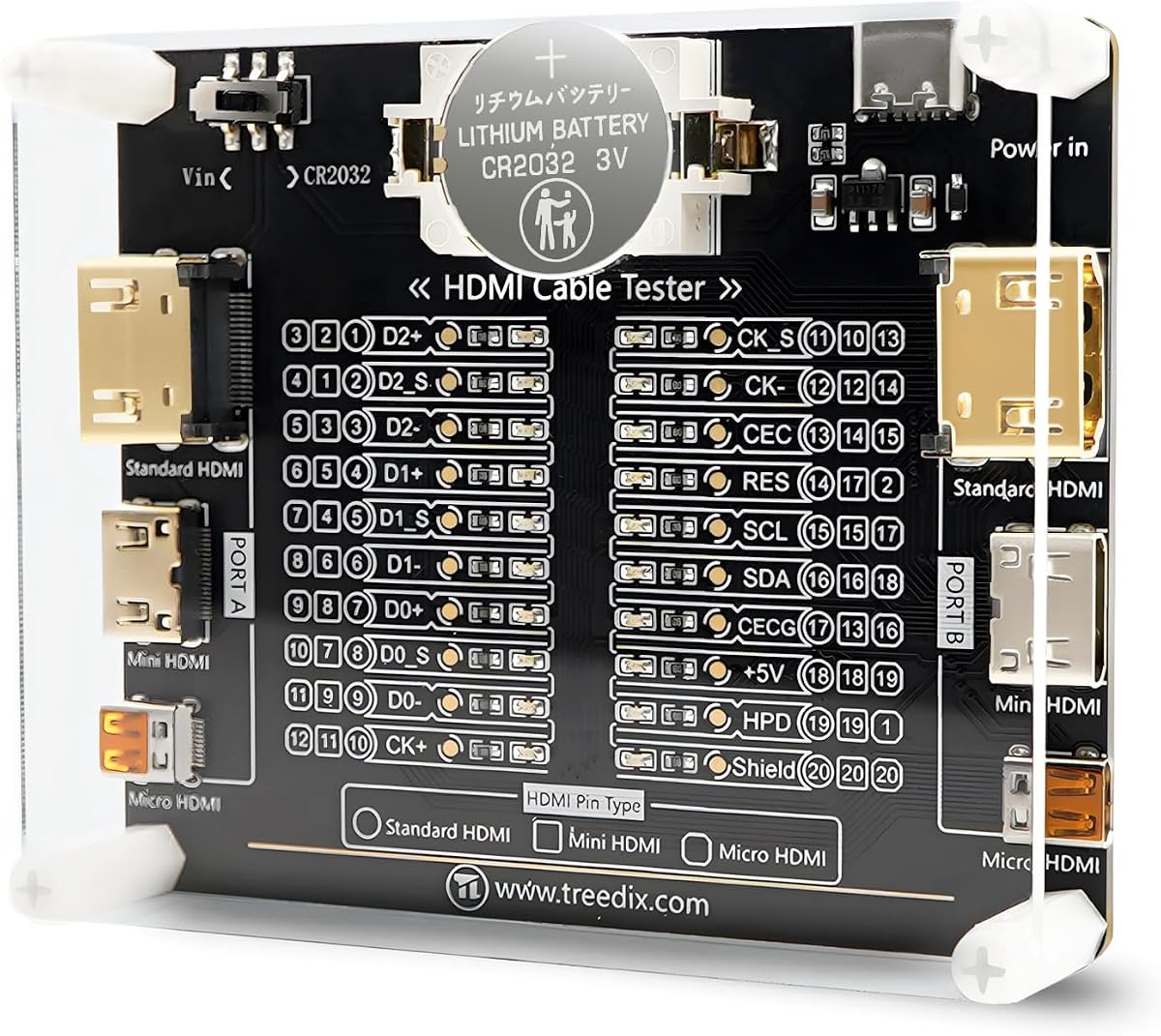
This board offers a straightforward way to test HDMI cable continuity with clear visual feedback. Its rating reflects satisfaction for simple and reliable wiring checks.
We may earn a commission when you buy through this link, at no additional cost to you.
It supports multiple HDMI versions and includes 20 LEDs corresponding to each pin. The acrylic housing protects the board during storage and transport.
The design is minimal, lacking advanced signal analysis. This is acceptable for users needing quick verification of cable pinouts.
Hobbyists and home users will find this board useful for cable verification. It is a practical pick for checking wiring without complex equipment.
Each pin corresponds to one LED light to clearly show the function of the cable.
Supports battery or external power supply in a range of 3 to 12 volts.
We may earn a commission when you buy through this link, at no additional cost to you.
Selecting the right tester depends on your specific needs, from basic continuity checks to advanced signal generation. This guide outlines the key factors to consider.
Ensure the tester supports the maximum resolution your displays or cables require, such as 4K or 8K. Modern standards may also need support for high refresh rates and color formats like 4:4:4 to avoid bottlenecks. For advanced users, checking HDR and bandwidth capabilities is essential.
Choose a model that matches your highest resolution needs to future-proof your testing setup.
HDCP encryption is critical for streaming and content playback. A good tester should support common versions like 1.4 and 2.2 to ensure signal authorization works correctly. This prevents issues where content is blocked due to handshake failures.
Verify that the device supports the HDCP versions used in your target environment.
Consider the number of HDMI ports available, as some models offer three ports for pass-through testing. If you need to check network cables too, a dual-function tester may save space. Look for detachable remotes if testing installed or long cables.
Select a port configuration that fits your workflow and cable testing needs.
Some testers include built-in screens to show video and audio without needing a monitor. Others rely on LED lights to indicate wiring status. If you need visual confirmation of content, a display is beneficial, otherwise LEDs are simpler.
Decide between visual displays and LED indicators based on your testing convenience.
Testers may run on batteries, USB chargers, or external power supplies. Portable units often use AA or AAA batteries for convenience. Check battery life and availability of rechargeable options for field use.
Choose a power source that ensures the device can run long enough for your tasks.
Professional tools should withstand drops and rough handling. Look for ruggedized housing, scratch-resistant screens, or protective cases. This ensures longevity when working in construction or field sites.
Prioritize a durable design if the device will be used in tough environments.
Simple interfaces with DIP switches or clear buttons make testing faster. Complicated menus can slow down quick checks. If speed is essential, look for one-touch operation or auto-scale features.
Opt for a model with straightforward controls to improve efficiency.
Prices vary widely from basic models to professional-grade analyzers. Check if the manufacturer offers warranty support and technical assistance. Investing in a reliable brand often ensures better longevity and support.
Balance cost with warranty coverage to ensure long-term value for your purchase.
To use a continuity tester, connect the cable to the main and remote units, then power on the device. Observe the LED indicators to confirm all pins are correctly connected. If a pin light is off, the cable may have a fault.
For signal generators, set the desired resolution and HDCP options using switches or menus before connecting to a display. Verify the output image matches your expected settings. This ensures the source device is outputting correctly.
Store testers in a protective case when not in use to prevent damage to ports or screens. Keep batteries fresh or recharge them regularly to ensure readiness. Cleaning the connectors occasionally helps maintain good signal contact.
A tester checks if a cable is working correctly by verifying electrical connections. A generator creates specific video signals to verify that a display can receive and decode them. Some devices combine both functions for comprehensive testing.
If you frequently install cables or troubleshoot video issues, a basic tester helps identify faulty wires quickly. For casual users, it may not be necessary unless they build their own cables or experience connection problems often.
Some advanced models support HDMI 2.1 and 40Gbps bandwidth. However, budget testers may be limited to older versions. Check the product specs to ensure compatibility with high-speed standards before purchasing.
If LED indicators show missing connections or flicker during testing, the cable likely has internal faults. Continuity tests help pinpoint breaks or shorts, while signal tests show if the image is stable and complete.
Many units use standard batteries like AA or AAA, while others support USB power. Check the manual for specific requirements. Having extra batteries ensures you can work without interruptions in the field.
Many professional installers use portable units for quick checks. However, complex setups may require advanced analyzers. Choose a model with enough features to handle your specific technical needs consistently.
We reviewed ten models ranging from simple testers to advanced generators. The Monoprice unit stands out for professional control, while the Parts Express model offers excellent value for basic needs.
Prioritize resolution support and durability based on your working environment. Investing in a tool that matches your technical requirements ensures reliable performance over time.
Always check current availability and specs before buying as models may change. Selecting the right tester today will save you time and effort in future installations.