
YATINEY Desktop Printer Stand with Storage Shelf
4.7Editor score
Affordable rustic brown finish option
Z-shaped design for stability
Easy assembly with included tools
Finding the right desktop printer stand can transform your workspace by reclaiming valuable surface area. A good model should offer stability, storage capacity, and a design that complements your existing decor without compromising functionality or safety.
We evaluated ten top-rated models based on durability, assembly ease, and storage versatility. Each option was assessed for weight capacity, dimensions, and additional features like drawers or wheels to ensure they meet diverse professional and home office needs.
Every pick below highlights specific strengths such as budget-friendly pricing or premium build quality. Remember that prices fluctuate regularly so verify current offers before purchasing to secure the best value for your specific organizational requirements.
4.7Editor score

4.8Editor score

4.6Editor score
As an Amazon Associate we earn from qualifying purchases.
This table provides a quick side-by-side overview of key specifications for all ten selected desktop printer stands to help you compare dimensions, features, and design styles efficiently.


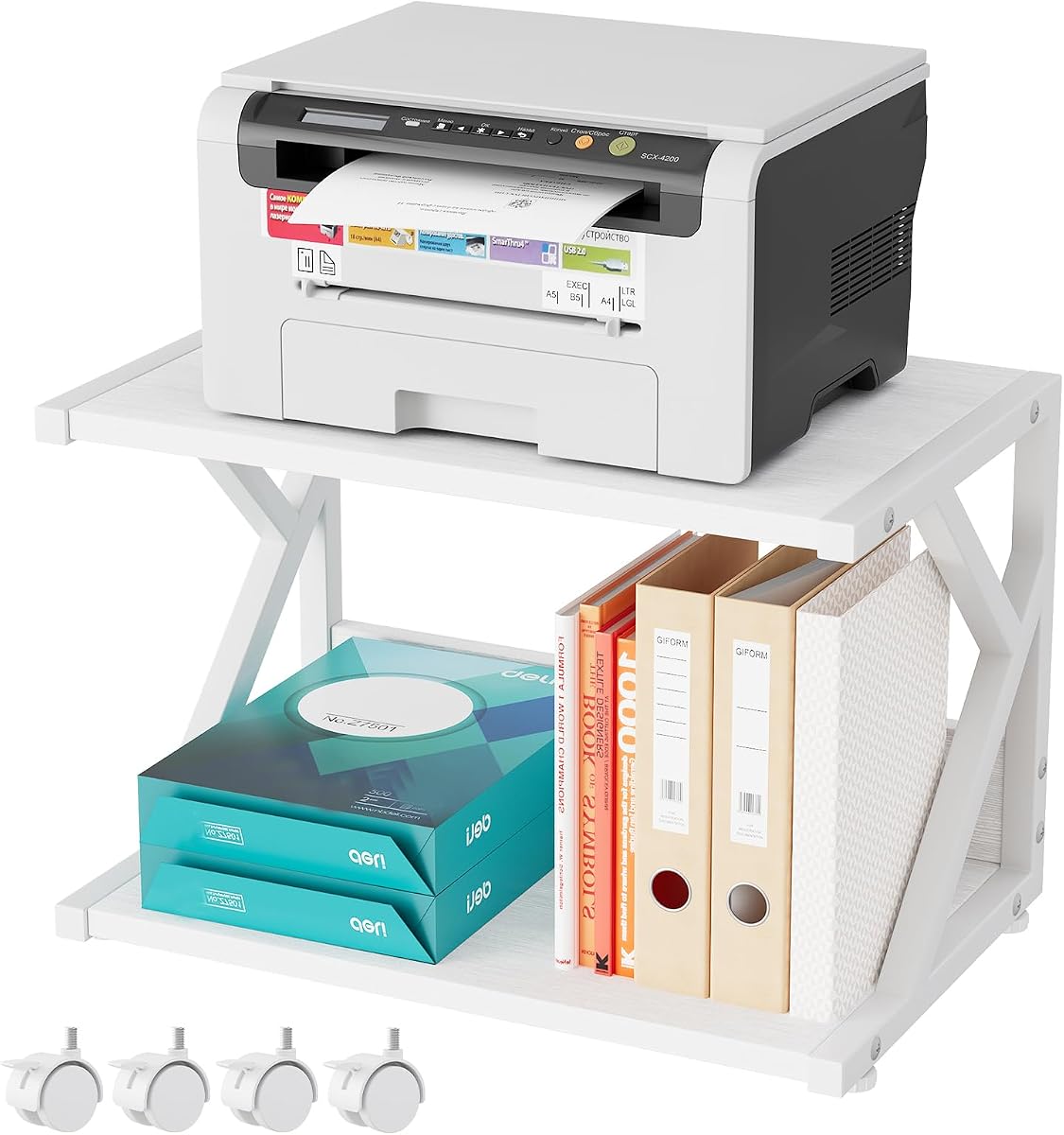
This printer stand ranks highest due to its exceptional balance of strength and utility. It holds significant weight while providing essential storage solutions for office items.
We may earn a commission when you buy through this link, at no additional cost to you.
The two-tier design allows you to place multiple devices or separate printers from supplies. The fabric drawer offers a discreet place to keep sensitive documents or loose supplies.
While the drawer is fabric rather than solid wood, it remains functional and space efficient. Some users may find assembly instructions slightly verbose but manageable.
Anyone needing a robust solution for a busy workspace should consider this model. It delivers professional performance at a competitive price point for most users.
The sturdy construction ensures your expensive equipment remains secure and stable during daily use.
Combining open shelving with a hidden drawer addresses multiple organizational needs effectively.
We may earn a commission when you buy through this link, at no additional cost to you.
Budget-conscious buyers will appreciate this model for its combination of low cost and solid performance. It delivers essential functionality without unnecessary complexity or expense.
We may earn a commission when you buy through this link, at no additional cost to you.
The Z-shaped design is not just aesthetic but functional providing enhanced stability. Shelves are open which keeps frequently used items within easy reach.
The lack of enclosed drawers means less privacy for sensitive items. Particle board surfaces are smooth but require care to avoid scratches.
This unit is ideal for casual home offices where heavy storage is not critical. It provides a clean and organized look for minimal investment.
Get reliable support for your printer without breaking your budget significantly.
The rustic finish adds warmth to your workspace while maintaining a sleek profile.
We may earn a commission when you buy through this link, at no additional cost to you.
This stand stands out for its integrated charging capabilities which are rare in this category. It modernizes the traditional printer stand concept significantly.
We may earn a commission when you buy through this link, at no additional cost to you.
The metal frame and thick particleboard construction ensure reliability over time. The storage hook helps keep cables organized reducing desk clutter.
The compact size might limit space for very large printers. Charging ports are standard but not as advanced as full charging stations.
Tech focused users who need easy device charging nearby will love this feature. It merges utility with modern convenience seamlessly.
Eliminate the need for extra power strips with built-in outlet and USB access.
The rustic aesthetic fits well in home offices or industrial style spaces.
We may earn a commission when you buy through this link, at no additional cost to you.
The metal mesh construction offers a unique open look that keeps things cool. It is particularly suited for organizing small office tools effectively.
We may earn a commission when you buy through this link, at no additional cost to you.
Pen holders are a thoughtful touch for keeping writing instruments handy. The drawer adds necessary enclosed space for items you want hidden.
The lower height might not work under all desks. Mesh surfaces require regular dusting to maintain a clean appearance.
Ideal for desks where writing tools are frequently used alongside the printer. It combines form and function in a compact design.
Built-in holders ensure your pens and markers are always within reach.
The metal mesh and steel frame offer long-lasting strength and durability.
We may earn a commission when you buy through this link, at no additional cost to you.
Mobility is the standout feature here allowing you to reposition your equipment instantly. The locking mechanism ensures stability when needed.
We may earn a commission when you buy through this link, at no additional cost to you.
The adjustable height feature means it can tuck neatly under desks. This saves floor space in smaller rooms significantly.
Weight capacity is moderate but sufficient for most standard printers. The assembly simplicity makes it accessible for all users.
This model is perfect for shared spaces where printer location needs to change. It offers flexible utility for dynamic office environments.
Move your printer easily between rooms or reconfigure your workspace instantly.
Adjustable dimensions ensure it fits perfectly under most standard desks.
We may earn a commission when you buy through this link, at no additional cost to you.
The dual-tier top shelf makes this ideal for offices needing multiple print devices. It keeps both units accessible without clutter.
We may earn a commission when you buy through this link, at no additional cost to you.
Dual-rod support is a distinct upgrade providing significant stability. The vintage particle board finish adds a charming rustic element.
Fabric drawers are convenient but not as robust as solid wood. The design is narrow so ensure desk clearance is sufficient.
If you run multiple printers or a copier and scanner this is a smart pick. It balances capacity with aesthetic appeal well.
Accommodate two different printing devices side by side on the top shelf.
Dual rods provide a rigid base that prevents tipping on heavy loads.
We may earn a commission when you buy through this link, at no additional cost to you.
This unit prioritizes simplicity and practicality for general office needs. The non-woven drawer offers privacy without bulk.
We may earn a commission when you buy through this link, at no additional cost to you.
Open shelves ensure you can see files and supplies quickly. The metal frame provides a sturdy base for the particleboard shelves.
Chipboard surfaces are smooth but should be treated with care. Assembly is quick making it a great choice for fast setups.
Users wanting a no fuss solution with hidden storage will like this. It keeps essentials neat without complex features.
The drawer hides clutter while open shelves keep daily items ready.
Assembly is straightforward and can be done quickly without hassle.
We may earn a commission when you buy through this link, at no additional cost to you.
The dimensions are generous making this suitable for large or bulky devices. The compartment layout offers varied storage for paper and files.
We may earn a commission when you buy through this link, at no additional cost to you.
Stackability means you can build a taller unit if needed later. Rubber feet protect your desk from scratches and vibration.
Its weight contributes to stability but makes moving harder. The lower profile may not fit under all standard desks comfortably.
Those with larger printers or significant filing needs should consider this. It offers substantial storage capacity in a single unit.
The wide top shelf accommodates large devices without compromising stability.
Stacking options allow you to customize the height as needed.
We may earn a commission when you buy through this link, at no additional cost to you.
The standout spec is the massive weight capacity that handles heavy printers safely. It focuses on core structural integrity above style.
We may earn a commission when you buy through this link, at no additional cost to you.
Rounded corners and anti-slip pads show attention to safety details. The steel frame ensures it stays rigid under load.
It lacks drawers or charging ports which might matter to some users. The design is functional and robust for industrial environments.
Heavy equipment owners will appreciate the confidence this model provides. It is a workhorse option for high demand areas.
High load capacity ensures safety for heavy professional printers and scanners.
Rounded edges and anti-slip features prevent accidents and damage.
We may earn a commission when you buy through this link, at no additional cost to you.
The choice between wheels and pads allows you to decide on mobility later. MDF wood offers a smooth durable finish that resists scratches.
We may earn a commission when you buy through this link, at no additional cost to you.
White color keeps the desk looking bright and modern. The size is compact but supports standard printers well.
Choosing wheels may increase cost slightly but offers utility. The assembly time is quick allowing fast setup.
For users who value choice and clean aesthetics this is a solid pick. It adapts to different floor conditions easily.
Select between stationary pads or rolling wheels based on your needs.
Waterproof and scratch-resistant surfaces ensure long-term visual quality.
We may earn a commission when you buy through this link, at no additional cost to you.
Selecting the right stand requires assessing dimensions, weight limits, and storage needs to match your printer size and workspace layout.
Measure your printer's width and depth to ensure it fits on the stand platform comfortably. Check the stand height to ensure clearance for cables and access if placing under a desk.
Always verify product dimensions against your printer model to avoid space issues.
Check the maximum load rating to ensure it can support your printer weight safely. Laser printers are heavier than inkjet models so choose a higher capacity for them.
Look for models rated at least 20 percent heavier than your printer for safety.
Decide if you need drawers for hidden storage or open shelves for quick access. Some stands include pen holders or hooks which add value for office supplies.
Choose open shelves for visibility or drawers to keep your desk looking tidy.
Metal frames offer long-term durability while wood or MDF provide aesthetic warmth. Waterproof surfaces are essential if you work near liquids or in humid areas.
Metal is often more durable but wood blends better in home decor.
Look for units with clear instructions and fewer parts to simplify setup. Some models are tool-free or take under 15 minutes which saves time.
Easy assembly is crucial if you plan to move or reconfigure the stand often.
If you need to move the printer frequently look for locking caster wheels. Fixed feet provide more stability but limit your ability to reposition the stand.
Use wheels for shared spaces and fixed feet for permanent desk setups.
Choose finishes like black, white, or rustic brown to match your current decor. Industrial styles suit modern offices while wood finishes work well in home settings.
Match the stand color to your desk for a cohesive and professional look.
Some stands include charging ports, built-in trays, or dividers for extra utility. These features can reduce cable clutter and improve workflow efficiency.
Extra features add value if you need to organize accessories beyond just the printer.
Start by assembling the stand on a flat surface and securing all screws tightly to ensure stability. Test the stability by applying slight pressure before placing your printer on it.
Clean the surfaces regularly with a soft damp cloth to remove dust and prevent buildup. Avoid harsh chemicals on wood or painted finishes to maintain the original look.
Check the wheels or pads periodically to ensure they are still gripping properly. Tighten any loose bolts after moving the stand to prevent wobbling.
The ideal capacity depends on your printer type but generally you should look for a stand rated for at least 20 pounds to 40 pounds. If you use a heavy laser printer choose a model rated for 50 pounds or more for safety.
Yes provided the stand has a sufficient weight capacity and a flat stable surface. Ensure the dimensions match the base of your 3D printer to prevent tipping during operation.
Many models are designed specifically for under desk use but you must check the total height. Ensure there is enough clearance between the stand and your desk surface for cable management.
Metal stands can be wiped down with a mild cleaner and a dry cloth to prevent rust. Wood stands should be cleaned with a damp cloth and dried immediately to avoid water damage.
Most models do not include dedicated cable management systems but some have open frames that make routing easier. Look for models with open backs or hooks to secure cables externally.
Most stands are designed for easy assembly taking between 10 and 20 minutes. They usually include necessary tools and numbered parts to guide you through the process step by step.
MDF is generally denser and smoother than particleboard making it more resistant to scratches and moisture. Particleboard is often lighter and cheaper but may be less durable over time.
Only if the specific product description mentions stackability. Some models allow stacking to create more vertical space while others are not reinforced for that load.
We highlighted ten distinct options ranging from budget friendly units to feature rich premium models. The YAOHUOO stand leads for durability and storage balance while the YATINEY models offer excellent value.
Prioritize weight capacity and dimensions before considering extras like wheels or charging stations. Ensuring the unit fits your printer and space is the most critical step.
Prices and availability change often so check current listings before finalizing your purchase. Use the reviews and specs provided to make an informed decision today.