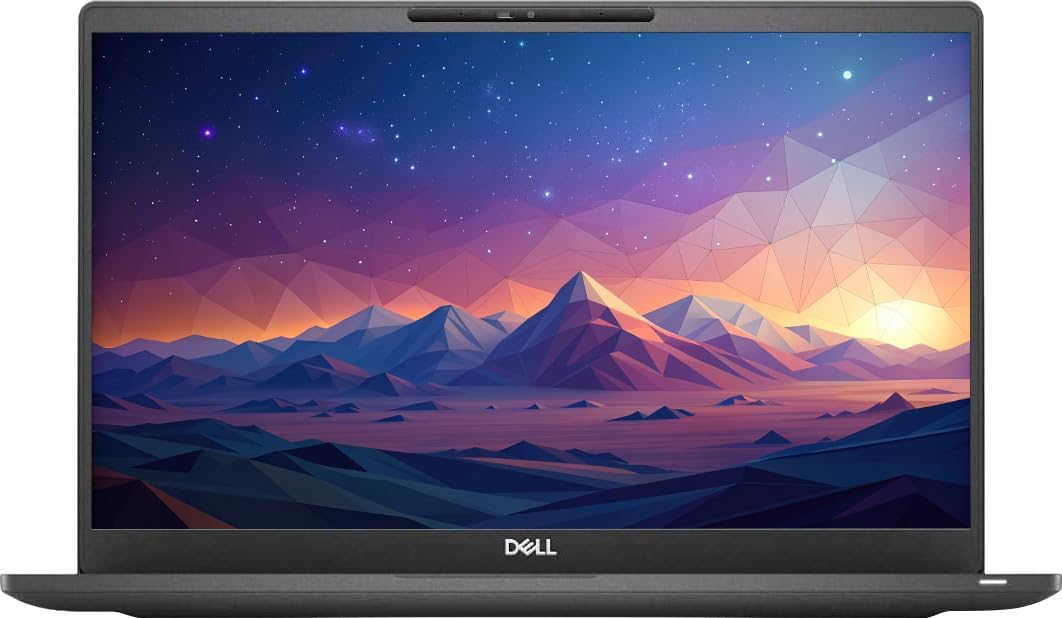
Dell 7400 Latitude Laptop
3.9Editor score
Intel Core i5-8365U Processor
16GB DDR4 RAM
256GB M.2 NVMe SSD
Finding a reliable laptop without breaking the bank is a common challenge for students and professionals alike. Amazon Renewed Laptops offer a compelling solution by providing certified refurbished devices that undergo rigorous testing and come with warranties. These machines often feature high-end specs from reputable brands like Dell and Lenovo at a fraction of the original cost. By choosing a renewed option, you can access powerful computing resources while reducing electronic waste and saving money on your next upgrade.
We have carefully evaluated ten top-rated models to create this comprehensive roundup. Our selection process focuses on processor performance, memory capacity, storage speed, and overall build quality. Each product has been inspected by Amazon qualified vendors to ensure it meets strict functional standards. We compare key specifications such as RAM, SSD size, and display resolution to help you understand what you are getting with each choice. This list covers a range of budgets and use cases, from basic office tasks to more demanding multitasking scenarios.
Each pick in this guide highlights specific strengths and potential trade-offs to consider before buying. You will find detailed breakdowns of processor generations, battery life expectations, and connectivity options available on these devices. While the ratings and descriptions reflect current data, availability and pricing can fluctuate frequently on the platform. We recommend verifying the latest details and warranty terms directly on the product page before making your final decision. Our goal is to provide you with the clarity needed to invest confidently in a renewed machine.
3.9Editor score

4.0Editor score

3.9Editor score
As an Amazon Associate we earn from qualifying purchases.
The following table provides a side-by-side look at the specifications and key features of all ten models included in this guide. Compare processors, memory, storage, and display details to find the configuration that best matches your workflow requirements and performance expectations for daily computing tasks.


This Dell Latitude 7420 model stands out as a robust business laptop offering high performance through its Intel Core i7 processor. With a rating reflecting solid reliability, it brings enterprise-grade features to the renewed market. The 11th generation chip ensures smooth multitasking for demanding office applications and web browsing sessions alike.
We may earn a commission when you buy through this link, at no additional cost to you.
The combination of 16GB RAM and a 512GB PCIe M.2 NVMe SSD provides exceptional speed and responsiveness. Users can expect fast boot times and quick access to files without noticeable lag during daily workflows. The Intel Iris Xe Graphics support light visual tasks effectively while maintaining energy efficiency throughout the workday.
While the display is limited to 250 nits brightness and lacks touch functionality, it remains adequate for indoor use. The anti-glare coating helps reduce eye strain during long hours of text editing or spreadsheet management. These trade-offs are acceptable given the price point and the durable carbon fiber chassis design.
Professionals seeking a reliable machine for remote work or academic research will find this unit highly suitable. The included Windows 11 Pro installation ensures compatibility with modern enterprise tools and security features. We recommend this model for anyone prioritizing processing power and storage speed over ultra-high screen brightness.
The carbon fiber construction ensures the chassis can withstand the rigors of daily travel and frequent use without compromising structural integrity.
With 16GB of RAM and a powerful processor, switching between multiple browser tabs and applications occurs seamlessly without performance bottlenecks.
We may earn a commission when you buy through this link, at no additional cost to you.
The Lenovo ThinkPad L14 brings AMD Ryzen processing power to the business laptop segment with impressive results. Its rating suggests strong performance consistency for users who need reliable computing without excessive power consumption. The 6-core architecture handles modern software demands efficiently and reduces bottlenecks during heavy workloads.
We may earn a commission when you buy through this link, at no additional cost to you.
This model features a high-quality IPS display that offers wide viewing angles and accurate color reproduction for visual work. The standard keyboard with Trackpoint provides precise navigation controls that many business users prefer over traditional touchpads. Connectivity is excellent with multiple USB-C and USB-A ports alongside HDMI for external monitor support.
Although the 256GB SSD is fast, users with large media libraries might find the storage somewhat limited compared to other options. The non-touch nature of the screen is a design choice focused on productivity and battery life rather than consumer multimedia features. These factors should be weighed against the strong processing performance offered by the Ryzen chip.
Tech enthusiasts and business professionals who value processing speed and build quality will appreciate this ThinkPad variant. The inclusion of Windows 11 Professional ensures access to advanced management features and security protocols. It is a strong contender for those who prioritize CPU performance and keyboard ergonomics in their daily computing setup.
Multiple USB-C and USB-A ports allow you to connect a wide range of peripherals and external displays without needing additional adapters.
The IPS panel delivers consistent color and contrast across different viewing angles making it ideal for collaborative work sessions.
We may earn a commission when you buy through this link, at no additional cost to you.
The Dell 7400 Latitude offers a compelling value proposition for budget-conscious buyers seeking reliable business performance. It carries a rating that reflects consistent functionality and build quality suitable for everyday tasks. The 8th Gen Intel Core i5 processor provides enough power for web browsing document editing and light multitasking applications.
We may earn a commission when you buy through this link, at no additional cost to you.
One of its strongest features is the inclusion of 16GB RAM which is generous for this price tier. Combined with a 256GB M.2 NVMe SSD the system boots quickly and handles file access with minimal latency. This memory capacity ensures that multiple applications can run simultaneously without slowing down the user experience significantly.
The main trade-off is the older processor generation which may struggle with very heavy workloads or future software demands. Storage space is also modest so users might need to rely on cloud services or external drives for large media libraries. These limitations are acceptable considering the overall cost savings and solid chassis durability.
Students and small business owners looking for an affordable machine with robust specifications should consider this model. The inclusion of Windows 11 Pro adds value by providing enhanced security and management features out of the box. We recommend it for basic productivity tasks where performance per dollar is the primary concern.
With 16GB of RAM this laptop allows for smooth multitasking between email clients web browsers and office suites simultaneously.
The M.2 NVMe SSD provides significantly faster read and write speeds compared to traditional SATA drives or hard disk options.
We may earn a commission when you buy through this link, at no additional cost to you.
The Dell Latitude 5420 is designed as a versatile business tool that balances performance and portability for daily tasks. Its rating indicates reliable operation for users who need a machine that handles office applications efficiently. The Intel Quad-Core i5 processor delivers sufficient power for standard workflows without excessive power consumption.
We may earn a commission when you buy through this link, at no additional cost to you.
Memory is upgraded to 16GB which allows for seamless switching between multiple applications and browser tabs. The 256GB SSD ensures that the system starts up quickly and provides adequate space for essential documents and programs. Connectivity options include HDMI and USB ports making it easy to connect to projectors or external monitors.
While the storage capacity is adequate for basic use, power users might find it limiting for large data sets or media files. The graphics capabilities are integrated and suitable for productivity but not for intensive gaming or video editing work. These trade-offs are typical for business laptops focused on efficiency and reliability.
Employees and students looking for a dependable machine for schoolwork or office assignments will find this unit highly practical. The Windows 11 Pro installation offers enhanced security features and remote management tools that are valuable in professional environments. We suggest this model for those prioritizing RAM and processor speed over storage capacity.
The combination of a fast i5 processor and ample RAM ensures that daily tasks are completed smoothly without system slowdowns.
Built-in HDMI and USB ports allow for easy connection to external displays and peripheral devices for versatile workstation setups.
We may earn a commission when you buy through this link, at no additional cost to you.
This Dell Latitude 7420 variant stands out for its generous storage capacity while maintaining a competitive price point. It has earned a strong rating from users who value reliability and consistent performance in their daily computing routine. The 11th Gen Intel Core i5 processor ensures that tasks are handled with speed and efficiency across various applications.
We may earn a commission when you buy through this link, at no additional cost to you.
The 512GB SSD offers significant headroom for storing files software installations and media without needing external drives. With 16GB RAM the system can handle multiple programs running simultaneously without lag or stuttering during routine operations. The display provides clear visuals for spreadsheets documents and web content with reasonable color accuracy.
While the display lacks high brightness and dedicated graphics, it remains functional for general office and home use. The integrated graphics are sufficient for basic multimedia tasks but not for heavy gaming or professional content creation. These limitations are acceptable given the overall balance of performance and storage offered by the unit.
Buyers looking for a laptop that offers ample storage and reliable performance for business or study will find this model appealing. The Windows 11 Pro environment supports modern security standards and remote work capabilities effectively. We recommend this device for anyone needing more than basic storage in a portable and affordable package.
The 512GB SSD provides plenty of space for your files and applications reducing the need for cloud storage or external drives.
Users report consistent performance across day-to-day tasks making it a trustworthy choice for remote work and online learning.
We may earn a commission when you buy through this link, at no additional cost to you.
The Dell Latitude 5400 boasts one of the highest ratings in this roundup reflecting strong customer satisfaction with its build quality. It is designed as a workhorse for professional environments where durability and consistent performance are key priorities. The Intel Core i5-8365U processor handles standard business tasks effectively without significant delays or performance drops.
We may earn a commission when you buy through this link, at no additional cost to you.
Memory is generously specified at 16GB ensuring that users can run multiple office applications and browser tabs simultaneously. The 256GB SSD provides fast boot times and efficient data access for daily workflows and essential file management. Connectivity options are robust with USB-C and HDMI ports available for versatile peripheral connections.
The display resolution is HD rather than FHD which may appear less sharp for text-heavy tasks compared to higher resolution screens. The processor is from an older generation which limits its ability to handle very demanding modern software efficiently. These trade-offs are acceptable given the strong reliability and durability feedback from users.
Professionals who prioritize robust build quality and reliability over screen resolution will appreciate this model for its dependability. It is well-suited for office environments where consistent uptime and sturdy construction are more important than cutting-edge visual fidelity. We recommend it for general business use where longevity is a primary concern.
The high rating reflects consistent performance and sturdy construction making it a safe choice for daily professional use.
Multiple USB and HDMI ports ensure you can connect various peripherals and monitors without needing extra adapters.
We may earn a commission when you buy through this link, at no additional cost to you.
This Dell Latitude 5420 offers a lightweight business notebook experience suitable for mobile professionals and travelers. It carries a rating that indicates functional reliability for users who need a portable machine for on the go work. The Core i5-1135G7 processor provides decent speed for standard applications and web browsing sessions.
We may earn a commission when you buy through this link, at no additional cost to you.
The 256GB SSD ensures quick system startup and efficient file handling for essential documents and programs. Windows 11 Pro is included to offer enhanced security features and management tools for business users. The compact form factor makes it easy to carry in a backpack or briefcase without adding significant weight to your load.
The 8GB RAM may limit multitasking capabilities when running several heavy applications simultaneously which could be a constraint for power users. Storage space is also modest so relying on cloud storage might be necessary for large media libraries or datasets. These limitations are typical for lightweight business notebooks focused on portability.
Students and professionals who prioritize portability and basic performance will find this model sufficient for their daily needs. It is an excellent choice for light office tasks and internet browsing where heavy computational power is not required. We recommend this device for those who value a slim profile and solid build quality.
The compact 14-inch footprint makes this laptop easy to carry anywhere without adding much weight to your daily bag.
Windows 11 Pro provides advanced security features that are essential for handling sensitive business data on the go.
We may earn a commission when you buy through this link, at no additional cost to you.
The Dell Latitude 5490 stands out for its generous storage and memory combination which appeals to data-heavy users. It has achieved a high rating from customers who appreciate the balance of performance and practical features for business use. The Intel Core i5-8350U provides solid processing power for daily office tasks and web browsing efficiently.
We may earn a commission when you buy through this link, at no additional cost to you.
With 16GB RAM and a 512GB SSD the system handles multiple applications and large file storage without performance degradation. The FHD display offers sharper visuals than HD screens which is beneficial for detailed spreadsheet work and document editing. Connectivity includes legacy VGA ports making it compatible with older projectors and displays in conference rooms.
The older processor generation limits its longevity for very demanding software updates but remains effective for current tasks. The presence of legacy ports like VGA is useful for older setups but limits ultra-modern connectivity options compared to newer models. These trade-offs are acceptable for users who prioritize storage and screen clarity.
Office workers and researchers needing substantial storage and memory will find this configuration highly practical for their workflows. The high rating suggests consistent performance and build quality that meets the expectations of business users. We recommend it for those who need a reliable machine with ample internal storage and clear display.
The 512GB drive allows you to store extensive files and programs locally without needing immediate external storage solutions.
Full HD resolution ensures text and graphics appear sharp making it easier on the eyes during long working sessions.
We may earn a commission when you buy through this link, at no additional cost to you.
This Dell Latitude 5400 offers a reliable balance of display quality and processing speed for general use. It holds a strong rating reflecting its ability to meet the needs of users seeking consistent performance for everyday tasks. The Core i5-8365U processor delivers high speeds for web browsing and document management applications efficiently.
We may earn a commission when you buy through this link, at no additional cost to you.
The FHD display provides sharp visuals which are beneficial for reading text and viewing media on the 14-inch screen. With 8GB RAM the system handles standard multitasking well though heavy workloads may cause slight slowdowns. The 256GB SSD ensures quick boot times and responsive application launches for typical daily workflows.
While the RAM is sufficient for basic use, power users might find it limiting when running many applications simultaneously. The storage capacity is moderate so external drives or cloud services might be needed for larger collections of files. These limitations are acceptable for a machine priced as an affordable business solution.
Students and home office users looking for a clear screen and reliable speed will find this model a solid choice. It offers a practical combination of display clarity and processing power without breaking the budget. We recommend it for general productivity tasks where screen quality is a priority.
The Full HD display delivers crisp text and images making it a pleasure to use for reading and writing tasks.
A strong rating indicates this machine handles daily workloads consistently making it a dependable tool for students.
We may earn a commission when you buy through this link, at no additional cost to you.
The Dell 5420 Latitude with 32GB RAM stands out as a powerhouse model for demanding workloads. Its rating reflects strong performance consistency for users who require high memory capacity for complex tasks. The 11th Gen Intel Core i7 processor ensures that even heavy applications run smoothly without significant latency or slowdowns.
We may earn a commission when you buy through this link, at no additional cost to you.
Memory is the standout feature here with 32GB allowing for extensive multitasking and virtual machine support. The 512GB M.2 NVMe SSD provides ultra-fast data access speeds for loading large software libraries and datasets quickly. Thunderbolt connectivity offers versatile high-speed transfer options for external storage and high-resolution monitors.
While the performance is exceptional the higher power consumption may lead to shorter battery life compared to lower-spec models. The premium price point might be beyond the reach of budget buyers but the capability offered justifies the cost. These factors are acceptable for users who need professional-grade computing power on a portable chassis.
Creative professionals and developers requiring substantial memory and processing power will find this configuration highly suitable. The inclusion of Thunderbolt and 32GB RAM ensures that future software demands are met with ease and efficiency. We recommend this device for those prioritizing raw performance and connectivity options over battery longevity.
With 32GB of RAM you can run multiple virtual machines and heavy applications simultaneously without performance lag.
Thunderbolt support enables high-speed data transfer and connects to multiple external displays for expanded workspace setups.
We may earn a commission when you buy through this link, at no additional cost to you.
Selecting the right renewed laptop requires careful attention to hardware specifications and vendor standards to ensure you get a reliable machine that meets your needs.
The processor is the engine of your laptop so look for recent generations like 10th or 11th Gen Intel Core or equivalent AMD Ryzen models. Newer chips offer better efficiency and support for modern software features ensuring longevity. Check the specific model number to understand base and boost clock speeds for multitasking capabilities.
Prioritize CPUs from recent generations to ensure your machine remains relevant and performant for several years.
Memory determines how many applications you can run simultaneously without lag so 16GB is often the sweet spot for business users. 8GB is adequate for basic tasks like web browsing and document editing but may struggle with heavy multitasking. More memory ensures smoother performance when switching between tabs and apps during a busy workday.
Aim for at least 16GB of RAM for professional use to maintain responsive performance over time.
Solid State Drives are essential for fast boot times and quick file access compared to traditional hard drives. NVMe SSDs offer even faster speeds than SATA SSDs and are preferred for modern workflows. Ensure you have enough space for your files software and system updates without needing external drives immediately.
Choose a model with an NVMe SSD and at least 256GB of storage for optimal speed and capacity.
The screen is your primary interface so look for Full HD resolution to ensure text and images appear sharp. IPS panels provide better viewing angles and color accuracy compared to cheaper TN panels. Consider brightness levels if you plan to work in varied lighting conditions or outdoors occasionally.
Opt for an IPS display with Full HD resolution to reduce eye strain and improve visual clarity.
Check for USB-C ports which are versatile and may support charging and video output simultaneously. HDMI ports are useful for connecting to external monitors or projectors easily. Ensure the laptop has adequate Wi-Fi standards like Wi-Fi 6 for fast and stable internet connections.
Verify that the port selection matches your peripheral needs to avoid carrying extra adapters everywhere.
Renewed batteries may have reduced capacity so check if the seller mentions battery health or cycle count. Look for models that advertise long battery life to ensure you can work unplugged for several hours. Carrying a charger is often a good backup plan when using older hardware.
Expect shorter battery life on renewed units and plan accordingly by keeping a charger nearby.
Amazon Renewed products come with a minimum 90-day warranty which provides peace of mind against hardware defects. Review the return policy to understand how long you have to test the machine and request a refund if needed. Reliable sellers often offer additional support options to help troubleshoot issues quickly.
Always confirm the warranty duration and return window before purchasing to protect your investment.
Ensure the laptop comes with a valid license for Windows 11 Pro or Home for security and compatibility. Older operating systems may require upgrades which could add to the overall cost and time needed. Windows 11 offers better security features and a modern interface for productivity tasks.
Look for a fresh installation of Windows 11 to ensure you have access to the latest security updates.
Upon receiving your renewed laptop inspect the exterior and ports to ensure there is no damage from shipping. Update all drivers and Windows settings immediately to optimize performance and security for daily use. Remove any pre-installed software you do not need to free up resources for your own applications.
Maintain the battery by avoiding leaving the laptop plugged in constantly and letting it discharge occasionally. Store the device in a dry and cool place to protect internal components from moisture and heat exposure. Clean the keyboard and screen regularly using appropriate cloths to prevent dust accumulation and wear.
Backup your important data frequently using cloud services or external drives to prevent loss in case of hardware failure. Monitor system temperatures and performance periodically to catch potential issues before they worsen significantly. Treat the machine gently during transport by using a padded case to protect it from physical shocks and bumps.
Renewed laptops are pre-owned devices that have been professionally inspected tested and certified to look and work like new. They typically undergo a refurbishing process that includes cleaning repairs and repackaging. Refurbished is often used interchangeably but renewed on Amazon implies meeting specific vendor standards and coming with a warranty.
Yes they are generally reliable as they are certified by Amazon qualified vendors to function properly. Most units come with a 90-day warranty to cover any unexpected hardware issues. They are a great cost-effective option for everyday tasks and workloads without paying full price for a new device.
Battery life depends on the age of the laptop and previous usage cycles it has undergone. Renewed units may have batteries with reduced capacity compared to brand new models. You should expect standard usage time but it is wise to keep a charger handy just in case.
Many business laptops allow for RAM and storage upgrades but it depends on the specific model and design. Some units have soldered RAM which cannot be changed while others offer accessible slots for expansion. Check the technical specifications of the chosen model to confirm upgrade possibilities before purchasing.
Most renewed laptops sold through Amazon include a valid Windows 11 Professional or Home license. This ensures you have access to essential security updates and features right out of the box. Always verify the operating system version listed in the product details before making your purchase.
If your renewed laptop stops working within the warranty period you can contact the seller or Amazon customer support. They will usually offer a replacement or repair service to ensure you are not left without a working machine. Keep your order details handy to streamline the claims process effectively.
Buying renewed is often better if you want premium features like more RAM or storage at a lower cost. New laptops might be better if you need the absolute latest hardware generation or longest battery life. Consider your priorities and budget constraints to decide which option offers the best value for you.
Business class laptops like Dell Latitude and Lenovo ThinkPad are built with higher durability and better build quality. They often feature better keyboards more ports and enhanced security hardware suitable for professional environments. These machines are designed to withstand daily wear and tear better than consumer grade models.
We have explored ten exceptional options ranging from budget-friendly choices to high-performance models tailored for business needs. The Dell Latitude 7420 and Lenovo ThinkPad L14 stood out for their balance of power and reliability in demanding environments. Whether you need massive RAM or a compact design there is a renewed model suited to your specific workflow.
Prioritize processor generation and memory capacity to ensure your laptop remains capable for future software updates and tasks. A good SSD is also essential for maintaining speed and responsiveness throughout the lifespan of the device. Consider these factors alongside warranty terms to make an informed choice that delivers long-term value.
Prices and availability change frequently on Amazon so check the current details before finalizing your purchase. You may find additional discounts or different configurations that better match your evolving needs. We hope this guide helps you find the perfect renewed machine for your professional or academic journey ahead.