
ARCTIC P8 (5 Pack)
4.6Editor score
Optimised for static pressure
High quality bearing
Value five pack bundle
This comprehensive guide compares the top 80mm case fans available in October 2026 to help you find the best cooling solution for your compact build or server.
Choosing the right cooling solution for your compact build is crucial for maintaining optimal performance and longevity. Eighty millimeter fans are essential for small form factor cases, NAS devices, and specialized cooling setups where space is limited but thermal demands remain high. Finding a fan that balances airflow, noise, and reliability can be challenging without expert guidance.
We have carefully evaluated the leading 80mm case fans on the market based on real-world performance data and user feedback. Our selection process considers static pressure capabilities, bearing types, PWM control features, and overall acoustic performance to ensure you get a product that meets your specific cooling requirements efficiently.
Each pick in this list highlights distinct advantages suited for different use cases ranging from silent office PCs to high-performance mining rigs. Prices and availability are subject to change frequently so please verify current details before purchasing to ensure you get the best value for your investment today.
4.6Editor score

4.9Editor score

4.8Editor score
The following comparison table provides a side-by-side overview of all ten selected models highlighting their key specifications and primary advantages to help you quickly identify the best fit for your setup.


The Noctua NF-A8 PWM stands out as the premier choice for those seeking silence and performance in equal measure. With a stellar rating of 4.9 it has earned its place as the top pick in this comprehensive guide for 2026.
We may earn a commission when you buy through this link, at no additional cost to you.
Its standout qualities include Flow Acceleration Channels that improve airflow efficiency and an Advanced Acoustic Optimisation frame that minimizes noise. The fan runs at up to 2200 RPM but remains whisper quiet even under full load making it ideal for HTPCs and office environments.
Honest trade-offs include the higher price compared to budget options and a slightly heavier build. However these are acceptable given the exceptional longevity with a 150000 hour MTTF and the inclusion of high quality accessories like anti-vibration mounts and extension cables.
Who should buy this fan If you prioritize silence and reliability above all else and have the budget for premium components this is the definitive choice. It is the final recommendation for anyone building a high-end small form factor PC or replacing a noisy fan in a sensitive device.
The fan's design ensures that even at maximum speed noise levels remain incredibly low ensuring a peaceful computing environment.
With a mean time between failures exceeding 150000 hours this fan is built to last for many years without replacement.
We may earn a commission when you buy through this link, at no additional cost to you.
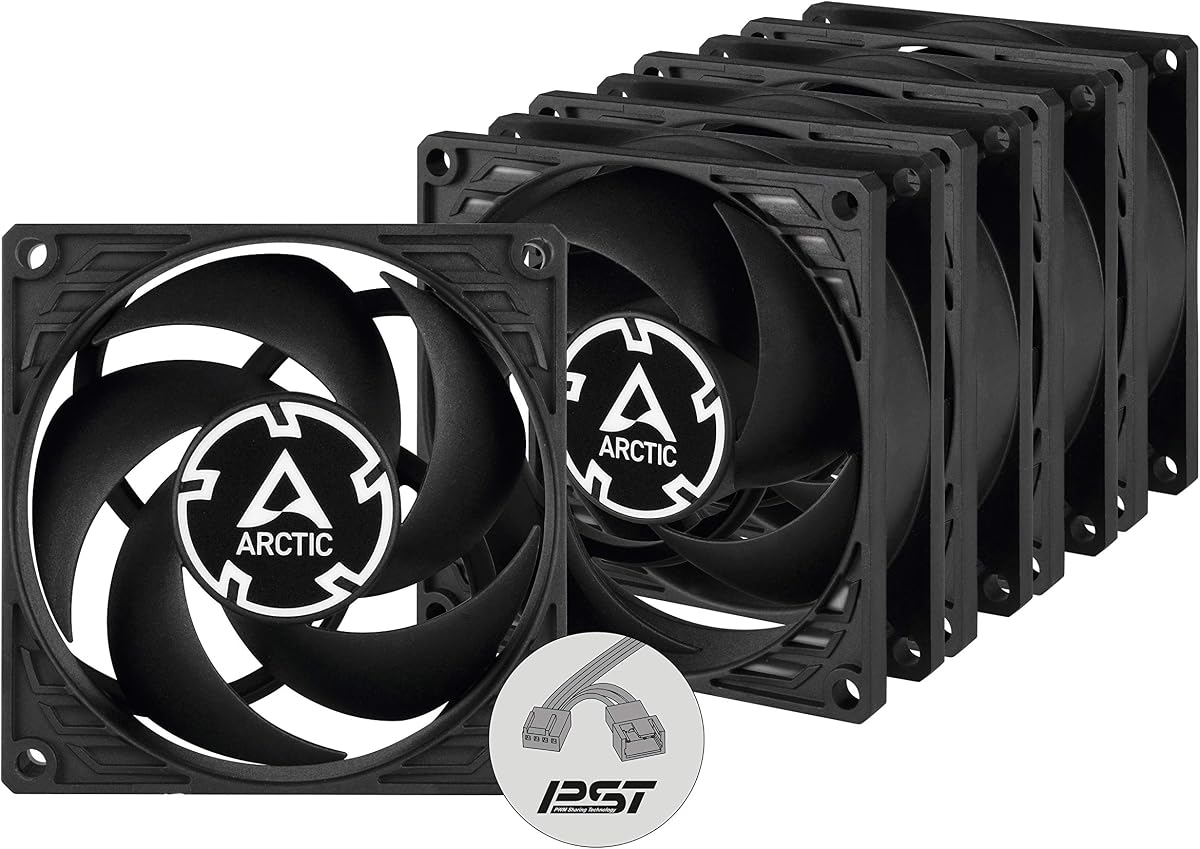
The ARCTIC P8 5 Pack offers an unbeatable value proposition for users needing multiple fans for a budget build or server rack. With a strong 4.6 rating it proves that affordability does not have to come at the expense of cooling efficiency.
We may earn a commission when you buy through this link, at no additional cost to you.
Key strengths include its optimization for static pressure which makes it excellent for use on heatsinks and radiators. The Fluid Dynamic Bearing reduces friction for greater efficiency and longer service life while the redesigned blades ensure effective cooling even with high air resistance.
Honest trade-offs involve the lack of PWM control since it uses a 3-pin connection and a bit more noise at top speed compared to premium options. These are acceptable for the price especially when buying a pack of five which lowers the per-unit cost significantly.
Who should buy this if you need to cool multiple areas or run a large array of fans on a tight budget this is the top choice. It is the final recommendation for value seekers looking for reliable cooling performance without breaking the bank.
Buying five fans at once provides significant savings and ensures you have spares or enough for a multi-fan setup.
Designed specifically to push air through restrictive environments this fan excels where standard fans might struggle.
We may earn a commission when you buy through this link, at no additional cost to you.
The chromax.Black.swap edition of the Noctua NF-A8 PWM brings premium aesthetics to an already award-winning performance model. It holds a 4.8 rating confirming that style and substance can coexist in a single fan package.
We may earn a commission when you buy through this link, at no additional cost to you.
Its standout features include the chromax black swap edition which offers an all-black design with swappable anti-vibration pads in multiple colors. This allows for color customization to match your build while maintaining the Flow Acceleration Channels and Advanced Acoustic Optimisation frame that define the A-series fans.
Honest trade-offs involve the cost which is the highest in this list and the black finish which might show dust more than lighter colors. These are acceptable because the customization options and the proven reliability of Noctua make it worth the investment for enthusiasts.
Who should buy this if you are building a show PC and want top-tier cooling with a matching aesthetic this is the perfect choice. It is the final recommendation for users who refuse to compromise on looks or performance.
Swappable pads in six colors let you match your fan to your case or other components for a unified look.
Built on the same award-winning design as the original brown fan this version adds style without sacrificing cooling power.
We may earn a commission when you buy through this link, at no additional cost to you.
The Noctua NF-R8 redux-1800 is the perfect choice for users seeking proven Noctua quality at a more attractive price point. With a 4.8 rating it continues to be a favorite for many hardware enthusiasts for NAS and chassis ventilation.
We may earn a commission when you buy through this link, at no additional cost to you.
Key strengths include its highly optimized low-noise design that delivers outstanding quietness of operation static pressure and airflow. The 1800 RPM speed is enough for most cases and supports automatic motherboard speed control to provide powerful airflow when needed and silence at idle.
Honest trade-offs include being part of the redux line which lacks some accessories of the full version and a slightly older design than the NF-A8. These are acceptable as it offers the same reliability and quality at a better price for many users.
Who should buy this if you want reliable Noctua performance without paying the top-tier price this is the ideal pick. It is the final recommendation for those seeking value without sacrificing the brand's hallmark quality.
The redux edition strips away non-essential accessories to lower price while keeping core Noctua performance intact.
The 4-pin PWM header ensures smooth speed adjustment based on thermal conditions for efficient and quiet operation.
We may earn a commission when you buy through this link, at no additional cost to you.
The Kingwin 80mm Silent Fan is an excellent choice for those on a tight budget who still demand quiet operation and reliable airflow. With a 4.5 rating it has proven popular for quiet PC builds office desktops and home servers.
We may earn a commission when you buy through this link, at no additional cost to you.
Its standout qualities include an optimized blade design that delivers excellent ventilation and airflow to reduce system heat buildup. The long life bearing ensures extended lifespan and consistent cooling while the rugged black frame provides lasting use in various environments.
Honest trade-offs include a basic feature set without advanced PWM control or premium accessories and less detail on the bearing type. These are acceptable for the extremely low price and the performance it offers for general replacement or auxiliary cooling tasks.
Who should buy this if you need a simple reliable replacement fan for an old case or need to add ventilation without a large expense this is the top choice. It is the final recommendation for budget-conscious buyers seeking a no-frills cooling solution.
Designed to handle high-performance environments such as crypto mining rigs it maintains airflow and minimizes overheating risks.
Fits standard 80mm mounts making it ideal for replacing fans in PC cases CPU coolers and custom water cooling radiators.
We may earn a commission when you buy through this link, at no additional cost to you.
The ARCTIC P8 Silent is engineered for those who value silence above all else in their cooling solution. With a 4.6 rating it proves that you can achieve high efficiency without loud noise levels even on a budget.
We may earn a commission when you buy through this link, at no additional cost to you.
Key strengths include a motor developed in Germany that is virtually silent especially at low speeds and a bearing that reduces friction for greater efficiency. The fan guarantees extremely efficient cooling even with increased air resistance making it perfect for heatsinks and radiators.
Honest trade-offs include a lower max speed of 1600 RPM and a 3-pin connection which lacks automatic speed control. These are acceptable if your primary goal is quiet operation and you can set fan speeds manually or via software.
Who should buy this if you need a silent replacement for a noisy fan in a small space or a quiet server this is the best budget pick. It is the final recommendation for users seeking the quietest possible performance for the lowest cost.
The motor design reduces unwanted noise at low speeds ensuring the PC runs quietly even during light tasks.
Especially effective when used on heatsinks with higher air resistance this fan pushes air where it is needed most.
We may earn a commission when you buy through this link, at no additional cost to you.
This fan represents the top tier of 80mm cooling with a unique focus on aesthetics and performance. It holds a 4.8 rating confirming that its stylish black design does not compromise the quiet cooling performance expected from Noctua.
We may earn a commission when you buy through this link, at no additional cost to you.
Its standout qualities include the chromax black swap edition which allows you to color-customize the anti-vibration pads to match your case or theme. This fan is ideal for compact PC cases like HTPCs and ITX systems where both noise and looks matter.
Honest trade-offs include the high price and the fact that the black frame may show dust more easily than lighter models. These are acceptable for enthusiasts who want a cohesive build aesthetic and premium performance in a small form factor.
Who should buy this if you are building a compact PC and want a fan that looks as good as it cools this is the right choice. It is the final recommendation for style-conscious builders who refuse to compromise on silence.
The 8cm format is perfect for small form factor cases where space is limited but performance must remain high.
Swappable pads in multiple colors let you create a unique look that matches the rest of your PC build.
We may earn a commission when you buy through this link, at no additional cost to you.
This bundle combines the silent features of the P8 model with the cost benefits of buying in bulk. It holds a 4.4 rating making it a solid choice for users needing multiple fans without paying high prices for each one.
We may earn a commission when you buy through this link, at no additional cost to you.
Its standout qualities include the guaranteed extremely efficient cooling even with increased air resistance thanks to its static pressure optimization. The virtually silent fan motor ensures that even in a multi-fan setup the system remains quiet during operation.
Honest trade-offs include the basic 3-pin connection and a lower max speed which limits peak airflow potential. These are acceptable for those who prioritize silence and budget over extreme cooling performance and manual speed control.
Who should buy this if you have multiple bays to fill with quiet fans such as in a NAS or server this is the best option. It is the final recommendation for multi-fan buyers seeking quiet performance at a reasonable total cost.
Running five of these fans together ensures effective cooling while keeping noise levels low across your system.
Designed for heatsinks and radiators this fan pushes air through tight spaces to maintain system efficiency.
We may earn a commission when you buy through this link, at no additional cost to you.
The ARCTIC P8 Max pushes the limits of what an 80mm fan can do offering high performance and powerful airflow in a small package. With a 4.7 rating it proves that speed and quality can coexist in the 80mm format.
We may earn a commission when you buy through this link, at no additional cost to you.
Key strengths include the widest RPM range available allowing speeds from 500 to 5000 RPM via PWM. It guarantees efficient cooling even with increased air resistance making it suitable for use on heat sinks and radiators in high-demand setups like server racks.
Honest trade-offs include higher noise levels at maximum speed and more vibration due to the extreme RPM. These are acceptable for users who prioritize raw cooling power and are willing to trade silence for performance.
Who should buy this if you need maximum airflow for a high-density server rack or a heavily loaded GPU setup this is the right pick. It is the final recommendation for performance-first users who need every bit of cooling power possible.
This fan is designed for performance with a wide RPM range and powerful airflow for demanding applications.
The bearing ensures silent operation at low speeds and powerful performance at maximum speed for lasting reliability.
We may earn a commission when you buy through this link, at no additional cost to you.
The Thermalright TL-8015 is a unique choice for those needing an ultra-thin fan profile for specific CPU coolers or tight spaces. With a 4.5 rating it has gained popularity for balancing performance and low noise levels in a compact design.
We may earn a commission when you buy through this link, at no additional cost to you.
Its standout qualities include its ultra-thin dimensions of 80x80x15mm which make it suitable for downward coolers to maximize heat dissipation performance. The S-FDB V2 bearings keep fan noise to a minimum while providing maximum cooling performance when needed.
Honest trade-offs include a thinner frame which may be less durable than 25mm fans and slightly lower static pressure. These are acceptable for cases where depth is constrained and a standard fan cannot fit without interference.
Who should buy this if you have a CPU cooler that requires a thin fan or a case with minimal clearance this is the best option. It is the final recommendation for tight-space cooling needs where standard thickness is a dealbreaker.
The 15mm thickness allows this fan to fit where standard 25mm fans cannot making it ideal for compact CPU cooling.
Carefully developed bearings solve the problem of shaking fan blades and keep noise to a minimum.
We may earn a commission when you buy through this link, at no additional cost to you.
Selecting the right 80mm case fan requires understanding several key factors that impact performance noise and compatibility. This section explains what to look for when comparing different models.
The bearing type determines the fan's lifespan and noise level. Fluid Dynamic Bearings (FDB) are common in high-end fans as they offer a good balance of quiet operation and long service life. Sleeve bearings are more affordable but may wear out faster and become noisier over time.
Look for FDB or hydro bearings for the best balance of silence and durability in long-term builds.
4-pin PWM fans allow automatic speed control via the motherboard which adjusts RPM based on temperature. This improves noise efficiency by running the fan slower when full power is not needed. 3-pin fans are simpler and cheaper but lack this automatic control feature.
Prioritize PWM control if you want dynamic speed adjustments and better noise management in your system.
Static pressure measures how well a fan pushes air through resistance such as radiators or filters while airflow measures volume in a free environment. High static pressure fans are better for radiators and heatsinks while high airflow fans are better for intake and exhaust.
Choose high static pressure models for radiators and high airflow models for open case ventilation.
Noise is measured in dB(A) or Sones. Lower values mean a quieter fan. Consider your environment a server room may tolerate more noise while a living room PC should be whisper quiet. Always check the rated noise at both idle and maximum speed.
Select a fan with a noise rating that fits your tolerance for sound in the room where your PC sits.
Most 80mm fans are 25mm thick but some like the Thermalright TL-8015 are 15mm. Check your case or cooler's clearance to ensure the fan fits without touching other components. Thickness can be a critical factor in tight form factor builds.
Verify your case clearance before buying to avoid compatibility issues with standard 25mm fans.
Established brands like Noctua and Arctic often offer better quality control and customer support. They tend to have more reliable warranties and consistent performance across batches. Newer brands may offer lower prices but less proven reliability.
Consider buying from a reputable brand for better peace of mind and support options.
Premium fans often include anti-vibration mounts screws extension cables and low-noise adapters. These accessories simplify installation and improve quietness by reducing vibration transmission to the case. Check the box contents before buying.
Look for a fan that includes all necessary accessories to save time and improve the final setup.
Some manufacturers sell fans in packs which reduces the per-unit cost. This is useful for users needing multiple fans for a large server or case setup. Ensure the pack meets your connector and speed requirements.
Buying a bundle can save money if you need multiple fans for the same build.
Install your 80mm fans carefully by aligning the screw holes with the case mounts and tightening them evenly to avoid warping. Use anti-vibration mounts if included to reduce noise transmission to the chassis. Ensure the airflow direction matches your case intake and exhaust plan.
Connect the fan cables to the correct headers on your motherboard or controller. PWM fans should go to 4-pin PWM headers while standard fans connect to 3-pin headers. Use extension cables if needed to reach headers without blocking other components inside the case.
Regular maintenance involves dusting the blades and checking for debris that might impede airflow. Spin the fan manually to ensure smooth rotation without grinding. Keeping the fan clean ensures optimal performance and longevity over the life of your system.
Yes 80mm fans are still essential for compact PC cases NAS devices and server racks where space is limited. While 120mm fans are standard for larger cases 80mm models provide excellent airflow in tight spaces and are perfect for specialized cooling needs.
PWM fans allow the motherboard to adjust fan speed dynamically based on temperature. This results in quieter operation during idle times and better cooling during heavy loads compared to fixed-speed fans. They are recommended for most modern builds.
Generally PWM fans are quieter because they can spin slower when full cooling is not needed. However both types can be quiet if the motor and bearing are high quality. Check the dB(A) rating to compare specific models directly.
Yes you can mix different fan speeds by connecting them to separate headers with independent PWM curves. However this can complicate cable management and noise balance. Using identical fans simplifies control and ensures consistent airflow across the case.
Anti-vibration mounts reduce noise by isolating the fan from the case chassis. They are especially useful in small cases where vibration is more noticeable. Most premium fans include them so check the box contents before buying.
It is recommended to clean dust off fans every three to six months depending on your environment. Use compressed air to blow dust off the blades and heatsink fins. Regular cleaning maintains airflow and prevents overheating.
Most quality fans last 50000 hours or more with proper use. Premium models like Noctua advertise lifespans of 150000 hours. Regular cleaning and smooth operation help extend the life significantly.
Fans with high static pressure like the Arctic P8 series or Noctua NF-A8 are best for radiators. They can push air through the tight fins of a radiator more effectively than standard high airflow fans.
We have reviewed the top 10 models ranging from budget bundles to premium silent options to help you find the perfect cooling solution. Whether you prioritize silence performance or value there is a fan in this list that fits your needs.
Prioritize your specific use case such as whether you need high static pressure for radiators or ultra-quiet operation for a living room PC. This ensures you spend your budget on the features that matter most to your build.
Remember to check current prices and availability as they can change frequently. Selecting the right 80mm fan will ensure your compact system runs cool and quiet for years to come.