
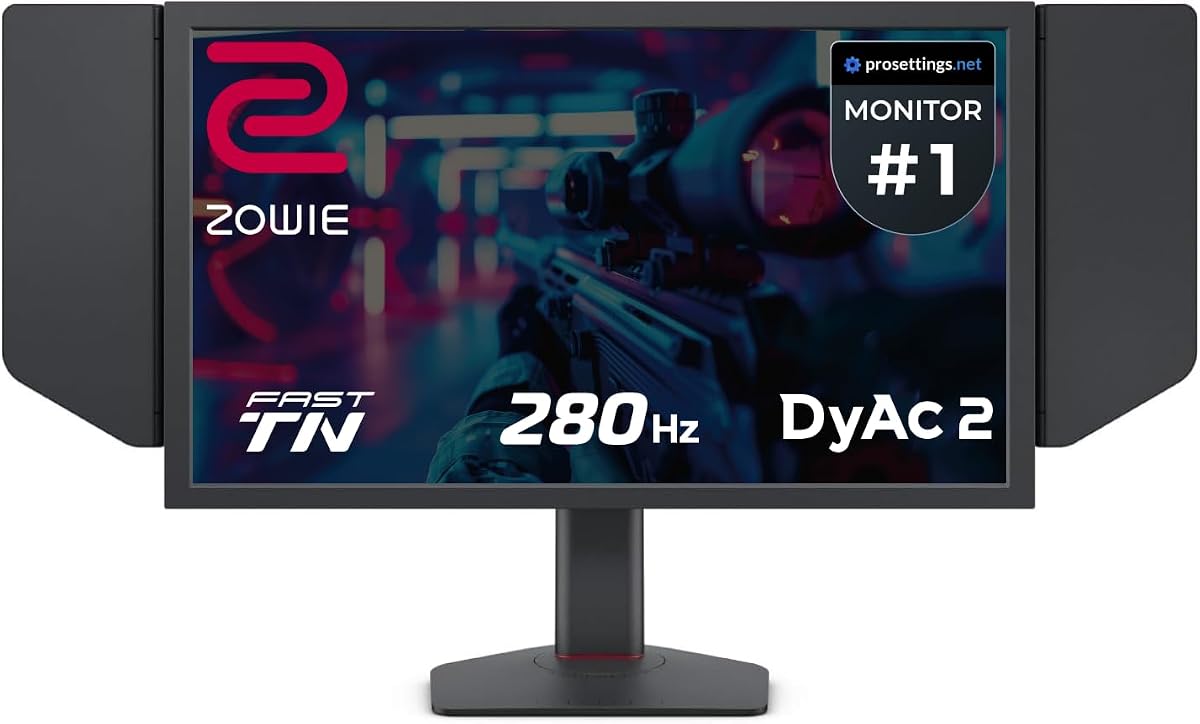
BenQ Zowie XL2566X+
4.3Editor score
400Hz refresh rate for competitive edge
Fast TN panel ensures sharp image clarity
DyAc 2 enhances blur reduction performance
Finding the perfect display can transform your gameplay experience significantly. A high-quality Benq monitor for gaming offers responsive visuals that keep you ahead of competitors during intense matches.
We have evaluated ten standout models based on refresh rates, panel types, and specialized technologies. Our analysis covers everything from professional esports rigs to versatile setups for casual players.
Each selection highlights unique strengths tailored to specific needs and preferences. Keep in mind that pricing fluctuates often, so checking current listings ensures you get the best value available today.
4.3Editor score

4.6Editor score

4.2Editor score
As an Amazon Associate we earn from qualifying purchases.
This table provides a side-by-side overview of key specifications across all ten selected monitors to help you quickly identify which model fits your specific gaming requirements.


The BenQ Zowie XL2586X+ stands out as a top-tier choice for serious esports athletes seeking the absolute fastest response times available on the market today. With an impressive 600Hz refresh rate, this monitor ensures that every movement is rendered with minimal latency and maximum fluidity. Its specialized DyAc 2 technology further refines visual clarity by reducing motion blur during rapid action sequences. While it focuses heavily on speed, the redesign also improves color performance to help players spot opponents more easily. This model is engineered specifically for those who demand peak performance in high-stakes competitive environments.
We may earn a commission when you buy through this link, at no additional cost to you.
At the core of this monitor is a newly developed Fast TN panel designed to enhance liquid crystal responsiveness significantly. The improved electrical conductivity helps reduce overshoot artifacts that can sometimes distract players during intense moments. Additionally, the vivid color film increases color performance by thirty-five percent compared to standard TN panels, resulting in less washout and better target definition. The dual backlight system offers a soft light output that facilitates eye adaptation without sacrificing the sharpness needed for tactical awareness. These technical upgrades collectively create an environment where precision and speed are prioritized above all else.
While the refresh rate is a major selling point, it does come with hardware requirements that gamers must consider before purchasing. To fully utilize the 600Hz capability, your graphics card must be powerful enough to push frames at that speed consistently in supported titles. Furthermore, the TN panel technology, while excellent for speed, does not offer the same wide viewing angles or color accuracy as IPS or OLED alternatives. These trade-offs are generally acceptable for dedicated esports players who value frame rates over cinematic visuals, but casual gamers might find other options more suitable for mixed usage.
If you are a competitive gamer focused on titles like first-person shooters where split-second reactions determine victory, this monitor is an exceptional investment. It provides the clearest motion clarity available in the industry right now, giving you a tangible edge over opponents using standard displays. For professionals or aspiring pros, the enhanced visibility and reduced blur can directly translate to better gameplay performance and higher win rates. We recommend this model for those who prioritize raw speed and motion accuracy in their setup.
The DyAc 2 technology uses dual backlighting to reduce blur without causing harsh flicker effects during fast movements.
A new vivid color film improves color accuracy by 35 percent making enemies easier to spot against complex backgrounds.
We may earn a commission when you buy through this link, at no additional cost to you.
The BenQ Zowie XL2566X+ delivers exceptional performance for gamers who need high-speed visuals without the highest price tag associated with top-tier models. Featuring a 400Hz refresh rate and DyAc 2 technology, this monitor provides clarity that rivals more expensive options in terms of motion handling. The Fast TN panel is optimized for native FHD resolution, ensuring that images remain sharp and detailed during fast-paced action. Recent redesigns have improved color performance to offer more vibrant hues, which aids in distinguishing enemies quickly. This makes it a strong contender for budget-conscious players who refuse to compromise on responsiveness.
We may earn a commission when you buy through this link, at no additional cost to you.
One of the standout features is the reduced overshoot achieved through the latest panel design improvements. By enhancing electrical conductivity, the liquid crystals respond faster and more accurately to input signals. The DyAc 2 technology also plays a crucial role by managing blur reduction while maintaining a soft light output for eye comfort. These factors combine to create a viewing experience where moving objects appear distinct and crisp. The monitor is tailored for players who spend most of their time in competitive matches where visual fidelity during movement is critical.
However, potential buyers should be aware that this model is strictly designed for esports performance rather than multimedia consumption. The limited FHD resolution may feel less immersive for single-player story games or content creation tasks compared to higher resolution displays. Additionally, the narrow viewing angles inherent to TN panels mean that color shifts can occur if viewed from off-center positions. These limitations are manageable if your primary focus is on competitive titles played from a direct frontal position.
For esports enthusiasts looking for a reliable monitor that prioritizes speed and clarity, this model offers outstanding value. It bridges the gap between professional-grade performance and accessible pricing for dedicated gamers. If your goal is to gain a competitive edge through better motion clarity and reduced blur, this monitor is highly recommended for your setup.
Native FHD resolution ensures maximum sharpness on the panel without downscaling artifacts affecting gameplay clarity.
Redesigned color performance offers vibrant hues that help identify enemies faster in crowded game scenes.
We may earn a commission when you buy through this link, at no additional cost to you.
The BenQ MOBIUZ EX271U offers a premium gaming experience that balances high-resolution visuals with advanced audio capabilities. Its 27-inch 4K display delivers intricate detail that brings game worlds to life with remarkable clarity. The inclusion of a built-in eARC port is a unique feature that supports up to seven-point-one audio channels directly through the monitor. This eliminates the need for complex external speaker setups while ensuring immersive sound. Combined with a 165Hz refresh rate and 1ms response time, it remains highly capable for gaming across various genres.
We may earn a commission when you buy through this link, at no additional cost to you.
Connectivity is another strong suit with support for DisplayPort 1.4, HDMI 2.1, and USB-C with 65W power delivery. This allows for seamless plug-and-play connectivity across different platforms including consoles and laptops. The Color Shuttle feature provides various authorized presets tailored to popular games which boosts the delicacy of your experience. Additionally, the Eye-Care Technology ensures comfort during long sessions. The Pixsoul Engine further refines visuals to ensure each game is showcased in an aesthetically pleasing palette.
While it excels in visual and audio fidelity, the 165Hz refresh rate may not satisfy hardcore competitive players accustomed to faster speeds. The higher price point also reflects its premium positioning compared to standard gaming monitors. For users who play a mix of single-player and multiplayer titles, these trade-offs are acceptable given the overall versatility and feature set.
This monitor is ideal for gamers who appreciate cinematic visuals and sound quality without needing additional peripherals. It serves as a powerful all-in-one solution for modern gaming setups. If you value resolution and audio integration alongside solid performance, the MOBIUZ EX271U is a compelling choice.
Built-in eARC supports up to 7.1 channels allowing immersive sound directly from the display without extra cables.
USB-C with 65W power delivery and HDMI 2.1 ensure seamless connection across multiple devices and consoles.
We may earn a commission when you buy through this link, at no additional cost to you.
The BenQ Zowie XL2546X+ is designed to provide sharper and clearer visuals than IPS alternatives in specific scenarios. It leverages a Fast TN panel with DyAc technology to deliver clearer images which helps players focus on the action. The design reduces unwanted afterimages that can distract during motion. Enhanced color performance ensures vibrant hues for better enemy identification. It is a reliable option for players who prioritize motion sharpness over wide color gamuts.
We may earn a commission when you buy through this link, at no additional cost to you.
At its core, the panel uses the latest design to improve electrical conductivity. This enhances liquid crystal responsiveness and reduces overshoot effectively. The DyAc 2 technology offers a soft light output for eye adaptation. The native FHD resolution provides optimal sharpness for common competitive resolutions. These technical features ensure that moving images remain distinct and clear throughout gameplay.
The lower refresh rate compared to newer models may limit its utility for those seeking the absolute fastest speeds. However, the clarity improvements still offer a significant advantage over standard displays. For most competitive gamers, the trade-off between speed and clarity is well balanced in this model.
Choose this monitor if you want a proven esports display with clear motion handling. It is suitable for dedicated players who value sharp outlines and reduced distractions during matches.
Dual backlight technology reduces blur while maintaining soft light for eye comfort.
Provides sharper outlines of moving images to help focus during intense moments.
We may earn a commission when you buy through this link, at no additional cost to you.
The BenQ MA320U is specifically designed for Mac users who need a seamless display experience that extends their ecosystem. It offers a vibrant P3 wide color gamut calibrated for MacBook Pro and Air models ensuring color accuracy. The dual USB-C ports support 90W power delivery to charge devices while displaying content. Integrated controls allow for adjustments directly from the keyboard enhancing convenience. It is ideal for those working and gaming on Mac hardware.
We may earn a commission when you buy through this link, at no additional cost to you.
A single USB-C cable connects and expands your display needs without extra adapters. The stand allows for height and tilt adjustments to optimize ergonomics. This integration ensures that your workflow remains efficient while enjoying high-resolution visuals. The monitor acts as a hub that simplifies your desk setup significantly.
While it lacks the high refresh rates of dedicated gaming monitors it delivers stunning visuals for mixed use. The Mac specific features may not appeal to non-Apple users. However for Mac owners this monitor provides a smooth experience that few competitors can match.
Select this monitor if you use a MacBook and want a large high-quality display. It balances professional work capabilities with casual gaming needs effectively.
Adjust brightness and volume directly from your MacBook keyboard without opening menus.
Dual USB-C ports deliver 90W power to charge your device while connected.
We may earn a commission when you buy through this link, at no additional cost to you.
The BenQ GW2790Q provides a balanced experience for gaming and productivity. It features a 100Hz refresh rate that reacts quickly to changes resulting in smoother user experiences. The IPS panel offers consistent colors and wide viewing angles. Included modes like Coding and ePaper ensure readability and eye comfort during long sessions. The Input Hotkey allows seamless switching between devices with a single click.
We may earn a commission when you buy through this link, at no additional cost to you.
Low Blue Light Plus filters out harmful blue-violet radiation while maintaining vivid color quality. Brightness Intelligence Technology auto adjusts brightness based on content and ambient light conditions. B.I. Gen2 allows customizable flexibility to meet your preferences. These features reduce eye strain and keep you comfortable during extended use.
While it does not reach the speeds of competitive esports monitors it is excellent for general gaming and work. The focus on eye care makes it suitable for long hours of use. For users who value comfort over extreme performance this monitor is a strong choice.
Choose this monitor if you need a comfortable display for gaming and daily tasks. It prioritizes eye health without compromising on visual quality.
Low Blue Light Plus filters radiation harmful to eyes while preserving vivid color quality.
Includes Coding and ePaper modes for effortless readability and long reading sessions.
We may earn a commission when you buy through this link, at no additional cost to you.
The BenQ RD320U is designed for professionals who spend long hours on screens. It features a Nano Matte Panel that minimizes reflection to deliver unparalleled clarity. Advanced coding modes provide clear fonts and better differentiation to reduce eye strain. Night Hours Protection offers minimum brightness technology for enhanced protection during dark usage. The 2000:1 contrast ratio ensures deep blacks and high image quality.
We may earn a commission when you buy through this link, at no additional cost to you.
MoonHalo Backlight with customizable color temperature ensures optimal eye protection and focus. The ergonomic design supports comfortable posture during extended sessions. This monitor prioritizes clarity and comfort for detailed tasks including gaming in low light conditions. The USB-C connectivity adds versatility to your setup.
While focused on programming the display is suitable for gaming that requires detail. The matte finish reduces glare but may soften sharpness slightly compared to glossy screens. For those who value eye health and clarity this model is worth the investment.
Select this monitor for professional work and immersive gaming. It offers a unique balance of protection and visual precision.
Featuring low reflection properties to minimize distractions and deliver peak performance clarity.
Deliver clear fonts and better code differentiation to reduce eye strain significantly.
We may earn a commission when you buy through this link, at no additional cost to you.
The BenQ GW2486TC is optimized for work and play with a focus on productivity. It features an edge-to-edge display to help you focus on the important stuff. Eye-Care technology reduces fatigue allowing extended work periods comfortably. Brightness Intelligence optimizes performance for both work and play. USB-C connectivity syncs images and data while charging mobile devices.
We may earn a commission when you buy through this link, at no additional cost to you.
The built-in noise cancelling microphone shifts focus to what matters. Note that the mic works when connected via USB-C to laptops or PCs. The height adjustable stand ensures ergonomic positioning. This monitor serves as a hub for your devices.
While not designed for high refresh gaming it handles casual gaming tasks well. The focus is on convenience and eye health. For office users needing a flexible monitor this is a strong option.
Choose this monitor for a streamlined workspace. It simplifies your desk setup and prioritizes comfort.
Synchronize images and data while charging devices with an all-in-one cable.
Built-in noise cancellation reduces background noise to shift focus to important tasks.
We may earn a commission when you buy through this link, at no additional cost to you.
The BenQ PD2706QN delivers accurate and consistent colors for creative and professional use. It features 95% P3 and 100% sRGB coverage with factory calibration for precision. ICCsync ensures consistency between Mac and BenQ displays. The USB-C connection syncs images and data while charging Mac devices. The Anti-Glare Nano Matte panel reduces glare while preserving color accuracy.
We may earn a commission when you buy through this link, at no additional cost to you.
Ergonomic design allows tilt pivot swivel and height adjustments to ensure comfort. Uniformity guarantees consistent brightness across the screen. This monitor is designed to enhance creativity and productivity. It serves as a reliable partner for detailed work.
While it supports 100Hz the focus remains on color accuracy rather than raw speed. The Anti-Glare Nano Matte ensures enhanced comfort during long sessions. For designers and gamers who value color accuracy this is a great choice.
Choose this monitor if color precision is a priority. It offers a balance of performance and visual reliability.
Factory-calibrated color accuracy ensures average Delta E less than or equal to 2 for consistency.
Automatically matches and syncs ICC profiles between your Mac and BenQ monitor seamlessly.
We may earn a commission when you buy through this link, at no additional cost to you.
The Acer Nitro KG241Y offers a competitive gaming experience at an accessible price. With a 180Hz refresh rate and 1ms response time it delivers smooth motion. The VA panel provides good contrast and deep blacks. AMD FreeSync Premium technology reduces screen tearing for cleaner visuals. The Zero-Frame design enhances immersion with a wide screen.
We may earn a commission when you buy through this link, at no additional cost to you.
Ports include Display Port and HDMI for flexible connectivity. The monitor supports VESA mounting for versatile mounting options. Tilt adjustments allow ergonomic positioning. This model is perfect for budget gamers needing high speeds.
While it is not a BenQ monitor it competes well in the gaming space. The focus is on refresh rate and affordability over specialized color tuning. It is a solid entry point into high refresh gaming.
Select this monitor if you need high speed on a budget. It delivers the essential features for competitive gaming.
180Hz refresh rate ensures quick reaction to changes resulting in smoother user experiences.
AMD FreeSync Premium technology reduces tearing and stuttering for smoother gameplay.
We may earn a commission when you buy through this link, at no additional cost to you.
Choosing the right Benq monitor for gaming requires understanding several key factors that impact your experience. This guide breaks down the essential elements to consider.
The refresh rate determines how many times the screen updates per second. Higher rates like 400Hz or 600Hz provide smoother motion which is critical for competitive shooters. Lower rates like 165Hz are sufficient for general gaming and immersion.
Aim for at least 144Hz for competitive play to gain a visual edge over opponents.
Panel types like TN IPS and VA each have distinct advantages. TN panels offer the fastest response times which is why they are popular for esports. IPS panels provide better color accuracy and viewing angles for a balanced experience.
Choose TN for pure speed and IPS for a mix of color and speed.
Resolution impacts image clarity and system requirements. 4K displays offer stunning detail but require powerful hardware. FHD is standard for esports to maintain high frame rates.
Select 1080p for maximum performance or 4K for visual immersion.
Technologies like DyAc help reduce motion blur by controlling backlight flicker. This feature keeps moving objects sharp during action sequences. It is a key differentiator for esports monitors.
Prioritize monitors with specific blur reduction tech if motion clarity is a priority.
Ensure the monitor has the right ports for your devices. HDMI and DisplayPort are standard. USB-C with power delivery simplifies laptop setups significantly.
Check that your ports match your PC console or laptop requirements.
Long gaming sessions can strain your eyes. Look for features like Low Blue Light and Flicker-Free technology. These reduce fatigue and make play comfortable for longer periods.
Eye-Care features are essential for anyone playing several hours a day.
An adjustable stand helps you set the monitor at a comfortable height. Look for tilt swivel and pivot options. Proper ergonomics prevent neck strain.
Adjustable stands improve posture and overall comfort during long sessions.
Determine how much you are willing to spend for your needs. High refresh esports monitors often cost more due to specialized panels. Entry-level options offer great value for casual gamers.
Balance your needs with your budget to find the best value.
To get the most out of your monitor ensure you update your graphics drivers regularly. This ensures all refresh rates and features work as intended with your hardware.
Clean the screen using a soft microfiber cloth to avoid scratches. Use only gentle cleaning solutions designed for screens to protect the coating.
Adjust the settings using the on-screen menu to match your game type. Customizing color and brightness can significantly improve your experience.
For budgets under $300 the BenQ Zowie XL2546X+ offers a strong balance of speed and clarity. It features 280Hz refresh rate and DyAc 2 technology. This makes it ideal for competitive gaming without high cost.
Yes using a 600Hz monitor requires a high-end graphics card. You need to push 600 frames per second to utilize the refresh rate. This is typically possible only with flagship GPUs.
DyAc or Dynamic Accuracy is a backlight technology used in Zowie monitors. It reduces motion blur by flashing the backlight in sync with frame rate. This ensures clear images during fast motion.
TN panels are generally better for esports due to faster response times. IPS panels offer better colors but may have slower pixel response. Most pros prefer TN for the clarity advantage.
You can but 4K requires more power to maintain high refresh rates. Many esports players stick to 1080p for higher frame rates. Choose 4K if you prioritize visual detail over speed.
Use Eye-Care features like Low Blue Light and adjust brightness. Take regular breaks using the 20-20-20 rule. Position the monitor at eye level to prevent neck strain.
USB-C simplifies connections for laptops by carrying video and power. It reduces cable clutter on your desk. This is especially useful for hybrid gaming and work setups.
Not all users need high refresh rates for casual gaming. Lower refresh rates reduce production costs making monitors affordable. High rates are mainly beneficial for competitive titles.
We reviewed ten options ranging from dedicated esports rigs to versatile displays for creators. The BenQ Zowie XL2586X+ stands out for those prioritizing speed above all else.
When choosing prioritize features that align with your gaming style. Speed matters for competitive play while resolution and connectivity are key for multimedia.
Always check current prices and availability as deals change frequently. Investing in the right monitor ensures a better experience for years to come.