
22MP Film & Slide Scanner with 5" LCD
4.3Editor score
Affordable price point
Built in memory storage
HDMI and USB output
Preserving old memories is easier than ever with modern film scanner to digital converter devices. These tools let you transform faded negatives and slides into crisp JPEG files without needing a computer. They are perfect for families wanting to share history quickly and securely.
We compared ten leading models based on resolution, screen size, and supported film types. Our analysis focuses on standalone functionality, scanning speed, and user interface simplicity. Each option offers unique strengths for different archival needs and budgets.
Each pick highlights key features and real-world performance for home users. Note that prices and availability change frequently across retailers. Check current listings before purchasing to ensure you get the best deal for your specific scanning needs.
4.3Editor score
4.4Editor score

4.0Editor score
As an Amazon Associate we earn from qualifying purchases.
This side by side comparison table lists every model we reviewed to help you find the right film scanner to digital converter for your collection. We highlight key specifications like screen size, supported formats, and connectivity options.





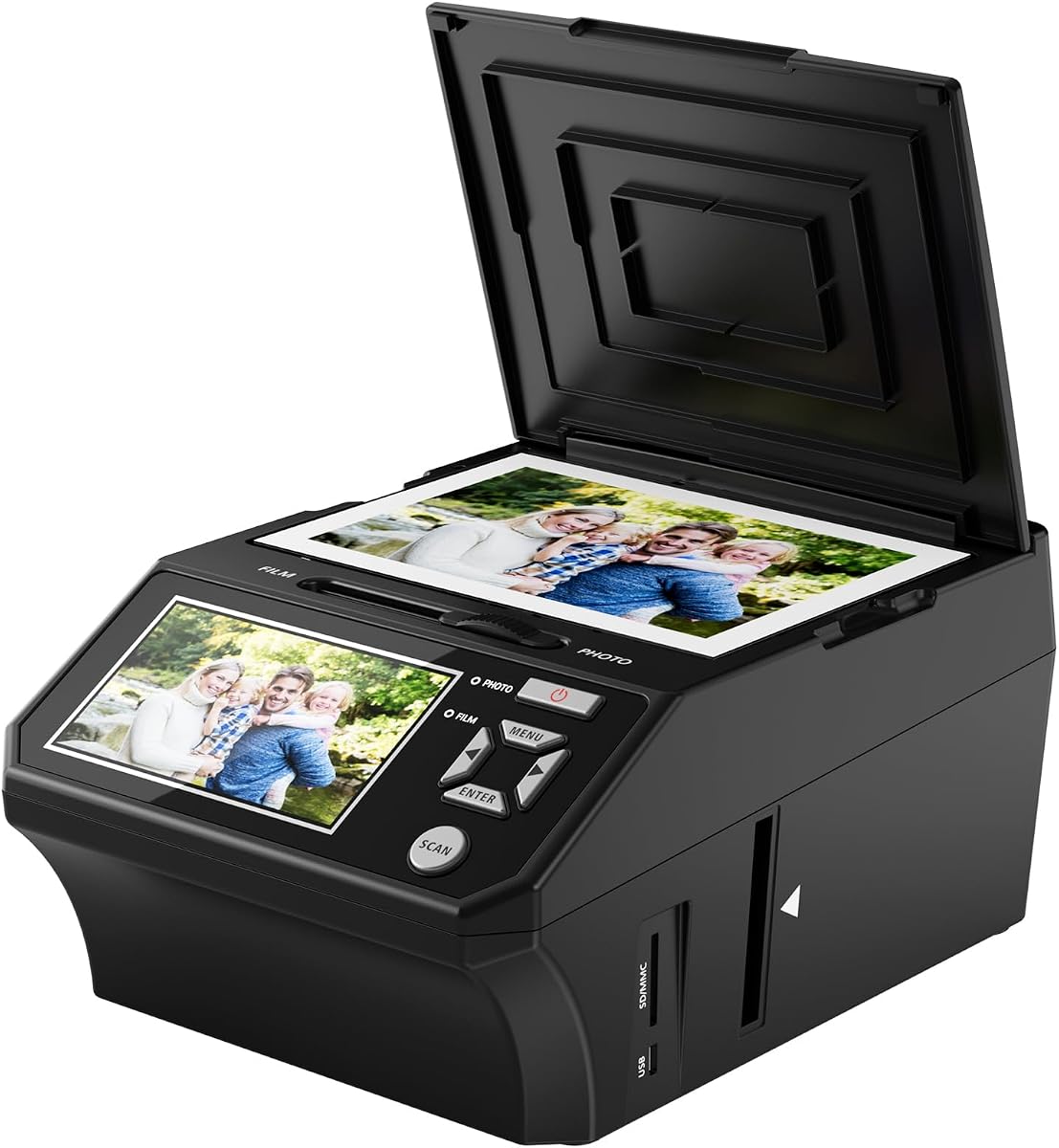
This all-in-one digital photo converter stands out for its ease of use and included accessories. With a strong 4.4 rating, it offers a complete package for digitizing family archives. The scanner supports 35mm slides and negatives plus printed photos up to 5R size.
We may earn a commission when you buy through this link, at no additional cost to you.
The 5-inch HD screen provides vibrant previews without needing a monitor. You can adjust images and view galleries directly on the device. The included 8GB SD card allows immediate archiving. This makes it ideal for non-technical users wanting quick results.
Scanning is fast and straightforward. The one-touch button initiates capture. However, the device is larger than some competitors. The warranty adds peace of mind. Overall, it balances features and simplicity effectively for home preservation.
Buyers seeking a hassle-free solution will appreciate this kit. It avoids complex software entirely. If you have mixed media like photos and slides, this covers them. It is a reliable choice for preserving memories with minimal effort.
The package includes film holders, cleaning brush, and an SD card. This means you can start immediately without extra purchases. It saves time and ensures all necessary tools are ready.
The 5-inch display offers wide viewing angles. You can share results with family easily. It doubles as a digital frame for your home decor.
We may earn a commission when you buy through this link, at no additional cost to you.
This model offers excellent value for those on a tight budget. It supports color and black-and-white negatives plus slides. The 5-inch display allows instant preview. You can scan and save directly to SD or internal memory.
We may earn a commission when you buy through this link, at no additional cost to you.
The HDMI cable included is a significant plus. It lets you view results on a larger TV instantly. The navigation is intuitive with simple buttons. No software installation is needed. This suits users wanting quick digital access.
While affordable, the build is functional. The internal memory is small but handy for testing. You can adjust brightness and color easily. It avoids complex menus for efficient workflow. The kit includes all adapters needed.
It is perfect for casual scanning projects. If you want quality without high cost, this fits. It handles mixed film types well. The warranty provides security. A smart pick for budget-conscious families.
Use the HDMI port to connect directly to a television. This allows group viewing of scanned slides during family gatherings. It enhances the sharing experience significantly.
You can use internal storage for immediate needs. For larger collections, insert an external SD card. This flexibility helps manage storage efficiently.
We may earn a commission when you buy through this link, at no additional cost to you.
This premium scanner features a large 7-inch touch LCD for precise control. It uses a high-quality CMOS sensor for sharp digital captures. The interface allows seamless preview and editing directly on the device. It suits professional or serious hobbyists.
We may earn a commission when you buy through this link, at no additional cost to you.
You can crop and adjust scans without a computer. The quick-feed tray speeds up batch scanning. It handles 135, 126, and 110 formats easily. The gallery mode transforms it into a display frame. This is versatile for home archives.
The price reflects its advanced capabilities. Setup might take more time than basic models. But the result is high-quality digitization. The USB and HDMI ports offer flexible transfer options. It preserves fine details well.
Buyers wanting top-tier control will find this appealing. It balances performance with ease of use. The touch interface simplifies complex tasks. It is a strong long-term investment for preservation. A great choice for demanding users.
The 7-inch touch screen simplifies editing. You can tap to crop or adjust settings easily. This modern interface makes the device accessible.
The quick-feed loading tray reduces downtime. It helps process large collections faster. This improves workflow for many users.
We may earn a commission when you buy through this link, at no additional cost to you.
This scanner lets you view, edit, and convert old negatives easily. It supports 135, 110, and 126 formats plus slides. The 5-inch screen offers wide viewing angles. You can share photos or use it as a frame.
We may earn a commission when you buy through this link, at no additional cost to you.
The easy-load inserts simplify the scanning process. Continuous loading technology makes it fast. You can adjust color and brightness via simple options. The capture software enhances files on the fly. This avoids complex external software.
It handles all old slides and negatives well. The SD card save option is convenient. The design blends seamlessly with home decor. However, the SD card is not included. You may need to buy one separately.
Ideal for families with mixed film archives. It balances quality and usability. The screen helps you verify scans instantly. If you want control without a computer, this works. A solid choice for general home use.
The software lets you adjust brightness and color. You can assign date and time too. This helps organize your digital collection effectively.
Quick-feeding tray technology allows fast action. You do not need to reposition each slide. This saves time during large batch sessions.
We may earn a commission when you buy through this link, at no additional cost to you.
This converter handles negatives and slides into high resolution JPEG files. It supports 35mm, 126, 110, and Super 8 formats. The stunning 5-inch screen lets you view directly. You can also connect to TV using HDMI.
We may earn a commission when you buy through this link, at no additional cost to you.
Adjusting brightness and color is done on device. You can flip and mirror images easily. The fast-loading trays make it quick to use. This gives freedom to preserve photos without a PC. It is a complete standalone solution.
The Super 8 support is rare at this level. It preserves motion picture film frames individually. The resolution ensures clarity for future viewing. However, SD card is sold separately. The unit is somewhat bulky for travel.
Perfect for users with mixed media including movies. It offers flexibility for display. The quick setup ensures frustration-free operation. If you have old Super 8 reels, this is a top pick. A great tool for home archives.
Converts Super 8 film into high resolution JPEGs. This preserves rare motion picture memories. It supports multiple film types effectively.
Use HDMI to view on a TV. This allows shared viewing sessions. It removes the need for a computer.
We may earn a commission when you buy through this link, at no additional cost to you.
Preserve old collections without a computer using this standalone unit. It digitizes slides and negatives efficiently. The 5-inch touch screen allows preview and edit. This streamlines the archival process significantly. It is a high-resolution CMOS scanner.
We may earn a commission when you buy through this link, at no additional cost to you.
Mixed archives are supported with versatile film formats. It functions as a scanner and viewer. Adjust scans via hands-on control on device. The quick load tray minimizes downtime. This enhances productivity for large collections.
The USB-C connectivity simplifies transfers. It ensures high clarity in digital conversions. However, it focuses on specific formats. The touchscreen is responsive and modern. It reduces dependency on external drivers.
Ideal for professionals managing large archives. It simplifies workflow to a standalone unit. The control gives precise adjustments. If you value efficiency, this is a strong option. A modern tool for preservation.
The quick-load tray streamlines scanning sessions. It minimizes downtime between scans. This enhances productivity for large batches.
The interactive screen allows direct adjustments. You can edit without additional equipment. This saves time and effort.
We may earn a commission when you buy through this link, at no additional cost to you.
This scanner converts old negatives and slides into JPEGs quickly. It handles 35mm, 126, 110, Super 8, and 8mm. The 3.5-inch display is bright and tilts for viewing. One-touch buttons allow scan and save steps.
We may earn a commission when you buy through this link, at no additional cost to you.
The intuitive interface includes helpful tray directories. You can browse galleries on the device. It comes with a USB power cable. Also included is a video cable and AC adapter. This ensures you can start right away.
The cleaning brush helps avoid marks on images. The display adjusts for easy operation. While the screen is smaller, it is clear. The adapter set covers many film types. It is a solid legacy converter.
Great for users with varied film types. It prioritizes ease of use. The included accessories are useful. If you need 8mm support, this is a top choice. A reliable tool for home conversion.
The bundle includes AC adapter and video cables. This ensures you can start immediately. It also provides a cleaning brush for maintenance.
One-touch buttons allow easy operation. It includes helpful tray directories for setup. This reduces confusion for users.
We may earn a commission when you buy through this link, at no additional cost to you.
Convert motion picture film reels into HD video files. It uses an 8MP sensor to save to SD card. The 5-inch screen lets you play films directly. You can adjust exposure and sharpness easily.
We may earn a commission when you buy through this link, at no additional cost to you.
The universal supply reel handles various reel sizes. On-screen prompts guide you without software. This includes a complete accessory kit. It has take-up reel and adapters. The design is lightweight and portable.
The Micro USB cable allows TV connection for playback. It lets you share family films instantly. However, there is no audio in output. The resolution is good for standard viewing. This is for movie lovers.
Perfect for 8mm and Super 8 collections. It preserves movement rather than static images. The interface is intuitive for all users. If you need to digitize movies, this is essential. A unique tool for motion film.
Converts motion film reels frame by frame. This preserves movement and history. It outputs MP4 for easy viewing.
Works with 3, 4, 5, 7, and 9-inch reels. The universal supply reel simplifies loading. It avoids complex setups.
We may earn a commission when you buy through this link, at no additional cost to you.
This scanner features a quick-feeding tray for continuous scanning. It ensures no repositioning of frames. Ideal for digitizing mixed slides and negatives. It saves directly to SD/SDHC cards. No computer is needed.
We may earn a commission when you buy through this link, at no additional cost to you.
The 7-inch LCD screen is tiltable. It doubles as a digital picture frame. The one-touch editing avoids complex menus. This simplifies resizing and converting. It is accessible for all users.
The workflow remains smooth with mixed film. You can adjust images intuitively. The screen enhances the sharing experience. However, SD cards must be purchased separately. It is a great picture scanner.
Best for users prioritizing workflow speed. The large screen aids preview and share. It keeps archives efficient. If you want high capacity with ease, this fits. A strong pick for home users.
The 7-inch LCD offers enhanced viewing. It doubles as a digital frame. This aids sharing and preview.
The quick-feeding tray allows continuous scanning. This eliminates repositioning. It improves speed and efficiency.
We may earn a commission when you buy through this link, at no additional cost to you.
Breathe new life into faded films with this unit. It converts negatives and slides into high resolution files. You can save directly to SD card. The 5-inch screen offers instant previews and editing.
We may earn a commission when you buy through this link, at no additional cost to you.
Use onboard buttons to select film type. Add date stamps easily. You can transfer files via USB Type-C. Connect to TV with HDMI cable too. It is a complete all-in-one kit.
The 36-month warranty provides reliable support. This adds peace of mind for buyers. You get adapters and cables in the box. It supports up to 64GB SD cards. A robust solution for conversion.
Buyers needing strong support will value this. It offers flexible transfer and viewing. The included bundle simplifies setup. If you prioritize warranty and quality, this is ideal. A great tool for family archives.
The 36-month warranty ensures support. This adds peace of mind for buyers. It reflects strong product confidence.
Use USB or HDMI cables for data. This allows PC or TV viewing. It adapts to your preferences.
We may earn a commission when you buy through this link, at no additional cost to you.
Selecting the right film scanner to digital converter involves evaluating key features. Understanding these factors helps ensure you get the best performance for your specific collection.
Resolution determines the clarity of your digitized photos. Most modern converters offer between 13MP to 24MP. Higher resolutions allow you to enlarge images without losing quality. This is crucial for archival purposes.
Look for models with at least 13MP for best results.
Check if the scanner supports your specific film formats. Common types include 35mm, 110, 126, and Super 8. Some models focus on slides while others handle negatives. Ensure compatibility before purchase.
Verify the adapter options included match your collection.
A larger display makes reviewing scans easier. Models typically have 3.5-inch to 7-inch LCDs. Touchscreens add convenience for editing settings. This improves the overall user experience.
Choose a screen that suits your viewing habits.
Standalone devices work without needing a computer. This simplifies the workflow for many users. You save directly to an SD card. It is ideal for users without computer access.
Ensure the device handles all required editing tasks independently.
Connectivity options help you transfer and view files. Look for USB Type-C, HDMI, or SD card slots. Some models allow direct TV connection. This facilitates sharing with family members.
Consider where you plan to store and view your files.
User-friendly interfaces are vital for beginners. Simple menus and one-touch buttons reduce learning time. Clear instructions ensure frustration-free operation. This makes the process accessible to all ages.
Prioritize models with intuitive navigation systems.
A strong warranty provides peace of mind. Look for at least 12 months of coverage. Some brands offer extended terms for reliability. This protects your investment over time.
Check customer support availability in your region.
Prices vary significantly between models. Basic options cost less but may lack features. Premium units offer better build and resolution. Determine your needs versus what you can afford.
Balance cost with the features you require.
First, read the manual to understand which adapters fit your film. Insert the film carefully to avoid scratches. Adjust the brightness settings for better contrast before starting.
Second, use the cleaning brush before scanning. Dust can ruin the quality of your digital files. Ensure the glass surface is clean for optimal results.
Third, store your SD cards safely to preserve digital files. Keep the scanner in a cool dry place. Cover it when not in use to prevent dust accumulation.
Most modern models are standalone devices that do not require a computer. They save directly to SD cards and have built-in screens for viewing. This makes them ideal for non-technical users who want simplicity.
Common formats include 35mm, 110, 126, Super 8, and 8mm. Some models also support slides and negatives. Always check the product specs to ensure your specific film type is compatible.
Many scanners come with HDMI cables. You can connect the device to a TV to view slideshows. This is a convenient way to share memories with family instantly.
Most devices do not include an SD card by default. You may need to purchase one separately. Check the product details to see what accessories are included in the box.
Yes, many models offer built-in editing tools. You can adjust brightness, color, and crop images on the screen. This allows you to finalize photos without using external software.
Scanning time varies by model and settings. High-quality scans may take a few seconds. Models with fast-feeding trays can process batches more quickly for efficiency.
We have reviewed ten top options including the best budget and premium picks. Each offers unique features for different needs and budgets.
Focus on resolution and film type compatibility. Ensure you value standalone functionality for ease of use.
Prices and availability change frequently. Check current listings to find the best deal for your home archive project.