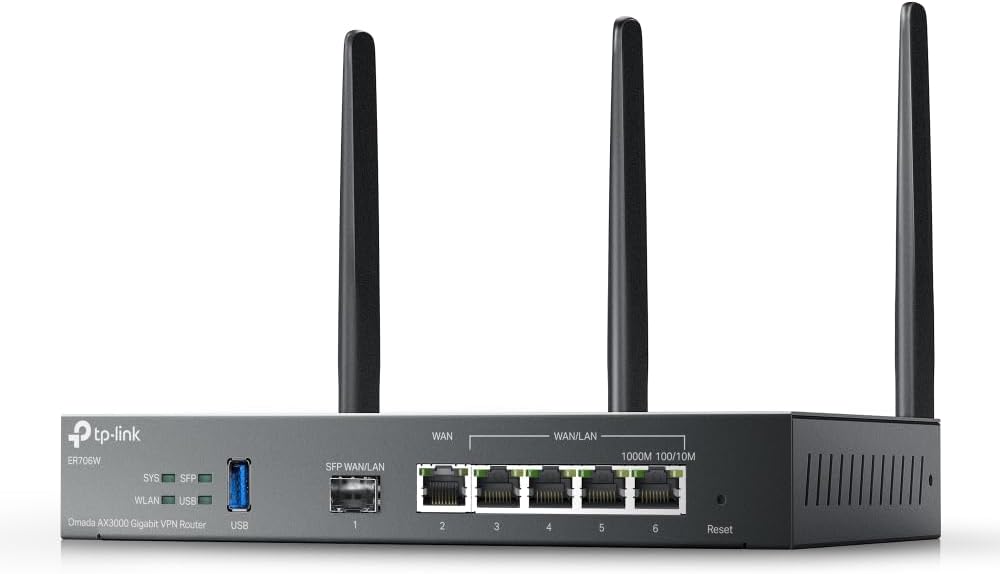
Omada ER706W, Gigabit AX3000 WiFi 6 VPN Router
4.1Editor score
AX3000 WiFi 6
Load Balancing on WAN
High-security VPN Support
This guide compares the top ten commercial wireless router options for enterprise networks, highlighting speed, security, and scalability features for business
Selecting the right commercial wireless router is critical for maintaining robust connectivity in modern business environments. High-performance devices ensure seamless operations across offices, retail spaces, and hospitality venues.
We evaluated ten leading models based on throughput, security protocols, and management capabilities. Our analysis focuses on reliability and scalability for growing enterprise networks requiring consistent uptime.
Each pick highlights unique strengths like mesh support or advanced VPN features. Note that availability and pricing may fluctuate over time, so check current listings before purchasing any device.
4.1Editor score

4.2Editor score

4.6Editor score
The following table provides a side-by-side comparison of all ten commercial wireless router models evaluated in this guide, focusing on key technical specifications and capabilities.





The ASUS ExpertWiFi EBR63 stands out as a top-tier commercial wireless router designed for business environments needing reliable connectivity. With a strong rating of 4.2 stars from users, it delivers AX3000 WiFi 6 speeds that support multiple devices without performance drops.
We may earn a commission when you buy through this link, at no additional cost to you.
Its standout features include the ability to create up to five distinct SSIDs for separating traffic like guests, employees, and IoT devices. The customizable guest portal allows businesses to brand their Wi-Fi access page, enhancing professional appearance. Enterprise-grade security comes free via ASUS AiProtection Pro, ensuring safety against threats.
While highly capable, the router has a limited number of physical wired ports compared to some competitors. Additionally, configuring the guest portal requires initial setup time. These trade-offs are acceptable given the strong security and management tools that justify the investment.
Small to medium businesses looking for an easy-to-manage router with robust security should consider this model. It provides the stability and flexibility needed for daily operations, making it a solid choice for professional settings.
Customizing the guest portal helps create a branded experience for visitors while keeping them on a separate network segment.
The system integrates with ExpertWiFi AIMesh, allowing you to add more access points as your business grows without complex reconfiguration.
We may earn a commission when you buy through this link, at no additional cost to you.
The Omada ER706W offers excellent value for businesses seeking high-speed connectivity without breaking the budget. It supports AX3000 WiFi 6 speeds and includes essential features like load balancing to maximize bandwidth usage across multiple internet lines.
We may earn a commission when you buy through this link, at no additional cost to you.
This router supports a wide range of VPN protocols including SSL, IPSec, and OpenVPN, making it versatile for secure remote access. The inclusion of a Gigabit SFP slot adds flexibility for fiber connections, which is rare in this price range. However, full functionality often requires an Omada controller.
Users may find the initial setup process more technical than plug-and-play home routers. Despite this complexity, the performance and networking options justify the effort for IT-savvy teams. It remains a top choice for cost-conscious businesses needing enterprise-level features.
Budget-focused buyers should look to this model if they need robust routing capabilities. The combination of speed, security, and flexibility makes it a practical solution for small to medium enterprises.
Load balancing ensures that traffic is distributed evenly across available internet connections, improving overall network reliability.
The SFP slot allows for direct fiber connectivity, which is crucial for high-speed backbone connections in modern office spaces.
We may earn a commission when you buy through this link, at no additional cost to you.
The Ruckus R750 is engineered specifically for challenging environments where many devices connect simultaneously. Its rating of 4.3 reflects user satisfaction with its ability to handle ultra-dense crowds without dropping connections or slowing down speeds.
We may earn a commission when you buy through this link, at no additional cost to you.
Key strengths include BeamFlex adaptive antenna technology which optimizes signal paths for each client. This ensures consistent performance even in crowded lobbies or event spaces. While it is an access point rather than a standalone router, it integrates well into larger managed networks.
The main limitation is the dependency on a Ruckus controller for full management features, which adds to the overall system cost. Also, the higher price may be prohibitive for smaller setups. However, for venues with hundreds of concurrent users, the investment pays off in reliability.
Businesses with high-density needs like stadiums or conference centers should prioritize this unit. It delivers unmatched capacity and stability where cheaper alternatives often fail to perform adequately under load.
Designed for ultra-dense environments, this access point ensures every device gets a fair share of bandwidth without congestion.
BeamFlex technology adjusts signal strength and direction in real time to maximize throughput for every connected user.
We may earn a commission when you buy through this link, at no additional cost to you.
The Ruckus R670 represents the cutting edge of wireless networking with native Wi-Fi 7 capabilities. Although it carries a higher price tag, its ability to deliver over 9 Gbps combined data rates makes it future-proof for high-bandwidth business applications.
We may earn a commission when you buy through this link, at no additional cost to you.
This access point supports 6 spatial streams and includes integrated IoT protocols like BLE and Zigbee, reducing the need for separate hardware. The 5GbE port prevents bottlenecks when connecting to modern switches. Its convergent design simplifies network architecture by unifying multiple wireless standards.
The main downside is the significant cost, which may not be justified for standard office environments. It is best suited for flagship locations needing top-tier performance. The management options are flexible, allowing both on-premises and cloud control for IT teams.
Enterprises investing in next-gen infrastructure should consider this unit. It provides the speed and connectivity density required for advanced collaborative tools and high-definition video streaming in professional settings.
Wi-Fi 7 delivers ultra-low latency and massive throughput, essential for AR/VR and 8K video collaboration in business.
By converging Wi-Fi and IoT technologies into one network, it streamlines management and reduces hardware complexity.
We may earn a commission when you buy through this link, at no additional cost to you.
The NETGEAR Orbi 970 Series delivers exceptional whole-building coverage with its mesh system designed for large spaces. With a high rating of 4.6, it promises speeds up to 27 Gbps and supports up to 200 devices simultaneously without performance degradation.
We may earn a commission when you buy through this link, at no additional cost to you.
Its Quad-Band technology dedicates a specific frequency for backhaul traffic, ensuring clients get full speed even when adding satellites. The inclusion of 10 Gigabit ports on both router and satellites allows for ultra-fast wired connections for servers or NAS drives. Security features like Advanced Router Protection come out of the box.
The premium cost is significant, and advanced security suites like Armor require separate subscriptions. For smaller offices, this might be overkill, but it is unmatched for sprawling facilities. The setup process is simplified through a guided mobile app for quick deployment.
Large enterprises or warehouses needing consistent signal everywhere should opt for this system. The combination of raw power, extensive coverage, and ease of use makes it a top recommendation for premium setups.
An exclusive wireless band handles communication between units, ensuring client devices always have maximum bandwidth available.
Built-in protection against malware and threats ensures network safety even in high-traffic environments without extra tools.
We may earn a commission when you buy through this link, at no additional cost to you.
The Omada EAP650 serves as a reliable entry point into professional-grade wireless networks. Rated at 4.5 stars, it offers fast Wi-Fi 6 speeds and integrates with the Omada SDN platform for centralized control across multiple sites.
We may earn a commission when you buy through this link, at no additional cost to you.
Key benefits include free cloud management without extra fees, which simplifies administration for IT teams. The 5-year warranty provides peace of mind for long-term deployments. Its slim design blends easily into modern office ceilings or walls without drawing attention. PoE Plus support allows flexible installation anywhere power outlets are scarce.
It functions solely as an access point, requiring a router and controller for full network functionality. Users may need to purchase additional hardware to complete a system. Despite this, the value proposition remains strong for businesses expanding existing networks.
Organizations looking to upgrade Wi-Fi coverage cost-effectively should consider this model. It balances performance, reliability, and management flexibility well, making it a smart choice for offices and retail spaces.
Multiple power options including PoE make it easy to install in hard-to-reach areas without running new power cables.
Remote management capabilities allow administrators to monitor and update the network from anywhere at any time.
We may earn a commission when you buy through this link, at no additional cost to you.
The Ubiquiti U6+ is a trusted choice for businesses needing stable and fast wireless access points. With a 4.6 rating, it supports high-speed data transfer and standard wireless protocols to ensure seamless connectivity for all user devices.
We may earn a commission when you buy through this link, at no additional cost to you.
Features like data encryption protect sensitive information from unauthorized access, making it suitable for professional environments. The wall-mountable design simplifies installation, reducing setup fatigue for technicians. A dedicated Gigabit Ethernet port ensures wired devices can connect at full speed without bottlenecks.
Setting up the device typically requires a UniFi controller, which might add complexity for smaller businesses without IT staff. While the hardware is robust, the management ecosystem demands some learning. For those willing to invest time, the rewards are stable performance.
Small businesses needing dependable wireless access should consider this unit. It offers a solid balance of speed and security, ensuring employees stay connected efficiently throughout the workday.
Built-in encryption features keep valuable business data safe from external threats and unauthorized users on the network.
The wall-mountable form factor allows for flexible placement to optimize signal coverage across various office layouts.
We may earn a commission when you buy through this link, at no additional cost to you.
The TP-Link BE6500 introduces the latest Wi-Fi 7 technology to commercial spaces, promising optimized performance for future devices. Rated at 4.3, it delivers combined speeds up to 6.5 Gbps, ensuring smooth streaming and downloads even in busy environments.
We may earn a commission when you buy through this link, at no additional cost to you.
Features like Multi-Link Operation allow simultaneous data transmission across bands, reducing latency. As a signatory of the Secure-by-Design pledge, TP-Link prioritizes security in its hardware construction. The inclusion of 2.5 Gbps ports supports multi-gig internet plans, keeping wired connections fast.
However, mesh compatibility is limited to EasyMesh routers and excludes TP-Link's own Deco line, which might confuse users. The advanced features also require some familiarity to configure correctly. For tech-savvy IT teams, these hurdles are minor compared to the speed benefits.
Enterprises looking to future-proof their network should look at this model. It delivers the raw speed and modern security needed for today's high-demand business applications.
The MLO feature ensures that the latest laptops and phones get maximum throughput by using multiple frequency bands simultaneously.
Being built with secure-by-design principles means security is integrated from the start rather than added as an afterthought.
We may earn a commission when you buy through this link, at no additional cost to you.
The NETGEAR Nighthawk WiFi 7 router provides high-speed connectivity suitable for businesses needing reliable internet. With a 4.3 rating, it supports up to 9.3 Gbps and covers large spaces, ensuring employees stay connected during video calls or data transfers.
We may earn a commission when you buy through this link, at no additional cost to you.
Its dedicated tri-band design gives fast devices a private lane, preventing slowdowns when many users connect. Multi-gigabit ports allow direct connection to high-speed modems, unlocking full internet plans. The Nighthawk app simplifies management, allowing users to run tests or pause devices remotely.
While coverage is broad, physical barriers like walls can still reduce range on multiple floors. Also, the security subscription adds an ongoing cost beyond the hardware price. These factors are minor compared to the sheer speed and convenience offered.
Businesses needing fast and reliable internet should consider this router. It balances performance and ease of use, making it a practical solution for modern office environments.
The dedicated high-speed band ensures that critical applications always have priority bandwidth regardless of network load.
It works with most existing modems and providers, making upgrades simple without needing to replace infrastructure.
We may earn a commission when you buy through this link, at no additional cost to you.
The ASUS RT-BE88U stands out for its exceptional wired capacity, offering two 10G ports for high-speed data transfer. Rated at 4.3, it supports the latest Wi-Fi 7 standard, delivering up to 7.2 Gbps for lag-free collaboration and cloud access.
We may earn a commission when you buy through this link, at no additional cost to you.
Its AI WAN detection ensures always-on internet by managing connections intelligently. The built-in Guest Network Pro simplifies IoT and visitor management. Strong security via Trend Micro ensures comprehensive protection against threats. Mesh compatibility allows easy expansion for larger offices.
The high price may be prohibitive for smaller setups, and configuring advanced features requires technical skill. For organizations needing multi-gigabit wired speeds and robust security, the investment is worthwhile. It delivers top-tier performance for demanding business scenarios.
Businesses needing advanced wired capabilities should look to this model. It combines speed, flexibility, and security in a powerful package.
AI WAN detection ensures your network stays up even if one connection drops by automatically switching to a backup.
Guest Network Pro helps manage smart devices separately, keeping main traffic secure and optimized for employees.
We may earn a commission when you buy through this link, at no additional cost to you.
Selecting the right commercial wireless router requires understanding several critical factors to ensure your business network performs reliably.
Choose a router supporting the latest Wi-Fi standards like Wi-Fi 6 or Wi-Fi 7 to ensure high throughput and low latency. These standards handle more devices efficiently which is essential for busy business environments where multiple employees connect simultaneously.
Look for models offering multi-gigabit speeds to future-proof your network against increasing bandwidth demands.
Commercial networks must protect sensitive data, so prioritize routers with advanced security suites like firewall protection and intrusion detection. Some models offer free subscriptions to security software, providing an extra layer of defense against malware and hackers.
Ensure the router supports WPA3 encryption and has a strong track record of regular firmware updates to stay protected.
As your business grows, your network should grow with it. Choose a router that supports mesh technology or integration with access points to expand coverage without performance loss.
Look for systems that allow easy addition of nodes to cover larger spaces efficiently.
Effective network management is crucial for IT teams. Evaluate whether the router offers centralized cloud management or a dedicated app for remote control of settings and devices.
Remote access simplifies monitoring and troubleshooting without needing physical presence at the site.
Check the number and type of Ethernet ports available. For businesses with wired desktops or servers, having multiple Gigabit or multi-gigabit ports is vital.
Models with SFP slots offer flexibility for fiber connections which might be necessary for high-speed backhaul.
Separating guest traffic from business traffic enhances security. Look for routers that support multiple SSIDs and customizable guest portals for branding.
Guest portals can capture emails or show terms of service, adding value to visitor experience.
Commercial equipment should come with robust warranties and technical support. Ensure the manufacturer offers a guarantee that matches your operational needs.
Good support ensures quick resolution if issues arise, minimizing downtime for your business.
While commercial-grade routers cost more than home models, they offer better durability and performance. Balance the features against your budget to find the best value.
Investing in quality hardware now can save money on upgrades and downtime later.
Proper placement of your router is essential for optimal signal coverage. Position the device in a central location away from physical obstructions like metal cabinets or thick walls to ensure even distribution of the wireless signal across your business premises.
Regularly update the firmware to keep your network secure against emerging threats. Most modern routers offer automatic updates, but checking the settings periodically ensures your device is always running the latest version with the best performance and security patches.
Maintain good physical hygiene by keeping the router ventilated to prevent overheating. Ensure the device is in a cool area and free from dust accumulation, which can degrade performance and shorten the lifespan of the hardware.
Commercial routers offer advanced features like multiple SSIDs, stronger security protocols, and better scalability. They are designed to handle many concurrent devices without performance drops which is critical for business continuity.
Some business routers require a separate software or hardware controller for full management features. However, many modern models come with built-in cloud apps that allow direct management without extra hardware.
Yes, many mesh systems are now designed for commercial use offering wide coverage and seamless roaming. They are particularly useful in large offices or multi-story buildings where wired access points are difficult to install.
Look for WPA3 encryption, built-in firewalls, and intrusion prevention systems. Free commercial-grade security subscriptions like those offered by ASUS are valuable additions that protect your network from external threats.
Most commercial routers allow you to create separate SSIDs for guests in the settings menu. You can often customize the portal page to match your branding before connecting visitors to the internet.
Load balancing allows the router to distribute internet traffic across multiple connections ensuring higher total bandwidth. This prevents single point failures and improves speed for employees relying on fast internet.
If your business involves high-bandwidth applications like 8K video or VR, Wi-Fi 7 provides significant speed and latency improvements. It is a future-proof investment if you expect your network needs to grow.
Ideally, keep automatic updates enabled so you always have the latest security patches. If automatic updates are off, checking manually once a month ensures your router remains protected and efficient.
We have reviewed ten top-rated commercial wireless routers ranging from budget-friendly models to premium systems offering cutting-edge speeds. Each option provides unique strengths tailored to different business sizes and technical requirements.
When choosing a router, prioritize security, management flexibility, and scalability to support your operations. Ensure the device supports the latest Wi-Fi standards to handle the growing number of connected devices efficiently.
Remember that prices and availability change frequently. Always verify the current listings and compatibility with your existing infrastructure before making a final purchase decision.