
Womier DK75 75% Wireless Gaming Keyboard
4.5Editor score
Triple mode connectivity support
PBT durable keycaps included
Smart screen display features
Discover the top ten green backlit gaming keyboard options for October 2026 with detailed comparisons of features, typing feel, and connectivity.
Finding the perfect green backlit gaming keyboard can transform your setup into a visually stunning and highly functional workspace. These keyboards offer unique aesthetics that stand out from typical RGB setups while providing essential gaming features. We have carefully selected models that balance style with performance for every type of user.
Our comparison process involved analyzing technical specifications user user feedback, and real-world usability across different scenarios. We looked at connectivity options, switch types, build quality, and additional features like rotary knobs or displays. This ensures that every product on our list meets high standards of quality and value.
Each pick in this guide highlights specific strengths that cater to different needs such as budget, portability, or advanced customization. While prices can fluctuate over time, the value proposition of these keyboards remains strong based on their features. Keep reading to find the ideal match for your gaming and typing requirements.
4.5Editor score
4.6Editor score
4.8Editor score
The following comparison table breaks down the core specifications and unique selling points of each of the ten selected green backlit gaming keyboards to help you make an informed decision.


The AULA F75 stands out as a top contender with its impressive rating and versatile connectivity options. It supports Bluetooth 5.0, 2.4GHz wireless, and USB wired connections allowing you to switch seamlessly between up to five devices. The hot-swappable base and pre-lubed switches deliver a smooth creamy typing experience that appeals to both gamers and enthusiasts.
We may earn a commission when you buy through this link, at no additional cost to you.
Its advanced structure includes five layers of filling to counteract cavity noise, ensuring a solid and quiet feel. The RGB backlighting offers 16.8 million colors with adjustable brightness and speed. Full-key macro programmability through the driver allows for complex command setups that can enhance gaming performance and productivity significantly.
While the driver offers extensive customization, it currently supports Windows systems more fully than macOS which might be a limitation for some users. The battery life is robust at 4000mAh but the need for software downloads for certain features adds a slight step to the initial setup process. These are minor trade-offs for the level of customization offered.
This keyboard is ideal for gamers and users who want a compact layout without sacrificing functionality. The combination of hot-swap capability, gasket structure, and multi-device support makes it a strong investment for anyone looking to upgrade their setup with a green backlit option that performs reliably.
The multi-function knob allows you to control backlight settings and media playback easily while the driver enables deep macro customization.
Pre-lubed Reaper switches and stabilizers provide a smooth mechanical feel with reduced noise for an immersive typing experience.
We may earn a commission when you buy through this link, at no additional cost to you.
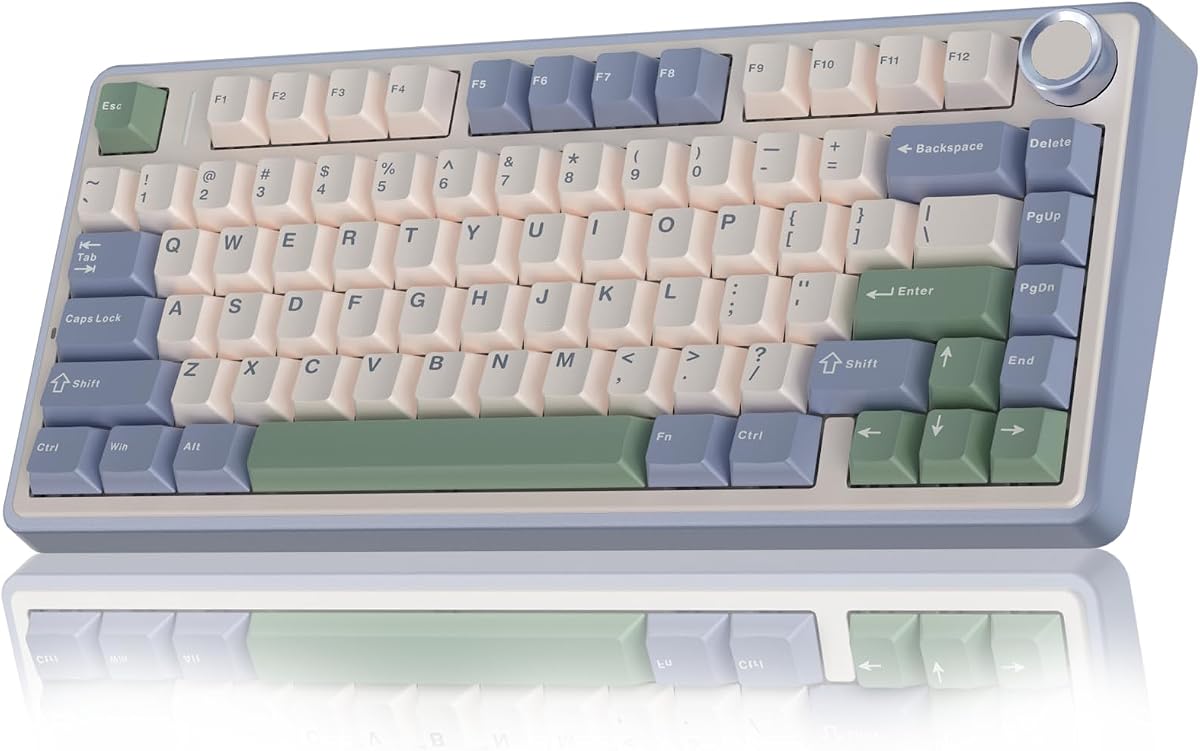
The Womier DK75 offers exceptional value with its combination of features at a budget-friendly price. It features a 75% layout that saves desk space while retaining essential keys like arrows and function rows. The triple-mode connectivity ensures you can work or game across multiple devices without hassle making it versatile for various setups.
We may earn a commission when you buy through this link, at no additional cost to you.
Unlike many budget keyboards, this one includes PBT keycaps which resist oil and wear better than ABS alternatives. The smart screen display keeps you informed about battery and connection status while the rotary knob provides quick access to volume and brightness controls. The quiet membrane switches make it suitable for shared environments like offices or libraries.
The main trade-off is the use of membrane switches instead of mechanical ones which might not satisfy enthusiasts seeking tactile feedback. Customization options are more limited compared to higher-end models but are sufficient for casual users. The 4000mAh battery ensures long usage between charges adding to its convenience factor.
This keyboard is perfect for students, casual gamers, or professionals looking for an affordable and reliable wireless option. Its creamy design and functional features make it a standout choice in the budget category without compromising too much on quality or aesthetics.
The 75% layout reduces clutter while maintaining functionality for work and play with a sleek mechanical-inspired look.
A large 4000mAh battery combined with auto-sleep modes ensures you can go days on a single charge.
We may earn a commission when you buy through this link, at no additional cost to you.
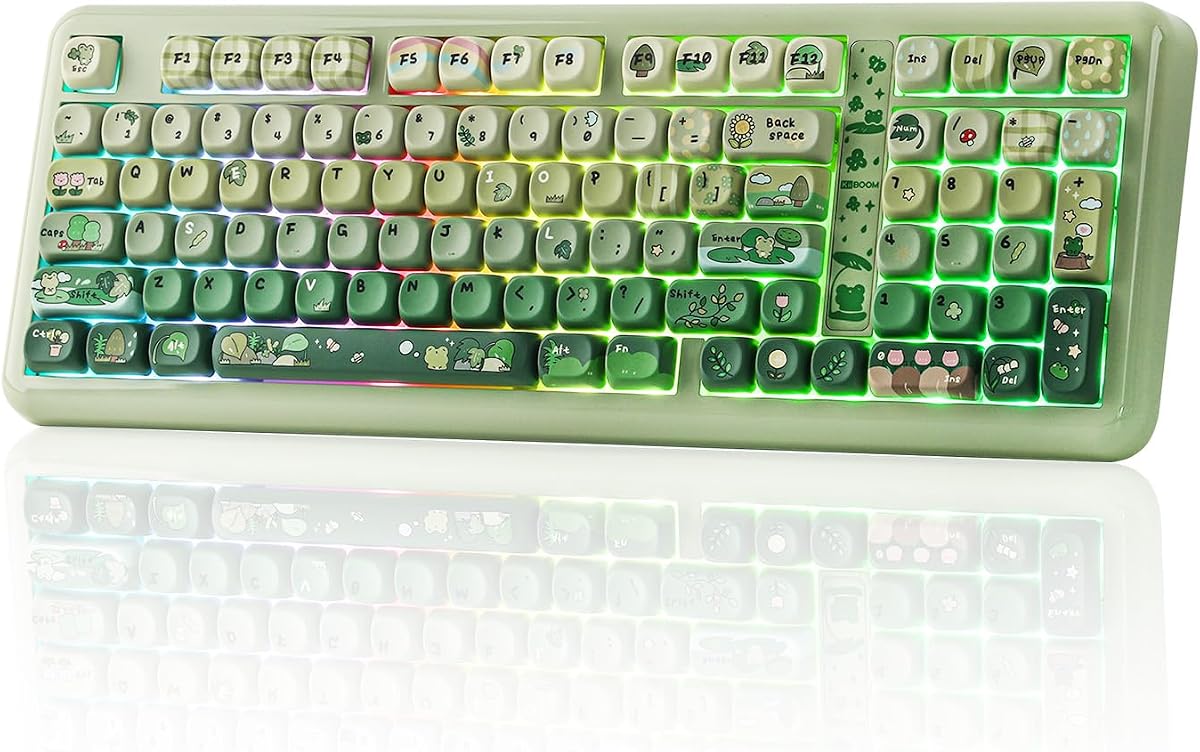
The KiiBoom Phantom98 Lite is a premium offering designed for enthusiasts who demand high performance and customization. Its 96% layout strikes a perfect balance between compactness and full functionality. The gasket mount structure and multiple sound-dampening layers provide a creamy typing experience that rivals much more expensive custom boards.
We may earn a commission when you buy through this link, at no additional cost to you.
VIA compatibility allows for deep customization of keys, macros, and lighting without needing proprietary software. The massive 8000mAh battery ensures extended wireless use which is rare in this category. Hot-swappable PCBs let you change switches easily making future upgrades simple and cost-effective.
The main downside is the higher price compared to standard mass-market keyboards. The extensive features might be overwhelming for users who just need a basic input device. However, for those who value sound quality and customization the value proposition is strong enough to justify the investment.
This keyboard is ideal for tech enthusiasts, content creators, and competitive gamers who want a premium setup. It offers a rare combination of battery life, ergonomic design, and advanced customization features that make it a top-tier choice for green backlit gaming keyboards.
VIA support allows endless possibilities for remapping keys and creating macros to suit specific workflows.
With an 8000mAh battery you can enjoy weeks of use on a single charge depending on your settings.
We may earn a commission when you buy through this link, at no additional cost to you.
The AULA S99 blends vintage aesthetics with modern functionality to create a unique typing experience. Its 96% layout keeps the numeric keypad while saving space. The dual-mode rotary knob allows for quick adjustments of volume and lighting which adds to its convenience. Full key programmability helps streamline complex tasks in games or work apps.
We may earn a commission when you buy through this link, at no additional cost to you.
Ergonomics are a focus with a foldable two-stage stand that reduces wrist pressure during long sessions. The keyboard supports Bluetooth 5.0, 2.4GHz, and USB-C connectivity making it flexible for various setups. The creamy membrane switches provide a smooth typing feel without the noise of mechanical switches.
While it lacks hot-swap support which limits switch customization the overall value is strong for users prioritizing ergonomics. The software for macros is straightforward but not as deep as premium options. The retro design might not appeal to everyone but it offers a distinct look in the market.
This keyboard suits users who want a blend of style and utility without a high price tag. Its ergonomic features and programmability make it a strong choice for office workers and casual gamers alike looking for a reliable green backlit option.
The adjustable stand helps reduce wrist strain making long typing sessions more comfortable and productive.
The rotary knob provides immediate control over lighting and audio without needing to navigate menus.
We may earn a commission when you buy through this link, at no additional cost to you.
The Womier SK80 stands out with its vibrant multimedia display that allows for custom GIFs and system info. This adds a unique visual layer to your setup that many users appreciate. The hot-swap socket lets you experiment with different switches easily while the gasket mount ensures a stable and quiet typing experience.
We may earn a commission when you buy through this link, at no additional cost to you.
The software offers deep customization for RGB lighting and macros though it is currently limited to Windows users. The frog green aesthetic creates a charming and cohesive look on the desk. Build quality is solid with PBT keycaps that feel durable and resistant to wear over time.
The main limitation is the software dependency which might hinder macOS users. The price is higher than entry-level models but justified by the advanced features and design. The visual customization options make it a favorite for streamers and users who value aesthetics in their workspace.
Ideal for creative users and gamers who want a highly customizable and visually engaging keyboard. The multimedia display and hot-swap capability provide a premium experience that is rare in this price range and color theme.
The display screen can show custom images and system data adding personality to your gaming setup.
Gasket mount and durable materials ensure the keyboard remains stable and feels premium over time.
We may earn a commission when you buy through this link, at no additional cost to you.
The Keymatic Gaming Keyboard offers a lot of functionality in a compact and wireless design. It supports tri-mode connectivity which allows seamless switching between devices for multitasking. The inclusion of a full number pad is beneficial for data entry tasks while the status screen keeps you informed on battery and connections.
We may earn a commission when you buy through this link, at no additional cost to you.
Using silver paste membrane technology it provides a mechanical feel without the noise which is great for quiet environments. The RGB backlighting offers multiple modes to match your mood. The build includes an iron plate for stability making it feel solid during intense use.
While it uses membrane switches which may lack the precision of mechanical ones it is a strong option for general use. The weight might be slightly high for some portable needs but adds to the stability. The screen and knob controls add convenience without complicating the setup.
This keyboard is perfect for users who need a reliable and versatile wireless option for work and play. Its combination of features like the number pad and screen makes it practical for various daily tasks while maintaining a clean look.
The 98-key layout with full number pad offers efficiency for data entry without excessive bulk.
Advanced membrane technology ensures low noise levels making it suitable for shared spaces.
We may earn a commission when you buy through this link, at no additional cost to you.
The Owpkeenthy Full Size Mechanical Gaming Keyboard provides a classic full-size layout ideal for those who need a number pad. Its N-key rollover ensures that all keystrokes are registered accurately even during rapid inputs. The linear red switches offer a smooth and quiet typing experience without tactile bumps.
We may earn a commission when you buy through this link, at no additional cost to you.
RGB backlighting is customizable with 18 modes that create a vibrant atmosphere. The XDA profile keycaps provide a uniform look that is comfortable for long typing sessions. Build quality is reliable with a focus on ergonomics to reduce wrist strain.
The wired connection limits portability but ensures stable performance without battery concerns. Customization options are basic compared to wireless programmable boards but sufficient for standard gaming and office use. The design is simple and functional appealing to those who prefer traditional layouts.
This keyboard is suitable for gamers and office workers who prioritize reliability and a full feature set. Its combination of full-size functionality and quiet switches makes it a practical choice for steady daily performance in any environment.
Wired USB connection ensures stable input without worrying about battery levels or signal drops.
Linear red switches provide fast and consistent keystrokes ideal for gaming and typing tasks.
We may earn a commission when you buy through this link, at no additional cost to you.
The Aula Nova75 combines modern features with a premium build that appeals to serious users. The multimedia display shows custom GIFs and system info adding visual flair to your desk. With tri-mode connectivity you can easily switch between devices while the 8000mAh battery ensures long-lasting performance.
We may earn a commission when you buy through this link, at no additional cost to you.
Hot-swap PCBs allow you to replace switches without soldering making it easy to customize the feel. The software offers deep customization for macros and RGB though it is limited to Windows users. The gasket mount design provides a comfortable and stable typing experience that enhances overall comfort.
The need to use USB cable for custom screen images adds a step to personalization. The battery life is excellent but the weight reflects this which might affect portability. Overall it offers a high level of features for a competitive price point in the market.
This keyboard is ideal for gamers and users who want advanced multimedia features and long battery life. Its balance of aesthetics and functionality makes it a strong contender for those seeking a wireless mechanical keyboard with unique visual capabilities.
Software support allows you to tailor macros and lighting to fit your specific gaming or work needs.
The large battery capacity ensures you stay productive without frequent recharges even with backlighting on.
We may earn a commission when you buy through this link, at no additional cost to you.
The Aula F75 Gaming Keyboard is designed for efficiency and performance with a compact 75% layout. It features hot-swappable switches and a gasket structure that deliver a premium tactile feel. The RGB backlighting offers millions of colors with adjustable effects to suit your environment and personal style.
We may earn a commission when you buy through this link, at no additional cost to you.
Full-key macro programmability via driver helps streamline workflows and gaming commands. The large battery capacity ensures long periods of use without interruption. Its tri-mode connectivity supports up to five devices making it versatile for hybrid work and gaming setups.
Software dependency for macros might be a hurdle for users without Windows systems. The compact size means a slightly different key layout which some might need time to adjust. Despite this the build quality and features make it a reliable choice for demanding users.
This keyboard is great for gamers and professionals who want a portable yet full-featured mechanical keyboard. Its combination of hot-swap capability, macro support, and strong battery life makes it a standout option in the green backlit category.
The 75% layout saves desk space while keeping essential keys for gaming and productivity tasks.
A large 4000mAh battery supports long usage periods even with bright RGB lighting enabled.
We may earn a commission when you buy through this link, at no additional cost to you.
The Redragon K742 Bluetooth Wireless Mechanical Gaming Keyboard offers advanced programmability through QMK/VIA support. This allows users to remap keys and automate tasks with high precision. The gasket structure and five-layer sound-absorbing padding ensure a satisfying and quiet typing feel that reduces noise effectively.
We may earn a commission when you buy through this link, at no additional cost to you.
Hot-swap PCBs make it easy to change switches without soldering. The 98% compact layout saves desk space while retaining essential keys. PBT keycaps provide durability and a textured finish that resists shine over time. Connectivity options include Bluetooth and USB-C making it versatile for different devices.
The software learning curve might be steep for users new to customization tools. Some features require contacting support for specific files which adds steps to setup. Despite this the level of control it offers is unmatched in its price range for technical users.
This keyboard is best suited for enthusiasts who want deep control over their input device. Its programmable features and solid build make it an excellent choice for those who value efficiency and customization in a wireless mechanical keyboard.
QMK and VIA support enable complex key remapping and layer configurations for power users.
Multiple layers of dampening materials help minimize noise and enhance the tactile experience.
We may earn a commission when you buy through this link, at no additional cost to you.
Choosing the right green backlit gaming keyboard involves considering several factors that impact performance, comfort, and longevity. Understanding these elements will help you find a model that fits your specific needs.
Modern keyboards often offer tri-mode connectivity including Bluetooth, 2.4GHz wireless, and USB-C wired options. Bluetooth allows for low-power connections with mobile devices while 2.4GHz ensures stable performance for gaming. Wired connections are essential for latency-sensitive activities. Consider which modes you need based on your devices.
Look for models that support switching between up to five devices to enhance your workflow efficiency.
Switch types define the tactile and acoustic feedback you receive while typing. Mechanical switches like linear red or clicky variants provide distinct feedback suitable for gaming. Membrane switches offer quiet operation and cost savings but may lack the same responsiveness. Choose based on your preference for noise and feel.
Ensure the keyboard supports hot-swappable switches if you plan to customize your typing experience in the future.
Build quality affects longevity and comfort. Keycaps made from PBT are more durable and resistant to wear than ABS. The internal structure may include sound-dampening layers like foam or silicone to reduce hollow sounds. A gasket mount provides a floating feel that enhances typing comfort.
Check for materials that ensure stability and a solid feel during intense gaming or work sessions.
For wireless models, battery life is critical to ensure uninterrupted use. Capacities ranging from 4000mAh to 8000mAh offer extended periods of use on a single charge. USB-C charging is standard but fast charging features can be beneficial for quick top-ups during busy schedules.
Opt for models with auto-sleep modes to conserve battery power during periods of inactivity.
Customization features like macro programming and RGB lighting adjustments can enhance productivity. Software support allows you to remap keys and set lighting effects. Ensure the software is compatible with your operating system as some models may only support Windows. Advanced users may prefer keyboards with QMK/VIA support.
Choose a keyboard that offers the level of control you need without requiring overly complex setup.
Keyboard layouts range from full-size to compact 75% options. Full-size includes a number pad which is useful for data entry. Compact layouts save desk space but remove certain keys. Ergonomic features like adjustable stands help reduce wrist strain during long sessions.
Select a layout that matches your desk space and workflow requirements to maintain efficiency.
Some keyboards include extras like multimedia screens, rotary knobs, or smart displays. These features can enhance usability by allowing quick adjustments to volume and brightness. Consider whether these additions justify the cost based on your usage patterns.
Look for models that integrate these features seamlessly without complicating the daily user experience.
Start by connecting the keyboard to your device using the preferred method whether wired or wireless. Pair Bluetooth devices by entering pairing mode and select the device from your system settings. For 2.4GHz connections ensure the dongle is securely plugged into the USB port.
Customize your RGB lighting and macros using the provided software or key combinations. Adjust brightness and speed to match your environment and personal style. Use the rotary knob for quick control over volume or lighting effects to enhance your experience.
Maintain your keyboard by keeping it clean and free from debris. Use compressed air to remove dust from key switches and wipe keycaps with a soft cloth. Store it in a dry place to avoid moisture damage and avoid exposing it to direct sunlight.
Yes, many green backlit gaming keyboards are built with durable materials like PBT keycaps and reinforced frames. These components resist wear and tear ensuring a long lifespan even with heavy use. Regular cleaning and careful handling further extend their durability over time.
Most models allow customization of lighting effects including colors and patterns. You can adjust brightness and speed using physical knobs or dedicated software. Some keyboards support dynamic lighting that syncs with games or music for an immersive effect.
Many modern keyboards support multi-device connectivity through Bluetooth and wireless modes. You can switch between devices easily using key combinations or a physical switch. This feature is ideal for users who work on multiple devices like PCs and tablets.
Most keyboards are compatible with both Mac and Windows systems but software features may vary. Some customization tools are only available on Windows so check product specifications. Basic functionality like typing and lighting work across platforms without issues.
Battery life typically ranges from several days to weeks depending on usage and settings. Models with large capacities like 4000mAh or 8000mAh offer longer periods of use. Turning off backlighting can also significantly extend the battery life between charges.
Yes, keyboards with hot-swappable sockets allow you to change switches without soldering. This feature enables you to customize the typing feel to your preference. Ensure the keyboard supports the pin type of your switches before attempting replacement.
The AULA F75, Womier DK75, and KiiBoom Phantom98 Lite stand out as top choices for their balance of features and performance. Each offers unique strengths such as hot-swap support, battery life, and customization that cater to different user needs.
When making your decision prioritize factors like connectivity, switch type, and battery life that align with your daily workflow. Consider whether you need advanced programmability or just a reliable device for gaming and general use to narrow down your options effectively.
Remember that prices and availability can change so check current listings before purchasing to ensure you get the best deal. These keyboards offer great value for anyone looking to enhance their setup with style and performance.